
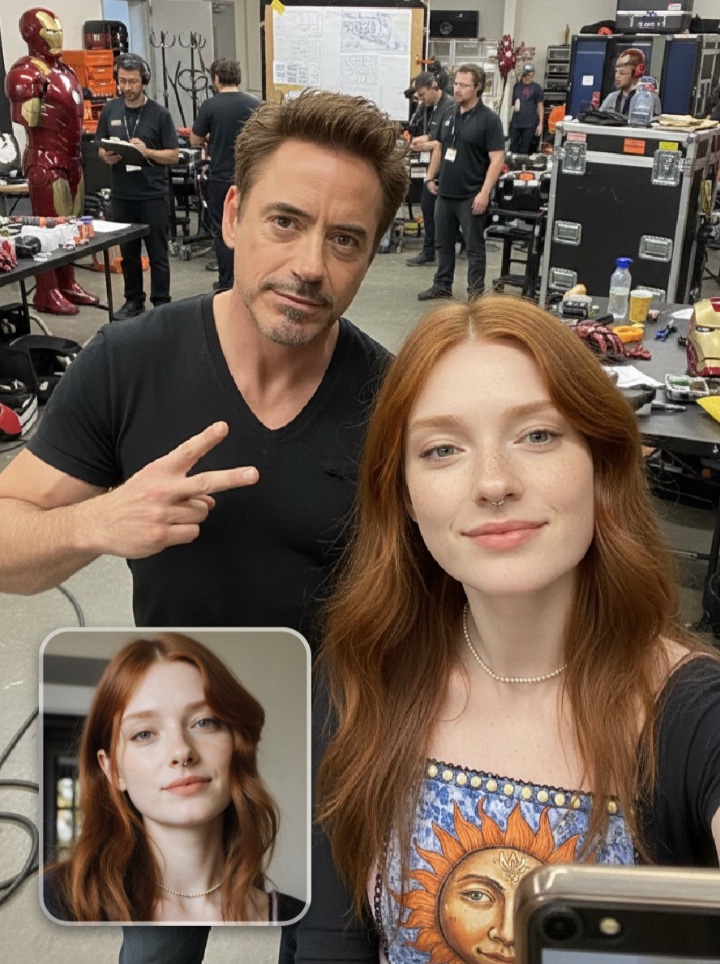
What Makes the AI Celebrity Selfie Look Real?
Look at the small square inset in the lower-left corner — that's the only thing the user uploaded, a plain headshot of herself with her hair down. Everything else in the frame — the peace sign from Robert Downey Jr, the half-turned three-quarter pose, the Iron Man armor in the far corner, the crew in matching black t-shirts, the workbenches with props — is what the AI celebrity selfie prompt generated on top of her face. Her exact features, bone structure, hair color, and freckles are preserved byte-for-byte from the inset; the prompt never touches her identity.
This is why the page ships with one hero image instead of a before/after slider: the hero is the before/after. You can literally see the source photo in the corner and the result around it at the same time. The moment you upload your own selfie, you become the person on the right — the inset updates to your photo, and the generation wraps the movie-set scene around it.
The celebrity and the set dressing are the prompt's job. Your face is yours. That is the whole contract.
Key Insight: The inset is not decoration — it is the product instruction. If a user cannot look at this hero image and immediately understand "I upload the small one, I get the big one", the case page has failed before the prompt even runs.
How to Customize Your Celebrity Selfie
Tip 1: Swap the celebrity
The prompt currently specifies "Robert Downey Jr". Replace this single name with any real celebrity Nano Banana Pro recognizes — "Zendaya" / "Keanu Reeves" / "Florence Pugh" / "Sabrina Carpenter". Keep everything else unchanged. The pose description, the setting, and the preservation directive all still work because they are written around the user from Image 1, not the celebrity.
Change: replace "Robert Downey Jr" everywhere in the prompt body
Tip 2: Swap the movie-set world
"Iron Man movie set workshop" is the current backdrop. Replace it with any plausible location that matches the celebrity's world: "Eras Tour backstage" for a pop star, "John Wick stunt rig" for Keanu, "Spider-Man trailer green room" for Zendaya. The rule is: keep the backdrop world-specific and visually loud, not a generic wall. A recognizable prop in the corner is worth more than ten words of description.
Change: replace the entire "Background is..." sentence
Tip 3: Tune the celebrity's body language
Robert is doing a two-finger peace sign. Swap it to match the celebrity's on-camera personality: "arms crossed, head back laughing" / "pointing at the camera mid-joke" / "holding a coffee cup mid-sip". Small gestures carry more authenticity than the face itself — people remember how a celebrity moves more than how their features are measured.
Change: replace "flashing a relaxed two-finger peace sign at chest level"
Common Pitfall: Writing "with me" or "with the user" instead of "with the person from Image 1". Nano Banana Pro needs the explicit "Image 1" reference or it may invent a new face for the user slot instead of preserving the uploaded photo. Always keep "the person from Image 1" as the subject noun phrase.
Frequently Asked Questions
Will the AI celebrity selfie generator preserve my exact face?
Yes — the prompt is explicitly built to preserve your exact facial features, bone structure, hair color and style, skin texture, and any distinguishing marks from the photo you upload (referenced as "Image 1" in the prompt body). We have tested it across a wide range of skin tones, hair colors, and facial structures, including dramatic cases like pink-and-blue streaked hair; in every case the person in the output is immediately recognizable as the person in the upload. The celebrity and the movie-set world are added around your face, never on top of it.
Can I swap Robert Downey Jr for a different celebrity?
Yes — replacing the name "Robert Downey Jr" in the prompt is the single highest-impact edit you can make. Nano Banana Pro recognizes roughly the top 500 living celebrities by name alone. For smaller or region-specific stars, add one or two descriptors like "K-drama actor [name]" or "early 2000s pop icon [name]". See Tip 1 in the How to Customize section above for the full swap workflow, and remember to update the movie-set world (Tip 2) to match the new celebrity.
What kind of photo should I upload for the best result?
A clear, front-facing selfie or portrait with good lighting, your face occupying roughly the upper half of the frame, and nothing blocking your features. Avoid extreme angles, heavy shadows, sunglasses, or masks — the model uses your upload as the identity anchor, so the more clearly your face is rendered, the more recognizably it transfers to the final image. Your hair color and style are preserved as well, so if you want the output to match your current look, upload a recent photo rather than an old one.