
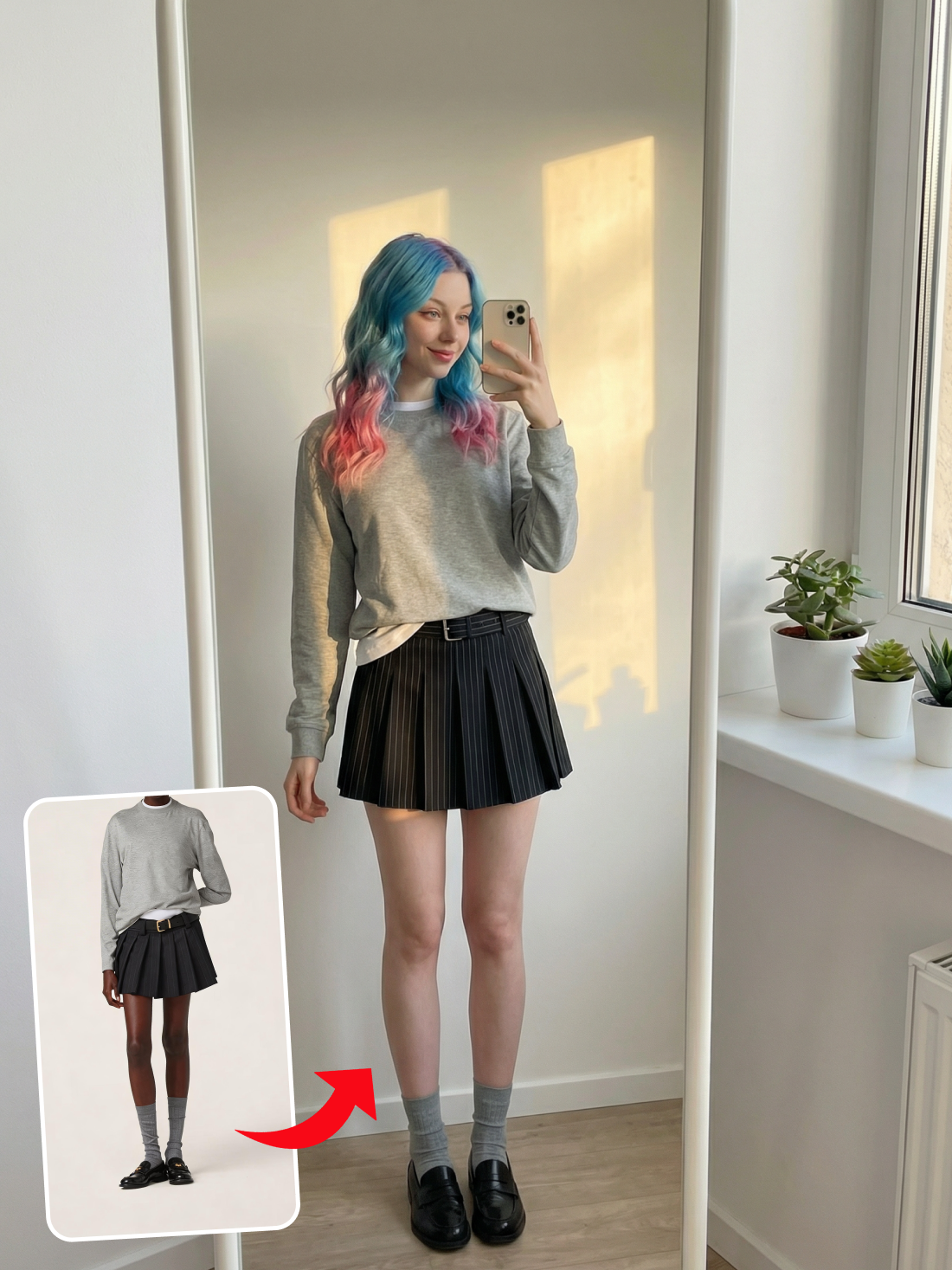
How the Clothing Swap Preserves Every Detail
The grey sweater transfers onto the subject with visible knit texture at the cuffs and collar — the kind of fabric-level detail that separates a real virtual try-on from a flat overlay. The sweater bunches naturally at the waist where it meets the pleated skirt, creating the exact tuck line you would see if someone actually pulled this knit over a structured waistband. Fabric lighting follows the same overhead-left source that illuminates the subject's skin and hair, so highlights on wool and highlights on skin stay consistent.
Everything except the clothing stays locked. The blue-to-teal gradient hair, phone-holding hand, mirror-selfie framing, and soft window-light spill on the right arm all carry through unchanged. The AI treats the garment swap as a single-layer replacement — identity, pose, background, and lighting remain untouched.
The side-by-side layout — flat-lay reference on the left, worn result on the right — lets you compare the original garment against the applied version directly. The skirt's pleat spacing and the sweater's exact grey tone match the reference, confirming that color and structure transfer accurately.
Key Insight: Providing a clean, well-lit reference garment image gives the AI the strongest signal — it can match fabric texture and color precisely instead of approximating from a text description alone.
How to Use the AI Clothes Changer
Tip 1: Upload your photo and a reference clothing image
The tool takes two inputs: your photo and a separate image of the garment you want to wear. Product photos from online stores or clean flat-lay shots work best as the reference.
Change: Use any clothing reference — a jacket from a lookbook, a dress from an e-commerce listing, or even accessories
Tip 2: Use a well-lit, front-facing photo
Natural lighting helps the AI match fabric shading to your skin. A mirror selfie or chest-up portrait works best.
Change: Full-body or upper-body crops for complete outfit swaps or single-piece changes
Tip 3: Start with single items
Swap one garment first — just the top or the shoes — for the most controlled result. Then try a complete look change.
Change: Specify which piece — "replace only the jacket" or "swap the shoes to white sneakers"
Common Pitfall: Using a garment reference with a busy background — the AI may transfer background elements along with the clothing. Crop to the garment only.
Frequently Asked Questions
Can I use this to try on clothes before buying online?
Yes. Upload your photo and a product image from any online store as the clothing reference. The result gives you a visual reference for how the item sits on your body shape and proportions — helpful for narrowing down options before purchasing.
Does it work with dresses, jackets, and full outfits — or just tops?
It handles any garment type. The AI replaces whatever clothing is specified, whether that is a single jacket, an evening dress, a complete casual-to-formal outfit swap, or even accessories like glasses and hats. More complex multi-piece swaps may need a clearer reference image.
Does the virtual try-on preserve my face and body shape?
Yes. The AI locks your facial features, hairstyle, skin tone, body proportions, and pose — only the specified clothing changes. No skin smoothing, no body reshaping, and no alterations to makeup or accessories outside the garment area.