
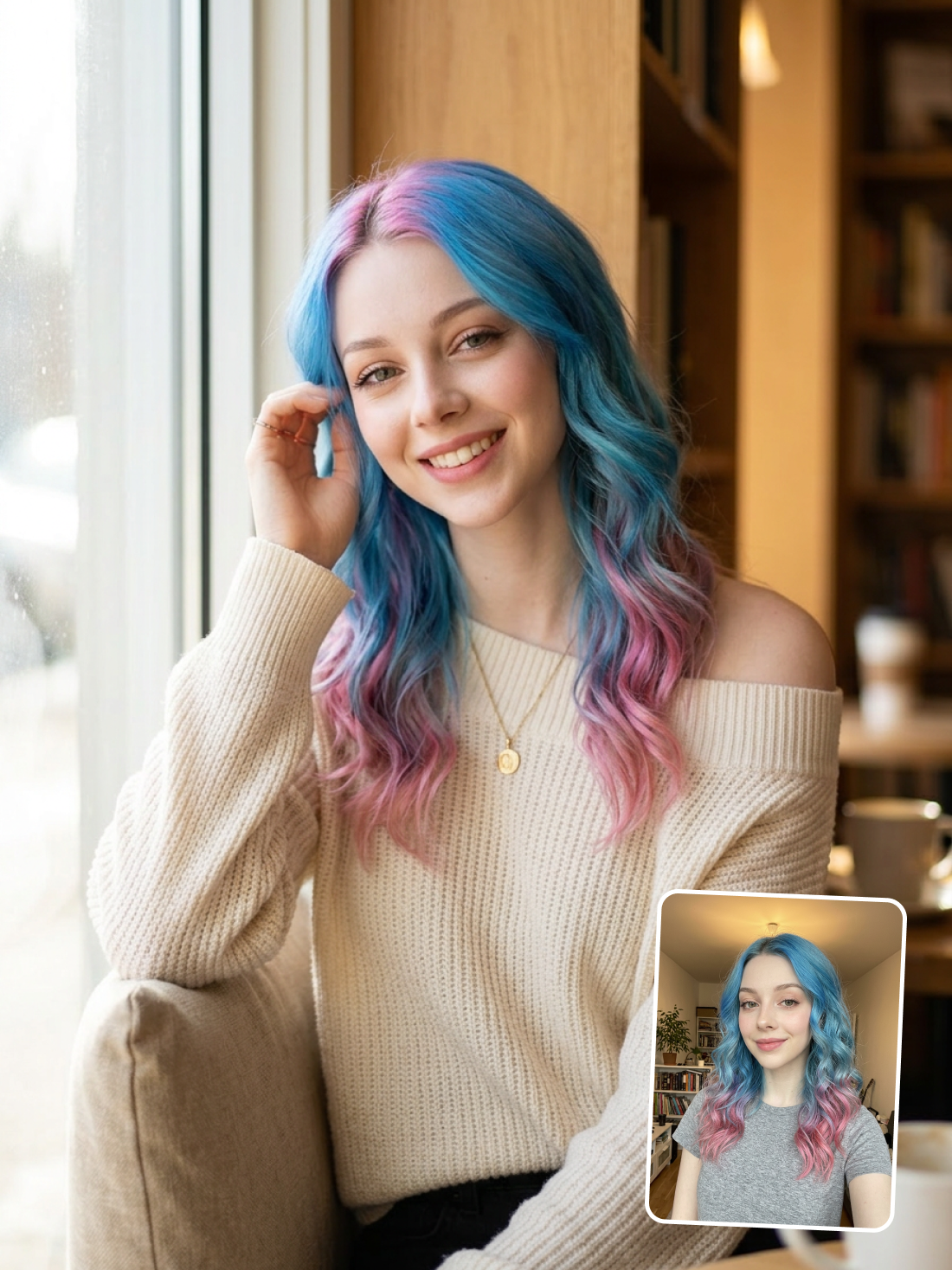
What Makes This Dating Portrait Feel Authentic Instead of Staged
Directional window light sculpts without flattening. The soft natural light enters from the left, wrapping around the subject's face with a gentle falloff toward the right cheek. This single-source lighting creates just enough shadow to add dimension while keeping the mood warm and inviting — the exact lighting that reads as "candid moment" rather than "photo studio session."
The hair-tuck gesture breaks portrait stiffness. Rather than a static pose, the hand reaching up to tuck hair behind the ear introduces natural asymmetry. The slight lean toward the window and the direct-but-soft eye contact create the impression of mid-conversation warmth — the kind of frame that works on dating platforms because it suggests approachability over perfection.
Shallow depth of field isolates without isolating. The 85mm focal length compresses the background bookshelves into a soft wash of color, keeping the environment present as context (this is a real place, not a void) while pulling all visual weight onto the subject's expression. The warm bokeh circles from the café interior reinforce the cozy atmosphere without competing for attention.
Key Insight: Dating photos that convert matches share one trait: the viewer can imagine sitting across the table — and this portrait engineers that feeling through lighting direction, mid-gesture timing, and environmental bokeh that says "I was actually here."
Customize Your Dating Photo in Three Steps
Tip 1: Upload a Clear, Filter-Free Selfie
The first line of the prompt locks your facial features, hair color, and skin tone to whatever the AI sees in your upload. Heavy Instagram filters or dramatic makeup will carry over — upload how you actually look for a profile photo that matches reality.
Change: The "Preserve the subject's original hair color, facial features, skin tone" line depends entirely on your input image quality
Tip 2: Swap the Scene to Match Your Vibe
The setting line controls the entire background atmosphere. Replace "sunlit window seat of a cozy bookshop café" with "rooftop bar at golden hour" or "park bench under string lights" to shift the mood while keeping your portrait consistent.
Change: Replace the Setting line in the prompt with your preferred location
Tip 3: Adjust the Outfit for Your Platform
Tinder leans casual; Hinge rewards conversation starters in the frame. Change "off-shoulder cream knit sweater" to a fitted blazer for a more polished look, or a band t-shirt to signal personality. The necklace detail adds a personal touch worth keeping.
Change: Replace the Outfit line in the prompt with your preferred clothing and accessories
Common Pitfall: Uploading a group photo or a photo with sunglasses — the model cannot isolate your face from a crowd, and eyewear hides the eye area the prompt specifically instructs to preserve.
Frequently Asked Questions
Can I use this generator for different dating platforms?
Yes — the output works across Tinder, Bumble, Hinge, and other apps. Each platform crops differently (Tinder uses a circle preview, Bumble shows full portrait), so the wide framing and centered composition here adapts to all formats. Generate 2-3 variations with different settings to cover your full profile.
Why does the prompt specify an 85mm lens and shallow depth of field?
An 85mm focal length compresses facial features in a flattering way, avoiding the distortion that wider lenses introduce at close range. The shallow depth of field (f/1.8) blurs the background into soft bokeh, which pulls visual focus to the subject's face — exactly where a dating photo viewer looks first.
What kind of selfie should I upload for the best results?
Upload a well-lit, front-facing photo without heavy filters or sunglasses. The AI maps your exact facial features, hair color, and skin tone from the input, so a clear reference produces the most accurate portrait. Natural indoor or outdoor light works better than flash.
Is there a free way to try the AI dating photo generator?
Yes — new accounts receive complimentary credits that cover several generations at no cost. That is enough to test the workflow with your own photo and see the full-quality output before deciding to continue. No subscription or card is required to start.