How cat_vlog365 Made This Tomato Kitten AI Video - and How to Recreate It
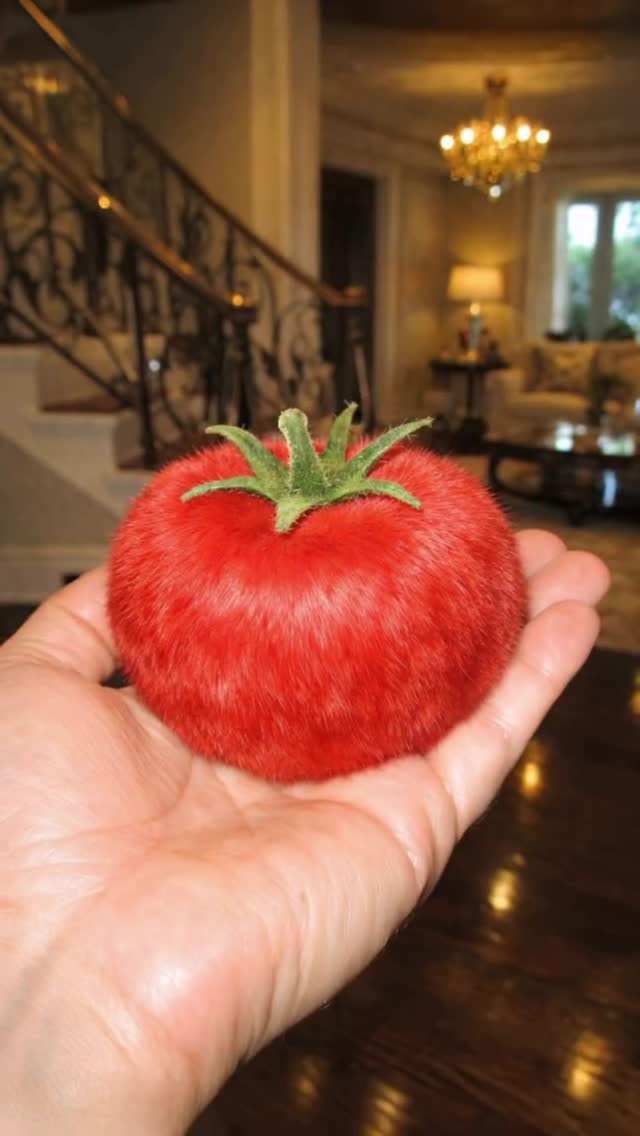
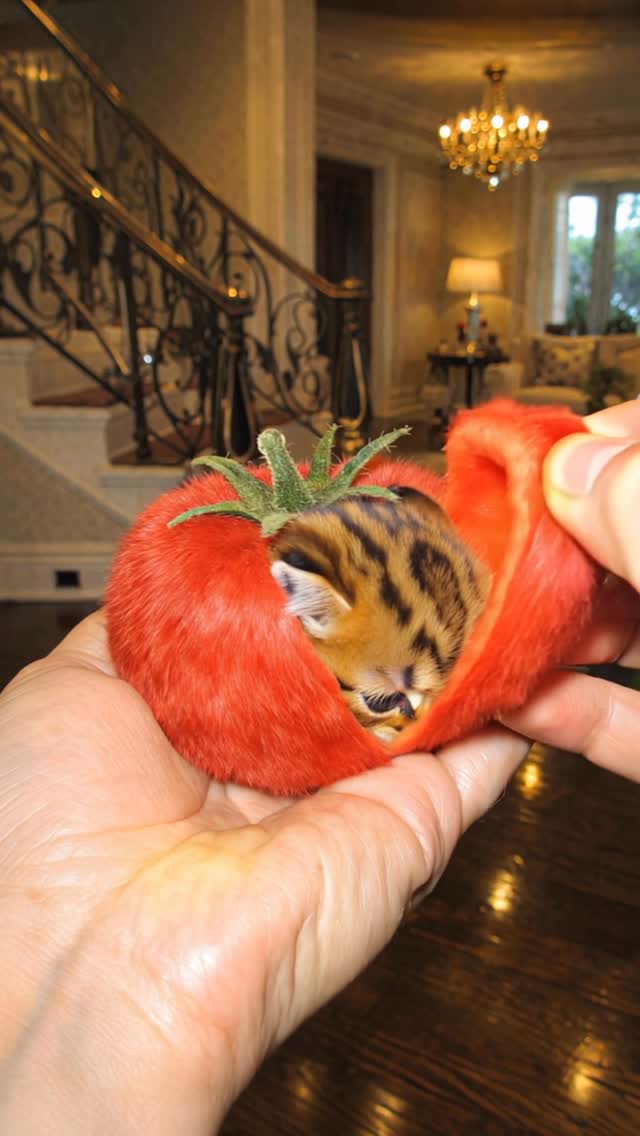
This short video is a perfect “cute surprise reveal” formula wrapped in a single, ultra-simple prop story: a hand holds a tomato that looks oddly fuzzy (almost like plush velvet), another hand peels the thick red “skin,” and a tiny tabby kitten appears inside the tomato like it was hiding there.
The final payoff is engineered for screenshots: the kitten is lifted closer to camera and hugs a heart-shaped piece of tomato with its paws.
Visually, it’s classic UGC (手机拍摄 / phone flash) but with a surreal AI twist: bright on-camera flash on the hands, shallow depth of field, and a warm luxury living room background (staircase with dark wrought-iron railing and chandelier bokeh).
The whole narrative fits in ~10 seconds, with the hook in the first second (the impossible fuzzy tomato), the “how?” moment at 2–4s (peel action), the reveal at ~5s (kitten appears), and the lingering cute close-up at the end for saves.
Keywords you can target from this case: AI kitten reveal, tomato transformation, UGC flash aesthetic, macro close-up, surreal prop peel, cute loopable short.
What you’re seeing
0–1s hook: the fuzzy tomato reads “wrong” in a good way
The tomato is instantly recognizable, but the surface is velvet/furry, which creates a split-second contradiction.
That contradiction is the scroll-stopper: viewers pause because they need to confirm what they’re seeing.
Hands-only framing keeps it universal and fast
You never see a face, only hands.
That makes the clip feel like a “magic trick demo” and reduces distraction, so the viewer’s attention stays on the prop and the reveal.
Lighting: harsh phone flash + warm interior bokeh
The hands and tomato are lit by a direct on-camera flash, giving bright highlights and crisp texture.
Behind that, the room is warm and softly blurred: chandelier lights glow, and the staircase railing adds an upscale pattern.
This contrast (clinical flash subject vs cozy background) makes the subject pop.
Environment cues: luxury living room without needing a location tag
You can spot a staircase with ornate dark railing, a chandelier, and a table lamp.
Even blurred, those shapes signal “expensive interior,” which elevates a simple hand-prop shot.
The “peel” action is the retention engine
The second hand pinches the skin and peels a thick layer like a flexible shell.
That tactile motion gives the viewer a reason to keep watching because the reveal is literally unfolding.
The reveal: kitten emerges from the tomato cavity
Around the mid-point, the tomato opens and a tiny striped kitten appears tucked inside.
The kitten’s slow blink and head lift are doing the emotional work, even if the motion is minimal.
Payoff framing: the heart-shaped tomato piece is the thumbnail moment
The last seconds tighten the framing on the kitten holding a heart-shaped tomato piece.
That creates a clean “save-worthy” still: big eyes, paws forward, bright red heart.
Shot-by-shot breakdown (estimated)
Time range
Visual content
Shot language (framing / focal-length feel / movement)
Lighting & color tone
Viewer intent
00:00–00:02
Hand holds a fuzzy/velvet tomato close to camera.
Handheld phone macro, shallow DOF, slight sway.
Hard flash on hands, warm chandelier bokeh behind.
Hook via “impossible texture.”
00:02–00:04
Second hand pinches and peels the thick fuzzy skin.
Same framing; motion centered; peel is continuous.
Flash highlights on peel edges; warm background stays blurred.
Retention via tactile action.
00:04–00:06
Kitten appears inside the opened tomato.
Macro close-up; small push-in feel.
Bright subject exposure; cozy room tone behind.
Surprise payoff (share trigger).
00:06–00:08
Kitten is gently supported and presented to camera.
Handheld hold; kitten centered; paws visible.
Flash keeps fur detail crisp.
Cuteness lock-in (watch to end).
00:08–00:10
Kitten hugs a heart-shaped tomato piece.
Tighter close-up; minimal movement for screenshot.
Red heart pops against warm neutral background.
Saves and comments ("so cute").
Why it went viral (breakdown of the viral mechanism)
Topic: cute animal + “impossible object” in one beat
Kittens already perform well because the emotional response is instant.
But this isn’t just “a kitten being cute.” The clip adds a puzzle: why is the tomato furry, and what’s inside?
That pairing (cute + mystery) tends to outperform either one alone.
Psychology: curiosity gap + tactile satisfaction
The viewer sees the pinch and peel and predicts a reveal.
That creates a curiosity gap (“don’t swipe, the answer is coming”), and the peeling motion is satisfying like ASMR-lite.
Even without audio, the movement reads as tactile.
Audience fit: people who share “aww” + creators who save templates
Casual viewers share it because it’s adorable and surprising.
Creators save it because the production is simple: hands, one prop, one reveal, one background.
That “low production burden” makes it replicable, which increases saves.
Platform perspective: strong early retention signals
The first frame is a clear close-up with high contrast (flash-lit tomato against blurred warm room).
The next frames immediately introduce motion (peel), which reduces drop-off.
The reveal happens mid-clip, so people stay long enough to see it, and the final still moment encourages replays.
5 testable viral hypotheses (evidence → mechanism → how to replicate)
“Wrong texture” hook (fuzzy tomato) → pattern interrupt → pick one familiar object and make one property impossible (texture, scale, gravity).
Tactile action (peeling shell) → retention → build a reveal that unfolds through a hand action (peel, unzip, unwrap, crack).
Midpoint surprise (kitten inside) → share trigger → place the reveal at 40–60% of duration, not at the end.
Flash macro clarity (crisp subject, blurred luxury background) → watchability → use harsh flash + shallow DOF so details read on small screens.
Screenshot ending (kitten hugging a heart slice) → saves/comments → end with a clean “still” pose for 1–2 seconds.
How to recreate (replication tutorial: from 0 to 1)
HowTo checklist (8+ steps)
Pick your base object: choose a universally recognizable prop (tomato, orange, cupcake, soap bar) that reads instantly in close-up.
Decide the impossible twist: in this case it’s “velvet/fuzzy tomato skin” that peels like a shell. Keep it one twist only.
Lock the shooting setup: hands-only, phone macro distance, shallow DOF, warm interior background with bokeh.
Generate a character sheet: 6–10 reference images of the same baby tabby kitten (front/side/3 expressions) so stripes and eye size stay consistent.
Storyboard the beats: hold → pinch → peel → reveal kitten → present → heart prop close-up.
Create keyframes: generate 5–7 key images matching those beats before you animate, and confirm the staircase/chandelier shapes stay consistent.
Animate with constraints: keep the camera mostly fixed and let hands do the motion; forbid morphing props (tomato stem stays attached).
Engineer the payoff still: end on a clear close-up where the kitten holds a heart-shaped tomato piece for 1–2 seconds.
Cover & title: cover frame = fuzzy tomato + pinch moment; title line = “I found a kitten inside a tomato.”
Publish adaptation: keep it under 12 seconds, avoid long captions, and pin a comment with the “how it was made” angle for extra saves.
Variable: final prop: heart slice → tiny bow / sticker / mini fruit piece that the animal can “hold.”
Troubleshooting (what breaks most often)
Hands deform: reduce camera motion, keep hands in-frame, and lock “five fingers, natural anatomy.”
Fuzzy texture crawls: add “stable velvet fibers, no crawling noise” and use shorter motion between keyframes.
Kitten morphs: generate a stronger kitten character sheet and keep the reveal angle consistent.
Background shifts: lock the staircase + chandelier layout; don’t let the model “rebuild the room.”
Growth Playbook (distribution & scaling strategy)
3 opening hook lines (ready to use)
“Wait… why is this tomato furry?”
“I peeled a tomato and this happened.”
“Don’t scroll, the reveal is at 5 seconds.”
4 caption templates (hook → value → question → CTA)
Template 1: “I made a fuzzy tomato peel reveal and found a kitten inside. The trick is: flash macro + one impossible texture + midpoint surprise. Want the prompt locks? Save this and comment ‘TOMATO’.”
Template 2: “Hands-only magic trick format: hold → peel → reveal → screenshot ending. What object should I do next: orange or strawberry? Follow for the next one.”
Template 3: “This is the simplest retention hack: give viewers a reason to wait (peel action) and pay them with a cute still. Would you try this formula? Save for your next test.”
Template 4: “If your AI videos feel random, try ONE twist only (like fuzzy tomato skin). What’s your favorite ‘impossible texture’? Drop an idea and I’ll pick one.”
Hashtag strategy (3 groups, 3–5 examples each)
Keep hashtags tight so you signal both “cute animal” and “AI surreal prop” without spraying 30 random tags.