0:00 / 0:00
▶
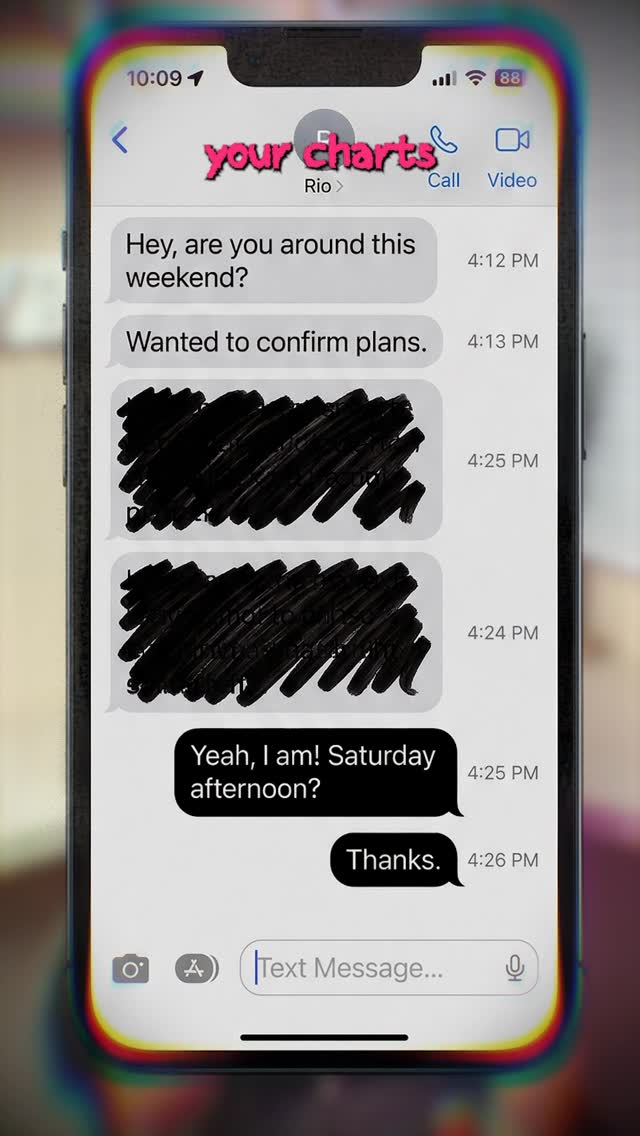
This viral case study features a high-impact "Tech-UGC" (User Generated Content) video by creator @cyborggirll. The video addresses a critical digital privacy flaw: using AI to "see through" redacted text in screenshots. Combining a cinematic bedroom studio aesthetic with a high-stakes security warning, the video leverages the "Security Scare" hook to drive massive engagement. Key elements include warm, moody lighting (pink and purple hues), a signature "CYBORG GIRL" neon-style background sign, and a fast-paced editing rhythm that alternates between direct-to-camera address and technical screen recordings. This is a prime example of how to turn a technical "how-to" into a viral PSA (Public Service Announcement) that demands saves and shares.
The video features a young South Asian woman speaking directly into a small, handheld lavalier microphone—a visual trope that signals "insider information" or "on-the-street reporting" even in a studio setting. She wears a simple black t-shirt, keeping the focus on her face and the information provided. The background is a soft-focus bedroom/office with a prominent white "CYBORG GIRL" sign and a potted plant, bathed in a warm, atmospheric glow.
| Time Range | Visual Content | Shot Language | Lighting & Color | Viewer Intent |
|---|---|---|---|---|
| 00:00–00:03 | Speaker holding mic, text: "you should be careful" | Medium Close-up (MCU) | Warm, pink/purple backlight | Hook: Establish authority & urgency |
| 00:03–00:06 | iPhone screenshot with blacked-out text | Screen Recording Overlay | High contrast, digital UI | Problem: Show the common behavior |
| 00:06–00:12 | Google Gemini interface & Python code snippets | Fast cuts, UI interaction | Dark mode, tech aesthetic | Process: Demonstrate the "AI Magic" |
| 00:12–00:18 | Revealed text behind the redaction | Split screen / Overlay | Bright green highlights | Payoff: Prove the security risk |
| 00:18–00:25 | Speaker returns, showing PDF examples & CTA | MCU with dynamic overlays | Consistent with intro | Scaling/CTA: Broaden the use case |
The core of this video's success lies in its Topic Selection. It taps into a universal human emotion: Fear of Exposure. By showing that a common habit (blacking out text with a digital highlighter) is actually unsafe, the creator creates an immediate "need to know" gap. This isn't just a tech tip; it's a survival guide for the digital age. The use of "Google Gemini" as the tool adds a layer of Recent Hot Topic relevance, as users are currently obsessed with finding practical (and sometimes controversial) uses for LLMs.
From a platform perspective, this video is a "Save & Share" machine. Users save it to remember the warning and share it with friends/family to "protect" them. This signals to the Instagram/TikTok algorithm that the content is highly valuable, triggering a wider distribution. The fast-paced editing and the visual of the handheld mic keep the Watch Time high, as the viewer feels they are receiving a rapid-fire briefing.
The "Warning" Structure:
🚨 STOP doing this if you care about your privacy.
Most people think blacking out text with a digital highlighter is safe, but AI tools like Gemini can now reverse the process in seconds.
Have you ever sent a screenshot like this? 👇
#CyberSecurity #AITips #PrivacyHack #TechNews
Use CapCut for the fast-paced editing and a warm LED light strip for the background glow.
"Redacted," "Gemini," and "Security."
Keep the speaker's movements natural and ensure the screen recordings show real UI interactions.
Instagram Reels currently favors "educational/utility" content like this more than TikTok's entertainment-heavy feed.
Use the "AI-generated" label if the person is AI, but for a tutorial, simply mention the AI tool in the caption.