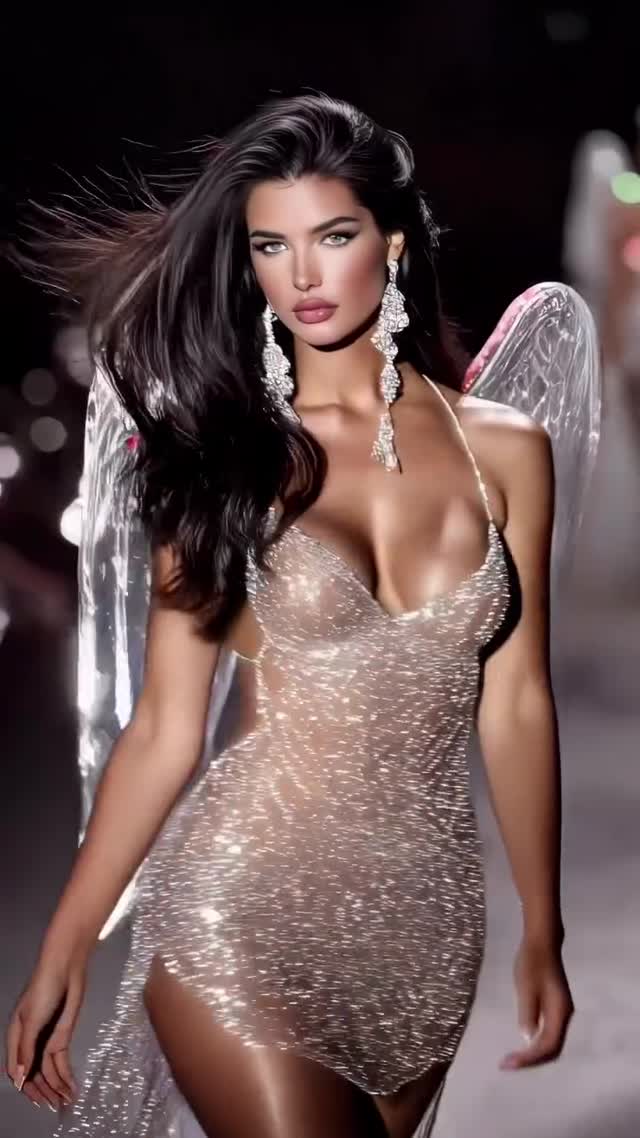
Angels collection 🪽
Animated with @klingai_official
Are you serious about learning how to create AI visuals at a professional level? In my course, I teach everything I use in my own process:
• How I build concepts and visual storytelling
• The exact tools, prompts, and workflows I use
• How to refine, edit, and create a portfolio that gets noticed
This is the full system I used to grow Dreamfall Art and work with brands.
If you want access —
Comment “COURSE” below and I’ll send you the link directly.
#ai #aifashion #aivideo #fashionshow #aiart #aiartcommunity #aidesign
Why dreamfall.art's Angels Collection Went Viral — and the Formula Behind It
This case study analyzes a high-glamour AI-generated fashion runway video titled "Angels Collection." The content leverages the iconic "Victoria's Secret Angel" aesthetic, featuring hyper-realistic models in shimmering, crystal-encrusted sheer gowns and iridescent wings. With over 280,000 likes, it demonstrates the massive appeal of cinematic editorial portraiture combined with fluid AI animation. The video uses a dark, high-contrast runway setting to make the glitter and skin textures pop, creating a "luxury-core" vibe that resonates deeply with fashion enthusiasts and AI creators alike. Key keywords include: AI Fashion Show, Kling AI, Shimmering Textures, Iridescent Wings, and Cinematic Lighting.
What You’re Seeing
The video is a montage of several "Angels" walking a dark, professional runway. The subjects are diverse but share a consistent "supermodel" build—athletic, tanned, and highly stylized. Their wardrobe consists of sheer, "naked" dresses dripping in micro-crystals that catch the light with every movement. The wings are the centerpiece: some are feathered and glittery, while others are translucent and iridescent, resembling butterfly or dragonfly wings.
The lighting is classic "stage lighting"—strong overhead spotlights (top-down) and rim lighting that separates the models from the dark background. The color palette is dominated by warm skin tones, silver/white sparkles, and deep, crushed blacks in the shadows. The texture is remarkably sharp for AI, showing fine details in the lace, individual crystals, and even the "flyaway" hairs blowing in a simulated wind.
Shot-by-Shot Analysis
Time Range
Visual Content
Shot Language
Lighting & Tone
Viewer Intent
00:00–00:02
Brunette model in silver sheer dress walking forward.
Medium Shot (MS), Eye-level.
High contrast, sparkling highlights.
The Hook: Instant glamour and "wow" factor.
00:02–00:04
Model crouching on the runway, touching hair.
Medium Close-Up (MCU), Low angle.
Warm skin glow, soft bokeh background.
Reinforce persona: Shows personality and "pose" variety.
00:04–00:06
Blonde model profile view, wings shimmering.
Profile Close-Up (CU).
Rim lighting on hair and wing edges.
Detail focus: Highlights the technical quality of the AI wings.
00:07–00:09
Model turning, hair blowing across face.
Close-Up (CU), Tracking shot.
Dramatic shadows, lens flare.
Create mystery: The "hair flip" is a classic high-fashion trope.
00:09–00:12
Blonde model raising arms, smiling.
Full Shot (FS) to Medium Shot.
Bright, celebratory stage lighting.
Emotional peak: A "victory" pose that feels like a finale.
00:12–00:16
Final walk-down, intense gaze.
Medium Shot (MS), Slow zoom in.
Consistent high-fashion editorial grade.
Retention: Keeps the viewer locked on the model's gaze.
Why It Went Viral: The "Angel" Effect
The Power of Aspirational Nostalgia
This video taps into the collective memory of the Victoria's Secret Fashion Show, which was a cultural juggernaut for decades. By recreating this specific "Angel" aesthetic, the creator targets a massive, pre-existing audience that craves high-glamour runway content. The "biological instinct" to be attracted to symmetry, beauty, and shimmering light (which signals water or precious minerals in our evolutionary past) is exploited here to maximize initial watch time.
Technical "Flex" as Content
From a platform perspective, this video serves as a "technical demo." AI enthusiasts share and save this content not just because it's pretty, but because the temporal consistency (the way the crystals move with the body) is currently the "gold standard" in AI video. The platform sees high "Save" and "Share" rates because users want to study the prompt or the tool used (Kling AI), which signals to the algorithm that the content is high-value.
5 Testable Viral Hypotheses
The "Shimmer" Hook: If the first 2 seconds contain high-frequency light reflections (glitter), retention will increase by 20% because the human eye is naturally drawn to moving light sources.
The Nostalgia Loop: Using specific keywords like "Angels" or "Runway" triggers the Instagram "Fashion" and "Nostalgia" clusters, placing the video in front of users who miss classic 2010s fashion shows.
The "Uncanny Valley" Bridge: By adding "imperfections" like flyaway hairs and realistic skin pores, the video avoids the "too-fake" AI look, leading to higher trust and longer watch times.
The Slow-Motion Elegance: Reducing the perceived speed of the walk increases the "luxury" feel, which correlates with higher engagement from high-income demographic segments.
The "Behind the Scenes" Curiosity: Mentioning the tool (Kling AI) in the caption creates a "How did they do that?" loop, driving users to the comments section to ask for prompts.
How to Recreate: Step-by-Step Tutorial
Step 1: Concept & Aesthetic Positioning
Decide on your "collection" theme. This video uses "Angels," but you could do "Cyberpunk Couture" or "Nature Goddesses." The key is high-contrast glamour. This suits accounts focused on AI art, fashion design, or luxury lifestyle.
Step 2: Generate Base Images (Midjourney/Flux)
Generate 5-10 high-quality images of your models. Use prompts that specify "editorial fashion photography," "runway lighting," and "intricate crystal textures." Ensure the models have a consistent look if you want a "brand" feel.
Step 3: Maintain Character Consistency
Use a tool like InsightFaceSwap or a custom LoRA (if using Stable Diffusion) to ensure the face remains the same across different shots. For Kling AI, you can use the "Image-to-Video" feature with a strong reference image.
Step 4: Video Animation (Kling AI)
Upload your base image to Kling AI. Use the "Professional" mode. Your prompt should focus on motion: "Model walks gracefully toward the camera, hair blowing in the wind, wings shimmering and flapping slightly, crystals reflecting stage lights."
Step 5: Camera Movement Control
In your AI video tool, set the camera movement to "Zoom In" or "Pan" to mimic a real runway camera operator. Avoid static shots; movement is key to the "cinematic" feel.
Step 6: Upscaling for Quality
Run your generated clips through an upscaler like Topaz Video AI or Magnific to bring out the fine details in the crystals and skin, which is crucial for the "luxury" aesthetic.
Step 7: Sound Design & Editing
Edit the clips in CapCut. Use a "Phonk" or "High-Fashion House" track. Cut on the beat. Add a slight "Film Grain" overlay to blend the AI artifacts.
Step 8: Publishing Strategy
Post as a Reel. Use a high-quality cover frame (usually the best-looking face shot). In the first comment, ask: "Which look is your favorite: 1, 2, or 3?" to drive engagement.
Growth Playbook: Distribution & Scaling
Opening Hook Lines
"The fashion show of the future is finally here. ✨"
"Wait for the wings on the third model... 🪽"
"Is AI the new creative director of high fashion?"
Caption Templates
Option 1 (The Educator):
Angels Collection 🪽 Created entirely with AI. I used Kling AI to achieve this level of fabric and wing motion. Want the prompt? Check my bio for my full AI Fashion course! #AIFashion #KlingAI #DigitalArt
Option 2 (The Aesthetic):
Heavenly bodies on the digital runway. ✨ Which wing design is your favorite? Let me know in the comments! 👇 #Runway #AngelCore #LuxuryAI