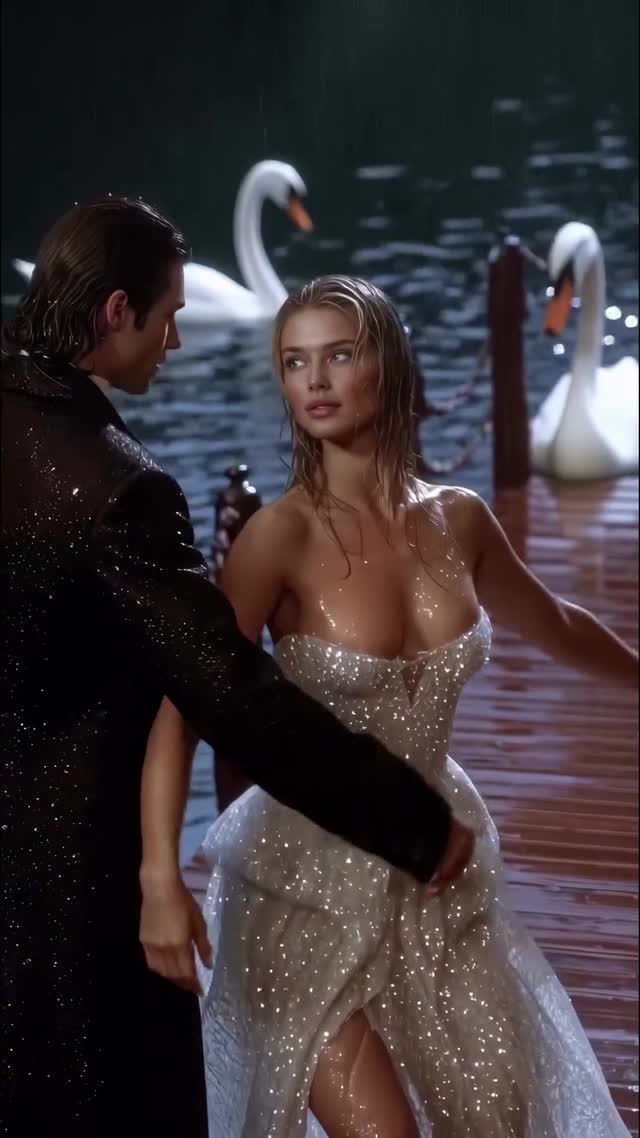
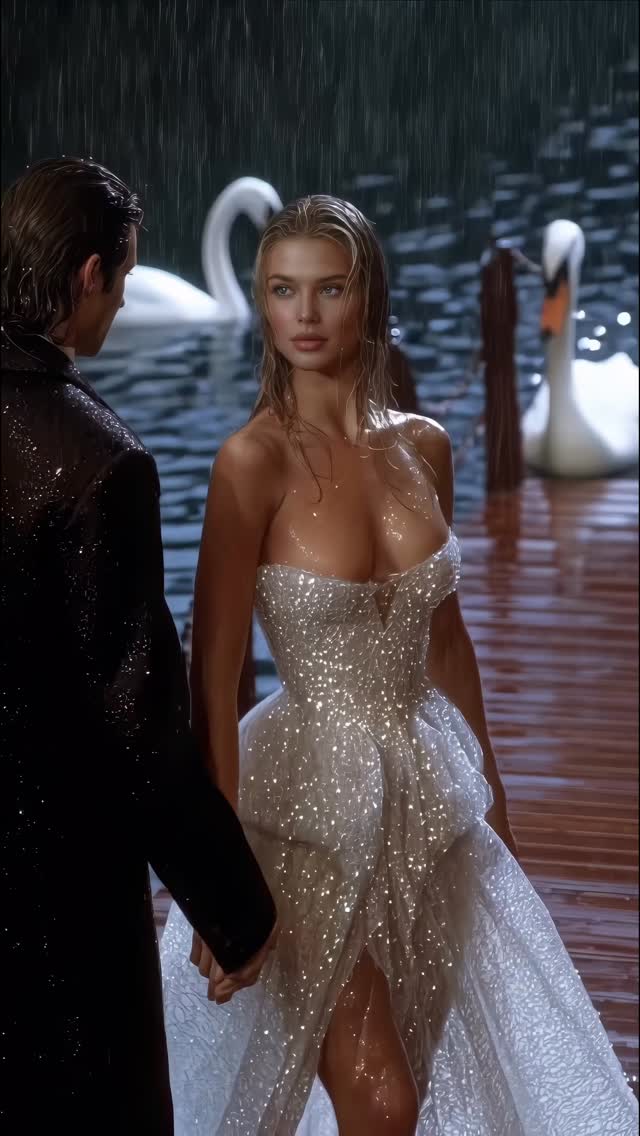
Swan Lake 🦢 Animated with @klingai_official Are you interested in learning how to create AI visuals at a professional level? In my course, I teach everything I use in my own process: • How I build concepts and visual storytelling • The exact tools, prompts, and workflows I use • How to refine, edit, and create a portfolio that gets noticed • Personal feedback, guidance, and access to my private community This is the full system I used to build my art studio and work with top brands. If you want access — Comment “COURSE” below and I’ll send you the link directly. #ai #aiart #aiartcommunity #midjourney #aidesign #aicommunity

Why dreamfall.art's Swan Lake Went Viral — and the Formula Behind It

This viral masterpiece by @dreamfall.art reimagines the classic "Swan Lake" through a high-end, cinematic editorial lens. Utilizing Kling AI, the creator achieves a level of visual fidelity that blurs the line between AI and high-budget fashion film. The core aesthetic combines a moody, rainy lakeside setting with the ethereal glow of a sparkling, sheer couture gown. It’s a perfect example of "Aesthetic Excellence" meeting "Technical Curiosity," capturing over 14,000 likes by leaning into romanticism, luxury fashion, and the sheer "how did they do that?" factor of modern AI video generation.

What You’re Seeing

The video is a montage of romantic, slow-motion sequences featuring a couple dancing on a wet wooden pier. The female lead wears a translucent, crystal-encrusted gown that reacts realistically to the light and rain. The male lead is in a classic black tuxedo, providing a sharp contrast to the shimmering dress. The environment is a dark, misty lake populated by elegant white swans, with a rustic, dark-wood cabin appearing in the wider shots. The color palette is dominated by deep teals, blacks, and silvers, with warm skin tones providing the necessary pop.

Shot-by-shot Breakdown (Estimated)

Time Range Visual Content Shot Language Lighting & Tone Viewer Intent
00:00–00:02 Couple dancing in rain on a pier. Medium Shot (MS) Cool, moody, rim lighting on rain. Hook: Immediate romantic atmosphere.
00:02–00:04 Woman spinning, dress shimmering. Close-up (CU) High-contrast, sparkling highlights. Showcase: Detail and AI physics.
00:04–00:06 Woman posing, rain dripping. Medium Close-up (MCU) Soft key light on face, wet skin texture. Reinforce persona: Ethereal beauty.
00:06–00:08 Man dips woman back by the lake. Medium Shot (MS) Misty background, desaturated greens. Emotional climax: Classic romance trope.
00:08–00:10 Close-up of hands and faces. Extreme Close-up (ECU) Warm skin tones vs. cool rain. Intimacy: Creating a connection.
00:10–00:13 Couple walking away into darkness. Wide Shot (WS) from behind. Low-key, silhouette-heavy. Mystery: Leaving the viewer wanting more.
00:13–00:15 Woman in flowing white fabric. Full Shot (FS) High-key white against dark pier. Contrast: Visual variety.
00:15–00:17 Cabin by the lake with swans. Extreme Wide Shot (EWS) Naturalistic, dark, atmospheric. World-building: Establishing the setting.

Why It Went Viral: The Mechanism

The Power of "High-End Romanticism"

This video taps into the "Dark Romance" and "Old Money Aesthetic" niches that are currently dominating Instagram and Pinterest. By using the "Swan Lake" theme, the creator leverages a globally recognized cultural touchstone, instantly providing context and emotional weight. The juxtaposition of the delicate, sparkling gown against the harsh, rainy environment creates a "Beauty in the Storm" narrative that is biologically hardwired to capture attention. It appeals to the viewer's desire for escapism and luxury.

Platform Signal Analysis

From a platform perspective, the high save-to-like ratio is likely the engine here. Creators and fashion enthusiasts save this as "mood board" material or "AI benchmark" reference. The loop effect is subtle but effective; the seamless transitions between dancing and posing keep the viewer engaged for multiple cycles. The caption "Swan Lake 🦢" is minimalist, allowing the visuals to do the heavy lifting while providing a clear keyword for the algorithm to categorize the content.

5 Testable Viral Hypotheses

  1. The "Sparkle" Factor: High-frequency detail (like shimmering crystals) in low-light settings triggers a stronger visual "stop" response than flat textures. Replication: Use prompts emphasizing "iridescent," "sequined," or "crystalline" fabrics.
  2. The "Rain" Physics: AI-generated rain that interacts with skin and fabric (wet look) is currently a "technical flex" that signals high-quality content to the algorithm. Replication: Include "heavy rain," "wet skin," and "water droplets" in your video generation prompts.
  3. Cultural Archetypes: Reimagining a classic story (Swan Lake) provides instant "story-market fit." Replication: Adapt a well-known fairy tale or ballet into a modern, high-fashion aesthetic.
  4. The "Mystery Man" Trope: Keeping the male lead's face partially obscured or in shadow focuses the attention on the female lead while maintaining a romantic, "POV" feel for the audience. Replication: Use backlighting or silhouettes for secondary characters.
  5. Cinematic Aspect Ratio: The 9:16 vertical format used with cinematic framing (shallow depth of field) makes the phone screen feel like a movie theater. Replication: Always use "cinematic lighting" and "f/1.8" descriptors in your image-to-video workflow.

How to Recreate: Step-by-Step

1. Topic Selection & Positioning

This style suits "AI Art," "Digital Fashion," or "Cinematic Storytelling" accounts. Position yourself as a "Digital Director" rather than just an AI prompter.

2. Character Consistency

Generate a set of 5-10 reference images in Midjourney of the same woman in the same gown. Use a consistent seed or a "Character Reference" (--cref) to ensure she looks the same across all shots.

3. Keyframe Generation

Select the best Midjourney images as your "Start Frames." Ensure the lighting is consistent (e.g., "nighttime, rainy, cinematic blue hour").

4. Video Generation (Kling AI / Luma Dream Machine)

Upload your reference image. Use a prompt like: "Cinematic slow motion, woman in sparkling sheer gown dancing on a wet pier, heavy rain falling, swans in the background, 4k, realistic physics." Adjust the "Motion" slider to 4 or 5 for graceful movement.

5. Adding the "Swan Lake" Elements

If the AI doesn't add swans automatically, use an "Inpainting" tool or generate separate shots of swans on a lake and edit them in during post-production.

6. Editing & Rhythm

Cut the clips to a slow, orchestral, or "dark academia" style track. Ensure the cuts happen on the beat or during a significant movement (like a spin).

7. Color Grading

Use a mobile app like CapCut or VN. Apply a "Cold" or "Cinematic" filter, then manually increase the "Sharpen" and "Glow" (to make the sparkles pop).

8. Publishing Strategy

Post as a Reel. Use a short, evocative caption. The first 3 seconds must show the most "impossible" or "beautiful" shot to hook the scroll.

Growth Playbook

Opening Hook Lines

  • "Swan Lake, but make it high-fashion AI. 🦢✨"
  • "The future of cinematic storytelling is here. Watch until the end."
  • "Can you believe this was made with AI? 🌧️💃"

Caption Templates

Option 1 (The Storyteller):
Reimagining the classics. 🦢 There’s something about the rain and the shimmer that feels like a dream.

Created with @klingai_official.

Which shot was your favorite? 1, 2, or 3? 👇
#AIArt #SwanLake #CinematicAI

Option 2 (The Educator):
How I achieved this 'Wet Look' in AI video. 🌧️ It’s all about the lighting prompts and the reference images.

I’m teaching my full workflow in my bio link. 🔗

Drop a 🦢 if you want more tutorials like this!
#AITutorial #KlingAI #DigitalCreator

Hashtag Strategy

  • Broad: #AIArt #DigitalArt #Cinematic #FashionFilm (Reach wide audiences)
  • Mid-tier: #KlingAI #AIVideo #MidjourneyArt #DarkRomance (Target specific interests)
  • Niche: #SwanLakeAesthetic #DigitalCouture #AIStorytelling (Own the specific look)

FAQ

What tools make it look the most similar?

Midjourney for the base images and Kling AI or Luma Dream Machine for the animation.

What are the 3 most important words in the prompt?

"Cinematic," "Sparkling," and "Wet-look."

Why does the generated face look inconsistent?

You need to use a Character Reference (--cref) in Midjourney before animating.

How can I avoid making it look like AI?

Keep motion slow, use high-quality lighting prompts, and add a slight film grain in post-production.

Is it easier to go viral on Instagram or TikTok with this?

Instagram, as the "Aesthetic/Editorial" vibe performs better there than on TikTok's "UGC/Raw" environment.

How should I properly disclose AI use?

Use the platform's "AI-generated" tag and mention the tools used in the caption.