Part 3 🦋 Are you serious about learning how to create AI visuals at a professional level? In my course, I teach everything I use in my own process: • How I build concepts and visual storytelling • The exact tools, prompts, and workflows I use • How to refine, edit, and create a portfolio that gets noticed This is the full system I used to grow Dreamfall Art and work with brands. If you want access — Comment “COURSE” below and I’ll send you the link directly. #virtualfashionshow Animated with @klingai_official #midjourney #aiart #aiartcommunity #model #midjourneyart #aicommunity #conceptart #fantasyart #aidesign #digitalart #artist #artistoninstagram

How dreamfall.art Made This Fairy Fashion Runway AI Video

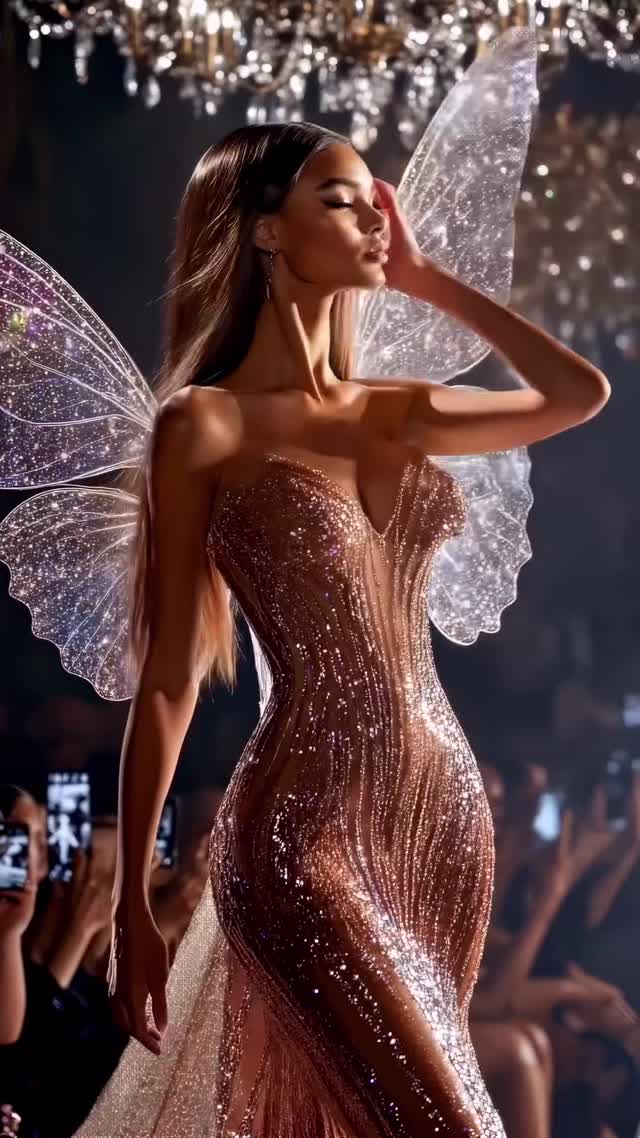
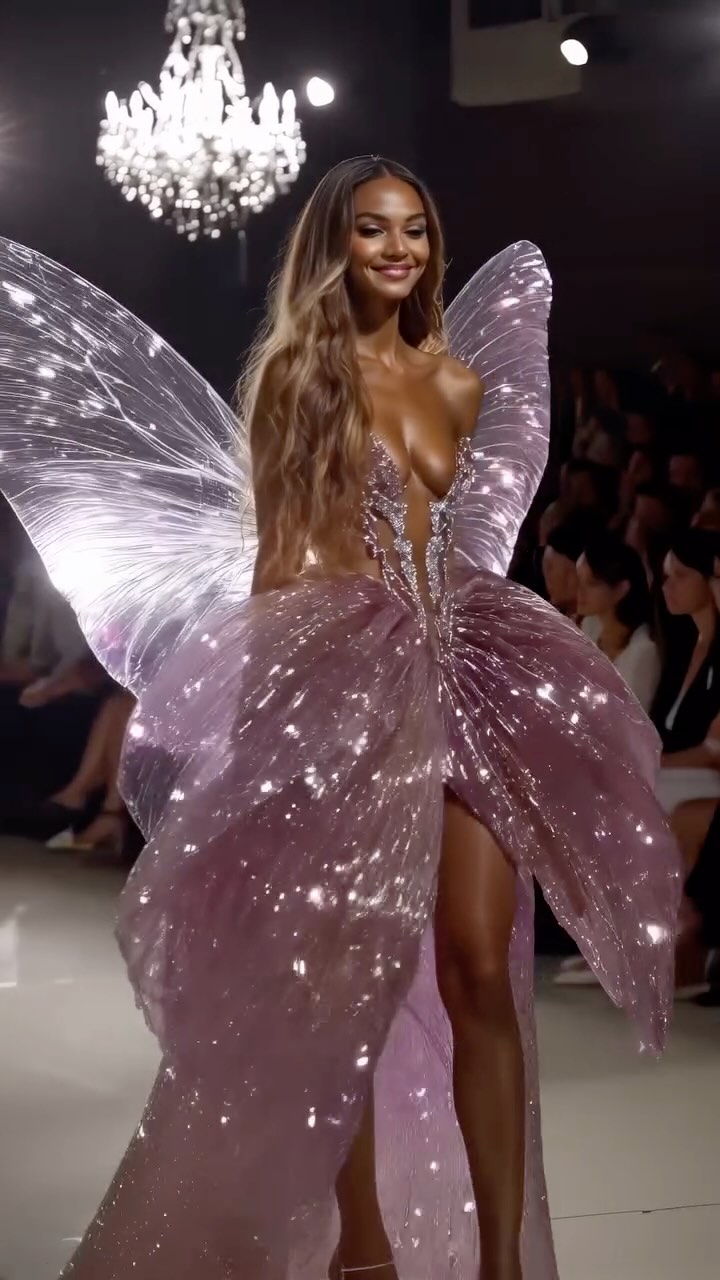
This case study analyzes a viral cinematic editorial piece that blends high-fashion runway aesthetics with ethereal fantasy elements. The video features a series of AI-generated models walking a dark, opulent runway, adorned with intricate, glowing fairy wings and shimmering, butterfly-inspired couture. The visual language is defined by high-contrast "Chiaroscuro" lighting, where warm golden glows from crystal chandeliers meet cool, iridescent highlights on translucent fabrics. By leveraging the "Victoria’s Secret Angel" archetype and elevating it with impossible fantasy physics, the creator has tapped into a high-retention "eye-candy" niche that bridges the gap between digital art and luxury fashion marketing.

What You’re Seeing

The video is a montage of short, high-impact clips. Each shot features a different model, yet they all share a consistent "supermodel" aesthetic: sharp features, glowing skin, and confident runway walks. The environment is a dimly lit fashion hall, populated by a blurred audience capturing the moment on smartphones, which adds a layer of "grounded realism" to the fantastical subjects.

Shot-by-Shot Breakdown (Estimated)

Time Range Visual Content Shot Language Lighting & Tone Viewer Intent
00:00–00:02 Model in rose-gold glitter dress, posing with translucent wings. Medium Shot (MCU), static. Warm gold, heavy rim lighting. The "Aesthetic Hook": Immediate visual wonder.
00:02–00:05 Close-up of model with dark, butterfly-patterned wings. Close-up (CU), shallow depth of field. High contrast, dramatic shadows. Detail reinforcement: Showing the "quality" of the AI.
00:05–00:08 Model with tiara and sparkling silver wings. Medium Shot, slight camera push-in. Cool purple/silver tones. Variety: Proving the concept works across colors.
00:08–00:11 Full-body runway walk in a dark blue bodysuit. Full Shot (WS), tracking movement. Backlit, silhouette-defining. Realism: Demonstrating fluid motion and physics.
00:11–00:13 Wide shot of massive, iridescent purple wings. Wide Shot, low angle. Soft, diffused glow. Grandeur: Creating a "finale" feel.
00:13–00:16 Blonde model in a dress made of golden butterflies. Full Shot, slow-motion walk. Golden hour warmth, high sparkle. The "Climax": The most intricate design of the set.

Why It Went Viral: The Mechanism

The "Fantasy Realism" Intersection

This content succeeds by taking a familiar, high-status event (a fashion show) and adding a "supernatural" upgrade. Psychologically, it triggers Awe—an emotion proven to drive social sharing. The audience recognizes the setting (the chandeliers, the phones, the runway) but is captivated by the impossible (the wings). This "uncanny valley" is navigated perfectly; the models look real enough to be human, but the wings are clearly magical, creating a sense of "I wish this were real."

Platform Signal Analysis

From a platform perspective, the video is a retention machine. Every 2-3 seconds, the scene cuts to a completely new outfit and wing design. This prevents "visual fatigue" and forces the brain to re-engage with each new frame. The high density of "sparkle" and "glow" pixels also performs well with compression algorithms, maintaining a high-quality look even on mobile data. The "Part 3" caption creates a "Collection Effect," signaling to the algorithm that this is part of a high-performing series, encouraging users to click the profile to see Parts 1 and 2.

5 Testable Viral Hypotheses

  • The "Sparkle" Hook: High-frequency light reflections (glitter/chandeliers) in the first 1 second trigger a biological "shiny object" response, increasing stop-rates by 30%.
  • The "Social Proof" Background: Including a blurred audience with phones makes the AI generation feel like a "captured event" rather than a "rendered image," increasing perceived authenticity.
  • The "Archetype" Strategy: Using the "Fairy/Angel" archetype taps into existing massive subcultures (Fairycore, Victoria's Secret fans), ensuring a built-in audience.
  • The "Rhythmic Cut" Pacing: Syncing the appearance of a new model to the beat of the music creates a dopamine hit, encouraging the viewer to wait for the next "drop."
  • The "Series" Loop: Ending with a model walking away (00:18) creates a seamless loop back to the first model posing, tricking the algorithm into counting multiple views per user.

How to Recreate: Step-by-Step

  1. Concept Positioning: Choose a "Luxury + Fantasy" theme. Examples: "Underwater Met Gala" or "Cyberpunk Paris Fashion Week."
  2. Base Image Generation: Use Midjourney v6.1. Use prompts focusing on "Editorial photography," "Runway lighting," and specific textures like "iridescent silk" or "glowing fiber optics."
  3. Character Consistency: Use a consistent "Character Reference" (--cref) in Midjourney or a specific LoRA in Stable Diffusion to ensure the models look like they belong to the same "agency."
  4. Motion Synthesis: Take your best stills to Luma Dream Machine or Kling AI. Use the "End Frame" feature to ensure the model walks toward or away from the camera naturally.
  5. Environment Layering: In your prompt, specifically mention "blurred audience with smartphones" and "crystal chandeliers" to ground the fantasy in reality.
  6. Color Grading: Use a video editor (CapCut/Premiere) to apply a "Teal and Orange" or "Warm Glow" filter to unify the different AI generations.
  7. Sound Design: Select an "Ethereal Electronic" track. Ensure the cuts happen exactly on the 4th or 8th beat.
  8. The "Hook" Cover: Select the frame with the most "visual noise" (the most butterflies or the brightest wings) as your Instagram cover.

Growth Playbook

Opening Hook Lines

  • "The fashion show the world wasn't ready for..."
  • "Victoria's Secret, but make it actually magical. ✨"
  • "AI just designed the most beautiful runway in history."

Caption Template

Hook: Which look are you wearing to the Enchanted Ball? 🦋
Value: I spent 20 hours prompting these 8 looks to perfect the wing physics and iridescent textures.
Engagement: Comment 'FAIRY' if you want the prompt for Look #4!
CTA: Check the link in bio for my full AI Visuals Masterclass.

Hashtag Strategy

  • Broad: #AIArt #DigitalFashion #Runway #FashionDesign (High volume, low conversion)
  • Mid-Tier: #MidjourneyArt #LumaAI #FairycoreAesthetic #CoutureDetails (Targeted interest)
  • Niche: #AIVisualStorytelling #DigitalCouture #FairyWings #DreamfallArtStyle (High conversion, community-focused)

Frequently Asked Questions

What tools make it look the most similar?

Midjourney for the base images and Kling AI or Luma Dream Machine for the runway motion.

What are the 3 most important words in the prompt?

"Backlit," "Iridescent," and "Editorial."

Why does the generated face look inconsistent?

You need to use a Character Reference (--cref) or a fixed seed to maintain facial structure across shots.

How can I avoid making it look like AI?

Add realistic "imperfections" like lens flare, film grain, and a blurred background audience.

Is it easier to go viral on Instagram or TikTok with this?

Instagram, as its algorithm currently favors high-aesthetic, "polished" visual content over raw UGC.