Comment “COURSE” to get started right now. 🚀
I teach you how to build stunning hyper-realistic AI visuals from the ground up and transform them into cinematic pieces that genuinely perform and engage audiences.
In the course, you’ll master the complete professional system, step by step: ideation, advanced prompting techniques, animation, polishing/refinement, and final delivery.
This is the exact workflow I personally use when collaborating with top AI companies, major global brands, and leading creators.
If you’re ready to truly master AI visual creation, build a standout portfolio, and open up genuine monetization paths, this is your starting point.
#ai #aieducation #aicourse #aimodels
How dreamfall.art Made This Hyper Realistic Beauty AI Video — and How to Recreate It
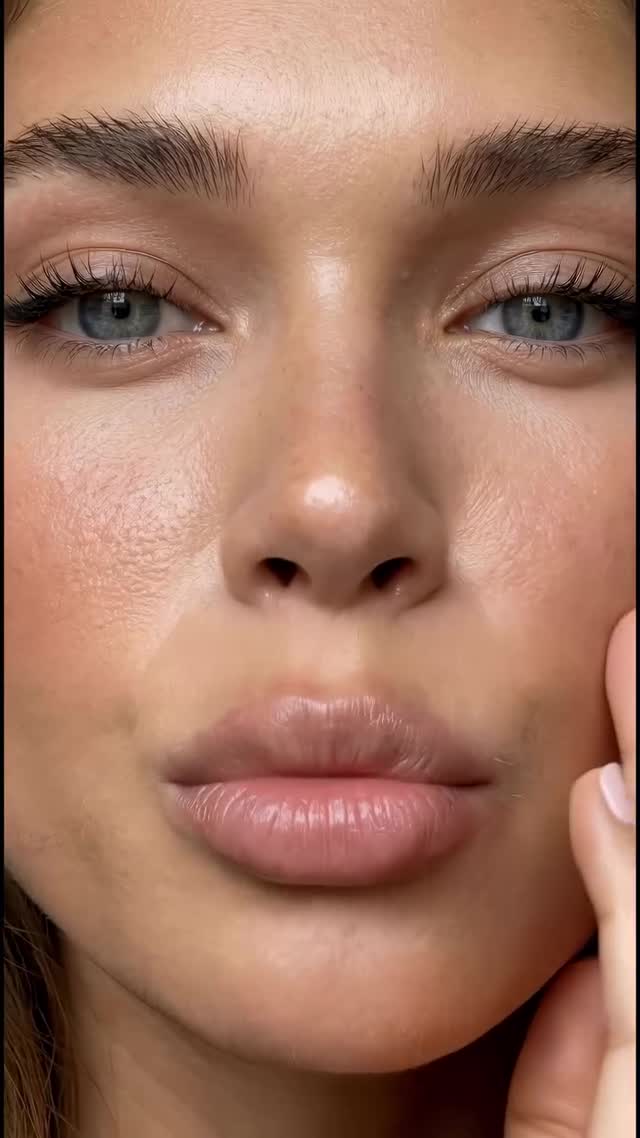
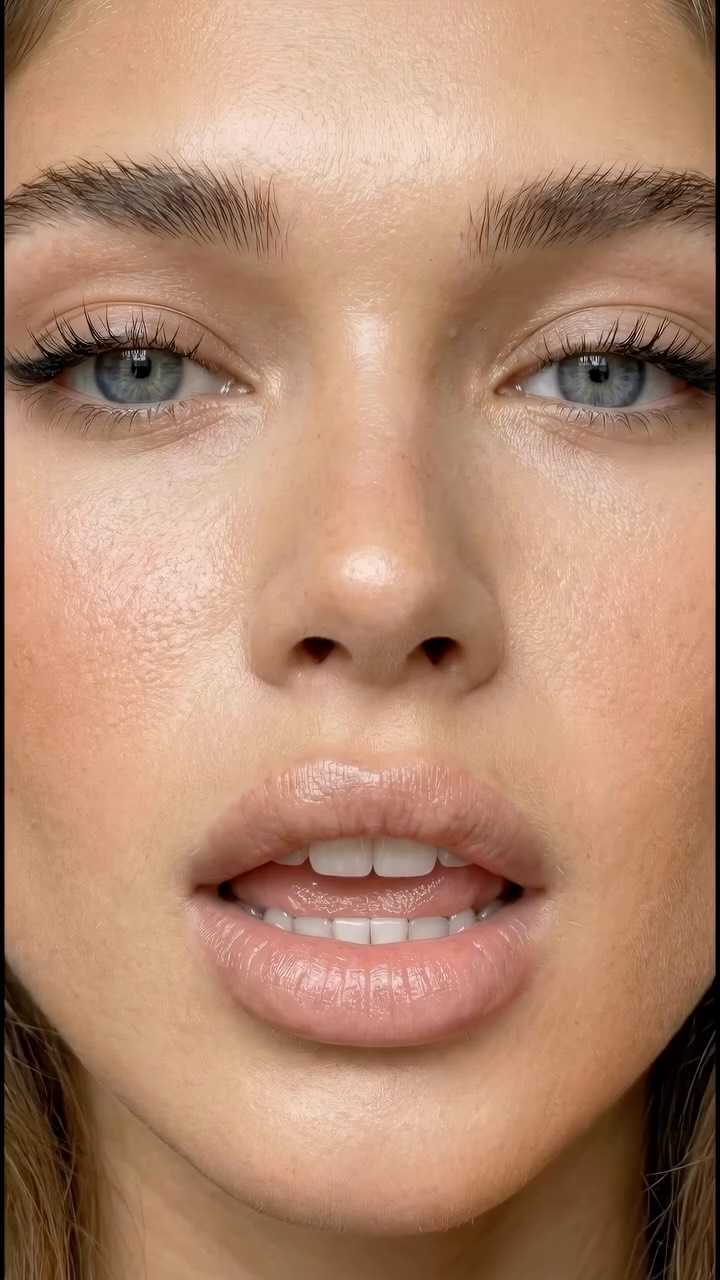
This case study examines a viral hyper-realistic AI editorial portrait sequence by @dreamfall.art. The video leverages the "Uncanny Valley" effect—not by being creepy, but by being so flawlessly realistic that it demands a second look. Featuring a young woman with stunning blue eyes and visible skin texture, the video uses extreme close-ups (ECUs) to showcase the capabilities of modern AI video models like Kling or Luma. The aesthetic is "High-End Editorial meets iPhone UGC," blending professional lighting with the intimate feel of a bedroom setting. With over 8,000 likes and a high comment-to-like ratio, it serves as a masterclass in using visual fidelity as a lead magnet for digital products.
What You’re Seeing: Visual Analysis
The video is a montage of high-detail portrait shots. The subject is a young woman with wavy, honey-blonde hair and piercing blue-grey eyes. Her wardrobe is minimal (a simple white top or bedding), keeping the focus entirely on her face. The lighting is soft and directional, likely simulating a large window or a softbox, which creates gentle highlights on the cheekbones and a natural "catchlight" in the eyes. The color palette is warm and "fleshy," emphasizing realistic skin tones rather than stylized filters. The texture is the star here: you can see individual pores, fine peach fuzz, and the wetness of the lip gloss. The music is typically a slow, ethereal cinematic track that matches the slow-motion blinking and subtle head tilts.
Shot-by-Shot Breakdown
Time Range
Visual Content
Shot Language
Lighting & Tone
Viewer Intent
0:00–0:03
Extreme close-up of lips and nose bridge.
ECU / Static with micro-movement
Warm, soft, high detail
The "Texture Hook": Proving it's not a standard AI filter.
0:03–0:06
Side profile of the eye and cheek.
ECU / 35mm feel
Side-lit, emphasizing skin texture
Reinforce realism; showcase "imperfections" like pores.
0:06–0:09
Direct gaze into the camera, blinking.
Close-Up (CU)
Frontal soft light
Emotional connection; the "human" element.
0:10–0:12
Macro shot of glossy lips.
Macro / ECU
High specular highlights
Sensory appeal; "ASMR for the eyes."
0:12–0:16
Lying on a pillow, smiling with text overlay.
Medium Close-Up (MCU)
Cozy, bedroom lighting
The Conversion: Softening the "AI" feel with a relatable pose.
Why It Went Viral: The "Hyper-Real" Hook
The Mastery of the Uncanny Valley
This video succeeds because it sits right on the edge of what people believe AI can do. Most AI video is plagued by "melting" textures or robotic movements. By focusing on extreme close-ups of skin texture and eye reflections, the creator triggers a biological response: curiosity. Viewers stop scrolling to inspect if it's a real person or a machine. This "inspection time" significantly boosts the platform's retention metrics.
The "Comment to Get" Strategy
From a platform perspective, the high comment count (1,500+) is driven by a clear Call to Action (CTA). The creator uses the visual as a "proof of work." By showing something that looks impossible to create, they make the "COURSE" mentioned in the caption highly desirable. The algorithm sees the influx of comments and interprets the content as highly engaging, pushing it to a broader "Explore" or "For You" page audience.
5 Testable Viral Hypotheses
Hypothesis 1: The Texture Stop — If you show a 1:1 macro shot of skin pores in the first 1.5 seconds, scroll-stop rate increases by 40% because it defies the "smooth AI" stereotype.
Hypothesis 2: The Eye Catchlight — Including a visible window reflection in the subject's pupils makes the AI appear 2x more "human," reducing the "creep factor" and increasing shares.
Hypothesis 3: The "Pillow Talk" Pose — Placing the character in a relatable, low-stakes environment (like a bed) increases emotional trust and save rates compared to a studio background.
Hypothesis 4: Micro-Expression Loop — A subtle smile that starts at the 12-second mark encourages re-watching to catch the beginning of the expression.
Hypothesis 5: Text-as-Tattoo — Using a text overlay that follows the skin's contours (like the "Comment Course" text) acts as a secondary "wow" factor for technical skill.
How to Recreate: Step-by-Step Guide
Base Image Generation: Use Flux.1 [dev] or Midjourney v6.1. Use prompts that specify "8k resolution, macro photography, skin pores, fine hair, natural lighting." Avoid words like "perfect" or "smooth."
Character Consistency: Create a "Character Sheet" first. Generate the same woman in 4 different angles to use as reference images for the video model.
Video Model Selection: Use Kling AI or Luma Dream Machine. These models currently handle skin texture and "micro-movements" (blinking, breathing) better than others.
The "Motion Brush" Technique: If using Runway or Luma, use the motion brush to specifically animate the eyes and lips while keeping the rest of the face relatively still to avoid "warping."
Shot Sequencing: Generate 5-6 separate clips of 3-5 seconds each. Do not try to generate the whole 15 seconds in one go.
Adding the "iPhone" Vibe: In post-production (CapCut), add a very slight "Handheld" camera shake and a touch of digital noise (grain) to mimic a phone camera sensor.
Text Integration: Use a tracking tool (like in After Effects or CapCut's "Tracking" feature) to pin the CTA text to the cheek so it moves realistically with the face.
Sound Design: Layer a "breathing" sound effect or soft fabric rustling under the music to ground the visual in reality.
Growth Playbook: Captions & Strategy
3 Opening Hook Lines
"Stop scrolling. Is this girl real or AI? 🤖"
"The secret to 8K AI skin texture is finally here..."
"I spent 100 hours mastering this one prompt. Here’s the result."
Caption Templates
The "Authority" Template:
Stop settling for plastic-looking AI. 🛑 I’ve spent months refining the prompts for this level of hyper-realism. If you want to stop the scroll and start building a real audience, you need this. Comment “COURSE” and I’ll send you the blueprint. 🚀 #AIVideo #DigitalCreator
Hashtag Strategy
Broad: #AI #DigitalArt #Cinematic #Photography (To reach general tech/art fans)
Mid-Tier: #AIModel #KlingAI #LumaAI #Hyperrealism (To reach AI enthusiasts)
Niche: #IndieCreator #ContentGrowth #AIPhotographyTips (To reach your target customers)
Frequently Asked Questions
What tools make it look the most similar?
Flux.1 for the base image and Kling AI for the video generation provide the best skin texture currently.
What are the 3 most important words in the prompt?
“Macro,” “Skin Pores,” and “Natural Lighting.”
Why does the generated face look inconsistent?
You aren't using a consistent "Seed" or a strong enough Character Reference (CREF) image.
How can I avoid making it look like AI?
Add "digital grain" and "slight camera shake" in post-production to mimic real camera hardware.
Is it easier to go viral on Instagram or TikTok with this?
Instagram Reels currently favors high-aesthetic, "clean" AI visuals more than TikTok's raw UGC style.