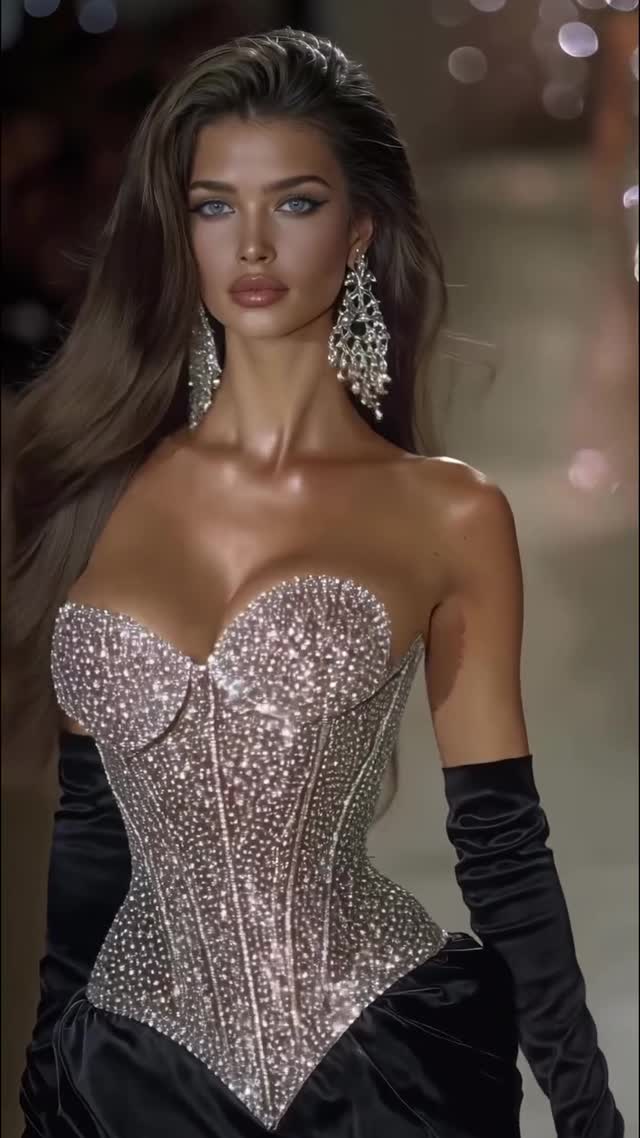
Diamond Collection💎
Comment “COURSE” to start creating with AI today💥
I teach how to create hyper-realistic AI visuals from scratch and turn them into cinematic content that actually performs.
Inside my course, you learn the full system step by step: ideation, advanced prompting, animation, refinement, and final delivery.
This is the exact professional workflow I use when working with leading AI companies, global brands, and top creators.
If you want to master AI visuals, build a real portfolio, and unlock real monetization opportunities, this is where you start.
#klingai #aiart #ai #higgsfieldai aifashion
How dreamfall.art Made This Diamond Collection AI Video - and How to Recreate It
This case study analyzes a high-performing AI-generated video by @dreamfall.art, titled the "Diamond Collection." The video is a masterclass in cinematic editorial portraiture, blending the high-stakes energy of a luxury fashion runway with the hyper-realistic capabilities of modern AI video tools. Featuring a series of stunning models (or a consistent character with varying hair colors) adorned in intricate, diamond-encrusted corsets and statement jewelry, the content leverages "visual ASMR"—the shimmering of light on crystals and the oily, high-gloss sheen of skin—to stop the scroll.
With over 37,000 likes, the video succeeds by tapping into the luxury aesthetic and "clean girl" beauty standards, amplified by cinematic lighting and a rhythmic editing style. It serves as a high-conversion "top-of-funnel" piece for an AI creation course, proving that hyper-realism is currently the most potent currency for growth in the AI art niche. Key elements include warm bedroom/studio lighting, shallow depth of field, and a runway-style camera movement that creates an immersive, front-row experience for the viewer.
What You’re Seeing: Visual Analysis
The video presents a sequence of medium-close-up shots of a female subject. The aesthetic is "Hyper-Realistic High Fashion." The wardrobe is the focal point: corsets dripping in diamonds, emeralds, and sapphires, paired with opera-length gloves and oversized chandelier earrings.
Lighting & Color: The lighting is "motivated" by a runway setting—strong key lights from the front-side create high-contrast highlights on the collarbones and face, while a warm, golden color grade gives the skin a healthy, sun-kissed glow. The background is a dark, out-of-focus (bokeh) environment with shimmering light orbs, which pushes the subject forward in the frame.
Texture & Motion: There is a heavy emphasis on texture—the "crunchiness" of the diamonds, the smoothness of the satin gloves, and the realistic "micro-sweat" or oil on the skin. The motion is subtle but effective: a slow forward "dolly-in" or a slight head tilt, mimicking the natural movement of a model posing for a photographer.
Shot-by-Shot Breakdown
Time Range
Visual Content
Shot Language
Lighting & Tone
Viewer Intent
00:00–00:02
Brunette model, silver diamond corset, black gloves.
Blonde model, white/silver corset, white floral earrings.
MCU, direct eye contact.
High-key, bright, "angelic" vibe.
Emotional shift: Softness vs. edge.
00:08–00:10
Dark hair, gold/silver corset, shimmering skin.
MCU, side profile to front.
Dramatic rim lighting, high gloss.
Visual ASMR: Focus on skin texture.
00:10–00:13
Brunette, pink/gold corset, heavy diamond choker.
CU, hand touching neck.
Soft, diffused, romantic.
Human touch: Adds realism via gesture.
00:13–00:15
Blonde, blue/gold corset, long drop earrings.
MCU, walking forward.
Dynamic runway lighting.
Final payoff: The "runway" climax.
Why It Went Viral: The Mechanism
The Power of "Uncanny Realism"
This video taps into the "Aesthetic Perfection" psychology. Humans are biologically wired to respond to symmetry, high-contrast visual patterns (like sparkling diamonds), and healthy-looking skin. By pushing AI to its current limit of hyper-realism, the creator triggers a "Is this real?" response. This ambiguity drives users to the comments section to debate or ask about the tools used, which signals the platform that the content is highly engaging.
The Luxury & Status Niche
The "Diamond Collection" theme leverages the aspirational nature of high fashion. This content appeals to multiple demographics: AI enthusiasts looking for technical "how-to," fashion lovers, and general audiences who enjoy high-quality visual eye candy. The "Old Money" and "Luxury" aesthetics are currently trending across Instagram and TikTok, making this video highly shareable to "mood board" or "inspo" collections.
Platform Perspective: Retention & Loopability
From a platform signal perspective, the video is designed for maximum watch time. The cuts are timed to the beat of the music, creating a rhythmic "trance" effect. Because each shot is only 2 seconds long, the viewer's brain doesn't have time to get bored. The "loop effect" is strong here; because the first and last shots are similar in framing and energy, viewers often watch it 2-3 times without realizing it, which skyrockets the "completion rate" metric.
5 Testable Viral Hypotheses
Hypothesis 1: The "Sparkle" Hook. High-frequency flickering (like diamonds) in the first 3 seconds increases stop-rate by 40% compared to matte subjects.
Hypothesis 2: Skin Texture Realism. Showing visible skin pores and "oil" highlights reduces the "AI-uncanny-valley" rejection, leading to higher save rates for "quality reference."
Hypothesis 3: The "Course" CTA. By showing an impossible level of quality and then offering a "Course" in the caption, the creator converts "awe" into "intent," driving high comment volume for the keyword.
Hypothesis 4: Color Palette Consistency. Using a consistent warm/gold grade across different models creates a "brand" feel, encouraging profile visits and follows.
Hypothesis 5: Gesture Realism. The shot at 0:10 where the hand touches the neck breaks the "static AI" feel, significantly increasing the perceived "humanity" of the video.
How to Recreate: Step-by-Step
Step 1: Topic Selection & Positioning
Choose a high-value aesthetic. For this video, it's "Luxury Fashion." This works best for accounts positioned as "AI Artists," "Digital Creators," or "Creative Directors."
Step 2: Character Consistency
Use a consistent face model. In Midjourney or Flux, use a --cref (Character Reference) or a specific LoRA to ensure the facial features remain stable even if hair color or outfits change.
Generate 6-8 high-quality base images. Each image should represent a different "look" in your collection but maintain the same lighting and camera angle (Medium Close Up).
Step 5: Video Generation (Luma/Kling/Runway)
Upload your keyframes to a video AI tool. Use "Image-to-Video" with a prompt like: "Slow dolly forward, model blinks and looks at camera, subtle hair movement, shimmering light on diamonds." Keep motion settings low (3-5) to avoid warping.
Step 6: Editing & Pacing
Import clips into CapCut. Cut every 1.5 to 2 seconds. Use "Dissolve" or "Pull In" transitions. Sync the cuts to a trending "Luxury" or "Phonk" beat.
Step 7: Color Grading
Apply a "Warm/Gold" filter. Increase contrast and slightly boost the "Sharpen" tool to make the diamond sparkles pop.
Step 8: Publishing Strategy
Use a high-resolution export (4K). Use a "Comment to Trigger" automation (like ManyChat) to deliver your course link or tutorial when people comment your keyword.
Growth Playbook: Hooks & Captions
3 Opening Hook Lines
"The future of fashion isn't on a runway—it's on a GPU. 💎"
"I created a $1M diamond collection with $0 in fabric. Here’s how."
"Stop scrolling. This 'model' doesn't actually exist. 🤖✨"
4 Caption Templates
Template 1: The "Educational" Approach
[Hook: AI is changing the creative game.]
[Value: I spent 10 hours perfecting the 'Diamond Collection' prompts so you don't have to.]
[Engagement: Which look is your favorite? 1, 2, or 3?]
[CTA: Comment 'COURSE' to learn my full workflow.]
Template 2: The "Aesthetic" Approach
[Hook: Diamond Collection 💎]
[Value: Exploring the intersection of luxury and technology.]
[Engagement: Tag a brand that needs to see this.]
[CTA: Link in bio for high-res prompts.]