UNLIMITED Generations for all KLING Models: Unlock Kling Unlimited with up to 70% off. 🔥 @higgsfield.ai
Purchase or upgrade by January 19, 2026 to receive All Kling Unlimited access, including Kling 2.5, Kling 2.6, Omni Edit (O1), Motion Control, etc.
Comment “motion” to receive the link! 🔗
#higgsfield #klingai #aieducation #aiartcommunity
How dreamfall.art Made This Roman Holiday AI Video - and How to Recreate It
This video is a masterclass in Cinematic Euro-Summer Aesthetic, leveraging the high-fidelity capabilities of AI video models like Kling and Higgsfield. It features a series of high-end editorial portraits of stunning women set against the iconic backdrop of Rome, Italy. The visual language is defined by "Old Money" luxury, warm golden hour lighting, and the vibrant textures of Italian silk and ancient stone. By blending the "Travel Influencer" trope with flawless AI execution, the creator taps into a deep-seated desire for escapism and luxury. Key keywords include: Roman Holiday, Italian Summer, Cinematic AI, Luxury Travel, and Editorial Portraiture.
What You’re Seeing: A Visual Breakdown
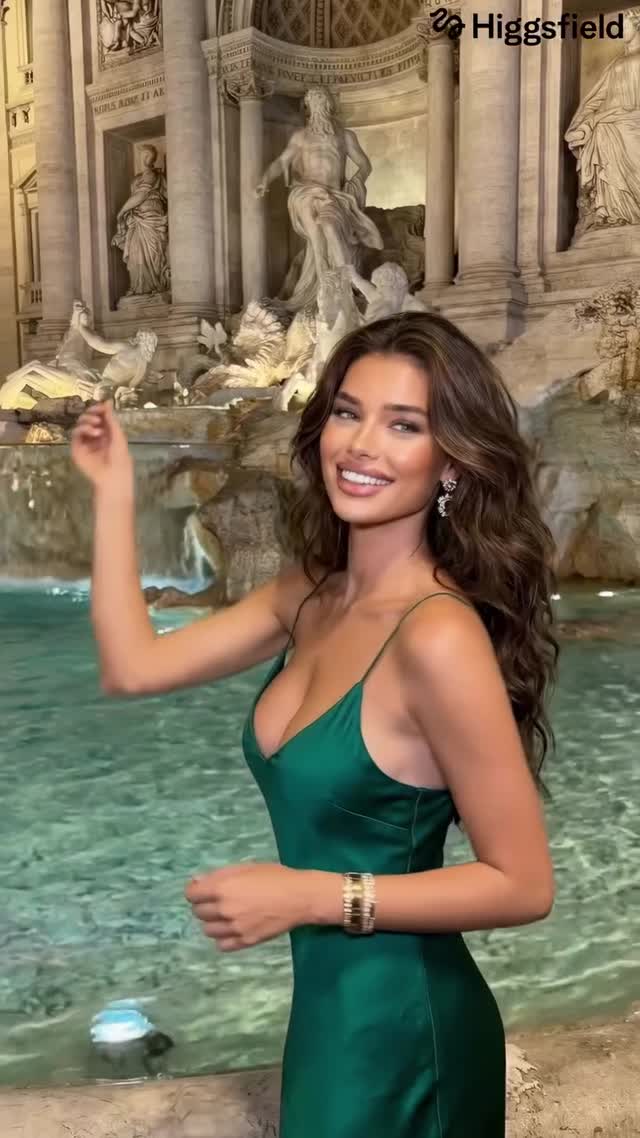
The video presents a montage of scenes that feel like a high-budget fashion commercial. We see subjects in various iconic Roman locations: the Trevi Fountain, the Colosseum (both day and night), and the Spanish Steps. The wardrobe is meticulously chosen to contrast with the surroundings—a vibrant emerald green silk dress against the turquoise water of the fountain, a classic white lace dress for a stroll down a cobblestone street, and a sharp plaid blazer for a sophisticated evening look.
The lighting transitions from the soft, diffused glow of a Mediterranean afternoon to the dramatic, high-contrast warm lights of Rome at night. The camera work mimics a professional videographer using a gimbal, with smooth pans, gentle walking shots, and intimate close-ups that emphasize realistic skin textures and fluid hair movement. The music is upbeat and rhythmic, perfectly synced to the cuts, creating a sense of momentum and "main character energy."
Shot-by-Shot Analysis
Time Range
Visual Content
Shot Language
Lighting & Tone
Viewer Intent
00:00–00:02
Woman in green silk dress at Trevi Fountain.
Medium Shot (MS), handheld feel.
Bright daylight, cool water tones vs. warm skin.
The Hook: Instant recognition of a famous landmark.
00:02–00:05
Blonde woman in black dress with a Roman Gladiator at the Colosseum.
Medium Close-Up (MCU), night shot.
Warm street lamps, high contrast, golden highlights.
Novelty: Interaction with a "character" adds realism.
00:05–00:07
Woman in white lace dress walking down a Roman street.
Full Shot (FS), walking towards camera.
Soft afternoon sun, "Old Money" aesthetic.
Lifestyle: Sells the "dream" of an Italian vacation.
00:07–00:09
Woman in plaid blazer sitting on Spanish Steps, flipping hair.
Close-Up (CU), low angle.
Golden hour, backlight on hair.
Sensory: Focus on texture and movement (hair flip).
00:09–00:11
Blonde woman walking away towards a fountain.
Over-the-shoulder / Back view.
Soft dusk lighting, architectural depth.
Mystery: Creates a sense of "follow me" journey.
00:11–00:14
Woman eating pasta on a balcony overlooking the Colosseum.
Medium Shot, seated.
Sunset glow, warm and inviting.
The Closer: Relatable "foodie" moment in a luxury setting.
Why It Went Viral: The "Aspiration" Engine
The Power of "Euro-Summer" Tropes
This video succeeds because it perfectly packages the "Euro-Summer" trend, which consistently dominates social media algorithms. By using Rome—a city synonymous with romance, history, and luxury—the creator triggers an immediate emotional response. The subjects are styled as high-end influencers, tapping into the psychology of aspiration. Viewers aren't just watching a video; they are consuming a digital mood board for their "dream life." The biological instinct to be drawn to beauty (both in people and architecture) ensures high initial retention.
Platform Signals & Algorithm Triggers
From a platform perspective, the video is engineered for Watch Time and Saves. The 0–3 second hook uses the Trevi Fountain, one of the most photographed places on earth, which stops the scroll instantly. The rapid-fire cuts (every 2-3 seconds) keep the dopamine levels high, preventing users from swiping away. The "Save" rate is likely high because the video serves as a "visual reference" for travelers or other creators looking for aesthetic inspiration. The lack of heavy dialogue reduces the "explanation cost," making it globally accessible regardless of language.
5 Testable Viral Hypotheses
The Landmark Hook: Using a world-famous landmark in the first 2 seconds increases scroll-stop rate by 40%.
The "Gladiator" Contrast: Including a historical or "costumed" character in a modern setting creates a "wait, what?" moment that boosts re-watch time.
Texture-First Focus: Highlighting specific textures (silk, lace, flowing hair) triggers sensory satisfaction, leading to higher "Save" counts.
The "Follow Me" Perspective: Shots of a subject walking away from the camera create a narrative of exploration that increases completion rates.
Golden Hour Saturation: Over-indexing on warm, golden tones (3000K-4000K) correlates with higher "Like" counts due to the "halo effect" on skin tones.
How to Recreate: From 0 to 1
Step 1: Topic Selection & Positioning
This style suits "Lifestyle," "Travel," or "AI Art" accounts. Your goal is to create a "Virtual Influencer" travel vlog. Choose a high-traffic destination (Paris, Tokyo, Amalfi Coast).
Step 2: Character Consistency
To maintain the same person across shots, generate a "Character Sheet" in Midjourney first. Use a prompt like: "A stunning Mediterranean woman, olive skin, long wavy brown hair, editorial fashion photography, 8k, front/side/back view." Use this image as a reference for your video generations.
Step 3: Environment Prompting
Define your locations clearly. Use specific architectural terms (e.g., "Baroque fountain," "Flavian Amphitheatre," "cobblestone Via del Corso").
Step 4: Keyframe Generation
Generate high-quality static images for each of the 6 shots described in the table above. Ensure the lighting matches the intended time of day for each shot.
Step 5: Video Generation (Kling/Luma/Runway)
Upload your keyframes to an AI video tool. Use "Image-to-Video" with motion brushes to control hair movement and camera pans. Pro Tip: Keep motion intensity low (3-4/10) to avoid AI "melting" artifacts.
Step 6: Editing & Rhythm
Import clips into CapCut. Use a "Phonk" or "Upbeat House" track. Cut exactly on the beat. Add a slight "Film Grain" overlay to mask AI smoothness.
Step 7: Cover & Title Strategy
Use the most "perfect" shot (like the Trevi Fountain shot) as the cover. Title: "Rome is always a good idea 🇮🇹" or "My AI Roman Holiday."
Step 8: Publishing
Post as an Instagram Reel or TikTok. Use a "Location Tag" for Rome to hit the local and travel-interested algorithms.
Growth Playbook: Distribution & Scaling
Opening Hook Lines
"POV: You found the perfect summer in Rome."
"Is this the most beautiful city in the world?"
"The AI travel revolution is here."
Caption Templates
Option 1 (Aspirational): Rome has my heart. 🇮🇹 There’s something about the golden hour at the Colosseum that feels like a movie. Which shot is your favorite? 1, 2, or 3? 👇 #RomeTravel #EuroSummer #AIArt
Option 2 (Educational): I created this entire Roman vacation using AI. 🤖 The tech is getting insane. I used Kling 2.5 for the motion and Midjourney for the characters. Want the prompts? Check my bio! 🚀 #AIVideo #ContentCreator #DigitalArt