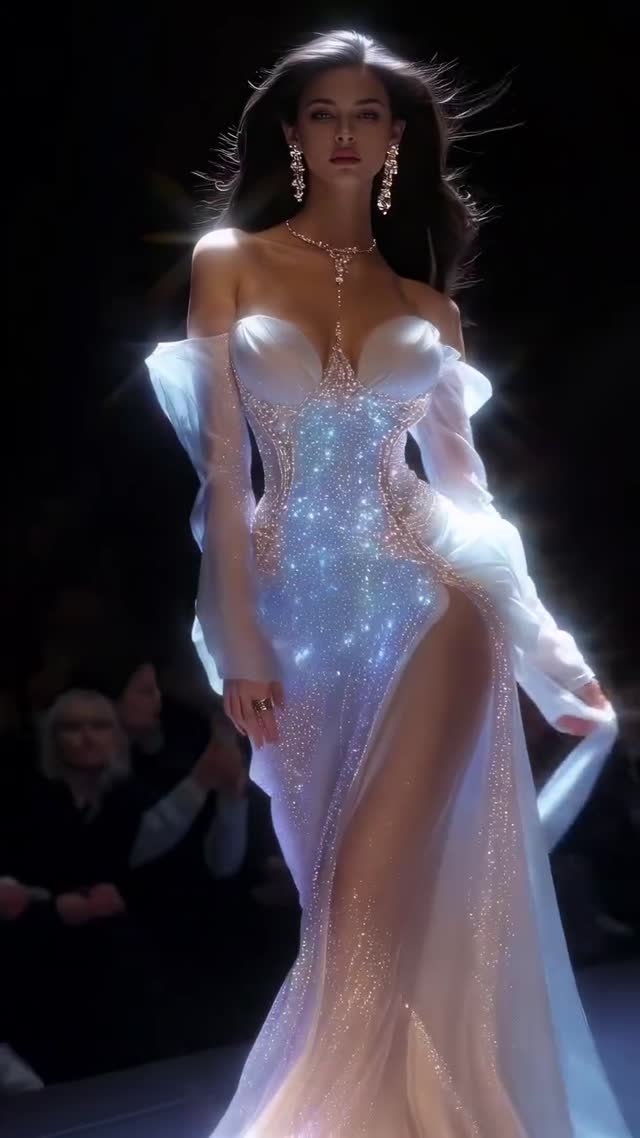
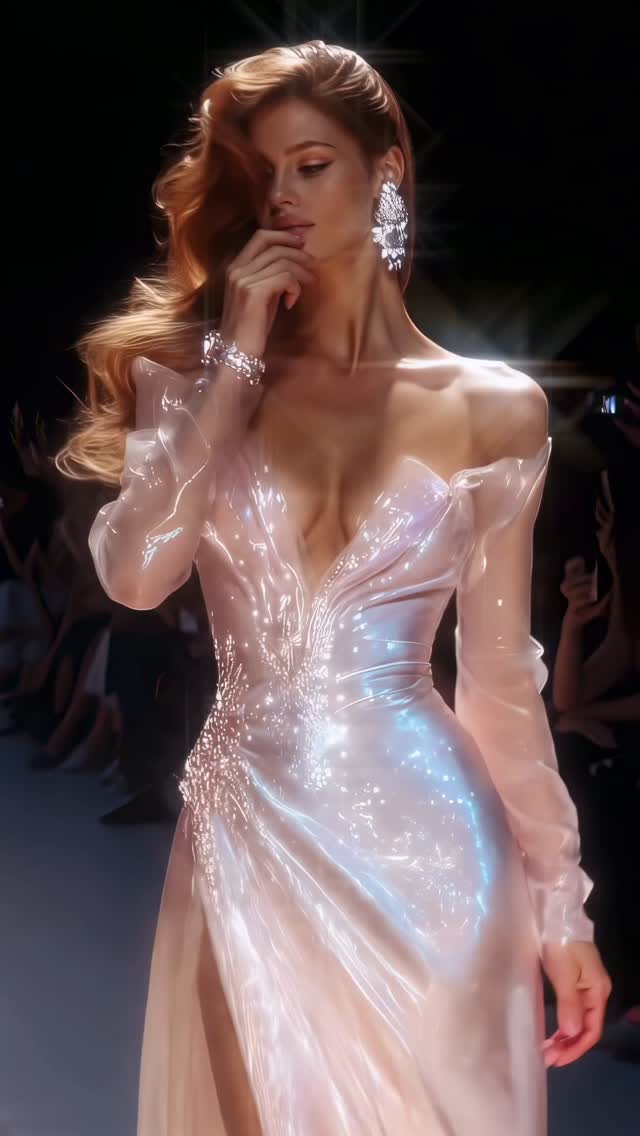
Gleam collection✨
Are you serious about learning how to create AI visuals at a professional level? In my course, I teach everything I use in my own process:
• How I build concepts and visual storytelling
• The exact tools, prompts, and workflows I use
• How to refine, edit, and create a portfolio that gets noticed
This is the full system I used to grow Dreamfall Art and work with brands.
If you want access —
Comment “COURSE” below and I’ll send you the link directly.
Animated with @klingai_official
#midjourney #virtualfashion #virtualfashionshow #aiart #model #fashioncollection #ai #midjourneyart #aidesign #digitalart #artist #aiartcommunity #fashionista
Why dreamfall.art's Gleam Collection Went Viral - and the Formula Behind It
This case study analyzes the "Gleam Collection" by @dreamfall.art, a masterclass in cinematic AI fashion editorial. The video features a series of high-fashion models walking a dark, atmospheric runway, showcasing ethereal, iridescent garments that seem to glow from within. By blending iPhone-style UGC framing with high-end luxury aesthetics, the creator achieved over 56,000 likes. The core appeal lies in the "hyper-real" texture of the fabrics—ranging from liquid silk to crystal-encrusted chiffon—and the dramatic use of backlighting that creates a shimmering halo effect around the subjects. This content targets the "aesthetic aspiration" niche, appealing to fashion enthusiasts, AI artists, and luxury brand followers who crave high-fidelity visual storytelling.
What You’re Seeing
The video is a montage of six distinct runway looks. Each segment features a different model, yet they are unified by a consistent "Gleam" theme. The wardrobe consists of avant-garde, high-slit dresses made of translucent, pearlescent materials. The lighting is the star here: a strong rim light separates the models from the pitch-black background, while soft front-lighting highlights the intricate textures of the clothing. The camera mimics a professional runway videographer, using medium-to-close-up tracking shots that follow the models' rhythmic movements. The color palette is a sophisticated mix of cool iridescent blues, warm skin tones, and deep shadows, giving it a "Vogue-meets-Cyberpunk" vibe.
Shot-by-Shot Breakdown
Time Range
Visual Content
Shot Language
Lighting & Tone
Viewer Intent
00:00–00:03
Model in blue/silver shimmering gown.
Medium Shot, tracking forward.
Cool blue iridescence, high contrast.
The "Hook": Immediate visual "wow" factor.
00:03–00:06
Blonde model in pearlescent cream dress.
Medium Close-up (MCU).
Warm, soft glow, lens flare.
Reinforce luxury persona and detail.
00:06–00:09
Redhead model in sheer pink gown, posing.
MCU, slight low angle.
Backlit hair, shimmering fabric highlights.
Create emotional connection/glamour.
00:09–00:12
Model with dark wavy hair in purple/blue dress.
Medium Shot, steady cam feel.
Deep shadows, vibrant iridescent glow.
Maintain visual variety and rhythm.
00:12–00:15
Dark-skinned model in silver mesh gown.
Medium Shot, side profile.
Metallic sheen, dramatic rim light.
Showcase diversity and material range.
00:15–00:17
Model in pearl-encrusted white gown.
MCU, focus on jewelry/texture.
Bright, high-key highlights.
Final "prestige" shot to drive saves.
Why It Went Viral
The Power of Aesthetic Aspiration
This video taps into the "Luxury & Beauty" biological trigger. Humans are evolutionarily wired to be attracted to symmetry, healthy skin, and shimmering objects (which historically signaled clean water). By combining these elements into a high-fashion context, the creator bypasses the logical brain and hits the "dopamine" button. The "Gleam" theme isn't just a title; it's a visual promise of something ethereal and beyond reach, which is the cornerstone of successful fashion marketing. The fast-paced editing (roughly 3 seconds per shot) ensures the viewer never gets bored, maintaining a high average watch time.
Platform Signals & Algorithm Triggers
From a platform perspective, Instagram's algorithm prioritizes visual fidelity and "saveable" content. This video acts as a "mood board" for other creators. The high number of saves likely comes from users wanting to reference the lighting or the AI-generated fashion designs. The lack of dialogue makes it globally accessible, removing the language barrier and allowing the video to travel across international feeds. The "loop effect" is subtle but effective; as the last model walks off, the first one appears, creating a seamless cycle of beauty that encourages multiple re-watches.
5 Testable Viral Hypotheses
The "Shimmer" Effect: High-frequency sparkling textures (like the crystals on the dresses) trigger higher engagement than flat textures because they create more "visual data" for the eye to process.
The "Runway" Context: Using a familiar high-status setting (a fashion show) instantly elevates the perceived value of the AI generation, making it feel "professional" rather than "experimental."
Rhythmic Synchronization: Cutting shots exactly on the beat of the music creates a "flow state" for the viewer, significantly increasing completion rates.
Identity Variety: Showcasing multiple ethnicities and hair colors within 15 seconds broadens the potential audience, as more viewers see someone they find aspirational.
The "Uncanny Valley" Bridge: By using cinematic lighting and "iPhone-like" camera movements, the creator makes the AI models look more like real humans in a high-budget production, reducing the "fake" feeling that often kills engagement.
How to Recreate (Step-by-Step)
Step 1: Concept & Aesthetic Positioning
Decide on a "material theme." For this video, it's "Gleam" (iridescence and light). This works best for accounts focused on AI art, digital fashion, or luxury lifestyle.
Step 2: Character Consistency Strategy
To maintain a "collection" feel, use a consistent base prompt for the environment and lighting, while varying the model's features. Create a "Character Sheet" in Midjourney first to define your models' looks.
Step 3: Generating the Keyframes
Generate high-quality static images of your models on a runway. Use prompts that specify "volumetric lighting," "rim light," and "iridescent fabric textures."
Step 4: Video Generation (The Motion)
Use tools like Runway Gen-2 or Luma Dream Machine. Upload your keyframe and use a motion brush to animate the fabric and hair. Keep the "Motion" slider around 3-5 to avoid warping.
Step 5: Camera Movement Control
In your video AI tool, specify "Tracking shot" or "Dolly in." This mimics the professional runway videography seen in the reference video.
Step 6: Curating the Best 3-Second Clips
AI video often breaks down after 4 seconds. Generate 5-10 second clips but only use the best 2-3 seconds where the motion is most fluid and realistic.
Step 7: Editing & Beat Matching
Bring your clips into CapCut. Choose a high-fashion, ethereal track. Use the "Match Cut" feature to ensure every model change happens on a major beat.
Step 8: Color Grading & Finishing
Apply a "Cinematic" filter. Increase the "Glow" or "Bloom" effect slightly to enhance the "Gleam" of the dresses. Add a subtle film grain to mask any AI artifacts.
Growth Playbook
Opening Hook Lines
"The future of fashion is here. ✨"
"Which look from the Gleam collection is your favorite? 1-6?"
"AI is officially taking over the runway."
Caption Templates
Template 1 (Engagement Focused):
Gleam Collection ✨ | Which look are you wearing to the gala? 1, 2, or 5? 👇
Exploring the intersection of light and fabric through AI.
#AIFashion #DigitalCouture #RunwayVibes
Template 2 (Educational/Process):
How I built the Gleam Collection using AI. 🧵
It’s all about the lighting prompts and material physics.
Want to see the workflow? Check the link in bio.
#AIArtCommunity #MidjourneyTips #CreativeTech