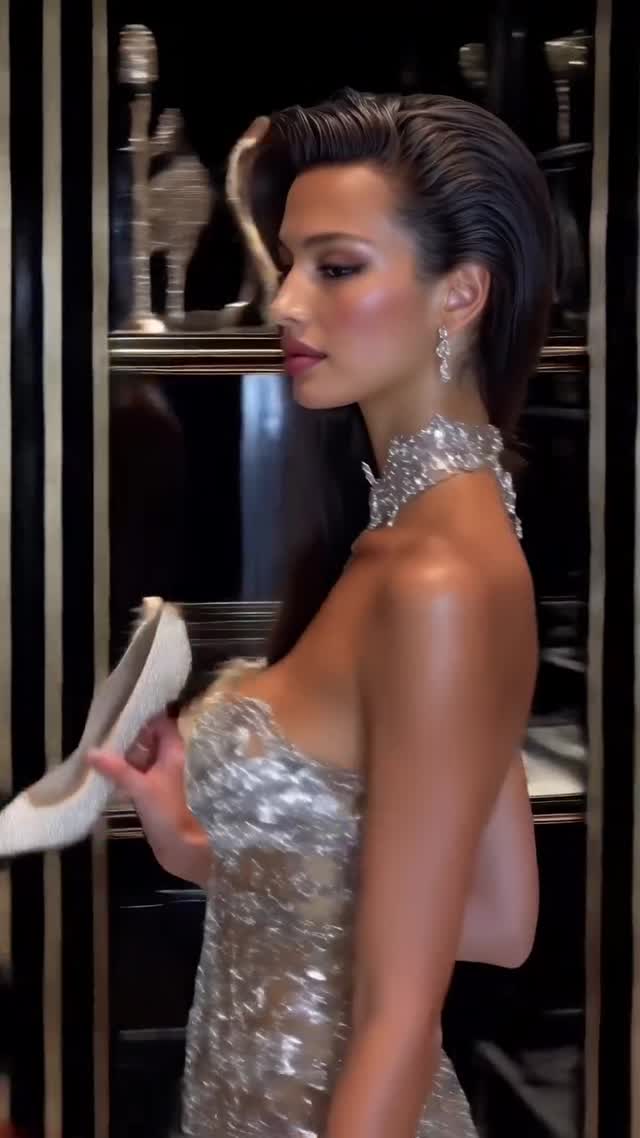
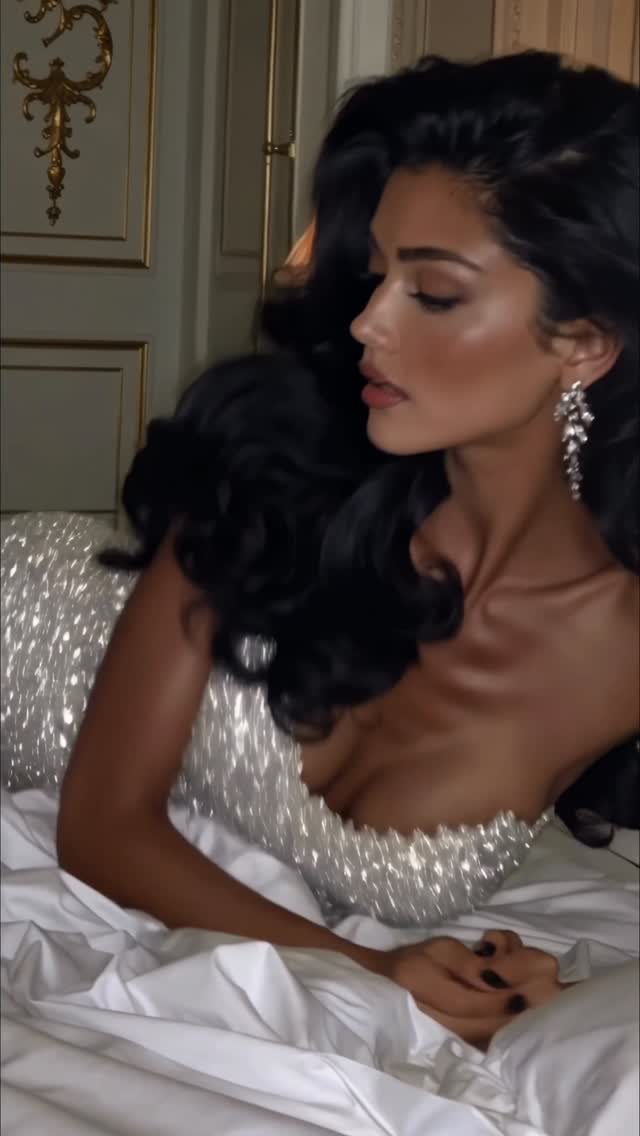
Getting ready pt.2✨
Animated with @klingai_official
Are you serious about learning how to create AI visuals at a professional level? In my course, I teach everything I use in my own process:
• How I build concepts and visual storytelling
• The exact tools, prompts, and workflows I use
• How to refine, edit, and create a portfolio that gets noticed
• Personal feedback, guidance, and access to my private community
This is the full system I used to grow Dreamfall Art and work with brands.
If you want access —
Comment “COURSE” below and I’ll send you the link directly.
#ai #aiartist #aifashiondesign #fashion #model #midjourney
How dreamfall.art Made This Luxury Fashion Editorial AI Video — and How to Recreate It
This high-performance Instagram reel by @dreamfall.art is a masterclass in the "Luxury Editorial AI" niche. By blending the popular "Get Ready With Me" (GRWM) trope with hyper-realistic AI animation via Kling AI, the creator taps into the aspirational "Old Money" and "High Fashion" aesthetics. The video features a series of cinematic shots—ranging from luxury walk-in closets to soft-lit bedroom portraits—all unified by a warm, golden-hour glow and high-contrast editorial lighting. With over 17,000 likes, it demonstrates how indie creators can leverage AI to produce content that rivals the production value of a Vogue photoshoot, focusing on texture, movement, and a rhythmic editing style that keeps viewers hooked.
What You’re Seeing
The video is a montage of high-fashion moments. The subject is a series of glamorous women (or a consistent AI persona) with tanned skin, voluminous hair, and heavy editorial makeup. The wardrobe consists of silver sequined gowns, white feathered bodysuits, and luxury accessories. The scenes transition between a dark, gold-trimmed luxury closet filled with designer shoes and a bright, airy bedroom with plush white linens. The lighting is predominantly "motivated" by practical sources like lamps or soft window light, creating a "glowy" skin texture and deep, cinematic shadows. The camera work mimics high-end gimbal shots—smooth pans, slow-motion turns, and intimate close-ups that emphasize the shimmer of the fabric and the clarity of the eyes.
Shot-by-Shot Breakdown
Time Range
Visual Content
Shot Language
Lighting & Tone
Viewer Intent
0:00–0:01
Woman in silver dress holding a white heel in a luxury closet.
Medium Shot (MS), Profile view.
High contrast, warm gold accents.
Hook: Immediate luxury and "getting ready" context.
0:01–0:02
Fast wipe transition through closet shelves.
Wipe / Pan.
Dark, moody, expensive feel.
Maintain rhythm and show scale of luxury.
0:02–0:04
Close-up of woman lying in white bedsheets.
Extreme Close-Up (ECU), Shallow DOF.
Soft, diffused, "dreamy" morning light.
Intimacy: Create a personal connection with the viewer.
0:04–0:07
Woman in white backless dress turning and smiling.
Medium Close-Up (MCU), Over-the-shoulder.
Warm interior glow, high-key.
Persona: Show personality and fluid movement.
0:07–0:09
Woman with black hair in bed, silver top.
Close-Up (CU), Low angle.
Moody, lamp-lit, warm shadows.
Contrast with previous bright shot; visual variety.
0:09–0:12
Full body/Medium shot in closet, picking up shoe.
Medium Shot, Eye level.
Structured, gold-rimmed lighting.
Reinforce the "getting ready" narrative.
0:12–0:14
Full body shot in feathered bodysuit.
Wide Shot (WS), Low angle.
Bright, luxury boutique lighting.
The "Reveal": Show the full high-fashion look.
0:14–0:15
Woman laughing with a teacup in bed.
Close-Up, Handheld feel.
Bright, airy, candid.
Loop Hook: End on a high-energy, relatable candid moment.
Why It Went Viral
The Aspirational Hook
This video targets the "Luxury Lifestyle" and "Fashion" demographics. Psychologically, it taps into aspirational envy—the desire to inhabit a world of effortless beauty and wealth. The "Getting Ready" theme is a proven social media format because it feels like a behind-the-scenes look at an exclusive life. By using AI to create a level of perfection that is difficult to achieve in real life (perfect hair, skin, and lighting in every frame), the creator maximizes the "thumb-stop" effect.
Platform Signals & Algorithm Triggers
From a platform perspective, the video succeeds due to its high information density. Every 1.5 seconds, the scene changes, which prevents "scroll-past" behavior and boosts watch time. The use of Kling AI for animation provides a level of fluid, realistic motion (hair swaying, fabric shimmering) that distinguishes it from static AI images or low-quality "jittery" AI videos. This high visual fidelity signals to the Instagram algorithm that the content is "premium," leading to higher placement in the Explore feed. The "loop effect" is also strong; the final shot of the woman laughing feels like a natural reset, encouraging viewers to watch the sequence again.
5 Testable Viral Hypotheses
Hypothesis 1: The "Glow" Factor. Using high-contrast, warm lighting on skin textures increases "saves" as users keep it for aesthetic reference. Evidence: The consistent golden-hour glow across all shots.
Hypothesis 2: Narrative Pacing. A "Getting Ready" sequence (Closet → Bed → Mirror → Final Look) creates a narrative arc that increases completion rate compared to random montages. Evidence: The logical progression of the shots.
Hypothesis 3: Texture Realism. Explicitly showing hair movement and fabric shimmer (sequins) reduces the "AI uncanny valley" and increases shares. Evidence: The focus on the silver dress and flowing hair in shots 4 and 6.
Hypothesis 4: The "Candid" Closer. Ending a high-glamour video with a candid, laughing shot humanizes the AI subject and increases "likes." Evidence: The final shot of the woman with the teacup.
Hypothesis 5: Niche Aesthetic (Old Money). Using gold-trimmed closets and white linens targets the trending "Old Money" aesthetic, which has high engagement in the fashion niche. Evidence: The specific set dressing of the closet.
How to Recreate (Step-by-Step)
Concept & Moodboard: Choose a high-fashion theme (e.g., "Met Gala Prep" or "Luxury Weekend"). Use Pinterest to find lighting references (e.g., "Chiaroscuro fashion lighting").
Character Consistency: Generate your base images using Flux.1 [dev] or Midjourney v6.1. Use a consistent descriptor: "A 25-year-old Brazilian fashion model, tanned skin, voluminous wavy brown hair, heavy editorial makeup, wearing a silver sequined gown."
Scene Generation: Generate 8-10 distinct scenes. Ensure you have a mix of Close-Ups (face/makeup), Medium Shots (outfit), and Wide Shots (environment like a luxury closet).
AI Animation (Kling AI): Upload your images to Kling AI. Use the "Image-to-Video" feature. Prompt Tip: Use specific motion prompts like "The woman slowly turns her head and smiles at the camera, hair swaying gently in the wind" or "Hand picking up a white high heel shoe from a shelf."
Refining Motion: Set the motion strength to 4-5 to avoid distortions. If the face warps, use the "Face Lock" or "Character Reference" features if available in your tool of choice.
Editing & Pacing: Import clips into CapCut. Use a trending "Luxury" or "Phonk" audio track. Cut the clips to the beat—aim for 0.8s to 1.5s per clip.
Color Grading: Apply a "Warm/Golden" filter in CapCut. Increase contrast and slightly lower the shadows to get that "Editorial" look. Add a subtle "Film Grain" for texture.
Publishing Strategy: Use a "Part 2" or "Behind the Scenes" hook in the caption to imply a series, encouraging profile visits.
Growth Playbook
Opening Hook Lines
"The secret to the 'Old Money' aesthetic (AI edition) ✨"
"Getting ready for a night that doesn't exist... yet."
"How I created a $10k fashion shoot for $0."
Caption Templates
The "Tutorial" Style:
Getting ready pt.2✨
I’m obsessed with how the lighting turned out in these Kling AI renders.
Which look is your favorite: 1, 2, or 3? 👇
Check the link in bio for my AI Visuals Masterclass! #AIFashion #KlingAI