It’s beginning to look a lot like Christmas❄️
Animated with @klingai_official
Are you interested in learning how to create AI visuals at a professional level?
In my course, I teach everything I use in my own process:
• How I build concepts and visual storytelling
• The exact tools, prompts, and workflows I use
• How to refine, edit, and create a portfolio that gets noticed
• Personal feedback, guidance, and access to my private community
This is the full system I used to build my art studio and work with top brands.
If you want access —
Comment “COURSE” below and I’ll send you the link directly.
#ai #aiart #midjourney #aiartcommunity #aiartwork
How dreamfall.art Made This Christmas Chalet AI Video - and How to Recreate It
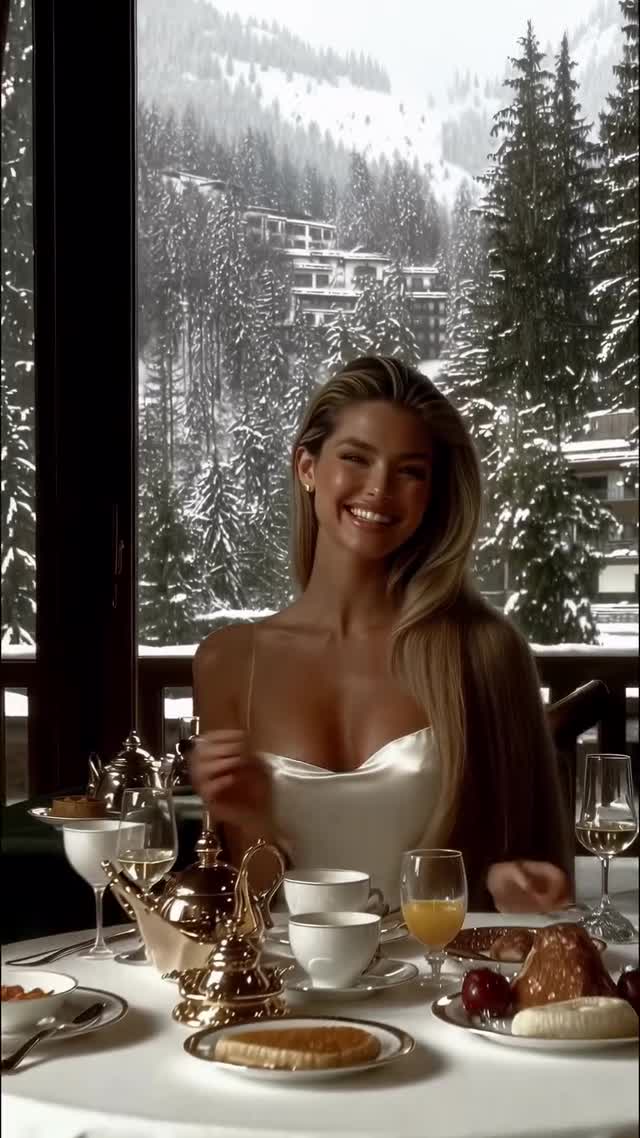
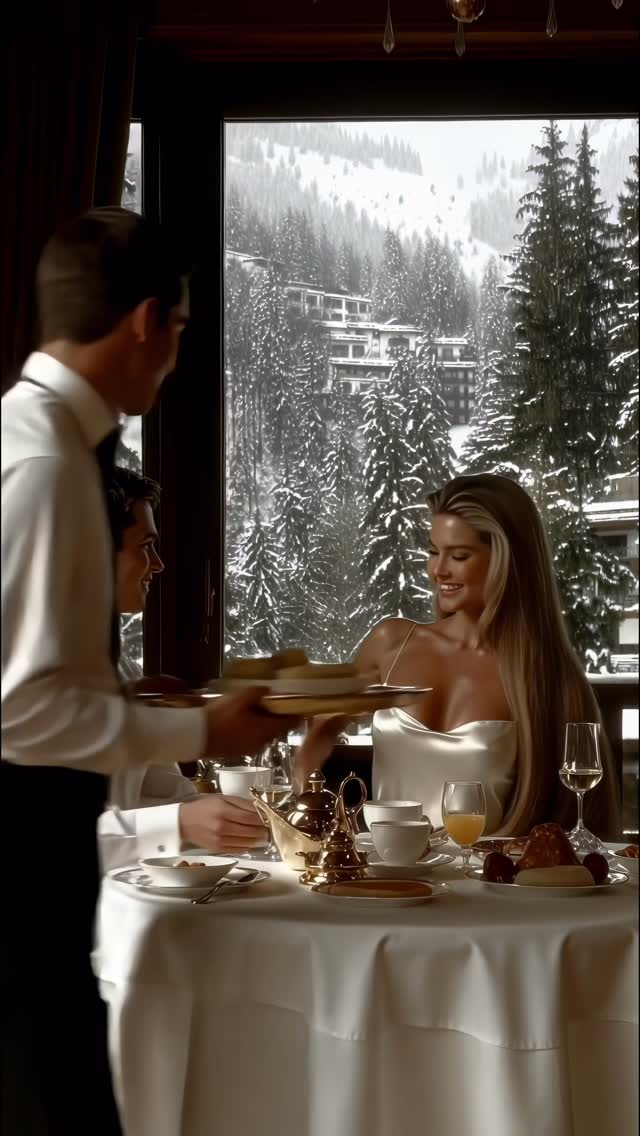
This viral masterpiece by @dreamfall.art is a textbook example of "Aspirational Luxury AI." It captures a cinematic, editorial-style portrait of a woman enjoying a lavish breakfast in a snowy mountain chalet. The video leverages the "Old Money Winter" aesthetic, blending warm, high-end indoor lighting with the crisp, cold blue tones of an Alpine landscape visible through floor-to-ceiling windows. By using Kling AI, the creator achieves remarkable character consistency and complex interactions, such as waiters serving food, which elevates the content from a simple slideshow to a high-production-value short film. The core keywords here are cinematic editorial, luxury winter aesthetic, Alpine chalet, and high-fashion portraiture.
What You’re Seeing
The video is a montage of short, high-impact clips. The subject is a woman with a "supermodel" aesthetic—long flowing hair, sun-kissed skin, and elegant wardrobe choices ranging from white silk slips to black corsets and fur wraps. The scene is set in a luxury dining room where the table is meticulously set with silver teapots, fine china, and fresh fruit. The camera work mimics high-end fashion commercials, using shallow depth of field (bokeh) to keep the focus on the subject while the snowy pine trees in the background provide a dreamy, atmospheric context.
Shot-by-Shot Breakdown (Estimated)
Time Range
Visual Content
Shot Language
Lighting & Tone
Viewer Intent
00:00–00:01
Woman smiling at the camera in a white silk dress.
Close-up (CU)
Warm, golden indoor light.
The Hook: Instant beauty and warmth.
00:01–00:03
Waiter placing a tray; woman looking down gracefully.
Medium Close-up (MCU)
High contrast; cold snow vs. warm skin.
Establish luxury and "service" lifestyle.
00:03–00:05
Woman in black corset; waiter serves a pastry.
CU / Over-the-shoulder feel
Rich shadows, editorial mood.
Create dynamic movement and depth.
00:05–00:07
Woman eating a strawberry; dark red dress.
CU / Profile
Soft rim lighting on hair.
Sensory appeal and "lifestyle" intimacy.
00:08–00:10
Woman sipping coffee in a white off-shoulder shirt.
CU
Bright, airy, morning vibe.
Relatable "perfect morning" aspiration.
00:10–00:12
Woman in white dress and fur wrap looking away.
MCU
Cinematic blue-hour background.
Reinforce the winter wonderland theme.
00:12–00:14
Woman laughing and covering her face with her hands.
CU
Soft, flattering glow.
Humanize the AI; create emotional connection.
Why It Went Viral: The Mechanism
The Topic: Aspirational Escapism
This video taps into the "Quiet Luxury" and "Winter Wonderland" trends that dominate social media during the holiday season. Psychologically, it triggers a "biological envy" or "aspiration" response—viewers want to be in that warm, safe, and beautiful environment. The contrast between the harsh, freezing exterior and the cozy, pampered interior creates a powerful emotional "safe haven" effect. It’s not just a video; it’s a 14-second vacation.
The Platform Perspective
From an Instagram algorithm perspective, this video excels in Watch Time and Saves. The fast-paced cuts (averaging 1.5 seconds) ensure that the viewer's brain is constantly receiving new visual stimuli, preventing them from scrolling away. The high aesthetic value makes it a prime candidate for "Saves," as users often save such videos for "mood board" inspiration or as a reference for their own photography/AI generation. The lack of dialogue makes it globally accessible, removing any language barriers to virality.
5 Testable Viral Hypotheses
Hypothesis 1: The "Warm-Cold" Contrast.Observation: The video uses orange-toned skin/lighting against blue-toned snow. Mechanism: Color theory suggests complementary colors increase visual retention. Replication: Always use a "warm" subject against a "cool" background.
Hypothesis 2: The "Service" Element.Observation: Waiters appear in multiple shots. Mechanism: Showing service reinforces the "luxury" status more than just a person sitting alone. Replication: Include secondary characters interacting with the main subject.
Hypothesis 3: Character Consistency.Observation: The woman’s face remains identical across 7+ shots. Mechanism: Consistency builds a "persona," making the AI feel like a real influencer. Replication: Use a fixed face reference in your AI video tool.
Hypothesis 4: The "Sensory Hook."Observation: Eating a strawberry and sipping coffee. Mechanism: Familiar sensory actions make AI feel more grounded and "real." Replication: Add micro-actions like drinking, eating, or touching hair.
Hypothesis 5: Seasonal Timing.Observation: Posted in November/December. Mechanism: Taps into the massive search volume for "Christmas" and "Winter." Replication: Align your visual theme with the current or upcoming holiday.
How to Recreate: Step-by-Step
Define the Persona: Create a detailed description of your "main character" (e.g., "Scandinavian model, honey-blonde hair, athletic build").
Generate Reference Images: Use Midjourney to create 3-4 high-quality portraits of this character in different outfits (silk, fur, knitwear) but with the same face.
Set the Scene: Use prompts that specify the environment: "Luxury Alpine chalet, floor-to-ceiling windows, heavy snow falling outside, breakfast table with silver service."
Video Generation (Kling AI): Upload your reference image to Kling AI. Use the "Image-to-Video" feature.
Prompt Tip: "The woman smiles at the camera while a waiter places a plate on the table, cinematic lighting, 4k."
Maintain Consistency: Use the "Character Reference" or "Seed" feature to ensure the face doesn't morph between clips.
Vary the Actions: Generate 8-10 short clips (2-3 seconds each) of different actions: sipping coffee, laughing, looking out the window, adjusting a fur coat.
Edit for Rhythm: Import clips into CapCut. Cut them to a rhythmic, upbeat "luxury" track. Ensure no clip lasts longer than 2 seconds.
Color Grade: Apply a consistent filter to unify the AI clips. Boost the "warmth" in the highlights and "coolness" in the shadows.
Growth Playbook
Opening Hook Lines
"Pov: You’re waking up in the Swiss Alps ❄️"
"The winter aesthetic you didn't know you needed."
"Is this the ultimate Christmas morning? ✨"
Caption Templates
Template 1: The Dreamy Vibe
It’s beginning to look a lot like Christmas in the Alps ❄️. There’s something about the contrast of the cold snow and a warm breakfast that just hits different. Which shot is your favorite? 1, 2, or 3? 👇 #WinterAesthetic #LuxuryTravel #AIArt
Template 2: The Creator Hook
Created this entire winter sequence using @klingai_official. The character consistency is getting insane! 🤯 Want to learn how to build your own AI brand? Check the link in my bio. #KlingAI #AIVideo #DigitalCreator
Hashtag Strategy
Broad: #winter #christmas #luxury #aesthetic #travel (High volume, high competition)