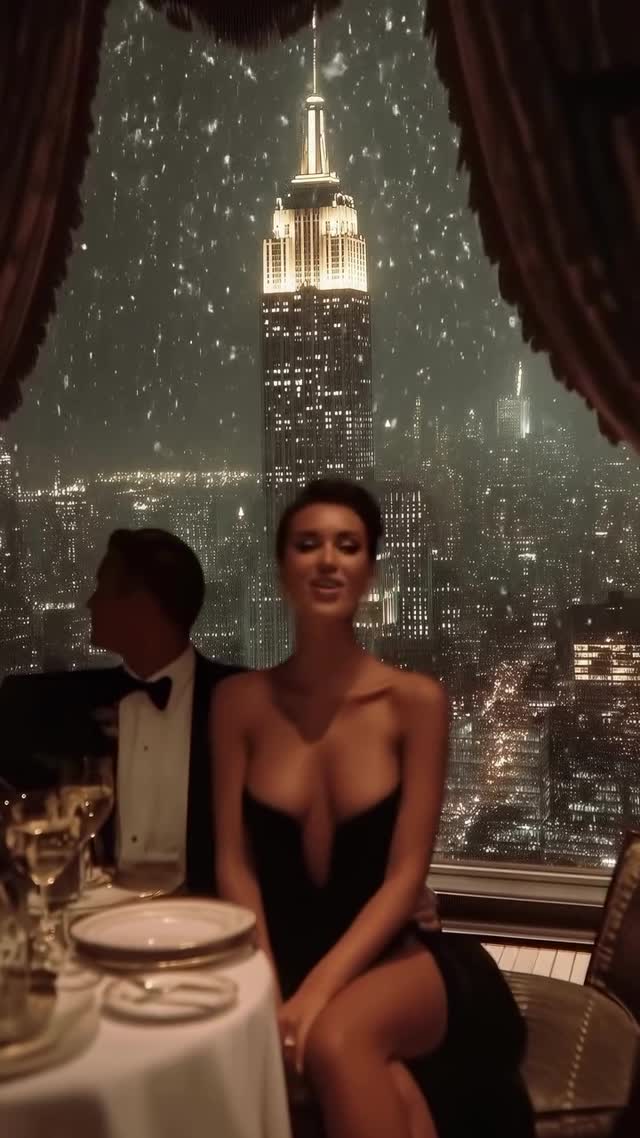
One night in New York❄️
Are you serious about learning how to create AI visuals at a professional level? In my course, I teach everything I use in my own process:
• How I build concepts and visual storytelling
• The exact tools, prompts, and workflows I use
• How to refine, edit, and create a portfolio that gets noticed
This is the full system I used to grow Dreamfall Art and work with brands.
Comment COURSE for the link.
Animated with @higgsfield.ai
#aiart #ai #midjourney #newyork #retro #aiartwork #newyorkcity #manhattan
Why dreamfall.art's NYC Romance AI Video Went Viral
This case study analyzes a viral cinematic AI video by @dreamfall.art, capturing a romantic "One night in New York" aesthetic. The video leverages the high-performing "Old Money" / "Quiet Luxury" niche, combining hyper-realistic AI characters with an iconic, aspirational setting: a candlelit dinner overlooking a snowy Manhattan skyline. With over 83k likes, it demonstrates how creators can use AI to bypass the massive production costs of high-end fashion shoots while maintaining a premium, editorial feel that resonates deeply on platforms like Instagram and TikTok.
What You’re Seeing: A Visual Breakdown
The video is a montage of romantic moments between a sophisticated couple. The subject is a woman in a plunging, backless black evening gown with a high slit, accompanied by a man in a classic black tuxedo. The scene is set in a luxury high-rise interior, likely a restaurant or penthouse, with floor-to-ceiling windows framing the Empire State Building.
The lighting is masterfully handled, featuring a "warm vs. cool" contrast: the interior is bathed in soft, golden candlelight and fairy lights (warm), while the exterior city lights and falling snow provide a crisp, blue-toned backdrop (cool). The texture mimics 35mm film with subtle grain and a soft highlight roll-off, making the AI-generated content feel grounded and "expensive." The music is a slow, romantic orchestral piece that dictates the slow-motion editing rhythm.
Shot-by-Shot Analysis
Time Range
Visual Content
Shot Language
Lighting & Tone
Viewer Intent
00:00–00:03
Couple at a dinner table; woman looks at the camera.
Medium Shot (MS), Eye-level.
Warm candlelight, bokeh city lights.
The Hook: Establishes the "Main Character" fantasy.
00:03–00:06
Couple dancing; focus on the woman's backless dress.
Medium Close-Up (MCU), tracking movement.
Golden rim lighting on the dress.
Aesthetic Value: Showcases fashion and elegance.
00:06–00:08
Woman points at the Empire State Building.
Over-the-shoulder (OTS) looking out.
High contrast; silhouette against the city.
Location Flex: Connects the viewer to the NYC dream.
00:08–00:11
Close-up of a toast and a gentle kiss.
Close-Up (CU), shallow depth of field.
Soft, romantic glow.
Emotional Connection: Peaks the romantic narrative.
00:11–00:15
Wide shot of dancing by the window with fairy lights.
Wide Shot (WS), static.
Warm fairy lights vs. cold snow.
The Loop: A final atmospheric shot that invites rewatching.
Why It Went Viral: The "Old Money" Psychology
The success of this video lies in its perfect alignment with the "Aspirational Lifestyle" trigger. By choosing New York City during a snowfall—a globally recognized symbol of romance and success—the creator taps into a collective cultural fantasy. The "Old Money" aesthetic (tuxedos, evening gowns, fine dining) triggers a psychological desire for status and elegance, which consistently performs well in the Instagram "Explore" feed.
From a platform perspective, the video excels in "Watch Time" and "Saves." The 0–3 second hook uses a high-quality, direct-to-camera gaze from a beautiful subject, which stops the scroll. The pacing is slow and rhythmic, matching the music, which creates a "trance-like" viewing experience. Users save these videos as "mood board" inspiration for photography, fashion, or travel goals, signaling to the algorithm that the content is high-value.
5 Testable Viral Hypotheses
The "Iconic Landmark" Anchor: Using a recognizable landmark (Empire State Building) increases shareability because it provides a clear "vibe" that people want to associate with their own profiles.
The "Warm/Cold" Color Contrast: The visual tension between the cozy interior and the freezing exterior creates a sensory "feeling" that keeps viewers engaged longer than monochromatic scenes.
The "Backless Dress" Reveal: High-end fashion details (like the backless gown at 0:04) act as a secondary hook for fashion-conscious audiences, increasing "Saves."
The "Snowfall" Loop: Continuous, gentle motion (like falling snow) makes the video feel alive and seamless, encouraging multiple loops without the viewer realizing it.
The "Silent Romance" Narrative: By not having dialogue, the video becomes universal. Anyone, regardless of language, can project themselves into the romantic scene.
How to Recreate: From 0 to 1
1. Topic Selection & Positioning
This style suits accounts focused on AI Art, Luxury Lifestyle, Fashion Inspiration, or Travel Romance. Your goal is to sell a "feeling" rather than a product.
2. Character Consistency
To keep the couple looking the same across shots, use a "Character Reference" (Cref) in Midjourney. Generate one high-quality portrait of the woman and one of the man first. Use these as your base for all subsequent scene generations.
3. Prompting the Vibe
Focus on lighting and material keywords: "cinematic lighting," "candlelit," "35mm film grain," "silk evening gown," "snowing outside window."
4. Video Generation (The Motion)
Use tools like Luma Dream Machine, Runway Gen-3, or Kling AI. Upload your Midjourney images and use "End Frames" or "Motion Brushes" to ensure the snow falls and the couple moves naturally (e.g., slow dancing, toasting).
5. Adding the Snow Effect
If the AI doesn't generate enough snow, use a "Snow Overlay" in CapCut or Premiere Pro. Set the blending mode to "Screen" to make the snowflakes pop against the dark city background.
6. Color Grading for "Old Money"
Apply a "Teal and Orange" grade but desaturate the oranges slightly to keep it looking sophisticated. Increase the "Glow" or "Bloom" on the highlights (the candles and city lights).
7. Sound Design
Choose a trending "Cinematic" or "Classical" audio track. Ensure the cuts in your video land on the "downbeat" of the music for a professional feel.
8. Publishing Strategy
Post as a Reel/TikTok with a short, evocative caption. Do not over-explain. Let the visuals do the heavy lifting.
Growth Playbook: Distribution & Scaling
Opening Hook Lines
"POV: You're spending a snowy night in NYC. ❄️"
"The AI aesthetic that's taking over Instagram."
"Manifesting this 'Old Money' winter romance."
Caption Templates
Option 1 (Emotional): One night in New York. ❄️ Sometimes the most beautiful moments are the ones we dream up. Which city should I do next? #AIArt #NYCWinter #OldMoney
Option 2 (Educational): How I created this cinematic NYC scene using AI. 🎥 It’s all about the lighting contrast. Full prompt breakdown in my bio! #AIContentCreator #RunwayGen3 #CinematicAI