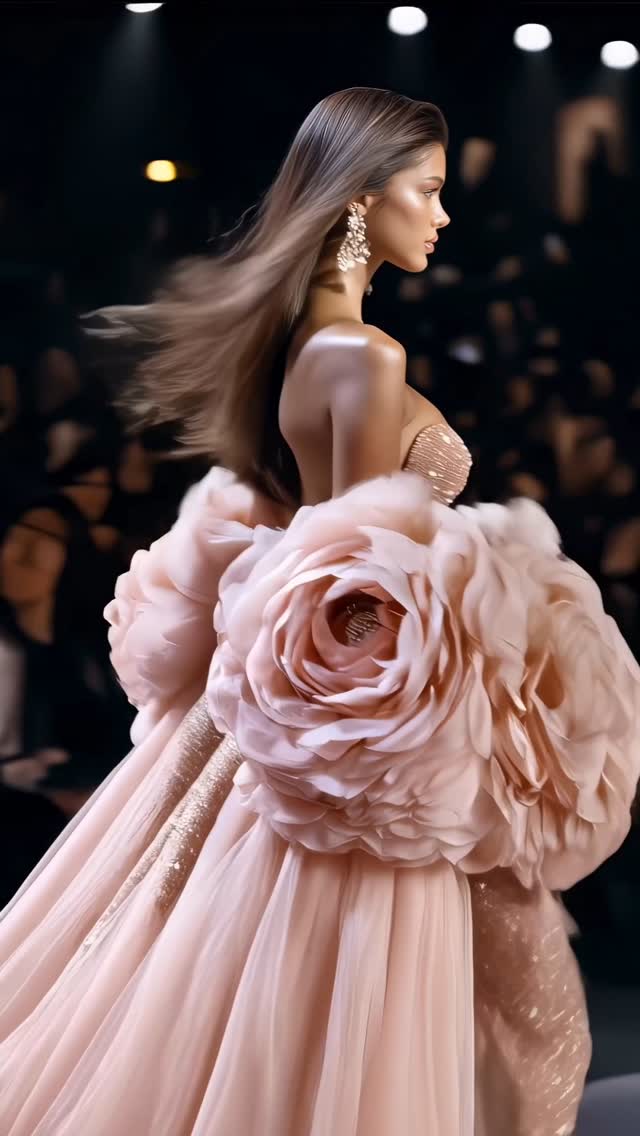
Flower collection🌸
Are you serious about learning how to create AI visuals at a professional level? In my course, I teach everything I use in my own process:
• How I build concepts and visual storytelling
• The exact tools, prompts, and workflows I use
• How to refine, edit, and create a portfolio that gets noticed
This is the full system I used to grow Dreamfall Art and work with brands.
If you want access —
Comment “COURSE” below and I’ll send you the link directly.
Animated with @klingai_official
#ai #aiartwork #midjourney #aicommunity
How dreamfall.art Made This Flower Fashion Runway AI Video
This case study analyzes a high-performance AI-generated fashion reel titled "Flower Collection." The video features a series of cinematic, editorial-style shots of supermodels walking a high-end runway, adorned in avant-garde couture dresses that mimic the structure of giant blooming flowers. With nearly 20,000 likes, it leverages the "AI Fashion Runway" aesthetic—a niche that combines aspirational luxury with surreal, impossible-to-sew designs. The visual signature is defined by warm, dramatic spotlighting, rich textures (silk, organza, sequins), and a rhythmic editing style that syncs perfectly with a high-energy catwalk beat.
What You’re Seeing
The video is a montage of several "looks" from a fictional floral-themed collection. Each segment features a different model, but they all share a consistent "supermodel" aesthetic: tanned skin, voluminous hair, and dramatic makeup. The dresses are the stars—sculptural masterpieces that look like giant roses, peonies, and lilies.
Shot-by-Shot Breakdown (Estimated)
Time Range
Visual Content
Shot Language
Lighting & Tone
Viewer Intent
00:00–00:03
Model in a dusty blue/lavender "flower petal" dress.
Medium Close-up (MCU) to Close-up (CU).
Warm rim lighting, dark background.
Hook: Immediate visual "wow" factor with surreal fabric.
00:03–00:05
Model in a shimmering rose-pink gown with a giant rose on the hip.
Full shot, tracking the walk.
Bright runway spotlights, high contrast.
Reinforce persona: Establishing the "runway" setting.
00:05–00:07
Side profile of a model with massive peach-colored flower sleeves.
Medium shot, side-on.
Soft, diffused key light.
Detail showcase: Highlighting the 3D texture of the "flowers."
00:07–00:10
Model in a deep red/coral dress with oversized shoulder flowers.
MCU, direct eye contact.
Dramatic, high-fashion editorial lighting.
Emotional connection: Intense gaze to stop the scroll.
00:10–00:12
Model in a cream/white floral gown blowing a kiss.
MCU, handheld feel.
Bright, airy, "angelic" tones.
Engagement: Humanizing the AI with a classic runway gesture.
00:12–00:14
Final model in a sequined bodice with a massive organza skirt.
Medium shot, slow zoom.
High-glamour, sparkling highlights.
Closing: Final "hero" look to encourage a loop or profile visit.
Why It Went Viral
The Power of Aspirational Surrealism
This video taps into the "Aspirational Luxury" psychology. Humans are biologically wired to be attracted to symmetry, vibrant colors, and signs of high status. By using AI to create "impossible" fashion—dresses that would cost millions to produce or are physically too heavy for a real runway—the creator provides a level of visual stimulation that real-world fashion brands struggle to match. The "Flower" theme is universally appealing, symbolizing beauty, growth, and femininity, which broadens the audience beyond just fashion enthusiasts.
Platform Dynamics & Algorithm Signals
From a platform perspective (Instagram/TikTok), this video is a "watch-time machine." The fast cuts (every 2-3 seconds) prevent the viewer's brain from getting bored. Each cut introduces a completely new color palette and dress structure, triggering a "novelty response." Because the AI generation is so high-quality, viewers often pause or rewatch to see if it's "real or AI," a behavior that signals to the algorithm that the content is highly engaging.
5 Viral Hypotheses
The "Uncanny Valley" Bridge: By making the models look 95% real but the clothes 100% surreal, the video creates a curiosity gap that forces users to comment ("Is this real?").
Color Psychology Sequencing: The video moves from cool (blue) to warm (pink/red) to neutral (cream). This progression keeps the visual energy shifting, preventing "aesthetic fatigue."
The "Blowing a Kiss" Hook: At 00:11, the model breaks the "fourth wall." This specific human gesture in an AI video increases shareability because it feels more "alive."
Niche Authority: By labeling it a "Collection," the creator positions themselves as a "Digital Designer" rather than just a prompt engineer, building a brand identity.
High-Frequency Motion: The constant movement of hair and fabric (simulated wind) creates a sense of "premium production value" that static AI images lack.
How to Recreate (Step-by-Step)
1. Concept & Theme Selection
Choose a "Nature + Luxury" mashup. Examples: "The Butterfly Collection," "The Crystal Ice Collection," or "The Deep Sea Collection." This video uses "Flowers."
2. Character Consistency
To keep the models looking like they belong to the same "agency," use a base prompt for the face (e.g., "Brazilian-Swedish mix, high cheekbones, almond eyes") and keep it consistent across all generations.
3. Wardrobe Prompting
Focus on fabric textures. Use keywords like: sculptural organza, iridescent silk, 3D fabric petals, intricate beadwork, avant-garde silhouette.
4. Setting the Scene
The environment should be a "blurred high-end fashion runway." Use: bokeh audience, dramatic catwalk spotlights, dark luxury interior, volumetric lighting.
5. Video Generation (The "Motion" Secret)
Use tools like Luma Dream Machine, Kling, or Runway Gen-3. Key Tip: Add "hair blowing in the wind" or "walking towards camera" to ensure the AI doesn't just create a static image with moving eyes.
6. The "Editorial" Edit
Cut your clips to a 115-125 BPM track. Ensure every transition happens on a "downbeat." Use a slight "glow" or "bloom" filter in CapCut to give it that dreamy, high-fashion look.
7. Cover & Title Strategy
Your cover must be the most visually striking dress (usually the one with the most contrast, like the red or blue one). Title it simply: "The [Theme] Collection."
8. Publishing & Adaptation
On Instagram, use the "Add Topics" feature and select "Fashion," "Visual Arts," and "Digital Art." This helps the algorithm find the right "aesthetic" audience.
Growth Playbook
Opening Hook Lines
"The fashion show that doesn't exist... yet. 🌸"
"Would you wear a dress made of giant roses? 🌹"
"AI just designed the most beautiful collection of 2025."
Caption Templates
Template 1 (The Visionary):
The Flower Collection 🌸. Exploring the intersection of nature and haute couture through the lens of AI. Which look is your favorite? 1, 2, or 3? 👇
#AIFashion #DigitalCouture #MidjourneyArt #Runway
Template 2 (The Educational):
How I created this floral runway using AI 🤖✨. It’s all about the texture prompts and lighting. Should I drop a tutorial on these fabric effects? Let me know! 🌸
#AIArt #CreativeProcess #FashionDesign #AIVideo
Hashtag Strategy
Broad: #Fashion #Style #Art #Design #AI (To reach the widest possible audience)