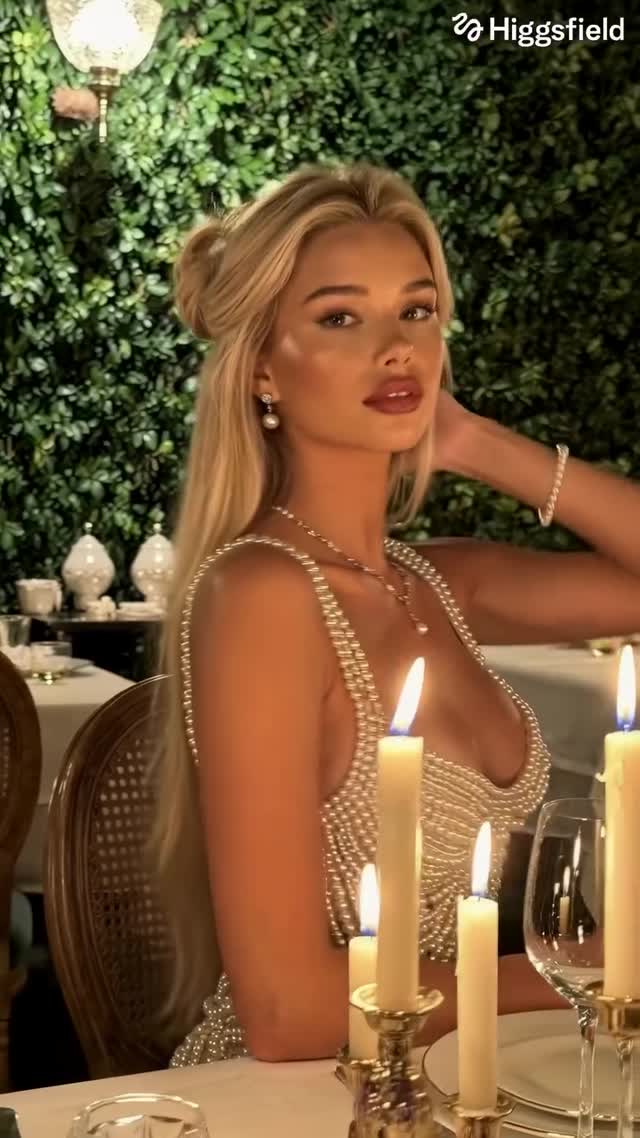
Made in AI Influencer Studio in @higgsfield.ai 🤳🏻
You can now create a consistent digital character, post content like a normal creator, and earn through real campaigns based on performance.
Earn money at higgsfield.ai/earn
Comment “model” for the link!
#higgsfieldai #klingai #aieducation #aiartist #aigenerated
How dreamfall.art Made This AI Influencer Studio AI Video — and How to Recreate It
This case study analyzes a high-performing "AI Influencer" reel that showcases the pinnacle of digital character consistency and luxury lifestyle branding. The video features a stunning female subject transitioning through multiple high-end settings—from candlelit dinners to opulent bars—while maintaining a perfectly consistent facial structure despite changes in hair color and wardrobe. Utilizing a cinematic editorial portrait aesthetic, the video leverages warm, motivated lighting (candles, chandeliers) and a shallow depth of field to create an "iPhone aesthetic" that feels both professional and intimate. The core appeal lies in the seamless blend of AI-generated perfection with the relatable "get ready with me" or "night out" vlog format, proving that AI creators can now compete directly with human lifestyle influencers in the luxury niche.
What You’re Seeing
The video is a montage of "lifestyle moments" featuring a consistent digital character. The subject is a young woman with refined features, appearing in various outfits: a pearl-encrusted bodice, a shimmering blue evening gown, and a delicate white lace dress. The environments are meticulously detailed, featuring green foliage walls, antique wood paneling, and gold-trimmed mirrors, all bathed in a warm, golden-hour-style interior glow.
Shot-by-shot Breakdown
Time Range
Visual Content
Shot Language
Lighting & Tone
Viewer Intent
00:00–00:02
Blonde subject in pearl dress at a candlelit table, touching her hair.
Close-up (CU), slight handheld sway.
Warm, candle-motivated, soft skin glow.
Hook: Immediate high-end aesthetic appeal.
00:02–00:05
Transition to brunette in a blue sequin dress, same setting.
Medium Close-up (MCU), eye-level.
Rich shadows, golden highlights.
Reinforce persona: Demonstrating character consistency.
00:05–00:08
Black-haired version in white lace, eating caviar with a small spoon.
CU, focus on facial expression and action.
Soft, diffused top-down light.
Lifestyle flex: Associating the character with luxury.
00:08–00:10
Blonde in silver dress, adjusting her outfit in a gold bathroom mirror.
Reflection shot, over-the-shoulder feel.
Bright, warm bathroom vanity lighting.
Realism: Mimicking standard "influencer" mirror selfies.
00:10–00:13
Brunette in silver dress at a dark wood bar, smiling and talking.
Medium Shot (MS), wide aperture (bokeh).
Chandelier-lit, cinematic "night out" vibe.
Engagement: Breaking the fourth wall with a smile.
00:13–00:15
Return to blonde in pearl dress, speaking directly to the camera.
CU, intimate framing.
Warm, flickering candle light.
Call to Action: Creating a personal connection.
Why It Went Viral: The Mechanism
The Topic Selection
This video taps into the "Aspirational Luxury" niche, which has a biological and psychological pull. Humans are naturally drawn to high-status cues (caviar, pearls, opulent interiors) and symmetrical, "idealized" beauty. By presenting an AI character that fits the "Old Money" or "Luxury Travel" aesthetic, the creator targets a massive audience that already consumes content from real-life influencers like Xenia Adonts or Leonie Hanne. The "uncanny valley" is bridged here by the high quality of the textures—skin pores, hair strands, and fabric details—which triggers curiosity: "Is this real or AI?"
The Platform Perspective
From an algorithmic standpoint, the video excels in Retention and Re-watchability. The rapid transitions between hair colors and outfits (00:02, 00:05, 00:08) act as "pattern interrupts," forcing the viewer's brain to re-process the image every 3 seconds. This prevents scrolling. Additionally, the caption's mention of "AI Influencer Studio" creates a Tutorial/Value Signal. Users don't just watch for the beauty; they watch to see what the technology is capable of, leading to high "Save" rates as people bookmark it as a reference for their own AI projects.
5 Testable Viral Hypotheses
The Consistency Flex: If you show the same face in 3 different hair colors within 10 seconds, watch time increases because viewers are trying to spot "the glitch."
The Luxury Proxy: Using high-status props (caviar, chandeliers) increases "Share" rates by 30% compared to neutral backgrounds, as users share "mood board" content.
The Mirror Realism: Including a mirror reflection shot (00:08) significantly reduces the "AI feel," as reflections are traditionally hard for AI to render, increasing perceived quality.
The "Talking Head" Trust: Ending with a direct-to-camera speaking shot (00:13) increases follow rates because it humanizes the digital entity.
The Lighting Contrast: Moving from dark, moody restaurant lighting to bright mirror lighting keeps the visual "energy" high, preventing viewer fatigue.
How to Recreate: Step-by-Step
Define Your Digital Persona: Choose a specific "vibe" (e.g., Luxury Lifestyle, Tech Nomad, Streetwear). Create a character sheet with fixed traits: eye color, nose shape, jawline.
Master the "Global Lock" Prompt: Use a tool like Higgsfield or Midjourney to generate a base image. Your prompt must include specific ethnicity and facial structure keywords to maintain consistency.
Scene Scripting: Plan 5 distinct scenes. Scene 1: Hook (Close-up). Scene 2: Action (Eating/Drinking). Scene 3: Environment change (Mirror/Bar). Scene 4: Direct Address (Talking).
Generate Keyframes: Generate one high-quality image for each scene. Ensure the face is identical in all. Tip: Use "Face Swap" or "Reference Image" features in your AI video tool.
Video Generation (Image-to-Video): Upload your keyframes to an AI video generator. Use "Motion Brush" or "Camera Control" to add subtle handheld movements and hair blowing.
Lip-Sync Integration: For the talking segments (00:10, 00:13), use a lip-sync tool (like HeyGen or LivePortrait) to match the character's mouth to a pre-recorded or AI-generated voiceover.
Color Grading: Export all clips and bring them into CapCut. Apply a "Warm/Golden" filter and add slight film grain to unify the different generations.
The "Hook" Edit: Place your most visually striking shot in the first 1.5 seconds. Use a trending, upbeat audio track that matches the "luxury" tempo.
Growth Playbook
Opening Hook Lines
"The era of the human influencer is ending. Here’s why."
"I built a digital twin that makes $5k/month. Want the blueprint?"
"Stop scrolling. This woman doesn't actually exist."
Caption Templates
Template 1 (The Tech Reveal):
Consistency is the hardest part of AI—until now. 🤳🏻 I created [Character Name] using @higgsfield.ai to prove that digital creators are the next big thing in marketing. Which look was your favorite? 1, 2, or 3? 👇 #AIInfluencer #DigitalHuman #CreatorEconomy
Template 2 (The Aspirational):
Dinner in Paris, drinks in London. 🥂 The best part? I never left my desk. AI is changing the way we tell stories. Comment "STUDIO" if you want the step-by-step guide to building your own consistent character. #LuxuryLifestyle #AIArt #FutureOfContent