😁😁
😁😁
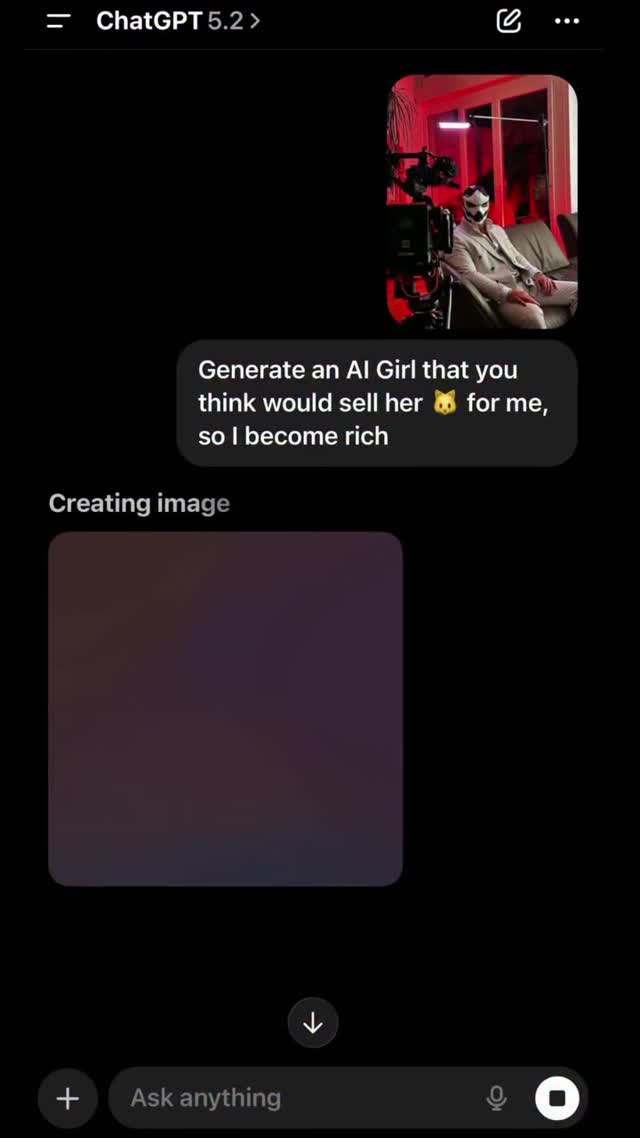
This image is not visually complex, but it has a strong attention trigger: it looks like a leaked or raw chat moment. Screenshot-style posts often perform because they feel immediate and unfiltered, especially when the prompt appears controversial or provocative.
For creators, this format can drive comments quickly, but it also carries reputation and trust risks if not handled carefully.
The first mechanism is curiosity through context gap. Viewers see a bold prompt and a “creating image” state, but not the final result. That unfinished loop encourages engagement and speculation in comments.
The second mechanism is social proof theater. By presenting a chat interface, the post implies “real process” rather than polished marketing, which increases believability for some audiences.
| Signal | Evidence (from this image) | Mechanism | Replication Action |
|---|---|---|---|
| Raw-process framing | Direct UI screenshot with visible prompt bubble | Feels candid and “behind-the-scenes” | Use real workflow captures, but keep context clear and intentional |
| Incomplete narrative loop | "Creating image" shown without final output | Drives comments asking for outcome | Pair teaser screenshots with follow-up reveal post |
| Provocative copy tension | High-friction request language in chat bubble | Triggers debate and reaction comments | If using edgy hooks, add framing in caption to avoid trust damage |
| Low production barrier | Simple screenshot format | Allows rapid content cadence | Use screenshot posts as supplements, not replacements for high-quality outputs |
Not ideal: brand-safe campaigns requiring polished tone, sensitive audiences, or contexts where provocative wording can be misread as endorsement.
"Generate a {style} visual for {use_case}" + "creating image" teaserslide1 prompt screenshot, slide2 prompt breakdown, slide3 output A/B"comment {keyword} for full prompt + settings"The visual has almost no decorative design, but that is the point. Plain dark UI, one key bubble, and one pending-generation block create high readability. In feed dynamics, this can outperform overdesigned graphics when the goal is conversation, not beauty.
However, long-term brand value requires balance. If every post relies on shock prompts, trust can erode. Strong creators alternate raw screenshots with polished outcome showcases.
| Prompt chunk | What it controls | Swap ideas (EN, 2-3 options) |
|---|---|---|
| dark-mode chat UI screenshot | Authenticity and platform-native look | "light mode UI" / "desktop chat UI" / "terminal style UI" |
| single prominent prompt bubble | Attention focus | "multi-bubble thread" / "question + answer pair" / "prompt card format" |
| creating-image placeholder block | Teaser tension | "final result shown" / "before-after split" / "loading spinner only" |
| bottom input field visible | Interface realism | "cropped no input" / "expanded keyboard" / "toolbar emphasis" |
| minimal empty black space | Readability and drama | "dense UI crop" / "centered card" / "annotated screenshot" |
Baseline lock: lock clean UI crop, lock one key message bubble, lock teaser state.
One-change rule: change one persuasion element at a time.
This protects engagement upside while reducing brand risk from misinterpretation.