
▶
I Dance Better on My Own is Coming Soon! 💜
I Dance Better on My Own is Coming Soon! 💜
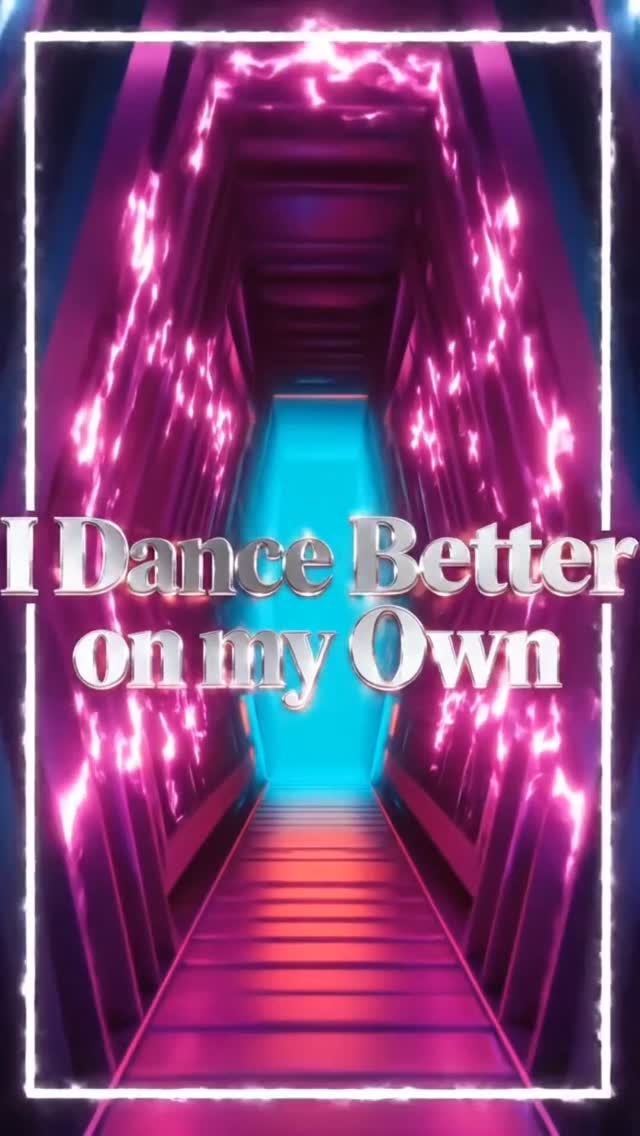
This 20-second video is a high-energy, 3D-animated music teaser featuring a stylized virtual pop star with purple-to-cyan pigtails dancing in a shifting neon-lit tunnel, culminating in a dramatic text reveal ("I Dance Better on my Own") accompanied by lightning VFX. It perfectly blends the "K/DA-style" virtual idol aesthetic with fast-paced, platform-native editing to hook viewers and promote an upcoming track.
The video is a masterclass in 3D character presentation and dynamic lighting. The subject is a highly stylized female character with large, expressive green eyes, freckles, and vibrant purple hair that fades into bright cyan at the tips, styled in high pigtails. She wears a black leather biker jacket over a shiny red crop top, paired with black high-waisted leather shorts and chunky black boots. The environment is an infinite, futuristic tunnel made of glowing neon archways that shift between circular and hexagonal shapes. The lighting is a vibrant cyberpunk palette of magenta, cyan, and warm orange, reflecting off a glossy floor. The camera is highly dynamic, pushing in, pulling out, and tracking her energetic dance moves. At the 13-second mark, the character disappears, and the video transitions into a pure typography teaser with lightning effects.
| Time Range | Visual Content | Shot Language | Lighting & Color Tone | Viewer Intent |
|---|---|---|---|---|
| 00:00 - 00:04 | Character dancing, smiling, touching her chest. | Medium close-up, slight camera push-in. | Cyan and magenta circular neon lights, bright and vibrant. | Hook the viewer with direct eye contact, expressive facial animation, and bright colors. |
| 00:05 - 00:08 | Character struts forward, then strikes a powerful wide-legged stance. | Full body wide shot, camera pulls back. | Warm orange and purple hexagonal lights, highly reflective floor. | Showcase the full character design and outfit; establish a confident, powerful persona. |
| 00:09 - 00:12 | Character resumes energetic dancing, mouth wide open as if singing loudly. | Medium shot, dynamic panning left and right. | Return to cyan and magenta circular lights. | Build energy and anticipation; simulate a live performance feel. |
| 00:13 - 00:20 | Character disappears. Text "I Dance Better on my Own" appears in the empty tunnel with lightning VFX. | Static POV looking down the tunnel. | Intense red and cyan pulsing lights, bright white lightning flashes. | Deliver the core message/teaser title; create a dramatic, memorable conclusion that encourages replays. |
This topic capitalizes on the massive, growing appeal of virtual influencers and VTubers. By utilizing a high-quality, 3D-animated aesthetic reminiscent of popular gaming and music crossovers (like League of Legends' K/DA or Fortnite concerts), the creator taps into a highly engaged subculture. The character design itself—vibrant purple/cyan hair, large expressive green eyes, and edgy leather-and-red wardrobe—is visually striking and instantly recognizable, creating a strong visual anchor for the brand.
From a psychological perspective, the video leverages direct eye contact and highly expressive facial animations in the first 4 seconds. Humans are biologically wired to respond to faces and eye contact; the character's exaggerated, joyful expressions trigger a positive emotional response and a parasocial connection, making the viewer want to keep watching. The energetic dancing and shifting neon colors provide constant visual stimulation, releasing dopamine and preventing the viewer from scrolling away.
From a platform perspective, the video's structure is perfectly optimized for retention. It employs a "bait and switch" pacing technique. The first 12 seconds are pure visual candy—a high-energy dance routine that holds attention. Just as the viewer might get used to the rhythm, the video abruptly shifts at 00:13. The character vanishes, and the screen is dominated by the text "I Dance Better on my Own" accompanied by flashing lightning VFX. This sudden change in visual language resets the viewer's attention span and forces them to read the text, effectively delivering the promotional message without feeling like a traditional ad. The flashing effects at the end also create a looping mechanism, as the bright flash transitions smoothly back to the bright opening frame.
This tutorial is for indie musicians, virtual creators, or producers looking to create high-end 3D-style music teasers without a massive animation budget.
3D animated stylized character, Pixar meets K/DA style, female, purple hair fading to cyan tips in high pigtails, large green eyes, freckles, wearing black leather biker jacket, red crop top, black leather shorts, multiple angles, character design sheet --ar 16:9 --niji 6.Infinite futuristic tunnel, glowing neon circular archways, cyan and magenta lighting, highly reflective glossy floor, cyberpunk aesthetic, empty --ar 9:16. Create a second version with hexagonal orange/purple lights.[Image prompt] Character dancing energetically, smiling, dynamic camera tracking, neon tunnel background. You will need to generate multiple short clips to piece together.#3DAnimation, #DigitalArt, #MusicTeaser, #NewMusic (These cast a wide net for general art and music fans).#VirtualIdol, #VTuber, #CyberpunkAesthetic, #Synthwave (Targets the specific subcultures that enjoy this visual style).#KDAvibes, #VirtualPopStar, #3DCharacterDesign, #IndieArtistRelease (Highly specific tags where fans are actively looking for this exact type of content).To get this exact level of consistency and lighting, traditional 3D workflows (VRoid Studio + Unreal Engine) are best, but Runway Gen-3 or Kling AI with highly specific image prompts can get you 80% there.
"3D stylized character", "Neon cyberpunk tunnel", and "Dynamic tracking camera".
AI video generators struggle with character consistency; you must use the exact same character reference image as the seed for every single shot generation.
Focus on intentional editing; cut to the beat, use varied shot sizes (wide, medium, close-up), and add high-quality VFX like the lightning in CapCut to mask AI artifacts.
TikTok favors the "VTuber/Anime" aesthetic heavily, but Instagram Reels is excellent for high-fidelity, aesthetic-driven music teasers like this one.
Use a bold serif font (like Times New Roman or Playfair Display), add a thick white stroke/outline, and apply a slight outer glow effect in your editing software.