▶
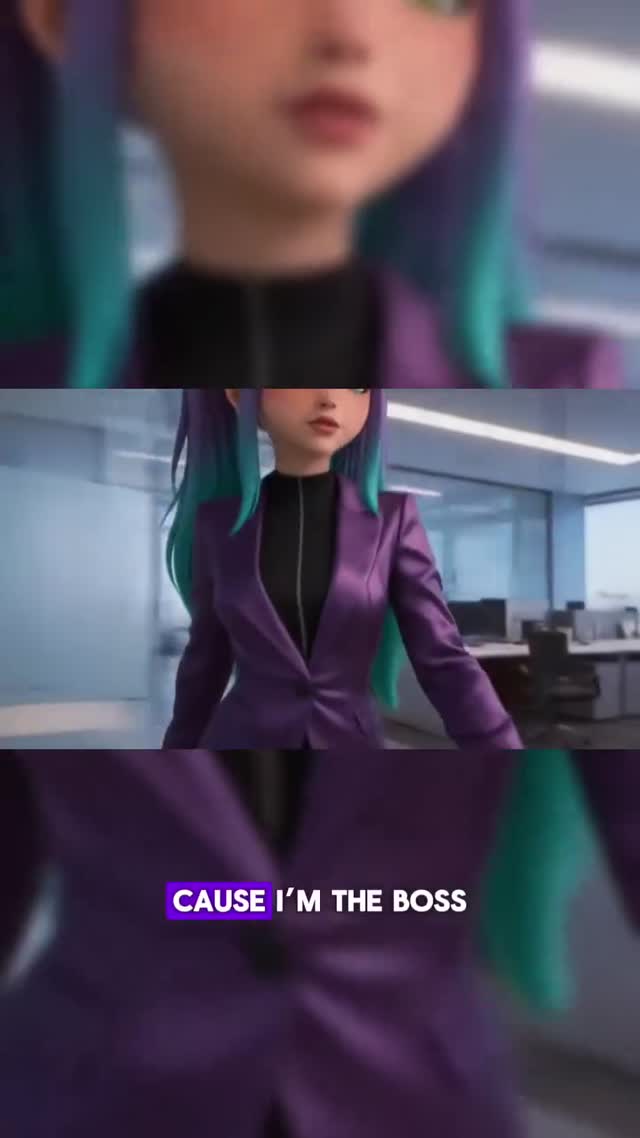
Cause I'm the boss ⚡️
Cause I'm the boss ⚡️
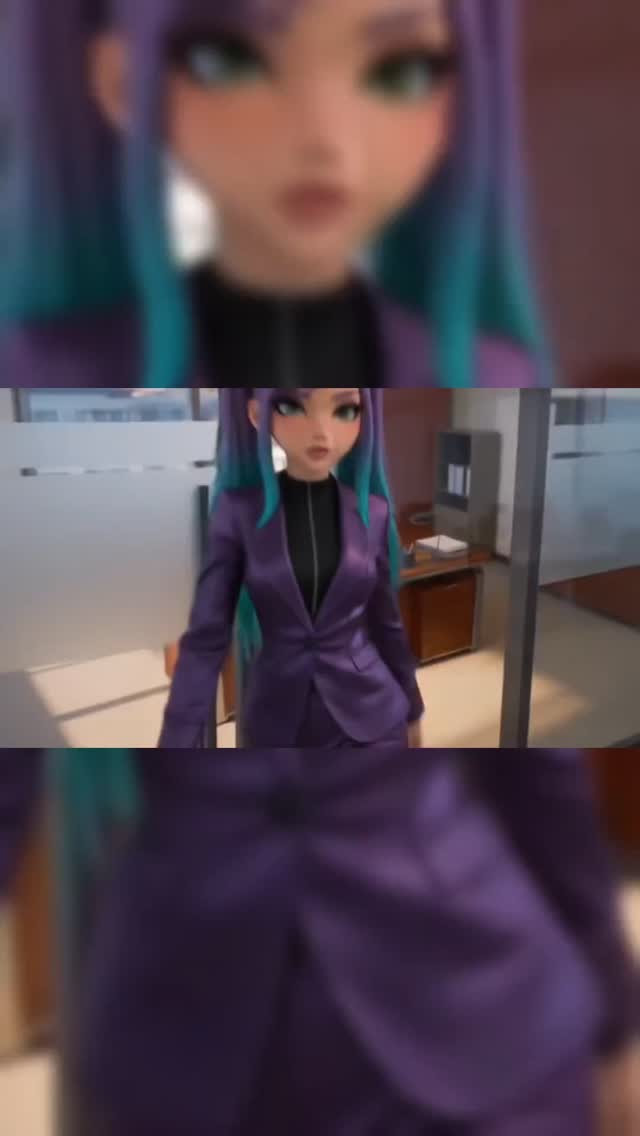
This 50-second Instagram Reel features a highly stylized, 3D-animated "boss girl" character with a high purple-to-teal ponytail and a glossy metallic purple pantsuit, confidently strutting through a modern high-rise corporate office. The video utilizes a striking 3-split screen layout—where the top and bottom thirds are heavily blurred, zoomed-in crops of the character's face and torso, while the middle third displays the sharp, in-focus main action. Set to an empowering, bass-heavy audio track ("Cause I'm the boss..."), the video combines video game cinematic aesthetics with aggressive, direct-to-camera eye contact, creating a visually overwhelming and highly engaging loop that demands attention.
The visual language of this video is heavily inspired by high-end 3D character animation (similar to Riot Games cinematics or modern stylized RPGs). The subject maintains a consistent, confident persona, characterized by her sleek metallic wardrobe, flawless glowing skin, and large, expressive green eyes. The environment shifts subtly from bright, cool daylight in a glass-walled office to a dramatic, neon-lit night skyline, mirroring the escalating energy of the audio track. The most defining feature is the 3-split screen editing technique, which artificially inflates the visual density of the frame.
| Time Range | Visual Content | Shot Language | Lighting & Color Tone | Viewer Intent |
|---|---|---|---|---|
| 00:00 - 00:07 | Subject walks confidently forward through a bright, modern office. | Medium full shot, tracking backward. Center framed. | Bright, cool daylight mixed with warm interior fluorescents. High gloss on the purple suit. | Establish the "boss" persona and hook the viewer with the confident strut. |
| 00:08 - 00:14 | Subject turns her back, then looks seductively over her right shoulder directly at the camera. City skyline visible behind her. | Medium shot, static camera. | Soft, flattering light on the face. Cool blue tones from the window contrasting with the warm purple suit. | Build parasocial connection through direct, sustained eye contact. |
| 00:15 - 00:22 | Subject leans forward onto a white office desk, resting hands on the surface, looking up at the camera. | Medium close-up, slightly high angle. | Warm desk lamp provides a rim light on her hair. Intimate, softer lighting. | Increase intimacy and intensity; the physical proximity to the lens creates a strong focal point. |
| 00:23 - 00:27 | Subject leans casually against a window sill. A blurred male character in a matching suit stands in the background. | Wide shot, static. Deep depth of field. | Bright daylight. The purple suits pop against the muted grey/blue city background. | Introduce environmental depth and hint at a larger narrative or "team" dynamic. |
| 00:28 - 00:36 | Subject walks past a grey office pillar, momentarily obscured, then emerges looking back at the camera. | Medium shot, tracking movement. | Dynamic lighting as she passes through shadows and back into the light. | Maintain visual interest through movement and temporary occlusion (peek-a-boo effect). |
| 00:37 - 00:44 | Subject leans over the desk again, much closer to the camera. Slow blinking. | Extreme close-up. Shallow depth of field. | High detail on glossy lips and eye makeup. Soft, diffused lighting. | Peak intensity; the extreme close-up forces the viewer to focus entirely on her expression. |
| 00:45 - 00:49 | Subject stands authoritatively behind a large executive desk, hands on hips. Background is now a night skyline. | Medium wide shot, low angle (hero shot). | Dramatic night lighting. Pink and purple neon hues reflecting off her suit and the glass desk. | Final payoff; the transition to night signifies "taking over," matching the audio climax. |
This video taps directly into the "empowerment" and "boss energy" trends that dominate social media. By utilizing a highly stylized, attractive 3D avatar, the creator appeals to multiple demographics simultaneously. For young women, it represents an aspirational, confident persona (reinforced by the lyrics "I break the odds, I make it hot"). For male audiences, particularly those adjacent to gaming or anime communities, the high-quality 3D render, the metallic form-fitting suit, and the direct, seductive eye contact trigger biological attention mechanisms. The character design—specifically the large green eyes and the unique purple-to-teal hair gradient—makes her instantly recognizable and memorable, acting as a strong visual anchor.
The most crucial element of this video's success is the 3-split screen layout. By placing a heavily blurred, zoomed-in crop of the character's face at the top and her torso at the bottom, the creator artificially creates "visual overload." The human eye naturally wants to scan the entire frame. Because the top and bottom sections are moving but out of focus, the viewer's eye is constantly darting between the sharp middle action and the blurred peripheral movement. This prevents the viewer from feeling "bored" or visually satisfied too quickly, effectively paralyzing their scrolling thumb and drastically increasing watch time.
From a platform perspective (Instagram/TikTok), this video sends massive positive signals. The 0-3 second hook is flawless: the audio drops immediately with "Cause I'm the boss," paired with a confident, forward-moving tracking shot. The constant eye contact from the avatar creates a parasocial loop, making the viewer feel addressed directly. Furthermore, the dynamic, word-by-word subtitles placed over the blurred bottom third ensure that viewers watching on mute are still engaged, while those with sound on experience perfect audio-visual synchronization. The seamless loop at the end encourages multiple rewatches, pushing the completion rate well over 100%.
This style is perfect for "faceless" creators, music promoters, or motivational accounts. You are essentially creating a virtual influencer. The key is to pick an audio track that has strong, confident energy (like the "boss" audio used here) and design a character that embodies that vibe.
To ensure the character looks the same across multiple shots, you need a strong base image. Use an image generator like Midjourney (specifically the Niji model for stylized 3D) with a highly detailed prompt. Example Prompt: "Stylized 3D animation, beautiful young woman, long purple hair with bright teal tips tied in a high ponytail, large expressive green eyes, wearing a glossy metallic purple tailored pantsuit, modern corporate office background, cinematic lighting, octane render --ar 16:9". Generate a few variations and pick the best one to use as your "Character Reference" (cref) for future generations.
You only need to generate the middle portion of the video. Use an AI video generator like Runway Gen-3, Luma Dream Machine, or Kling AI. Upload your base image and use specific motion prompts. Example Prompt for the first shot: "Subject walks confidently forward towards the camera, slight smirk, camera tracks backward, smooth cinematic motion." Generate 4-5 different clips (walking, leaning on desk, looking over shoulder) to match the pacing of your chosen audio.
This is where the magic happens. Open CapCut and create a new 9:16 project. Import your generated AI video clips and arrange them on the timeline to match the audio beats. Now, duplicate the main video track twice so you have three identical layers stacked on top of each other. Select the top layer, move it to the top third of the screen, scale it up significantly (so it's just a close-up of the face), and apply a heavy "Gaussian Blur" effect. Repeat this for the bottom layer, focusing on the torso/legs. Leave the middle layer sharp and centered.
Use CapCut's auto-captions feature. Style the text to be bold and modern (e.g., a thick sans-serif font like Montserrat or Proxima Nova). Add a subtle drop shadow or a dark background box to ensure readability against the blurred bottom layer. Crucially, set the animation to highlight word-by-word or line-by-line to keep the viewer's eye moving.
Add a subtle adjustment layer over the entire project to unify the colors. Boost the saturation slightly to make the purple and teal pop, and add a tiny bit of sharpening to the middle layer to make it stand out even more against the blurred top and bottom. Export at 1080p, 60fps for the smoothest playback on social platforms.
Midjourney Niji for the base character image, and Runway Gen-3 or Kling AI for the smooth, cinematic video generation.
"Stylized 3D animation," "glossy metallic," and "cinematic lighting."
You must use a consistent character reference (cref) image in your AI generator and keep the descriptive prompt (purple hair, green eyes) identical for every shot.
In an editor like CapCut, duplicate your video layer twice, move them to the top and bottom, scale them up, and apply a heavy Gaussian Blur effect.
This highly polished, aesthetic-driven content currently performs exceptionally well on Instagram Reels, especially when paired with trending audio.
Use platform-specific AI labels (like Instagram's "Made with AI" tag) and include a hashtag like #aiart or #aianimation in your caption to be transparent.