
Thank you for all the pain 💔
Thank you for all the pain 💔
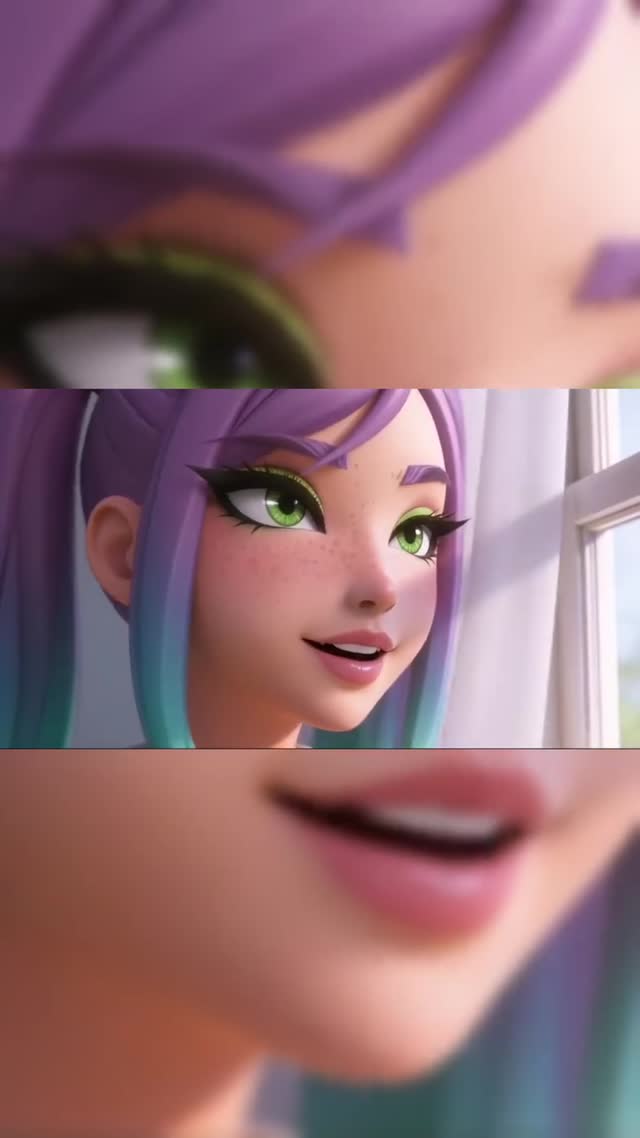
This frame is doing something smart: it turns one character shot into a mini-sequence. The three horizontal bands feel like “three beats” in one image, which increases pause time and makes the post look more designed than a standard close-up.
The middle band gives you the story (a character by a window, smiling), while the top and bottom bands behave like magnifiers. You get detail (eye, mouth) without needing motion. That is a powerful scroll mechanic: people stop to understand the layout, then they linger to read the facial detail.
Color signatures also help. Purple-to-teal hair and bright green eyes create an instant thumbnail hook. Combine that with soft daylight and you get a frame that feels friendly but still stylized.
| Signal | Evidence (from this image) | Mechanism | Replication Action |
|---|---|---|---|
| Built-in pause | Three horizontal bands with different crops | Layout novelty increases dwell time | Use a 3-strip crop system for reaction or lyric moments |
| Emotion readability | Eyes and mouth amplified in separate strips | Micro-expression becomes the hook | Choose 2 facial details to “zoom” (eyes + mouth) and lock them |
| Signature palette | Purple/teal hair + green eyes | Improves recognition in a feed | Assign 1–2 accent colors to your character and repeat them |
| Soft daylight mood | Window light from the right | Feels approachable and clean | Use window-light setups instead of dramatic lighting for this format |
The three strips mimic the rhythm of cuts in film: detail, context, detail. That rhythm makes a still image feel like motion, which is why it performs well as a cover frame for short videos.
To replicate it, be strict about alignment. The strips should feel intentional, not random. Use the middle strip as the anchor, then choose one eye crop and one mouth crop that match the same moment.
| Observed | Recreate | Why it matters |
|---|---|---|
| Middle strip carries the scene | Keep one full face shot as the anchor | Prevents confusion |
| Top/bottom act as magnifiers | Use two extreme close-ups of facial features | Increases detail reward |
| Soft daylight | Use window light and avoid harsh shadows | Keeps it friendly and shareable |
| Clean 3D style | Lock render style and reuse across episodes | Builds a recognizable universe |
| Prompt chunk | What it controls | Swap ideas (EN, 2–3 options) |
|---|---|---|
| layout system | Pause and novelty | 3-strip triptych; split screen; film strip |
| facial detail crops | Emotion emphasis | eye close-up; mouth close-up; eyebrow close-up |
| color signatures | Recognition | purple/teal hair; green eyes; pastel palette |
| lighting mood | Tone | window daylight; golden hour; soft studio |
| render style | Series consistency | Pixar-like; glossy 3D; claymation |
Baseline Lock: (1) three-band layout, (2) window daylight, (3) character color signatures.
One-change rule: change only 1–2 knobs per run. Example sequence: