▶

If only we could dance above the clouds (NYC edits). Art/Prompts by @ifonly.ai AI-generated (Midjourney • Magnific AI • @klingai_official • @freepik)
If only we could dance above the clouds (NYC edits). Art/Prompts by @ifonly.ai AI-generated (Midjourney • Magnific AI • @klingai_official • @freepik)
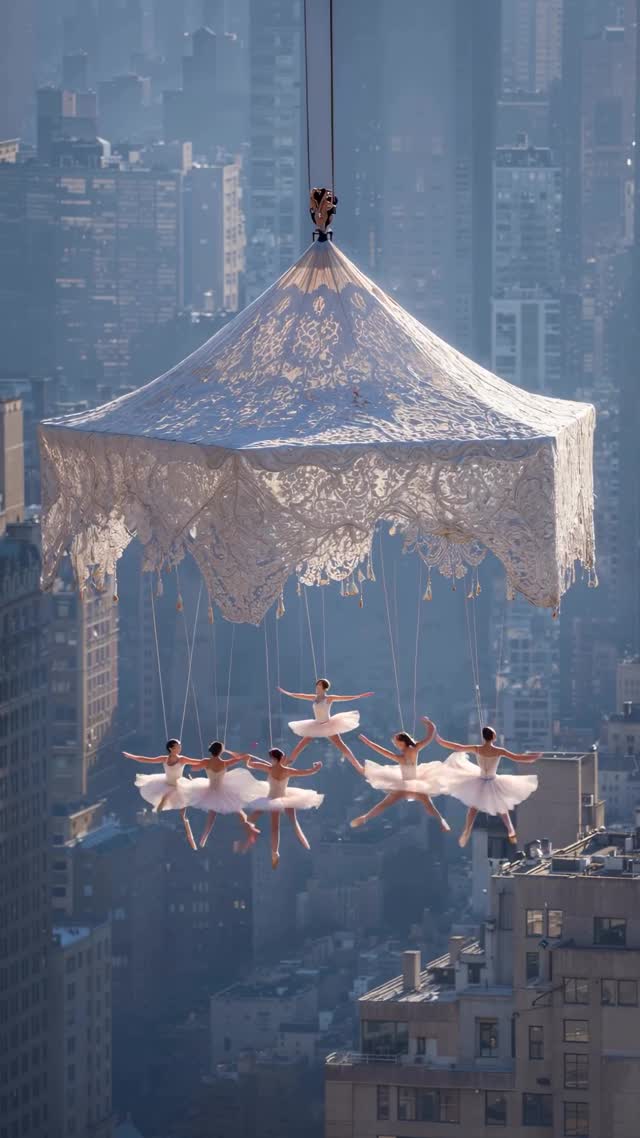
This viral masterpiece by @ifonly.ai is a masterclass in surreal cinematic editorial content. By blending the gritty, industrial landscape of the New York City skyline with the ethereal, delicate beauty of classical ballet, the creator taps into a "dream logic" that is both jarring and mesmerizing. The video utilizes a high-contrast aesthetic—bright white lace and tulle against the muted, hazy blues and grays of Manhattan's skyscrapers. Key elements include the use of Kling AI for fluid motion, Midjourney for high-fidelity base imagery, and Magnific AI for that hyper-realistic texture that makes viewers question if it's real. This "Sky-High Ballet" concept leverages the "If Only" aspirational theme, turning a mundane construction site (a crane) into a stage for a high-fashion fantasy. With over 136k likes, it proves that high-concept, visually "impossible" scenarios are the gold standard for engagement in the current AI video era.
The video presents a series of four distinct shots, each exploring the theme of ballerinas suspended in the sky. The subject matter consists of multiple female dancers in traditional white tutus and pointe shoes. The wardrobe is consistent: crisp, multi-layered tulle that catches the light. The scenes are set against the unmistakable backdrop of New York City, characterized by dense skyscraper clusters and a soft, atmospheric haze that suggests a high-altitude "above the clouds" feel.
The lighting is naturalistic but enhanced, featuring a soft "golden hour" glow that illuminates the intricate patterns of the lace canopies. The color palette is sophisticated, dominated by desaturated urban tones (slate, steel, concrete) which allow the high-key whites of the tutus to "pop" off the screen. The texture is remarkably sharp, showing fine details in the lace and the fabric of the tutus, which is a hallmark of the Magnific AI upscaling process mentioned in the credits.
| Time Range | Visual Content | Shot Language | Lighting & Tone | Viewer Intent |
|---|---|---|---|---|
| 00:00–00:03 | Ballerinas hanging from a lace carousel canopy over NYC. | Wide shot, slow push-in. | Hazy daylight, muted blues. | The "Hook": Establish the surreal scale immediately. |
| 00:04–00:06 | Dancers on a lace-covered platform attached to a crane. | Medium-wide, high angle. | Direct sun, high contrast. | Reinforce the "Impossible" reality; ground it in industrial elements. |
| 00:07–00:10 | View from under the lace, dancers facing the city. | POV/Over-the-shoulder feel. | Backlit, atmospheric haze. | Create emotional depth and a sense of "longing." |
| 00:11–00:14 | Low angle looking up at a lace canopy and chandelier. | Extreme low angle, rotation. | Sun flare, bright white. | The "Grand Finale": Awe-inspiring beauty and light. |
This video succeeds primarily through conceptual contrast. It places the most delicate human art form (ballet) in the harshest, most dangerous environment (hundreds of feet above a city on a construction crane). This triggers a psychological response known as "cognitive dissonance"—the brain struggles to reconcile the beauty with the danger, forcing the viewer to keep watching to make sense of the image. The addition of "grandma's lace" to a heavy-duty crane adds a layer of "Coquette Aesthetic" that is currently trending on platforms like Instagram and Pinterest.
From a platform perspective, the video excels in Watch Time and Re-watchability. The 0–3 second hook is an "impossible image" that demands a second look. Because the motion is fluid and the details (like the fluttering tutus) are so intricate, users often loop the video to catch details they missed, signaling to the Instagram algorithm that this is high-quality content. The "NYC" tag also taps into a massive, built-in audience of city lovers and travelers, while the "AI-generated" disclosure actually sparks healthy debate in the comments, further boosting engagement metrics.
Choose two clashing worlds. Example: "Deep sea" + "Luxury Ballroom" or "Desert" + "Ice Sculptures." For this video, it's "Industrial NYC" + "Ethereal Ballet."
Generate your "Hero" frames. Use prompts that specify the lace texture and the specific NYC lighting.
Prompt Tip: /imagine prompt: A group of ballerinas in white tutus suspended from a giant lace canopy over the NYC skyline, cinematic lighting, 8k, fashion photography --ar 9:16
Take your best Midjourney images and run them through Magnific. Set the "Creativity" to low but "Resemblance" to high. This adds the skin pores, fabric weave, and architectural detail that makes it look "non-AI."
Upload your upscaled image as a "Start Frame." Use a motion prompt like: "The ballerinas gently move their arms in a balletic motion, the tutus flutter in the wind, the camera slowly pans."
Use the same "Seed" number or a consistent character reference (cref) in Midjourney to ensure the ballerinas look like the same group across different shots.
Apply a "Cinematic" or "Film" filter. Lower the saturation of the blues and increase the highlights on the whites to match the @ifonly.ai aesthetic.
Use a "Dreamy" or "Ambient Orchestral" track. The sound of wind or distant city hums added at a low volume increases immersion.
Post as a Reel with a "hooky" caption that asks a question or presents a "What if" scenario.
The combination of Midjourney (for base) and Magnific AI (for texture) is essential for this high-end look.
"Intricate lace," "Atmospheric haze," and "Cinematic lighting."
At wide angles, AI struggles with faces; use "Face Fix" tools or keep the camera at a distance as seen in this video.
Avoid "over-saturated" colors and use Magnific to add realistic film grain and textures.
Instagram favors this "Aesthetic/Editorial" style, while TikTok prefers "Process/Tutorial" versions of the same content.