My bestie nævis 💛
Thank you for visiting my world 🐰🦋
#APOKI #아뽀키 #アポキ
#nævis #naevis #나이비스
#Miracle #APOKIMiracle @naevis.smtown.official
How imapoki Made This Miracle Dance AI Video - and How to Recreate It
This page turns a bright 3D dance clip into a creator-ready replication guide: how to lock the world, keep choreography stable,
and structure a PSEO page that’s useful (not thin prompt spam).
Case Snapshot
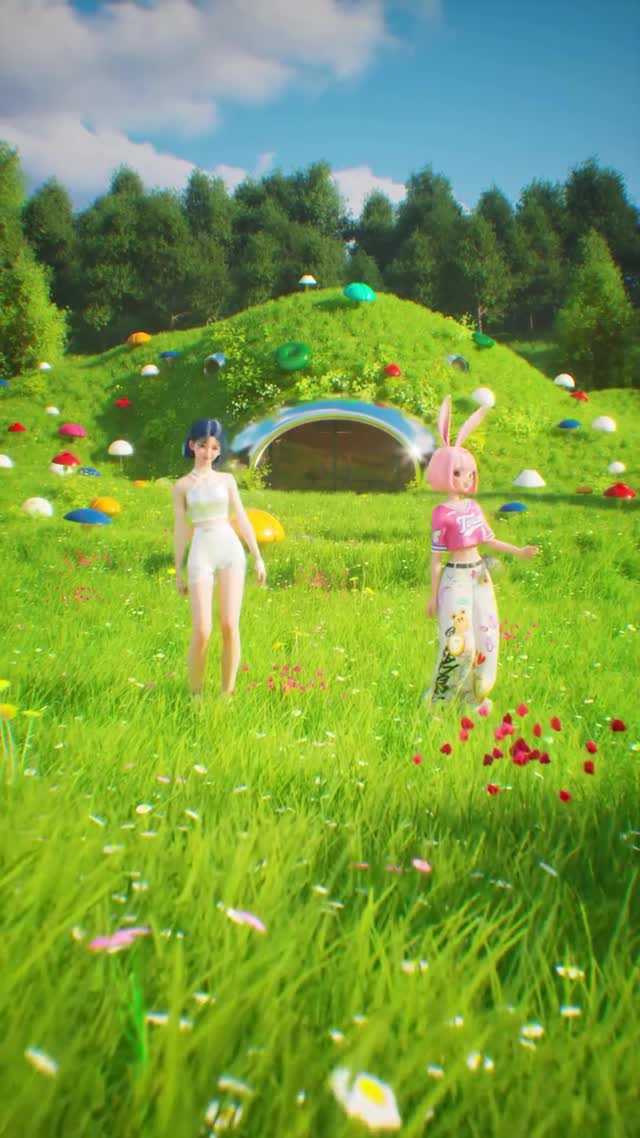
A colorful 3D music-video dance in a sunny green meadow under a saturated blue sky. Two characters perform synchronized choreography:
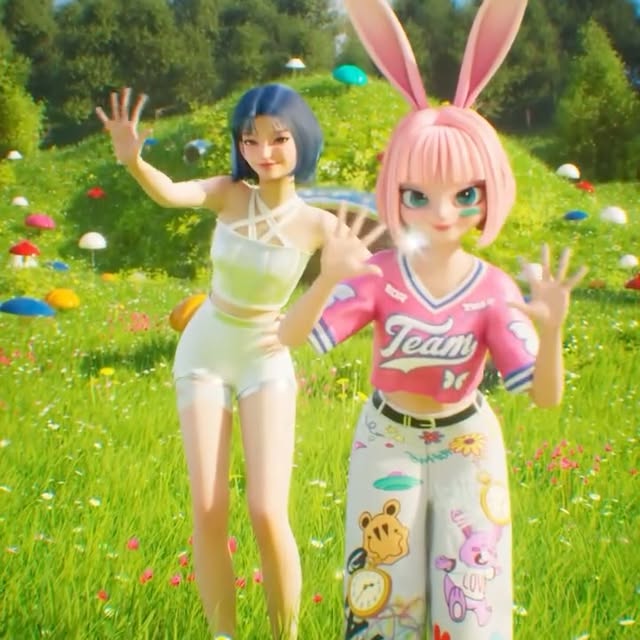
a white-outfit human avatar and a pink bunny-themed virtual idol avatar (pink hoodie, bunny ears, patterned wide pants). The camera stays
mostly wide to show full-body motion, and the title text “Miracle” appears near the bottom during later beats.
The format is immediately legible and globally shareable: cute collab energy, no dialogue, simple world, repeatable moves.
What you’re seeing
1) The world is a clean “happy place”
Bright grass, small red flowers, distant trees, and fluffy clouds. There’s nothing grim or complicated—this is designed for instant comfort.
A simple world also helps AI: fewer geometry glitches and fewer continuity problems.
2) Two-character choreography is the hook
A single dancer can feel like a demo. Two dancers creates story: friendship, bestie energy, call-and-response moves, and a “collab” feeling
that viewers love to share.
3) Wide framing protects motion quality
The camera stays wide so feet contact and arm arcs look natural. This matters because the most obvious “AI tell” in dance is foot sliding and
inconsistent limb lengths. Wide shots make stability easier.
4) Character design contrast keeps the eye engaged
White minimal outfit vs. pink bunny outfit is a strong visual contrast. Viewers can track the duet without confusion, even on small screens.
5) The “Miracle” title is a branding anchor
Repeating title text near the bottom turns the dance into a “track identity” moment. It also gives creators a clear template: one title word,
consistent placement, no extra captions.
Shot-by-shot breakdown (estimated)
Treat this as one continuous dance with beat sections. The exact seconds are approximate; keep choreography aligned to music beats.
Time range
Visual content
Shot language
Lighting & color tone
Viewer intent
00:00–00:06
Wide establish: both dancers centered, start steps
Wide full-body, stable camera
Sunny saturated palette
Instant comfort + clarity
00:06–00:12
Call-and-response arm waves
Wide, minor push-in
Clean soft shadows
Collab story beat
00:12–00:18
Front-facing chorus moves (arms up/out)
Wide/medium-wide
Consistent sky + grass
Shareable choreography section
00:18–00:24
Three-quarter variation angle
Stable camera, no shake
Same bright grade
Variety without world change
00:24–00:30
“Miracle” title appears near bottom
Wide, text overlay consistent
High readability
Branding anchor moment
00:30–00:38
Energetic loopable dance section
Wide, stable
Bright pop MV look
Rewatch trigger
00:38–00:43
Symmetrical end pose, clean finish
Hold final frame
Same palette, no flicker
Loop-friendly close
Why it went viral
1) It’s pure positive emotion
Bright colors + cute duet choreography is universally shareable. You don’t need language context; the vibe is the message.
2) Collab energy increases saves
Two characters invites remix thinking: viewers imagine themselves as the third dancer, or they want to recreate it with a friend.
3) Clean readability in the feed
Wide framing, simple background, high-contrast outfits. This makes the clip easy to understand even when it’s small on screen.
4) Platform view (Instagram)
Dance clips like this succeed on rewatch and shares. The title overlay also helps fans remember the track name and find it again later.
Five testable viral hypotheses
Evidence: saturated meadow world. Mechanism: instant mood lift. Replicate: keep the environment “happy” and uncluttered.
Evidence: two-character duet. Mechanism: social story. Replicate: always choreograph mirrored moves and one call-and-response beat.
Evidence: stable wide framing. Mechanism: motion looks better. Replicate: avoid tight shots unless your footwork is perfect.
Evidence: bunny-ear character. Mechanism: mascot memorability. Replicate: design one signature character element (ears, hat, wings).
Evidence: “Miracle” title overlay. Mechanism: brand recall. Replicate: use one consistent title word, not multiple captions.
How to recreate (Replication tutorial: from 0 to 1)
Step checklist
Pick a world: sunny meadow with a clean horizon line (trees + hills).
Design two characters: one minimal human avatar + one mascot avatar with a strong color theme (pink bunny).
Lock the palette: green grass, blue sky, white outfit, pink outfit.
Storyboard beat sections: intro, call-and-response, chorus moves, angle variation, title moment, loop section, end pose.
Animate foot contact carefully: avoid foot sliding; keep steps small and rhythmic.
Keep camera stable: wide framing with only mild push-ins.
Add title overlay: “Miracle” near the bottom, consistent font/placement.
Export for loop: end on a pose that can cut back to the opening wide shot smoothly.
Growth Playbook (Distribution & scaling strategy)
3 opening hook lines
“A duet dance inside a bright little world—watch the sync.”
“If you love cute virtual collabs, save this.”
“Two characters, one chorus, one title word: Miracle.”
4 caption templates
Template 1: Hook: “Bestie dance.” Value: “Duet choreography template.” Q: “Who would you dance with?” CTA: “Tag them.”
Template 2: Hook: “Bunny idol collab.” Value: “World + palette lock.” Q: “Pink or blue mascot next?” CTA: “Comment.”
Template 3: Hook: “Miracle vibes.” Value: “Loop-friendly end pose.” Q: “Should I make a Part 2?” CTA: “Follow.”
Template 4: Hook: “3D dance MV.” Value: “Wide framing for clean motion.” Q: “Want the prompt structure?” CTA: “Save.”