The AI Motion Graphics Preset Pack: How invideo.io Built This AI Art
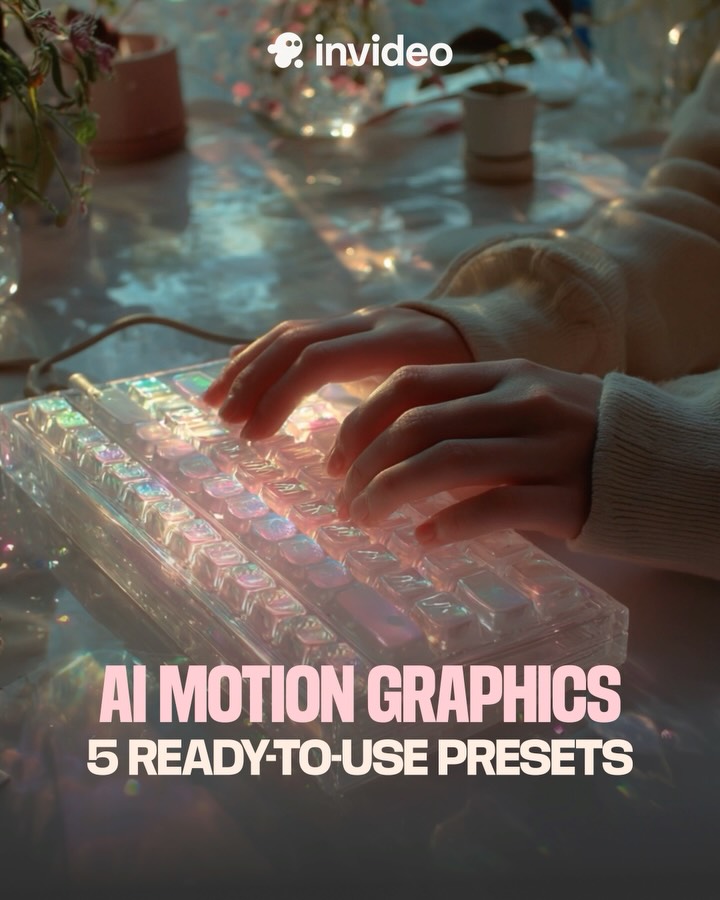
This creative works because it sells a feeling before it sells a feature list. The transparent keyboard, soft glow, and tactile hand motion suggest "creation flow" in one glance. Then the bold text locks the practical promise: 5 ready-to-use presets. Emotion first, utility second, conversion path clear.
The design also avoids the common SaaS mistake of overloading UI screenshots. Instead of showing a crowded dashboard, it stages a sensory moment that implies creative speed. For motion-graphics products, this is especially effective because users are buying time and aesthetic confidence, not only technical capability.
Signal Table
| Signal | Evidence (from this image) | Mechanism | Replication Action |
|---|
| Tactile creation cue | Hands actively typing on luminous transparent keys | Action-oriented scene implies immediate usability | Show human interaction with tool output, not static icon grids only |
| Premium atmosphere | Soft bloom, iridescent highlights, shallow depth | Perceived quality increases trust and perceived product value | Use cinematic light treatment for hero promo frames |
| Clear offer compression | Headline states product category + exact preset count | Fast cognitive parsing improves response rate | Pair emotional visual with one concrete numeric promise |
| Brand anchoring | Top logo and consistent color hierarchy | Memorability improves without extra explanation | Keep brand mark small but persistent in upper safe area |
Use Cases and Transfers
- SaaS feature-drop announcements: ideal when launching template packs or quick-start kits.
- Creator-tool ad creatives: strong for performance ads targeting editors/designers.
- Landing page hero visuals: good as top fold image for high-intent traffic.
- Short-form video thumbnails: effective still frame for reel/tiktok promo hooks.
Not Ideal
- Technical API documentation: atmosphere-heavy visual lacks structural detail.
- Enterprise procurement decks: needs companion slides with concrete metrics.
- Minimal monochrome branding: iridescent glow may conflict with rigid visual systems.
Three Transfer Recipes
- Plugin bundle transfer
Keep: hands-on-tool moment + numeric offer headline.
Change: keyboard to timeline UI tablet and headline to "10 Plug-ins".
Slot template (EN): {hands_using_tool} under {cinematic_glow} with {clear_numeric_offer_headline} - Template marketplace transfer
Keep: sensory visual plus concise utility promise.
Change: motion presets to website template pack.
Slot template (EN): {creative_action_scene} + {brand_mark_top} + {value_prop_bottom_text} - AI writing tool transfer
Keep: mood-first hero and conversion-focused caption hierarchy.
Change: keyboard highlights to document glow and text to writing shortcuts.
Slot template (EN): {focused_hands} in {dreamy_workspace_light} with {specific_time-saving_promise}
Aesthetic Read
The visual strategy is "soft-tech." Instead of hard neon or sterile UI, it uses pastel reflection and fabric texture to humanize digital creation. Transparent keycaps catch light like glass objects, making the tool feel futuristic yet approachable. The depth blur removes distractions and pushes attention toward gesture and text. Typography is straightforward and heavy, balancing the dreamy background with practical clarity. This tension between atmosphere and explicit promise is what makes the design both beautiful and performance-ready.
Prompt Technique Breakdown
| Prompt chunk | What it controls | Swap ideas (EN, 2-3 options) |
|---|
| Human-action anchor | Usability perception | "hands typing", "hands dragging timeline", "hands tapping controls" |
| Material keyword | Visual novelty | "transparent acrylic keyboard", "glass-like interface", "iridescent key surface" |
| Atmosphere profile | Emotional tone | "dreamy cinematic glow", "soft neon haze", "moody creative studio light" |
| Headline compression | Conversion clarity | "AI MOTION GRAPHICS", "5 PRESETS", "READY TO USE" |
| Brand placement rule | Recall without clutter | "small top-center logo", "upper-corner brand tag", "minimal brand watermark" |
| Color pairing | Premium feel | "teal shadows + pink highlights", "midnight blue + pearl glow", "graphite + cyan rose" |
Remix Steps
Baseline Lock: 1) hands on translucent tool surface, 2) dreamy low-key lighting, 3) bold numerical value headline.
One-change rule: change one variable per iteration.
- Run 1: Build baseline with current keyboard scene and 5-preset headline.
- Run 2: Keep scene, change only headline emphasis (title size vs subline size).
- Run 3: Keep typography winner, change only color temperature (cooler vs warmer glow).
- Run 4: Keep color mood, change only logo placement for brand recall testing.