0:00 / 0:00

I wish you were here • • • #wishyouwerehere #cuteanimals #penguin #cutepenguin

How itspuffpuff Made This 3D Penguin Animation — and How to Recreate It

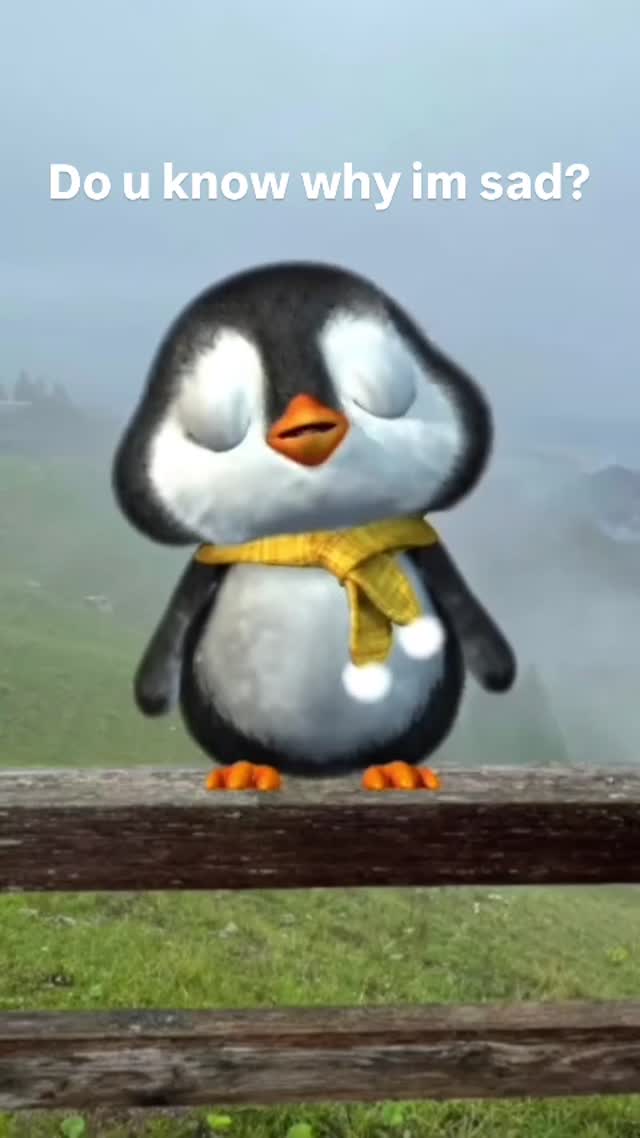
This viral sensation features a hyper-realistic 3D animated baby penguin delivering a heart-tugging message. With nearly 500k likes, the video leverages the "kawaii" (cute) aesthetic combined with a melancholic, relatable sentiment. The core keywords here are 3D character animation, emotional storytelling, baby schema (cute features), and misty cinematic lighting. It’s a masterclass in using high-quality AI-generated visuals to evoke a specific biological response—the urge to comfort something small and vulnerable.

What You’re Seeing

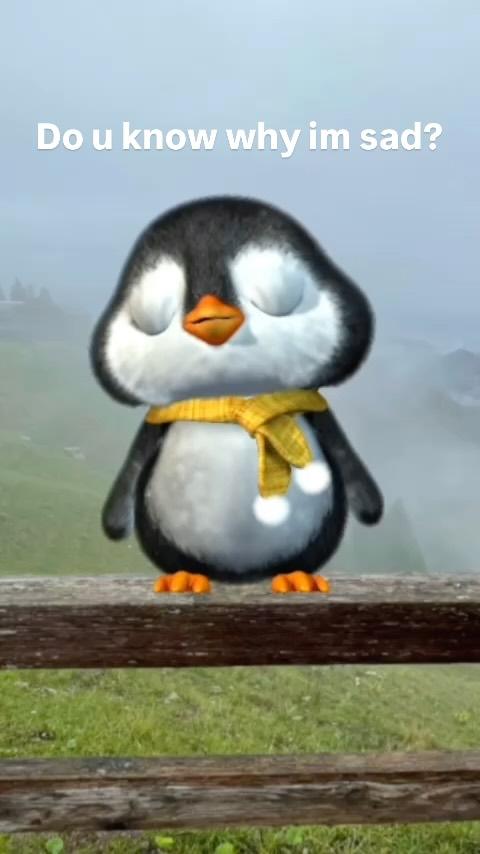
The video centers on a single subject: a 3D-rendered baby penguin standing on a rustic wooden fence. The penguin is designed with "baby schema" proportions—large blue eyes, a rounded body, and a small beak. It wears a bright yellow knitted scarf that provides a pop of color against the muted, misty green background of a hillside. The lighting is soft and diffused, mimicking an overcast, rainy day, which enhances the "sad" mood. The camera alternates between a Medium Close-Up (MCU) and a Close-Up (CU), focusing on the penguin's expressive blinks and slight head tilts.

Shot-by-Shot Breakdown (Estimated)

Time Range Visual Content Shot Language Lighting & Tone Viewer Intent
00:00–00:02 Penguin opens eyes, looking directly at the lens. Medium Close-Up (MCU) Soft, misty, cool tones. Hook: Establish eye contact and pose a question.
00:02–00:04 Penguin looks down, eyes drooping, looking sad. Slight Zoom / MCU Diffused natural light. Build Tension: Create emotional vulnerability.
00:04–00:06 Penguin looks back up with watery, sad eyes. Close-Up (CU) Highlight on eyes. The "Aww" Moment: Deliver the emotional payoff.

Why It Went Viral: The Psychology of "Sad-Cute"

The Power of Relatability and "Baby Schema"

This video taps into two powerful psychological triggers. First, the Baby Schema (Kindchenschema): the set of physical features (large eyes, round face) that humans are evolutionarily programmed to find "cute" and want to protect. By making the penguin look sad, the creator triggers a "nurturing" response in the viewer. Second, the script—"I'm not with you"—is a universal sentiment. Whether it's a long-distance relationship, a missed friend, or a lost pet, the message is a "blank canvas" that viewers can project their own feelings onto.

Platform Synergy & Shareability

From a platform perspective, this video is "Share Bait." It’s designed to be sent to a significant other or a best friend with a caption like "This is me right now." The high share-to-view ratio tells the Instagram algorithm that the content is highly valuable, pushing it out to a broader audience. The short duration (6 seconds) ensures a high completion rate and likely multiple loops, which are key signals for the "Explore" page.

5 Testable Viral Hypotheses

  • Hypothesis 1: The "Direct Question" Hook. Starting with "Do you know why I'm sad?" forces the brain to seek an answer, increasing retention for the first 3 seconds.
  • Hypothesis 2: High-Contrast Color Palette. The yellow scarf against the green/grey background makes the subject "pop" even on small mobile screens.
  • Hypothesis 3: Emotional Music Sync. The melancholic piano notes hit exactly when the penguin looks down, reinforcing the visual emotion.
  • Hypothesis 4: The "Tag a Friend" Effect. The vague but emotional script encourages users to tag others, creating a viral loop.
  • Hypothesis 5: High-Fidelity Textures. The realistic "fuzz" on the penguin's head makes it feel more "real" and high-effort, which increases perceived value.

How to Recreate: From 0 to 1

  1. Character Concept: Choose an animal that naturally fits the "cute" archetype (penguin, red panda, kitten). Use Midjourney to generate a consistent character sheet.
  2. Environment Setup: Create a background that matches the mood. For "sad," use misty, rainy, or sunset settings. For "happy," use bright, sunny meadows.
  3. Voiceover Generation: Use ElevenLabs. Select a "Child" or "Cute" voice profile. Adjust the stability and clarity to ensure it sounds emotive but not robotic.
  4. AI Video Generation: Use Luma Dream Machine or Runway Gen-3. Upload your character image and use a prompt that describes the specific movement (e.g., "baby penguin looking down sadly, then looking up at camera").
  5. Lip-Syncing: Use Hedra or LivePortrait to sync the generated voiceover with your AI video. Ensure the mouth movements match the "p" and "b" sounds in "because."
  6. Text Overlays: Use CapCut. Use a clean, sans-serif font. Place the text in the center-top to avoid being covered by the UI.
  7. Sound Design: Layer a soft piano track under the voiceover. Lower the music volume to 15-20% so the voice remains clear.
  8. Final Polish: Add a slight "Film Grain" or "Soft Glow" filter in CapCut to blend the AI elements and give it a cinematic feel.

Growth Playbook

3 Opening Hook Lines

  • "I have a secret to tell you..."
  • "Can I ask you a question?"
  • "This is how I feel when you're gone."

4 Caption Templates

  • The Romantic: I wish you were here. 🥺 Tag your person. ❤️ #longdistance #missyou
  • The Bestie: Me every time we hang up the phone. 😭 @[FriendName] #besties #cuteanimals
  • The Relatable: Sundays feel like this. Who else relates? ☁️ #mood #weekendvibes
  • The Engagement Bait: What’s one thing that always makes you smile? 👇 #questionoftheday #penguin

Hashtag Strategy

  • Broad (Reach): #cute #animation #trending #viral (High volume, high competition)
  • Mid-Tier (Niche): #3danimation #cuteanimals #moodygrams #digitalart (Targeted interest)
  • Long-Tail (Specific): #cutepenguin #missyouquotes #sadbutcute #aianimation (High conversion/intent)

Frequently Asked Questions

What tools make it look the most similar?

Use Midjourney for the base image and Luma Dream Machine for the high-quality 3D motion.

What are the 3 most important words in the prompt?

"Baby schema," "cinematic lighting," and "expressive eyes."

Why does the generated face look inconsistent?

You need to use a "Character Reference" (cref) in Midjourney or a consistent seed in your video generator.

How can I avoid making it look like AI?

Add post-processing effects like film grain, motion blur, and high-quality sound design.

Is it easier to go viral on Instagram or TikTok with this?

Instagram Reels currently favors high-aesthetic, emotional "shareable" content like this.