▶

I miss you 😔 • • • #imissyou #imissmymom #cuteanimals #penguin #cutepenguin
I miss you 😔 • • • #imissyou #imissmymom #cuteanimals #penguin #cutepenguin
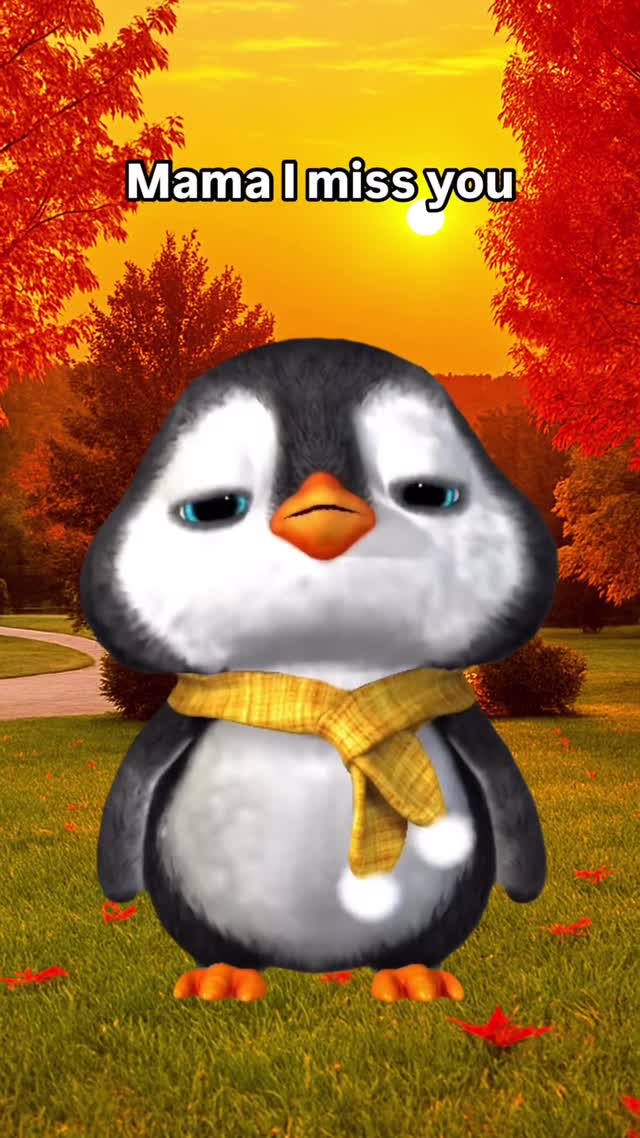
This video is a textbook example of the "Sad-Cute" viral archetype. It features a stylized 3D animated baby penguin singing a heartbreaking line ("Mama I miss you") in a pitched-up, child-like voice against a warm, golden-hour autumn background. The core hook relies on emotional contrast: the adorable, innocent visual of a chubby penguin wearing a yellow scarf combined with the universally melancholic theme of missing a parent.
Key Elements: 3D Character Animation (Pixar-lite style), Golden Hour Lighting, Pitched-up "Chipmunk" Vocals, Emotional Lip-sync, Static Background Layering.
Subject: A 3D rendered baby penguin. It has a round, chubby body, large expressive blue eyes (often closed in emotion), and a small orange beak. It wears a yellow plaid scarf, adding a humanizing "toddler" element.
Scene & Lighting: The background appears to be a static or slightly moving image of a park in autumn. The trees are vibrant red and orange. The sun is low on the horizon (center frame), creating a strong backlight/halo effect. The lighting on the penguin is soft and warm, matching the sunset vibe.
Audio & Mood: The audio is a pitched-up cover of a sad song. The high pitch makes it sound like a child or a small creature, instantly triggering a "cute" response while the lyrics trigger sadness.
| Time | Visual Content | Shot Language | Lighting & Color | Viewer Intent |
|---|---|---|---|---|
| 00:00–00:03 | Penguin stands center frame, eyes closed then opening, singing "Mama I miss you." | Medium Close-Up (MCU), Static Camera. | Warm golden backlight, soft face fill. High saturation (autumn reds). | Emotional Hook: Establish the character and the sad theme immediately. |
| 00:03–00:06 | Penguin tilts head, looks up with pleading eyes, sings "I miss you." | Slow Zoom-In (digital crop) to Close-Up (CU). | Consistent golden hour. | Intensification: Bring viewer closer to the emotion; emphasize the facial expression. |
| 00:06–00:13 | Penguin finishes singing, closes eyes, sways slightly in silence/instrumental. | Close-Up (CU), Static. | Same. | Resonance: Allow the emotion to linger; creates a loop-able moment of sadness. |
Find a trending sad song or a classic ballad. Use an audio editor (Audacity, CapCut, or Adobe Audition) to pitch it up by roughly 15-25%. It should sound child-like but still legible.
Generate your "actor." You need a consistent character.
Prompt Concept: "Cute 3D baby penguin, fluffy texture, wearing a yellow plaid scarf, standing in an autumn park, golden hour lighting, Pixar style, octane render, 8k --ar 9:16"
Option A (High Quality Sync): Use Hedra or Runway Gen-3 (with lip sync control) or Kling. Upload your character image and your pitched audio. Prompt for "singing with emotion, sad expression, closing eyes."
Option B (Simpler): Use SadTalker or D-ID (though these may look more robotic). For this specific "swaying" vibe, Hedra is currently a strong choice for character performance.
If your generation tool struggles with the background, generate the penguin on a green screen (add "green background" to prompt) and composite it over a high-quality stock video of an autumn park sunset in CapCut.
Import into CapCut. Add the "Karaoke" style subtitles.
Font: Use a bold, rounded font (like 'Fredoka One' or system bold) with a heavy black stroke/outline to match the meme aesthetic.
Apply a "Warm" or "Autumn" filter in CapCut to unify the colors of the character and background if they feel disjointed.
Midjourney v6 is best for the initial character look (keywords: "Pixar style," "Octane render"), followed by Hedra or Luma Dream Machine for the motion.
It's a simple pitch shift. In CapCut, go to Audio > Voice Effects > "Chipmunk" or manually increase pitch by +5 to +8 semitones.
Yes, but be careful with copyrighted music. Using covers or original AI-generated songs is safer for long-term monetization.
Use the same "seed" in image generators, or use the "Character Reference" (--cref) feature in Midjourney to lock the character's identity.
Lip sync AI struggles with extreme emotions. Try to use a source image where the mouth is slightly open or neutral, rather than fully closed, to give the AI room to work.