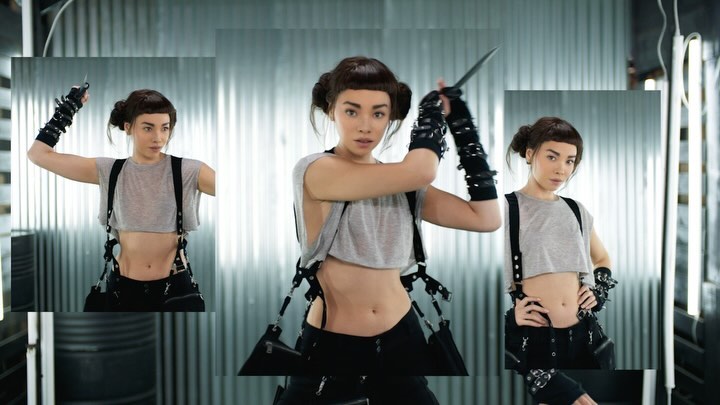
I teamed up with my friends at MSI @msigaming , and yes, these are what my days consist of 😉 Go Borderless with me and my MSI QD-OLED monitor. https://msi.gm/Go-Borderless-Miquela #MSIGoBorderless
I teamed up with my friends at MSI @msigaming , and yes, these are what my days consist of 😉 Go Borderless with me and my MSI QD-OLED monitor. https://msi.gm/Go-Borderless-Miquela #MSIGoBorderless
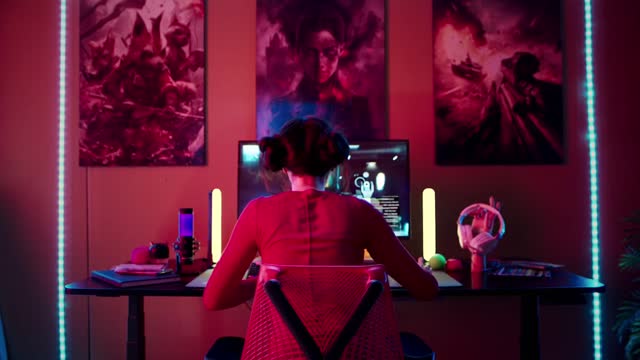
This image is basically a mood board for modern tech sponsorships: you don’t see a hard sell, you see a lifestyle. The product feels inevitable because the environment is designed around it.
Gaming/creator setups are aspirational content. They work like interior design posts: viewers study the lighting, the layout, and the “vibe engineering.” This frame leans into that behavior with strong symmetry—monitor centered, creator centered, posters aligned—and a color system that’s instantly recognizable: red/magenta wash plus cyan edge lights. It reads like a thumbnail for a stream, a music video, or a late-night grind montage.
Notice how the creator is shot from behind. That’s not a limitation; it’s a strategy. Back-view imagery lets more people project themselves into the scene (it could be you at that desk). It also keeps attention on the monitor and the environment, which is perfect when the post is about gear. The setup becomes the main character.
Finally, the practical lights on the desk are doing conversion work. They suggest “premium,” “intentional,” “dialed-in.” Even if someone doesn’t know the exact model, they understand the category: high-end display + creator workflow.
| Signal | Evidence (from this image) | Mechanism | Replication Action |
|---|---|---|---|
| Setup-as-content | Full desk + wall + lighting shown | Viewers pause to study environments (aspiration + shopping intent) | Shoot wide enough to show the whole “system,” not just the product |
| Symmetry readability | Centered subject, centered monitor, aligned posters | Clean composition reads instantly at thumbnail size | Lock a symmetrical framing; place the product at the visual center |
| Color identity | Red wash + cyan edge LEDs | Signature palettes increase recognition across posts | Pick a 2-color lighting scheme and repeat it across a campaign |
| Self-insert perspective | Back view instead of face | People imagine themselves using the setup | Try back-view “at the desk” shots for product workflows |
Transfer 1: Cozy warm productivity
Transfer 2: Music studio gear flex
Transfer 3: Console living-room campaign
This palette is popular for a reason. Red/magenta fills create immersion—like the whole room is a single mood. Cyan edge lights provide separation so the subject and furniture don’t collapse into one blob. The warm desk lights add a third “premium” cue: they feel like intentional tools, not random glow.
| Observed | How to recreate it (prompt + knob) |
|---|---|
| Centered back-view composition | Lock “straight-on rear view, perfect symmetry” |
| Two-color gel contrast | Use “red/magenta ambient wash” + “cyan LED rim” |
| Triptych wall art | Add “three vertical posters aligned above the monitor” |
| Practical desk lights | Place two warm vertical light bars flanking the screen |
| Minimal-but-real props | Add 3–6 small desk items (mic, bottle, fan) without clutter |
| Prompt chunk | What it controls | Swap ideas (EN, 2–3 options) |
|---|---|---|
| Camera angle | Self-insert vs personality | “back view at desk” / “over-shoulder” / “front-facing streamer” |
| Lighting palette | Brand identity and mood | “red + cyan” / “purple + teal” / “amber + blue” |
| Hero product placement | What viewers remember | “monitor centered” / “laptop open” / “speakers flanking” |
| Wall decor density | Maximal gamer vibe vs minimal premium | “three posters” / “single large print” / “blank wall + LEDs” |
| Desk prop count | Realism vs clutter | “few curated props” / “clean desk” / “busy streamer chaos” |
Wide cinematic shot, back-view creator seated at a symmetrical gaming desk, centered monitor as hero, red/magenta ambient wash with cyan LED edge lights, three posters above, two warm desk light bars, a few curated props, modern premium gaming vibeChange one knob per post: swap the on-screen content, swap one prop, or swap one poster. Keep the rest identical so the audience recognizes the format and doesn’t feel “sold to.”