▶
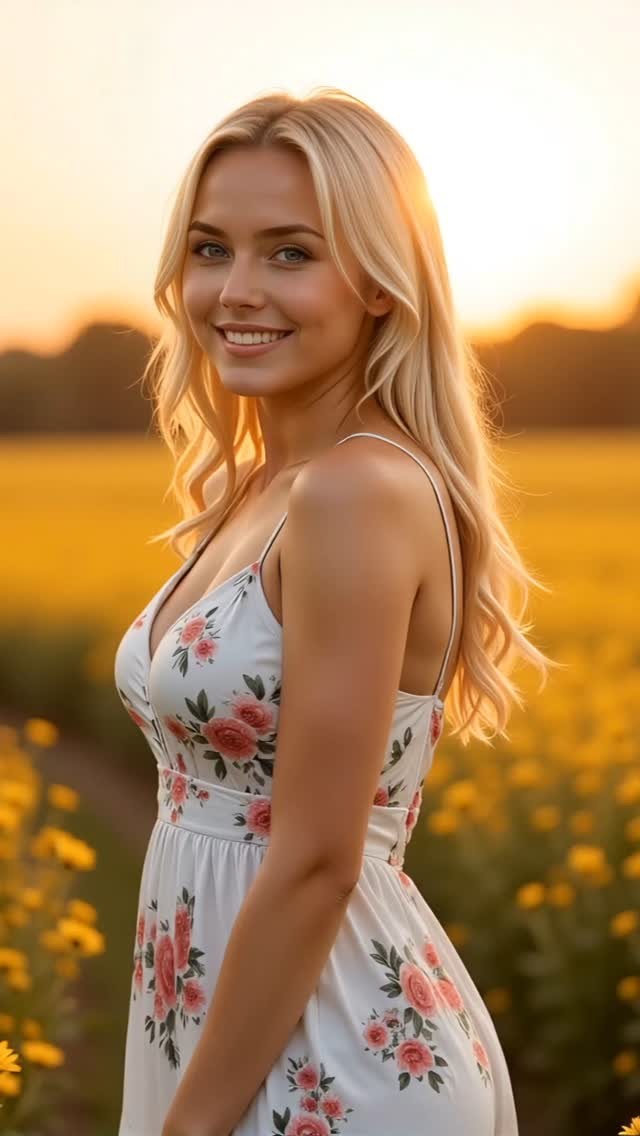
Nature’s glow, my favorite filter.
Nature’s glow, my favorite filter.
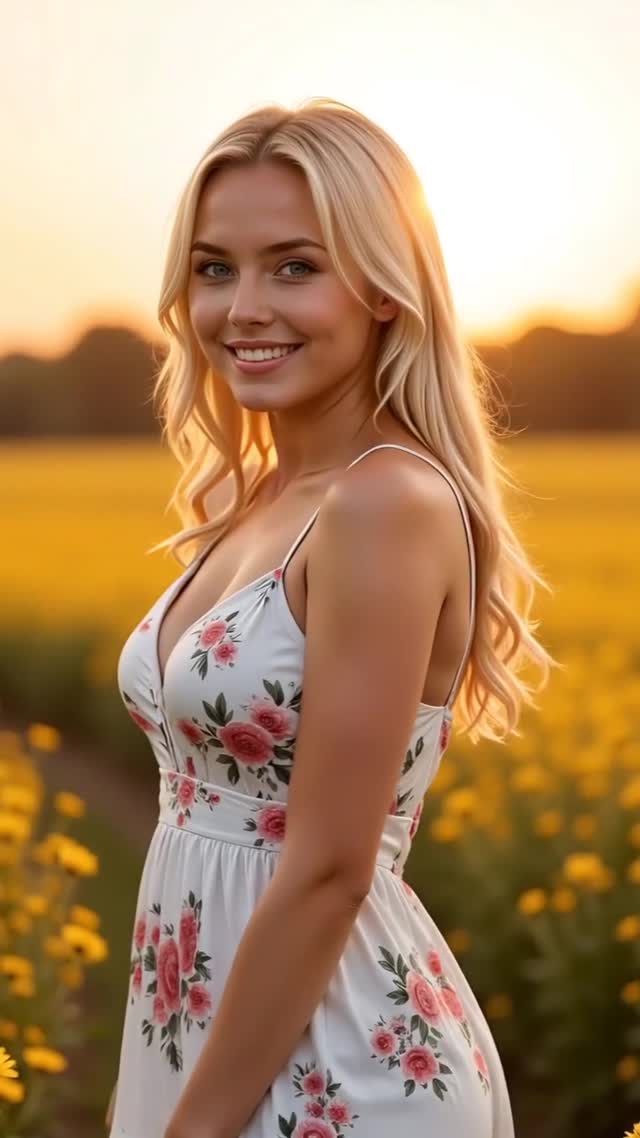
This case study analyzes a high-performing "AI Influencer" video featuring a cinematic editorial portrait of a young woman in a sun-drenched flower field. The aesthetic leverages golden hour lighting, a warm color palette, and a slow-zoom camera movement to create a mesmerizing, high-end look that mimics professional photography. With over 2,800 likes, this content demonstrates how "perfected reality" and nature-themed aesthetics drive massive engagement on platforms like Instagram and TikTok, specifically within the lifestyle and AI-art niches.
The video features a young Caucasian woman with long blonde hair and blue eyes, embodying a "girl-next-door" yet polished aesthetic. She is wearing a white sundress adorned with delicate pink rose patterns. The setting is a vast field of yellow flowers at sunset, creating a powerful "rim light" effect that makes her hair glow. The texture is clean and sharp, with a heavy bokeh effect that blurs the background into a soft, golden wash. The only movement is a subtle, steady zoom-in on her face as she maintains a warm, inviting smile. There is no speech, allowing the visual "vibe" and background music (implied) to carry the emotional weight.
| Time Range | Visual Content | Shot Language | Lighting & Tone | Viewer Intent |
|---|---|---|---|---|
| 00:00–00:03 | Subject waist-up in a field of yellow flowers. | Medium Shot (MS), 50mm feel, static. | Golden hour, warm backlight, soft fill on face. | Establish the "vibe" and hook with aesthetic beauty. |
| 00:03–00:06 | Slow, smooth zoom into the subject's face. | Close-Up (CU), slow dolly-in/zoom, shallow DOF. | Increased focus on eye detail and skin texture. | Reinforce persona intimacy and increase watch time. |
The choice of "Golden Hour" is not accidental. Biologically, humans are wired to find the warm, low-contrast light of sunset soothing and attractive. This "Nature's Glow" (as mentioned in the caption) triggers a positive emotional response, making the viewer more likely to stop scrolling. The yellow flowers provide a complementary color contrast to the blue/green eyes of the subject, creating a visually balanced and "expensive" look that users associate with high-fashion editorials.
From a platform perspective, this video succeeds because it sits right at the edge of the "uncanny valley" but stays on the pleasant side. The subject's features are symmetrical and idealized, which triggers high initial "stop-rate" (the 0-3 second hook). Because the video is short and loops seamlessly, the slow zoom keeps the viewer's eyes locked on the screen, signaling to the algorithm that the content is highly engaging, thus pushing it to more "Explore" pages.
Choose a consistent character. For this aesthetic, use a "Scandinavian blonde" or "Girl next door" archetype. Create a character sheet with specific traits (e.g., "blonde wavy hair, blue eyes, light freckles").
Use a prompt that emphasizes lighting: A beautiful blonde woman in a white floral sundress, standing in a field of yellow sunflowers, golden hour sunset, rim lighting, cinematic photography, 8k, highly detailed skin texture.
Use the same seed or a "Character Reference" (--cref in Midjourney) to ensure the face doesn't change between different shots or videos.
Upload your base image and use a motion prompt: Slow cinematic zoom into the woman's face, she is smiling warmly at the camera, hair blowing slightly in the wind, hyper-realistic.
In CapCut or Premiere, boost the "Warmth" and "Saturation" slightly. Add a "Soft Glow" or "Diffusion" filter to mimic the hazy sunset look.
Choose a trending "Aesthetic" or "Chill" audio track. The music should be ethereal and slow to match the zoom speed.
Keep it short and relatable. Use the "Nature + Emotion" formula (e.g., "Golden hour heals everything").
Export in 1080x1920 (9:16), 30fps or 60fps. Ensure the bitrate is high to maintain the "premium" look of the AI-generated skin textures.
Flux.1 for the base image and Luma Dream Machine for the high-fidelity motion.
"Golden hour," "Rim lighting," and "Cinematic."
You likely aren't using a fixed seed or a character reference (CREF) tool.
Lower the "Motion" slider and add a slight film grain in post-production.
Instagram, as the platform prioritizes high-quality, static-leaning "aesthetic" visuals.