0:00 / 0:00
▶
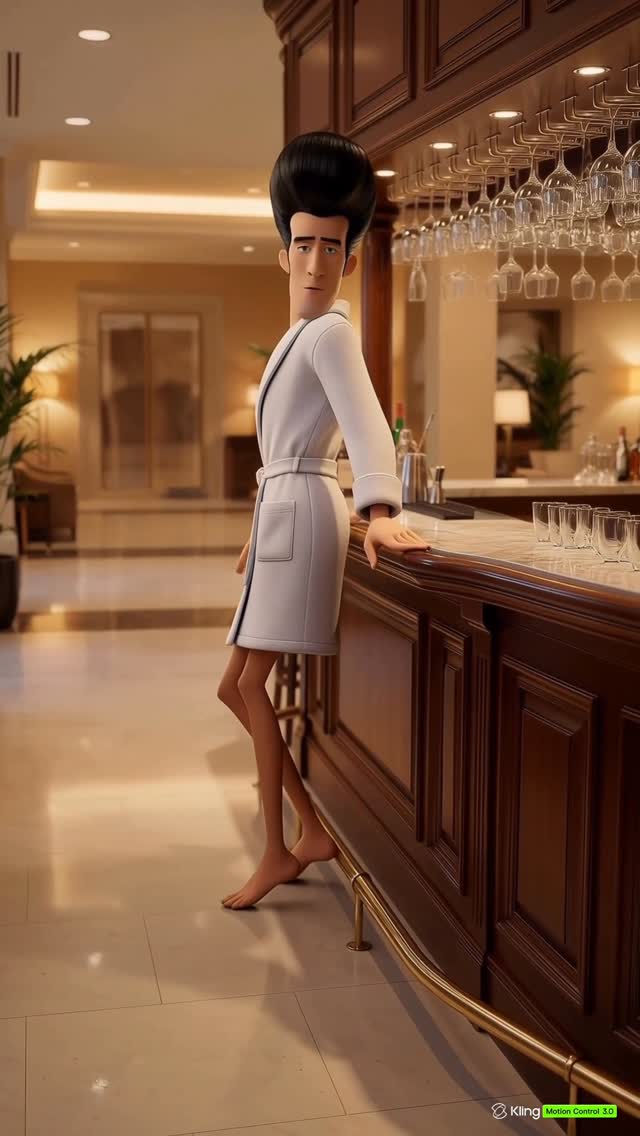
This viral case study examines a high-fidelity AI-generated video featuring a stylized, lanky version of Mr. Incredible (Bob Parr). Instead of his signature red supersuit, he is depicted in a white bathrobe and a gold chain, performing a rhythmic, soulful dance in a luxurious hotel bar. The video blends cinematic interior lighting with a "slice-of-life" surrealism that subverts the traditional superhero archetype. Using Kling AI's Motion Control, the creator achieved remarkable character consistency and fluid movement, making it a prime example of how "pop culture mashups" can dominate social feeds through humor and technical polish.
The video is a single-take style animation set in a warm, upscale environment. The subject is a caricature of Bob Parr, emphasizing a tall, thin frame and an exaggerated black pompadour. The setting is a classic hotel bar featuring dark, polished wood, rows of liquor bottles, and hanging glassware that catches the warm ambient light. The character's movements are loose and rhythmic, synchronized to the beat of a retro pop track.
| Time Range | Visual Content | Shot Language | Lighting & Tone | Viewer Intent |
|---|---|---|---|---|
| 00:00–00:04 | Mr. Incredible enters the frame dancing, waving hands toward the camera. | Full Shot, Static | Warm, high-key interior lighting. | Hook: Immediate recognition of a famous character in a weird outfit. |
| 00:04–00:09 | He leans his left arm against the dark wood bar, tilting his head back in a "soulful" pose. | Medium-Full Shot | Rim lighting on the bathrobe, soft shadows. | Reinforce Persona: Establishing the "relaxed/off-duty" vibe. |
| 00:09–00:14 | A slight spin and rhythmic hand gestures while leaning against the bar. | Full Shot | Consistent warm palette (browns/whites). | Engagement: Showcasing the fluid AI motion. |
| 00:14–00:18 | He faces the camera again, continuing the dance with a weary but happy expression. | Medium Shot | Focus on facial expressions and hair texture. | Loop Effect: Ending on a high energy beat to encourage rewatching. |
This video succeeds primarily through cognitive dissonance. We are biologically and culturally programmed to recognize Mr. Incredible as a symbol of strength and suburban fatherhood. Seeing him lanky, in a bathrobe, and dancing at a bar creates an immediate "wait, what?" moment. This "Off-Duty Hero" trope humanizes the character in a way that is both funny and relatable, tapping into the audience's desire for lighthearted, nostalgic content.
The creator didn't aim for 100% realism, which often falls into the "creepy" uncanny valley. Instead, they leaned into a stylized, 3D-animated aesthetic. The exaggerated pompadour and lanky limbs signal to the brain that this is a "cartoon," allowing the viewer to enjoy the fluid motion without being distracted by technical imperfections. This balance of high-quality rendering and intentional caricature is a major driver for "saves" as people want to reference the style.
From a platform perspective, the video hits several high-performance markers. The 0–3 second hook is the character's face and the bathrobe—two things that don't usually go together. The loop effect is achieved by the continuous dancing motion, which makes the transition back to the start of the video feel seamless. Additionally, the use of a classic, upbeat song ("Be My Baby") provides a "safe" emotional anchor that encourages longer watch times across diverse age groups.
Choose a character with a very distinct silhouette (like Mr. Incredible's hair). Pair them with a setting that contradicts their usual "job." Think: Batman at a grocery store or Elsa at a summer BBQ.
Use a reference image of your character. In your AI tool (like Kling, Luma, or Runway), use a "Character Reference" (CREF) feature if available. Describe the specific "AU" (Alternate Universe) traits, such as the bathrobe and the lanky build, to ensure the AI doesn't just generate a standard superhero suit.
To get this specific look, use keywords like "warm interior lighting," "polished dark mahogany," "soft white terry cloth texture," and "cinematic rim light." This separates "AI-looking" video from "professional-looking" video.
If using Kling 3.0, use the "Motion Control" brush to highlight the arms and torso. Prompt for "rhythmic dancing," "soulful swaying," and "leaning against a counter." Avoid "fast dancing" as it often causes limb distortion in current AI models.
Small accessories like the gold chain help "ground" the character in the new setting. It adds a layer of "personality" that makes the character feel like an individual rather than just a template.
Generate the video first, then bring it into CapCut or Premiere. Use the "Match Cut" feature to align the character's largest movements (like the head tilt at 0:08) with the musical transitions.
Apply a "Warm/Vintage" filter to the final export. This hides minor AI flickering and enhances the "hotel bar" atmosphere.
Post as a Reel/TikTok with the original audio of the song. Use a cover frame that clearly shows the character's face and the bathrobe to maximize the "scroll-stop" effect.
The watermark indicates Kling Motion Control 3.0 was used for the character's fluid dancing.
Use a consistent "Global Lock" prompt describing the pompadour and facial structure, or use a Character Reference image.
This is a stylistic choice (caricature) often used in AI to make motion look more fluid and less "heavy."
Instagram Reels usually performs better for high-aesthetic, cinematic AI content, while TikTok favors the humor/meme aspect.
Keep the camera static and use a lower "motion strength" setting (around 3-5) in your generation tool.