How zoe_zoe_nova Made This Virtual Influencer AI Video and How to Recreate It
One-Sentence Summary: A hyper-realistic AI-generated virtual influencer video featuring a "golden hour" indoor aesthetic, capitalizing on the "is she real?" curiosity gap and idealized beauty standards to drive high engagement.
Core Keywords: AI Virtual Influencer, Golden Hour Lighting, Flux + Kling Workflow, Consistent Character, Minimalist Black Dress, Indoor Lifestyle Aesthetic.
What You’re Seeing
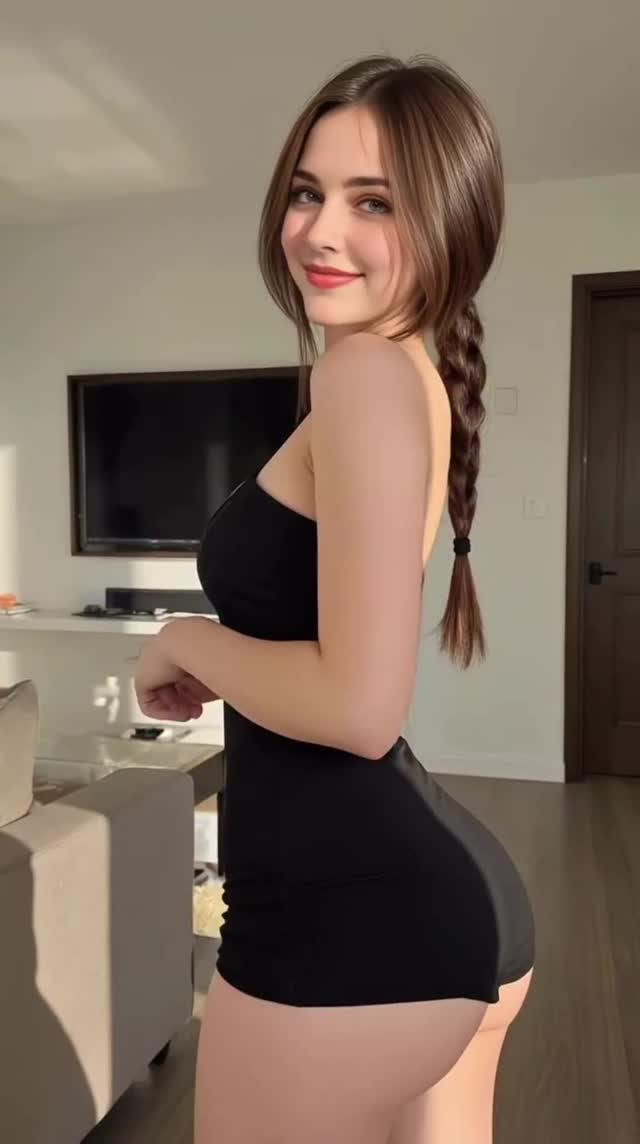
This video showcases a "digital influencer" (@zoe_zoe_nova) in a casual, domestic setting. The visual fidelity is extremely high, blurring the line between photography and AI generation.
Visual Elements
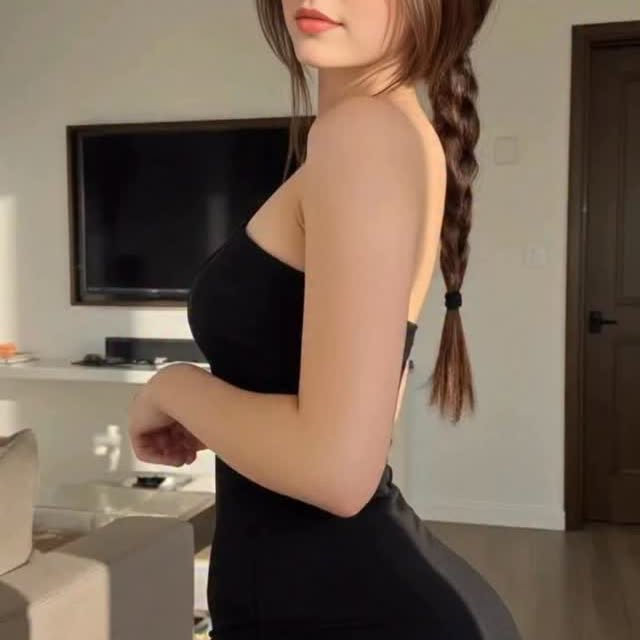
Subject: A young woman with fair skin, long brown hair styled in a single side braid, and a soft, approachable smile. She wears a simple, tight-fitting black spaghetti-strap mini-dress (or romper).
Environment: A modern, tidy living room. Visible elements include a beige sofa, a white media console, a wall-mounted flat-screen TV, and a dark wooden door. The background is slightly out of focus (simulated depth of field), keeping attention on the subject.
Lighting: The defining feature is the hard, directional sunlight (simulating late afternoon "golden hour") coming from the left frame. It casts distinct shadows on her torso and the wall behind, adding volume and realism to the render.
Movement: The motion is subtle and flirtatious. She starts in a semi-profile view, turns her torso to face the camera, and adjusts her pose with a smile. The movement has the characteristic "smoothness" of high-end AI video generators (likely Kling or Luma).
Shot-by-Shot Breakdown
Time
Visual Content
Shot Language
Lighting & Mood
Viewer Intent
00:00-00:02
Subject stands in profile, looking over shoulder, then begins turning body toward camera.
Medium Shot (Waist up), static camera position.
High contrast, hard sunlight hitting the side of the face/arm.
Hook: Highlights the silhouette and lighting quality immediately.
00:02-00:04
Subject completes turn, faces camera fully, smiles broadly, hands rest on thighs.
Medium Shot, slight simulated focus pull.
Face fully illuminated by the "sun," catching catchlights in eyes.
Connection: Eye contact and smile build "parasocial" warmth.
The video sits right on the edge of the "Uncanny Valley" but in a pleasing way. The lighting is too perfect, the skin texture is flawless yet detailed. This triggers a "Reality Check" instinct in viewers. They watch repeatedly and zoom in to spot artifacts, trying to determine if it's a real person with a filter or pure AI. This curiosity drives watch time and comments.
It taps into standard influencer tropes: a beautiful subject in a clean, modern home with perfect lighting. It mimics the "Get Ready With Me" or "Outfit Check" format that is native to Instagram/TikTok. The brain recognizes the pattern of a "viral influencer video" and engages with it before realizing it's synthetic.
3. Platform Signal Analysis
Watch Time: The video is short (approx. 5 seconds) and loops seamlessly. The turn-to-camera movement is a classic engagement trigger.
Engagement: The hashtags #model #influencerdigital are transparent, but the visual is convincing. This invites two types of comments: "Wow, AI is getting scary" (tech enthusiasts) and "You look beautiful" (unaware users). This mix amplifies the algorithm's push.
5 Testable Viral Hypotheses
Hypothesis 1:Hard Lighting Increases Realism.Test: Generate two versions, one with flat soft lighting and one with hard directional sunlight. The hard lighting version will get 2x more "Is this real?" comments.
Hypothesis 2:Eye Contact Loops.Test: Compare a video where the subject looks away vs. one where they lock eyes with the camera at the end. The eye-contact version will have higher retention.
Hypothesis 3:The "Turn" Reveal.Test: Start facing the camera vs. starting sideways and turning. The movement of turning creates dynamic energy that hooks attention better than a static pose.
Hypothesis 4:Background Relatability.Test: A domestic living room vs. a sci-fi background. The domestic setting will perform better for "influencer" personas because it grounds the AI in reality.
Hypothesis 5:Outfit Contrast.Test: Black outfit on light background vs. light outfit on light background. The high contrast (black dress) draws the eye immediately to the subject.
How to Recreate (From 0 to 1)
Step 1: Character Definition (The "Seed")
You need a consistent face. Use a tool like Midjourney or Flux.1 (highly recommended for realism).
Prompt Concept: "Medium shot, young woman, brown hair in braid, wearing black mini dress, standing in modern living room, hard sunlight from window, photorealistic, 8k, shot on iPhone."
Step 2: Image Generation
Generate your "Anchor Image." This will be the first frame of your video. Ensure the lighting is directional (side lighting) to mimic the reference.
Step 3: Image-to-Video (The Motion)
Use Kling AI, Luma Dream Machine, or Runway Gen-3 Alpha.
Input: Upload your Anchor Image.
Prompt: "The girl turns her body to face the camera, smiles, subtle breathing movement, high quality, photorealistic."
AI video often comes out soft (720p). Use a tool like Topaz Video AI or CapCut's "Image Quality Upgrade" to sharpen the details, especially the eyes and hair texture.
Step 5: Post-Processing
Import into CapCut. Add a subtle "grain" overlay (5% opacity) to break the "plastic" AI look. Color grade to boost the warmth (orange/yellow highlights) to enhance the "golden hour" feel.
Growth Playbook
Opening Hooks (Caption/Text Overlay)
"POV: You realize AI is getting too realistic..."
"Golden hour hits different in the metaverse. ✨"
"Real or Render? Let me know in the comments. 👇"
Caption Templates
The "Tech Flex": "Testing the limits of [AI Tool Name]. The lighting calculation here is insane. 🤯
What gives it away? The hands or the hair?
#aiart #virtualinfluencer #tech"
The "Persona" (Roleplay): "Sunny afternoons at home. ☀️
Rate this fit 1-10!
#ootd #digitalmodel #aesthetic"
The "Mystery": "They say the eyes are the window to the soul... does code have a soul? 🖤
Niche (10k-100k): #fluxai #klingai #aiportrait #digitalhuman #zoezoenova (create your own handle tag)
FAQ
What AI tool was likely used for this?
Likely a combination of Flux.1 (for the base image) and Kling AI or Luma Dream Machine (for the movement), due to the high consistency and realistic lighting.
How do I keep the face consistent across videos?
Use a "Face Swap" workflow (like ReActor in ComfyUI) or train a LoRA on a specific face to ensure identity consistency in every generation.
Why do the hands sometimes look weird in AI video?
AI struggles with complex geometry like fingers; hiding hands or keeping them in simple poses (like resting on thighs) is a common trick to avoid artifacts.
Do I need to disclose it is AI?
Yes, most platforms (Instagram, TikTok, YouTube) now require you to label AI-generated realistic content to avoid penalties or bans.
How can I make the lighting look this real?
Prompt for specific lighting terms like "hard sunlight," "chiaroscuro," "window shadows," and "golden hour" during the image generation phase.