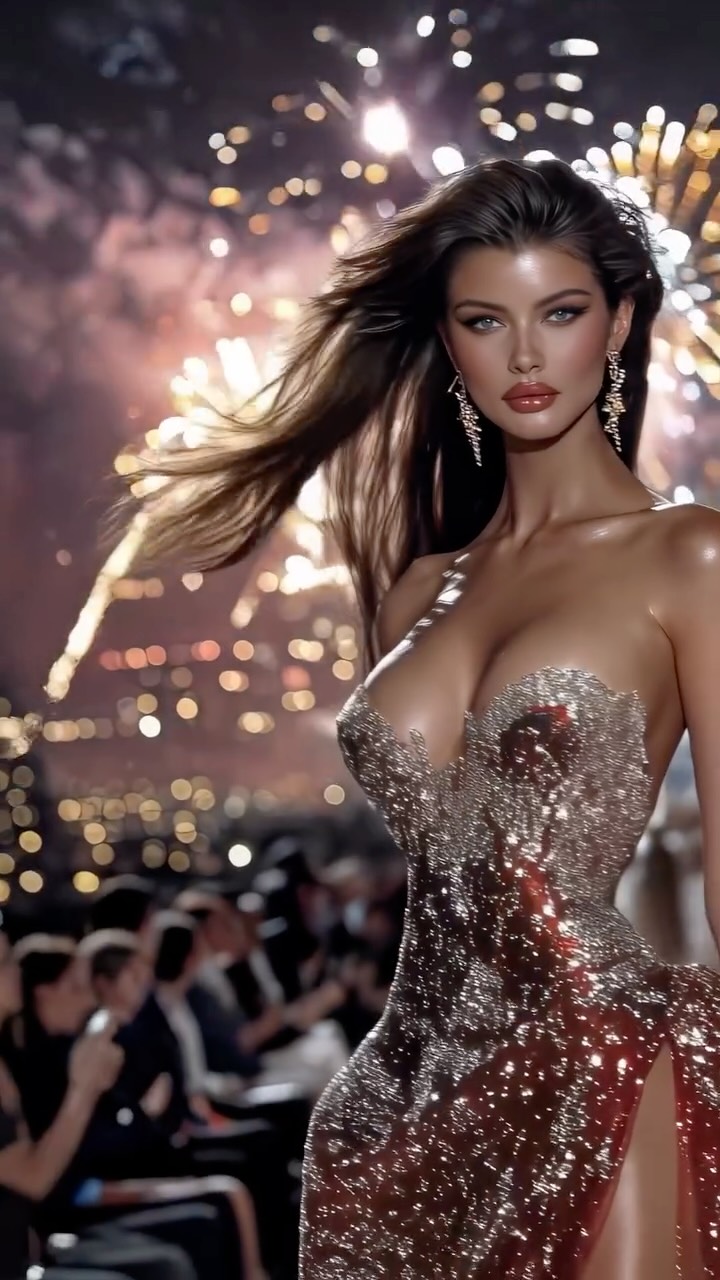
How dreamfall.art Made This Rooftop Runway AI Art
This image performs because it stacks two high-arousal signals in one scene: fashion authority and celebration energy. Runway visuals already carry status, but fireworks multiply emotional intensity. The viewer reads the post as a “peak moment” rather than a normal outfit shot. Peak-moment framing is one of the most reliable drivers of shares and saves.
The second reason is contrast orchestration. The dark night environment makes the sequined dress and skin highlights pop, while the runway blur keeps the model as the uncontested focal point. The frame is dramatic, but it remains clean. That balance is critical: chaos creates attention, but visual hierarchy converts attention into retention.
Signal Table
| Signal | Evidence (from this image) | Mechanism | Replication Action |
|---|
| Peak Event Cue | Fireworks exploding behind the model | Encodes celebration and urgency | Add one high-energy background event element (fireworks, confetti, pyros) |
| Status Frame | Runway layout with seated audience | Immediately communicates prestige context | Use catwalk geometry and side audience blur as fixed scene grammar |
| Texture Magnet | Sparkling sequined gown with reflective highlights | Encourages zoom-in behavior and saves | Prompt explicit fabric microtexture and specular response |
| Hero Isolation | Single centered subject, controlled depth of field | Protects readability in feed thumbnails | Keep one clear foreground subject and simplify all secondary layers |
Use Cases and Transfer Recipes
- Collection launch hero post: ideal for premium reveal moments.
- Award-night campaign visuals: ideal because celebration cues are built-in.
- High-impact personal brand milestones: ideal for “big announcement” narratives.
- Luxury reel cover art: ideal for immediate emotional punch in small format.
- Not ideal for minimal everyday content: intensity may feel mismatched.
- Not ideal for educational explainers: scene competes with long informational text.
- Not ideal when production realism is weak: this style needs convincing light logic.
- Confetti Ballroom Transfer — Keep: centered hero and sparkle fabric. Change: fireworks to indoor confetti burst. Slot template (EN):
{luxury venue} {sparkle gown} {celebration effect} {hero runway framing} - City Rooftop Gala Transfer — Keep: night drama and high-status styling. Change: catwalk to rooftop edge event lane. Slot template (EN):
{night skyline location} {formal gown} {event lighting} {single subject dominance} - Festival Couture Transfer — Keep: peak energy backdrop + elegant silhouette. Change: runway crowd to festival stage audience blur. Slot template (EN):
{festival fashion stage} {sequined look} {pyro background} {confident forward walk}
Aesthetic Read
The image uses luminous hierarchy. Fireworks create a bright crown-like zone above and behind the subject, but the model remains readable because frontal fill protects facial detail. The gown acts as a second light source through reflected sparkle, extending brightness into the lower frame. Warm and cool tones are balanced: warm highlights from pyrotechnics, cooler night shadows in the environment. Motion is implied through hair flow and runway stride, yet the camera keeps the core subject sharp. This mix of motion cues and clarity is a strong formula for social impact.
Prompt Technique Breakdown
| Prompt chunk | What it controls | Swap ideas (EN, 2–3 options) |
|---|
| Event intensity block | Emotional amplitude | “fireworks burst”, “gold confetti rain”, “pyro spark fountains” |
| Wardrobe texture block | Luxury perception | “crystal sequin gown”, “metallic satin column dress”, “beaded corset gown” |
| Runway geometry block | Status context and depth | “catwalk with side audience blur”, “U-shaped gala runway”, “outdoor fashion lane” |
| Lighting blend block | Readability under high contrast | “warm back pyros + soft front fill”, “single key + rim pyros”, “spotlight with haze bloom” |
| Camera authority block | Hero presence | “slight low-angle 85mm”, “eye-level 70mm”, “dynamic 100mm runway crop” |
Remix Steps
Baseline Lock: lock one centered model, lock runway side blur, lock high-energy background effect.
- Generate baseline with fireworks and gown texture only; keep pose simple.
- Change one knob: pyrotechnic scale (small, medium, large) while preserving camera angle.
- Keep fireworks fixed; test dress texture variants (sequin vs beaded vs satin metallic).
- Finalize by tuning front-fill intensity to protect facial detail without losing night drama.