/
/
/
/
Budget Breakdown YouTube Thumbnail Template
Budget Breakdown YouTube Thumbnail Template
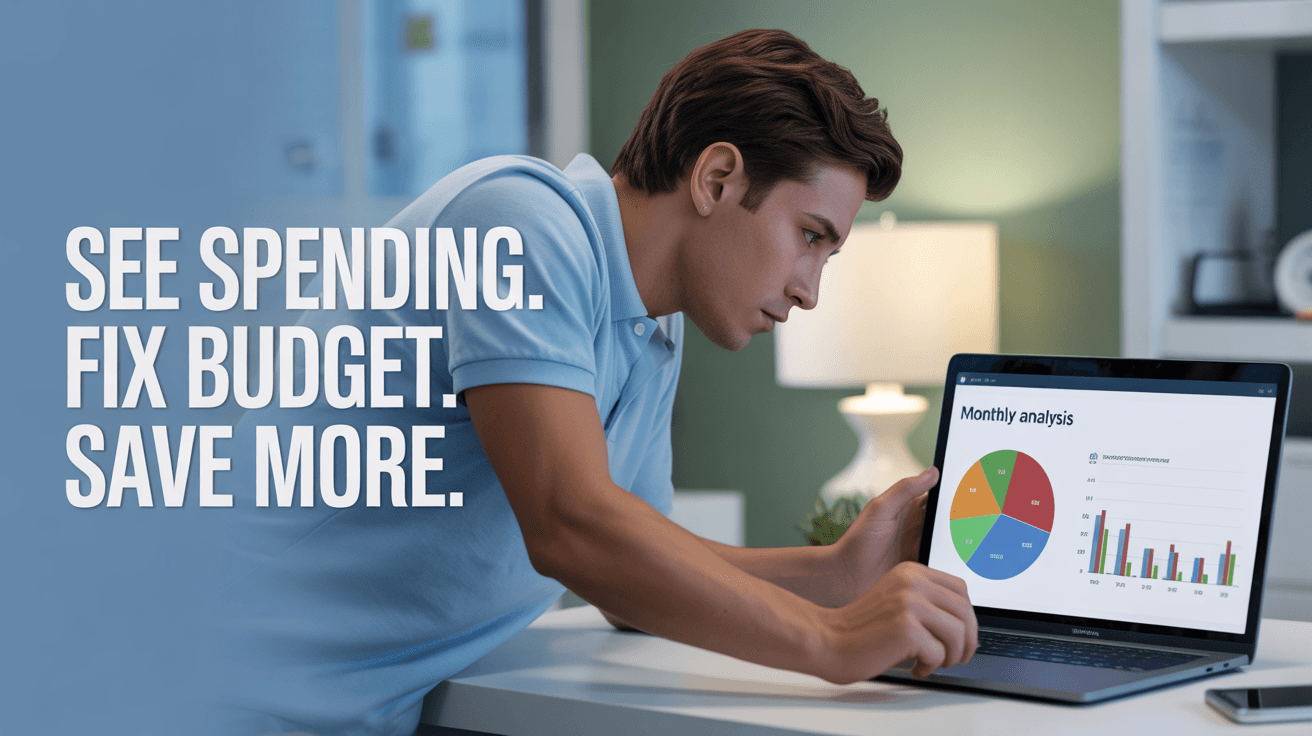
This thumbnail makes personal finance feel practical and immediate. A focused profile shot of someone leaning into a laptop creates a working-session mood, while the screen shows a colorful monthly analysis dashboard with pie charts and bar graphs. The cool blue and green palette feels clean and trustworthy, and the stacked headline turns the frame into a clear three-step promise: diagnose, adjust, improve.
Use it for budget audits, spending review videos, or monthly money reset content where the viewer wants a system, not motivation alone. The side-profile posture communicates concentration and action instead of lifestyle aspiration. Replace the laptop chart, headline language, or background tone to fit budgeting, expense tracking, or savings challenge content.
budget breakdown thumbnail, monthly spending analysis, personal finance dashboard
1280x720
Best Use Cases for This Thumbnail Template
Monthly Budget Review Videos
The dashboard on screen gives viewers a visual shortcut to the kind of detail they expect from a budget review. Instead of selling a vague financial improvement promise, the template suggests a real breakdown with categories, numbers, and decisions. That makes it strong for creators who want to attract viewers ready to examine spending patterns rather than passively consume motivational money advice.
Customization tip: Replace the chart labels or on-screen colors to match your own budget categories, but keep the profile-view concentration because it reinforces the working-session feel.
Example titles:
I Reviewed Every Dollar I Spent This Month
My Monthly Budget Reset Step by Step
How I Found the Leaks in My Spending
Saving Plan Fixes and Audits
This layout also fits videos where the creator diagnoses why a budget is failing and shows the changes needed to save more. The three-part headline creates a process, not just an aspiration, and the laptop view makes the advice feel grounded in actual numbers. That helps channels position themselves as practical guides for viewers who want financial control, not vague inspiration.
Customization tip: Swap the headline with your exact framework, such as Cut Waste or Rebuild Budget, while preserving the laptop analytics view as the proof element.
Example titles:
Why Your Budget Is Not Working Yet
The Spending Audit That Helped Me Save More
3 Fixes That Improved My Monthly Cash Flow
Why This Works
The cool blue-green palette signals calm control rather than stress, which is important for budgeting content. Many viewers arrive feeling behind or embarrassed about their money habits, so a chaotic visual would increase resistance. This palette tells them the video offers order, clarity, and a workable process they can actually follow.
The side-profile composition puts the viewer beside the creator instead of in front of a lecture. That creates a collaborative feeling, as if the audience is looking over the shoulder during a real review session. Combined with the laptop screen, the frame suggests practical analysis rather than abstract money advice.
The stacked text uses short commands that mirror the viewer journey: identify the problem, make an adjustment, get a better outcome. That sequence reduces ambiguity. Instead of asking why they should care, the audience instantly sees the promise and understands how the video intends to get them there.
Creator Fit
Best fit: Best for personal finance creators in the 1K-100K range making practical budgeting, savings, or cash-flow content. It suits channels with a clear, methodical tone and works especially well when the creator shows real dashboards, Notion sheets, or budgeting apps as part of the teaching process.
Not recommended for: Avoid it for luxury wealth content, macro investing commentary, or emotionally dramatic debt confession videos. The laptop dashboard, soft lighting, and calm headline create a measured systems vibe, so it would undersell content that depends on aspiration, urgency, or high-stakes storytelling.
Video Hooks:
Hook 1: If you feel like your money disappears every month, the first fix is not earning more. It is seeing exactly where the leaks are, and that is what we are going to map out today.
Hook 2: I pulled up my monthly spending data, and within minutes the biggest budget problems were obvious. Let me show you the review process that made saving easier instead of more restrictive.
Hook 3: Before you cut another expense blindly, look at the pattern first. A good budget starts with visibility, because you cannot fix what you have not clearly measured.
These hooks work because the thumbnail promises a practical review workflow, so the opening has to move straight into diagnosis and action.
More you like

CRCL Stablecoin YouTube Thumbnail Template

Pi Network Cashout YouTube Thumbnail Template

Cheap Tropical Property YouTube Thumbnail Template
Austin Market Outlook YouTube Thumbnail Template

USDT Income YouTube Thumbnail Template
Margin Income YouTube Thumbnail Template

Social Leads YouTube Thumbnail Template

Chaos to Clients YouTube Thumbnail Template
Ready to 3x Your YouTube Views?
Join 10,000+ creators who've discovered the secret to viral thumbnails