CS2 FPS Boost YouTube Thumbnail Template
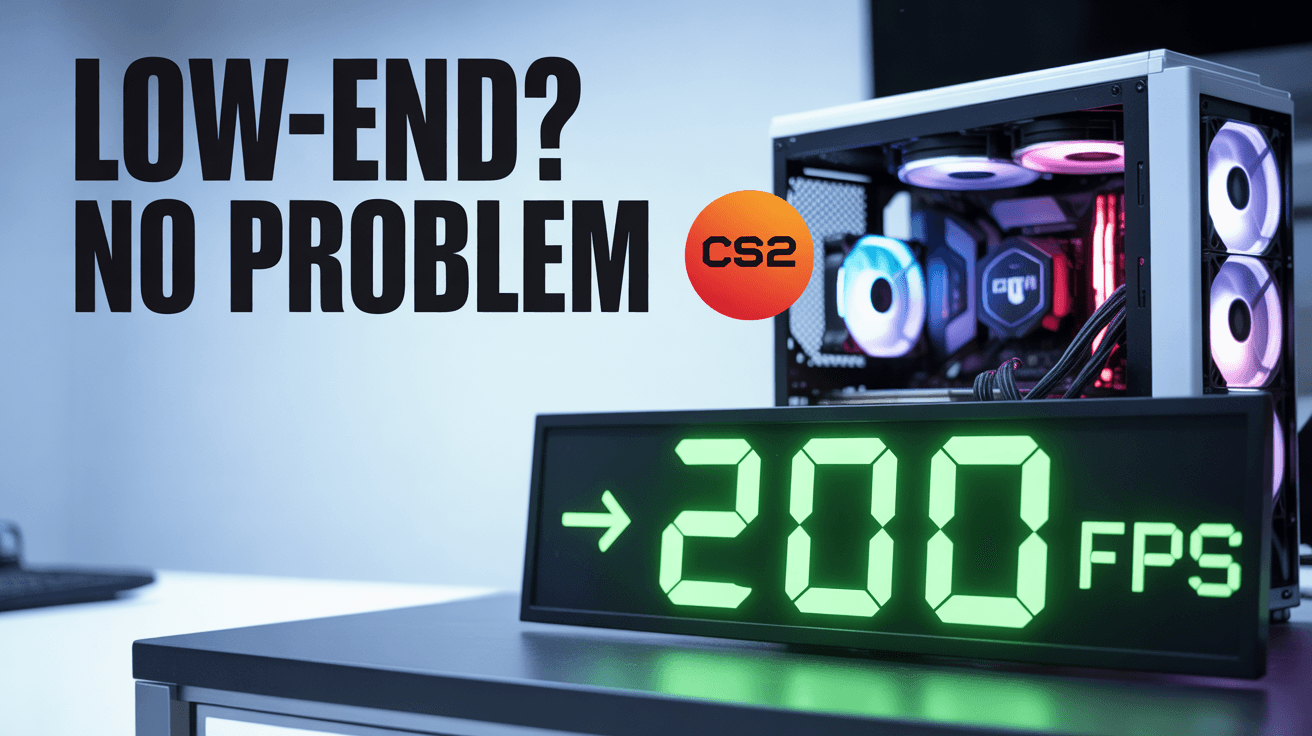
This thumbnail tells viewers the fix is achievable. A budget PC sits front and center instead of an expensive setup, while the bright 200 FPS counter gives the frame a measurable promise. Green performance cues and clean tech lighting keep the design readable and practical, so the image feels like a solution video rather than vague gaming motivation.
Use it for CS2 settings guides, low-end optimization walkthroughs, or benchmark-before-after uploads. The key strength is specificity: the viewer knows this is about making weaker hardware perform better. That makes the frame more useful than generic CS2 branding alone. Replace Low-End? No Problem with your CPU, GPU, or exact FPS target to match search intent more tightly.
cs2 fps thumbnail, low-end pc design, counter strike optimization
1280x720
Best Use Cases for This Thumbnail Template
Low-End CS2 Settings Guides
Optimization videos win clicks when the thumbnail reduces anxiety. By showing a budget machine instead of premium hardware, the image tells weaker-PC users the advice is actually meant for them. The big green 200 FPS readout adds a visible target, which makes the tutorial feel concrete and outcome-based rather than full of abstract settings talk.
Customization tip: Replace the 200 FPS counter with your realistic result for the hardware you tested, such as 120 FPS or 144 FPS.
Example titles:
Best CS2 Settings for Low-End PCs in 2026
How I Doubled My FPS in Counter-Strike 2
CS2 Optimization Guide for Budget Hardware
Before and After Benchmark Videos
Benchmark content performs when the viewer can see improvement before clicking. The glowing FPS number and hardware-focused composition imply that measurable gains are the whole point of the upload. That is stronger than using only the game logo because it turns the thumbnail into evidence. Audiences comparing tweaks want proof first, and this frame gives them that cue instantly.
Customization tip: Add a smaller old FPS number in one corner if the video leans heavily on before-and-after testing.
Example titles:
From 70 FPS to 200 FPS in CS2
Every Setting I Changed on My Old Gaming PC
The CS2 Tweaks That Actually Improved Performance
Budget Gaming Upgrade Advice
This template also works for hardware advice because the glowing PC case is as important as the game logo. It suggests that system choice and optimization strategy both matter. For viewers deciding whether to tweak, upgrade, or do both, the image positions the creator as someone solving a practical performance problem, not just showcasing flashy gameplay clips.
Customization tip: Swap the headline to Upgrade or Optimize? if the video compares settings changes against hardware spending.
Example titles:
Should You Upgrade or Optimize for CS2
The Cheapest PC Tweaks That Made CS2 Smooth
Budget Hardware Setup for Better Counter-Strike FPS
Why This Works
Green is the right color for performance promises because viewers associate it with stable numbers, higher output, and system health. In a gaming-tech frame, that matters more than pure aesthetic appeal. The bright green FPS counter tells the audience this video is about measurable improvement, which builds instant relevance for anyone currently frustrated with CS2 performance.
The composition keeps the PC tower, FPS number, and game logo in a simple three-part structure. That simplicity is powerful because optimization viewers are usually scanning quickly for whether a guide applies to their problem. There is no clutter from gameplay chaos or unnecessary faces, so the message lands fast: hardware, game, result.
The headline Low-End? No Problem acts like a confidence transfer. It mirrors the viewer's worry and resolves it in the same breath, which is stronger than a generic boost claim. For creators, that means the thumbnail does emotional work as well as informational work, helping underpowered-PC users feel that the tutorial might genuinely help them.
Creator Fit
Best fit: Best for PC optimization channels, CS2 settings creators, and practical benchmark reviewers serving budget-conscious players, especially in the 5K to 300K subscriber range. It works best when your videos deliver test results, exact settings, and grounded advice rather than just entertainment.
Not recommended for: Not recommended for pro-match highlights, skin showcases, or personality-led reaction content. The budget PC visual, green FPS counter, and problem-solving copy promise a technical performance tutorial, so the frame will feel misleading if the video is really about gameplay moments or cosmetic content.
Video Hooks:
Hook 1: "If your PC is struggling in CS2, start with these three settings because they changed my frame rate immediately. I’ll show you the exact before-and-after numbers."
Hook 2: "This guide is for players who do not want to buy new hardware just to make the game playable. We are squeezing the best result out of a low-end setup."
Hook 3: "Most FPS boost videos repeat the same useless tips. Here are the changes that actually pushed my Counter-Strike performance into a different tier."
The thumbnail promises a practical fix for weak hardware, so the hook should confirm real numbers and fast applicability right away.
More you like

Spider-Man Kraven YouTube Thumbnail Template
Train Door Horror YouTube Thumbnail Template

Goku Showdown YouTube Thumbnail Template
Stream Viewer Spike YouTube Thumbnail Template

Zombies Legendary Loot YouTube Thumbnail Template

Jett God Mode YouTube Thumbnail Template
KaiSa Master Tips YouTube Thumbnail Template

Minecraft Christmas Gift YouTube Thumbnail Template
Ready to 3x Your YouTube Views?
Join 10,000+ creators who've discovered the secret to viral thumbnails