PS5 Upgrade YouTube Thumbnail Template
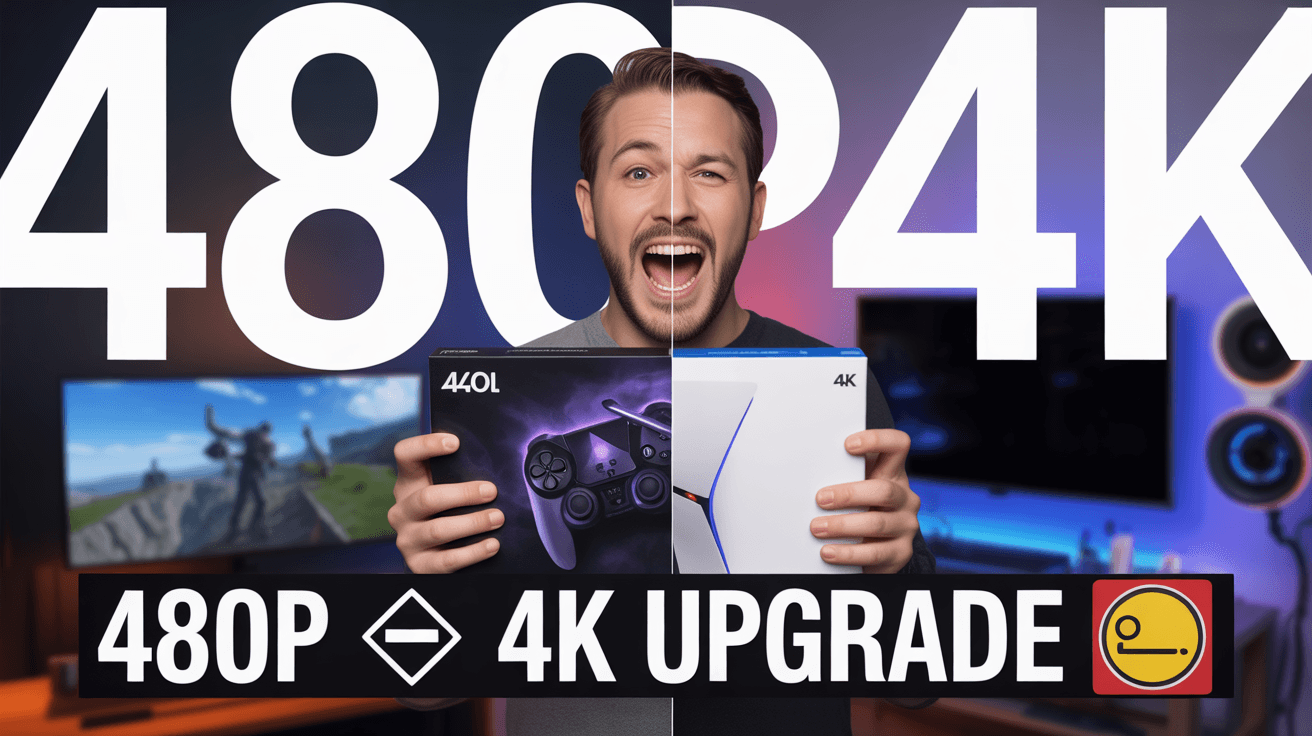
This thumbnail makes the value proposition blunt. Giant 480p and 4K labels dominate the frame while the subject stands centered holding the product between both worlds. The left side intentionally feels darker and softer, while the right side feels cleaner and brighter. RGB room lighting adds familiar gaming-tech atmosphere, and the bottom upgrade line makes the transformation read like a before-and-after reveal.
Use it for capture-card reviews, setup upgrade videos, or PS5 quality tests where the whole click depends on visual improvement. The split-screen comparison reduces the technical topic into one obvious result. Replace the product box, resolution labels, or bottom caption to match your exact hardware angle.
ps5 upgrade thumbnail, capture card design, 4k gameplay test
1280x720
Best Use Cases for This Thumbnail Template
Capture Card Review Videos
Hardware review thumbnails work best when the improvement is visible rather than abstract, and this design does exactly that. The huge resolution labels create a clear before-and-after claim, while the product held in the center gives viewers a direct cause for the change. That is valuable because most buyers want one quick answer first: will this actually make my setup look better?
Customization tip: Keep the split resolution background and swap the product box to your exact device so the upgrade logic remains obvious.
Example titles:
Is This Capture Card Worth the 4K Upgrade
The PS5 Recording Upgrade I Should Have Made Earlier
From Soft Footage to Sharp 4K in One Setup Change
Gaming Setup Upgrade Videos
Upgrade content performs when the payoff feels immediate, and this thumbnail makes the improvement almost impossible to miss. The subject's excited expression, center placement, and giant text turn a technical purchase into a visible transformation story. That is especially effective for setup videos because viewers are often comparing whether an investment will tangibly improve how their content or gameplay looks.
Customization tip: If the video covers a full setup refresh, keep 480p and 4K as the main visual contrast and update the bottom banner text to your specific upgrade claim.
Example titles:
I Upgraded My PS5 Setup and the Difference Is Huge
What Actually Changed My Gameplay Recording Quality
This One Device Made My Content Look Better Fast
Why This Works
The oversized 480p and 4K labels remove ambiguity. Viewers do not need to inspect tiny details of the image to understand the value difference being promised. That is important for tech thumbnails because many hardware topics are too abstract at first glance. Here, the resolution contrast is unmistakable, making the click decision much easier for casual viewers and buyers alike.
The split-screen format structures the comparison exactly the way shoppers think: bad before, better after. Placing the creator and product at the center links the transformation to a specific purchase. This is effective because it turns a technical review into a simple story of improvement, helping the thumbnail appeal to both gear enthusiasts and creators who just want better output.
The RGB-lit background and excited expression create familiarity without overpowering the message. They signal gaming setup culture and personal endorsement, but the design still prioritizes the comparison itself. That balance matters because hardware thumbnails often fail when they show too much gear and not enough benefit. This one keeps the benefit front and center.
Creator Fit
Best fit: Best for gaming tech reviewers, PS5 setup creators, stream-tool channels, and creators comparing recording quality or capture workflows. It fits channels from 5K to 300K subscribers that need to make practical gear decisions visually obvious. The strongest fit is content where the audience is weighing whether a specific device or upgrade is worth the money and setup effort.
Not recommended for: Not recommended for deep technical calibration guides, software-only tutorials, or minimal talking-head commentary. The dramatic split and huge resolution labels promise a visible transformation, not nuanced settings advice. If the real content is mostly menus, bitrates, or background explanation, this template will overpromise visual payoff.
Video Hooks:
Hook 1: "If your footage still looks soft no matter what you do, the problem may not be your game settings at all. This upgrade changed the output instantly."
Hook 2: "I wanted to know whether this device would actually push my PS5 content into real 4K territory, so I tested the difference side by side."
Hook 3: "Before you spend money on another tech fix, compare what bad capture looks like next to the right setup. The gap is bigger than most people expect."
The image promises a clear before-and-after hardware payoff, so the intro should move straight into visible improvement and device impact.
More you like

Spider-Man Kraven YouTube Thumbnail Template
Train Door Horror YouTube Thumbnail Template

Goku Showdown YouTube Thumbnail Template

Stream Viewer Spike YouTube Thumbnail Template

Zombies Legendary Loot YouTube Thumbnail Template

Jett God Mode YouTube Thumbnail Template

KaiSa Master Tips YouTube Thumbnail Template

Minecraft Christmas Gift YouTube Thumbnail Template
Ready to 3x Your YouTube Views?
Join 10,000+ creators who've discovered the secret to viral thumbnails