/
/
/
/
Roblox FPS Booster YouTube Thumbnail Template
Roblox FPS Booster YouTube Thumbnail Template
This thumbnail makes the promise measurable instead of vague. The left side is dark and slow at 30 FPS, the right side is brighter and smoother at 75 FPS, and the center avatar reacts like the improvement is obvious. Because the frame is split cleanly and the labels are huge, the viewer understands the transformation before they even reach the big FPS BOOSTER SCRIPT headline.
Use it for optimization tutorials, script showcases, or low-end Roblox setup videos where the main appeal is a visible performance jump. The contrast between both sides gives you a built-in before-and-after structure, while the top feature list implies practical methods rather than empty hype. Replace the FPS numbers, mode labels, or avatar skin to match your exact performance claim.
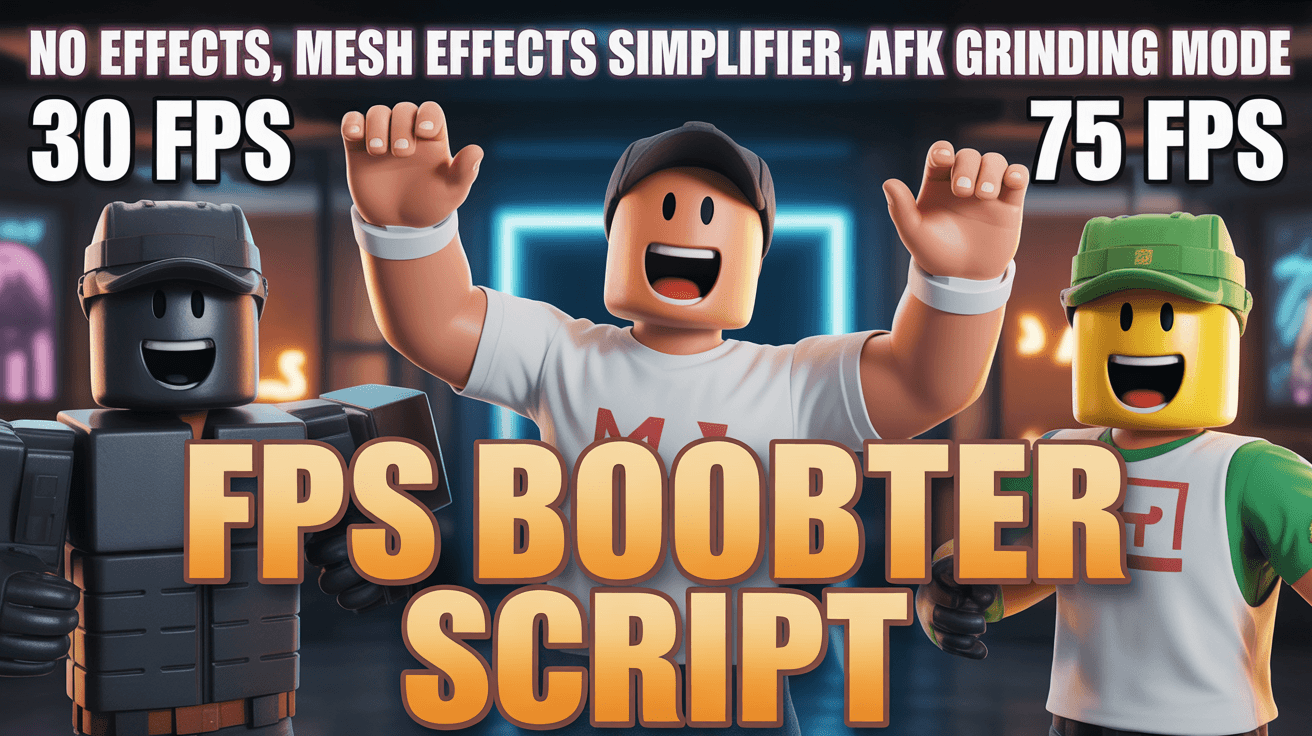
roblox fps thumbnail, booster script design, optimization tutorial
1280x720
Best Use Cases for This Thumbnail Template
Performance Optimization Guides
Optimization videos need proof at a glance, and this split-screen setup delivers that instantly. Viewers can compare the dark 30 FPS side against the bright 75 FPS side without reading a long title, which is exactly what a low-friction tutorial thumbnail should do. The visual difference creates confidence that the video will show a real improvement rather than a vague collection of settings tweaks.
Customization tip: Use your actual FPS numbers on both sides so the promise feels specific to your test setup instead of generic.
Example titles:
How I Took Roblox From 30 FPS to 75 FPS
The Best Roblox Performance Fixes for Weak PCs
My Real Test of This Roblox FPS Booster Script
Low-End Device Tutorials
Low-end audiences click when they feel the creator understands their exact pain. The dark left side represents lag visually, not abstractly, and the clean right side shows the outcome they want in practical terms. That emotional clarity matters because viewers searching for fixes are impatient. They want evidence of relief before they commit to a tutorial, and this thumbnail provides it fast.
Customization tip: Keep the side-by-side layout, but add your device type or graphics preset in the top banner if the video targets a specific setup.
Example titles:
Roblox Settings That Saved My Old Laptop
If Your Roblox Feels Laggy, Start With These Fixes
A Simple Script Setup for Better Roblox Frame Rate
Why This Works
The orange-and-blue palette carries a useful meaning split. Orange on the central headline feels energetic and solution-oriented, while the blue glow in the background keeps the frame technical rather than chaotic. That helps the viewer read the video as a practical upgrade, not just a loud promise. For creators, it is a strong middle ground between hype and trust for utility-focused gaming content.
The split-screen composition removes ambiguity. Viewers do not need to imagine what the improvement looks like because the before and after are already staged side by side. That structure is highly efficient for optimization videos, where the biggest risk is sounding abstract. By letting the image do the comparison, the creator earns the click before explaining methods, benchmarks, or settings inside the video.
Numbers anchor the promise. A label like 75 FPS feels testable in a way that smoother gameplay does not. Combined with the cheering avatar, the frame balances data and emotion, which is important for broad gaming audiences. It reassures technical viewers while still giving casual players an easy reason to care about the result.
Creator Fit
Best fit: Best for Roblox utility channels, script reviewers, and settings-focused creators in the 1K to 100K range who publish direct help content for players on weak or mid-tier devices. It suits creators whose tone is practical, fast, and solution-first. The thumbnail is strongest when the upload includes visible benchmarks or side-by-side proof.
Not recommended for: Not recommended for roleplay videos, story games, or generic Roblox news. The FPS numbers, split comparison, and feature list promise a technical fix, so using this style on entertainment content would create a false expectation and weaken click satisfaction.
Video Hooks:
Hook 1: "If Roblox is stuck running badly on your setup, I am going to show you the exact script and settings combination that gave me the biggest frame jump."
Hook 2: "This is not a vague graphics guide. I tested the before and after, and the difference is obvious enough that you can feel it in the first minute."
Hook 3: "Before you buy new hardware, try these three changes because one of them made the biggest difference by far."
These hooks fit because the thumbnail promises a clear before-and-after performance result, so the intro has to validate measurable improvement immediately.
More you like
Spider-Man Kraven YouTube Thumbnail Template
Train Door Horror YouTube Thumbnail Template

Goku Showdown YouTube Thumbnail Template
Stream Viewer Spike YouTube Thumbnail Template

Zombies Legendary Loot YouTube Thumbnail Template
Jett God Mode YouTube Thumbnail Template
KaiSa Master Tips YouTube Thumbnail Template
Minecraft Christmas Gift YouTube Thumbnail Template
Ready to 3x Your YouTube Views?
Join 10,000+ creators who've discovered the secret to viral thumbnails