Kling 2.6 Is Here: Motion Control + Native Audio
The AI video model behind those viral baby dance videos just got even better. Now with motion transfer and built-in audio.
|
5 min
TL;DR
You've probably seen those AI baby dance videos taking over TikTok. That's Kling 2.6's Motion Control — upload any photo, add a dance video as reference, and watch your character come to life. Plus, Native Audio means your videos now come with synchronized sound. Here's how to try it.
If you've been scrolling TikTok lately, you've definitely seen those AI baby dance videos, pets grooving to viral choreography, or the Stranger Things deepfake clips that racked up 14 million views. That's Kling 2.6 Motion Control at work. One photo + one dance video = instant viral content. The platform now has 60 million users and has generated over 600 million videos.
Ready to try it? Jump to Try It on Alici or keep reading for what's new.
See It in Action
The formula behind these videos is simple: Your motion + Any character = Viral content.
Motion Control: Make Any Character Dance
The core idea: Upload a reference video of someone moving — yourself, a dancer, anyone — and Kling 2.6 extracts the skeletal motion and transfers it onto whatever character image you provide.
What you can do with this:
Create dance videos without showing your face — Record yourself dancing, then let an anime character, 3D avatar, or even your dog "perform" those exact moves.
Bring your IP characters to life — Brand mascots, virtual influencers, game characters — they can now move exactly the way you want.
Cross-species motion transfer — Human dance moves can animate pets, cartoon characters, or even inanimate objects. The AI adapts the skeleton automatically.
Technical specs:
Video length: 3-30 seconds
Resolution: Up to 1080p (Pro mode)
Reference video requirements: Clear subject, clean background, moderate motion speed
For the full walkthrough, check out our Complete Motion Control Tutorial.
Native Audio: Videos That Come With Sound
Previous AI video models generated silent clips — you'd create the visuals, then manually add audio in post-production. Kling 2.6 generates video and audio together. The model understands that a crashing wave doesn't just look like a crash — it sounds like one too.
What it can generate:
Character dialogue — Automatic lip-sync so mouth movements match the speech.
Voiceover and narration — Explanatory audio that matches your video's pacing.
Environmental sounds — Wind, traffic, crowds, background music — added automatically based on the scene.
Voice cloning (coming soon) — Train the model on your voice, then apply it to any character.
Technical specs:
Audio sample rate: 48kHz
Supported types: dialogue, narration, singing, ambient sounds, complex soundscapes
Try It on Alici
Kling 2.6 is now available in Alici's AI Video Studio. No regional restrictions — available globally.
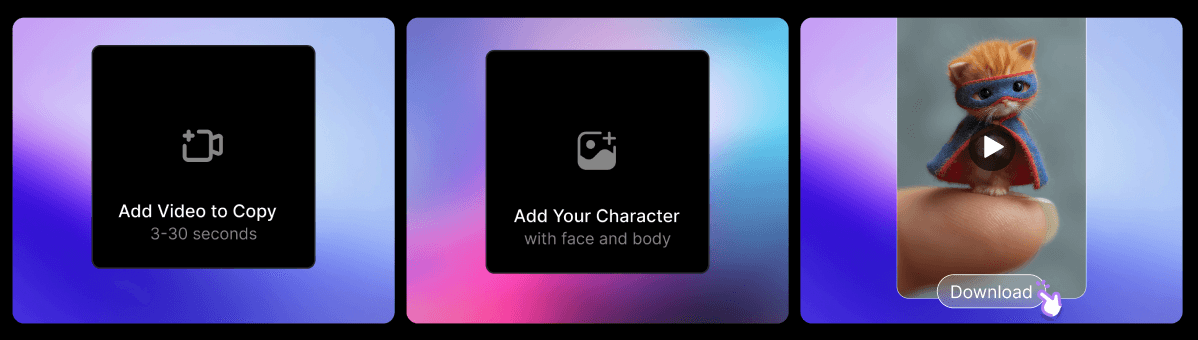
Step 1: Upload your character image
Choose who you want to animate — a person, an anime character, your pet, even a toy. The image should be clear with the subject easy to identify.
Step 2: Upload your reference motion video
Upload a 3-30 second video as motion reference. This can be you dancing, a clip from the internet, or any movement you want to transfer. Keep the subject visible and centered.
Step 3: Generate and download
Hit generate and wait a few minutes. Kling 2.6 transfers the motion onto your character and outputs a complete video. Happy with it? Download. Want changes? Adjust parameters and regenerate.
Pricing: Video generation uses credits. Motion Control Pro mode costs more than standard text-to-video — check current rates in the studio.
Create Your First Kling 2.6 Video →
Creative Ideas to Try
Motion Control + Native Audio together unlock content that used to require a production team:
AI Baby Dance (the hottest trend right now)
Upload a baby photo, pair it with a viral dance video, and generate a dancing AI baby. These videos regularly hit millions of views on TikTok.
Pet Dance Videos
Make your cat or dog dance to human choreography. The AI automatically adapts human skeleton movements to animal bodies — and the results are surprisingly natural.
Virtual Influencers / IP Characters
Brand mascots, game characters, anime avatars — now they can "perform" any motion you want, and with Native Audio, they can talk too.
Anonymous Dance Creator
Love dancing but don't want to show your face? Record your moves, let an AI character take the spotlight. Your choreography, their face.
Instant Video Localization
Same visuals, different voiceover. Use Native Audio to quickly create multi-language versions of the same video.
Kling 2.6 vs 2.5: What Changed?
Feature | Kling 2.5 | Kling 2.6 |
|---|---|---|
Motion Control | Not available | Full skeletal transfer |
Native Audio | Silent video only | 48kHz synchronized audio |
Max Video Length | 10 seconds | 30 seconds (Motion Control) |
Lip Sync | Manual post-production | Automatic with dialogue |
Hand Rendering | Often problematic | Significantly improved |
Bottom line: 2.5 was about visual quality. 2.6 adds control and completeness — you dictate the motion, and the AI handles the sound.
FAQ
What's the biggest difference between Kling 2.6 and 2.5?
Kling 2.6 adds two features 2.5 didn't have: Motion Control (animate characters using reference videos) and Native Audio (generate synchronized sound with video). Version 2.5 produced silent video with no direct motion control.
What's the maximum video length Kling 2.6 supports?
Motion Control mode supports up to 30 seconds. Standard text-to-video and image mode max out at 10 seconds. For longer content, generate in segments and stitch together.
Can I use my own voice with Kling 2.6?
Voice cloning is rolling out gradually. Currently, you can generate AI voices via text prompts or upload audio files for reference. Full custom voice training is expected in future updates.
What kind of reference video works best for Motion Control?
Use reference videos with clear subject visibility, clean backgrounds, good lighting at 30fps or higher, and moderate motion speed. Keep the subject relatively centered. Avoid blurry or shaky footage.
Does Native Audio work with Motion Control?
Yes. You can combine both — transfer motion from a reference video AND generate synchronized audio in the same output. That's how you create a dancing character with matching background music, or a talking animated figure.
Kling 2.6 is now available on Alici. For detailed tutorials, see our Motion Control Guide.
🎁
Limited-Time Creator Gift
Start Creating Your First Viral Video
Join 10,000+ creators who've discovered the secret to viral videos