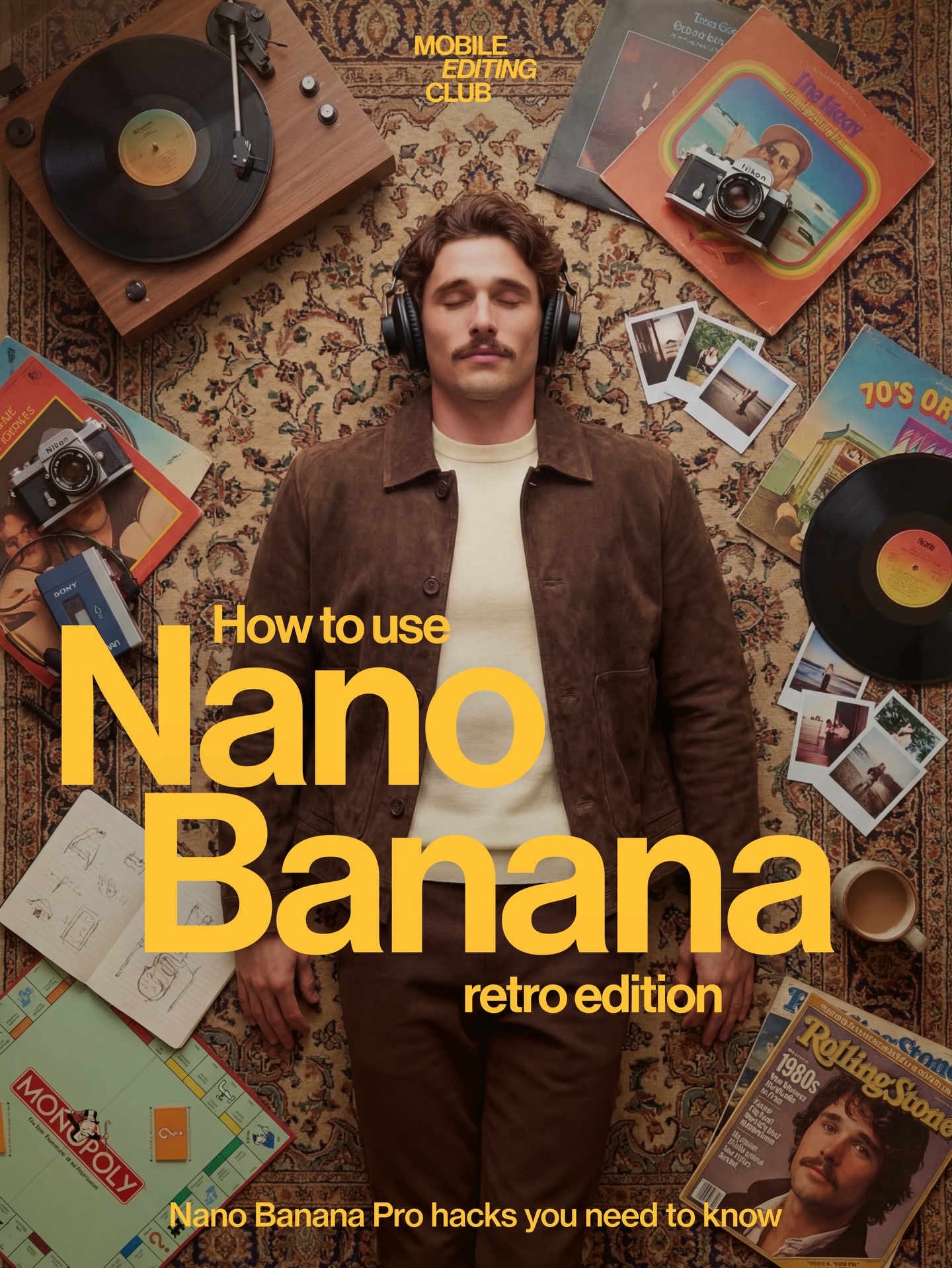
This image works because it transforms a software tutorial into a lifestyle world. Instead of showing a dashboard or generic screen mockup, it creates a tactile environment around the idea of editing. Vinyl, magazines, cameras, headphones, printed photos, and warm brown clothing all turn the cover into a full creative identity rather than a simple tool explainer.
Most AI-tool covers look like product demos. This one looks like culture. The top-down composition feels deliberate and collectible, almost like an album sleeve or magazine spread. That gives the cover a stronger emotional hook because viewers are not only learning about a tool. They are buying into a vibe.
| Element | Why It Works |
|---|---|
| Top-down body flatlay | Creates immediate graphic clarity and makes the cover feel designed rather than incidental. |
| Vinyl and turntable | Signal analog nostalgia and reinforce the retro-editing concept. |
| Printed photos and camera | Tie the image directly to image-making and editing culture. |
| Warm brown styling | Unifies the subject and props into one coherent decade-coded palette. |
| Patterned rug base | Acts as both texture and stage, holding all objects together visually. |
This frame combines three visual systems at once: creator tutorial packaging, analog nostalgia, and editorial flatlay storytelling. The strongest move is the decision to make the person part of the object arrangement. He is not posing in front of the scene. He is embedded inside it, which makes the whole composition feel designed with intent.
The result is also highly reusable because it proves that educational covers do not need to look technical. A tutorial can be sold through atmosphere and identity just as effectively as through UI or screenshot-based design.
| Prompt Move | Purpose |
|---|---|
| Use a centered top-down flatlay portrait | Creates strong poster clarity and leaves room for bold typography. |
| Surround the subject with analog media props | Turns the tutorial into a world, not just a product mention. |
| Keep the palette warm and decade-specific | Strengthens the retro concept without needing explicit costume design alone. |
| Mix personal and creative objects | Makes the scene feel lived-in and narrative rather than decorative. |
| Block modern minimal tech aesthetics | Protects the analog mood and keeps the image distinct from standard AI-tool covers. |
This format works for prompt packs, editing tutorials, filmmaker brands, analog-photo courses, music-production covers, and creator newsletters. The method is simple: define a person, define a surface, define a prop world, and make the composition graphic enough to support title overlays.
Try a cassette-and-typewriter version for a stronger pre-digital feel, a desktop-desk variant for a more work-focused tutorial, or a female-centered version with fashion-photography props. Another strong remix is to build the same composition around a specific creative niche such as filmmaking, journaling, or sound design.
When prompting retro creator covers, do not rely on “70s aesthetic” alone. Name the objects, the palette, the surface, and the camera angle. The nostalgia only becomes convincing when it is built through tangible things. That is why this image works: every prop helps tell the same story.