0:00 / 0:00
▶
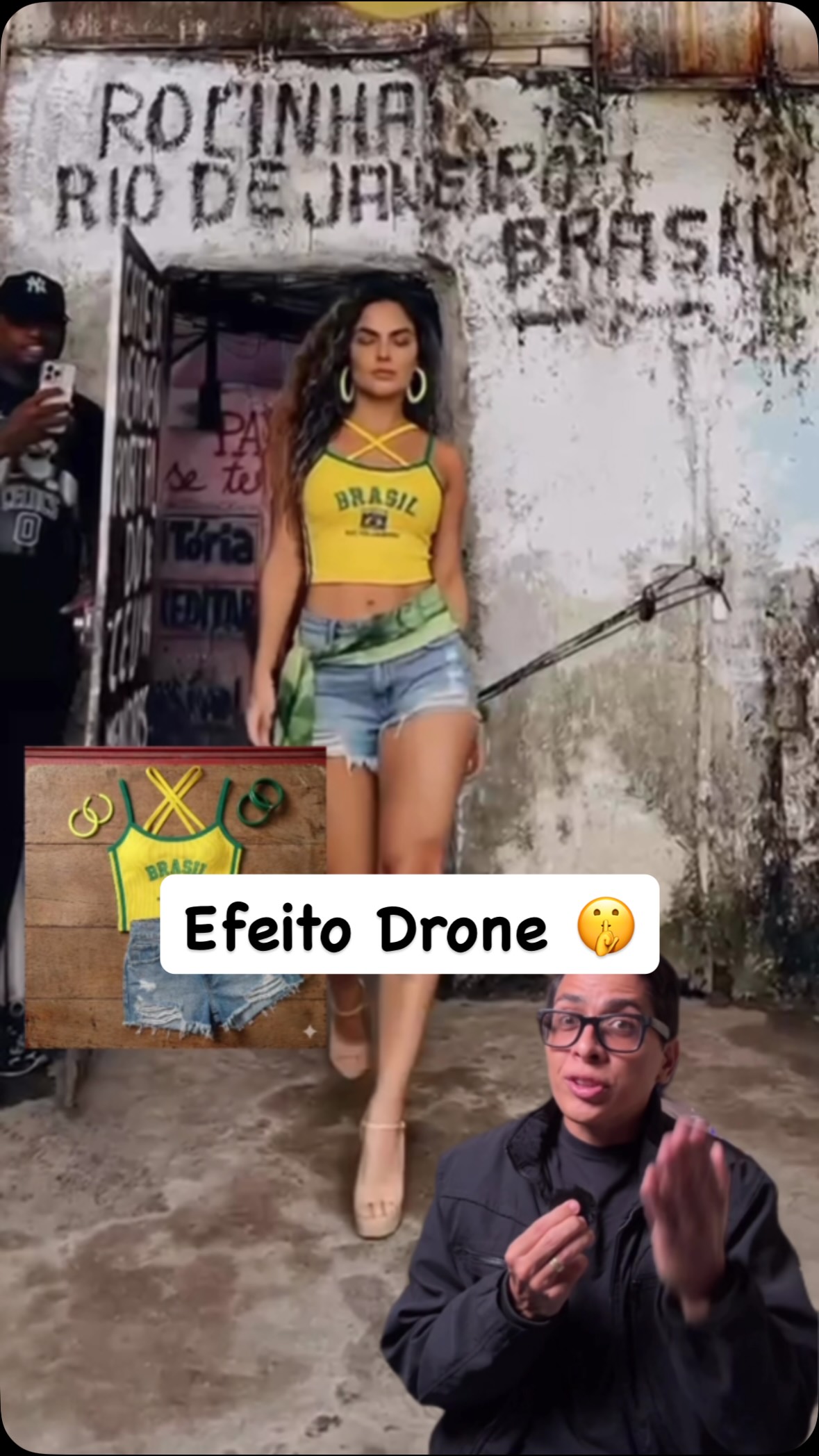
This case study analyzes a high-performing tutorial by creator @bruno.ia1, which demonstrates how to hijack the viral "Rocinha, Rio de Janeiro" walking trend using advanced AI tools. The video perfectly blends cinematic editorial portraiture with a "behind-the-curtain" look at AI video generation. By using a combination of Freepik's image generator and Kling AI's Omni model, the creator shows how to place a consistent AI-generated model into a specific, culturally relevant setting—a weathered favela alleyway—without ever leaving a home studio. The aesthetic is characterized by warm, natural daylight, vibrant "Brasil" themed wardrobe, and a rhythmic editing style that syncs with the trending audio. This content appeals to indie creators looking to scale their production value using digital fashion and AI influencers.
The video is a split-screen and overlay-heavy tutorial. It features the creator in a professional studio setting (dark jacket, glasses, soft key lighting) acting as the narrator, while the background and overlays showcase the AI generation process. The "target" video features a Brazilian female model with long, wavy brown hair, wearing a yellow "Brasil" crop top and denim shorts. She walks through a narrow alley in Rocinha, Rio de Janeiro, characterized by weathered concrete walls, "ROCINHA" graffiti, and dense urban architecture. The lighting in the AI segments mimics harsh, mid-day sun, creating realistic shadows that ground the character in the environment. The music is a rhythmic, upbeat Brazilian track that provides the "heartbeat" for the model's walk and the video's cuts.
| Time Range | Visual Content | Shot Language | Lighting & Color | Viewer Intent |
|---|---|---|---|---|
| 00:00–00:08 | AI model walks out of a door in Rocinha. | Medium shot, tracking back. | Natural daylight, vibrant yellow/green. | Hook: Show the "impossible" result immediately. |
| 00:09–00:31 | Screen recording of Freepik image generation. | UI capture / Overlays. | Digital UI, clean. | Tutorial: Establish the "Character Consistency" step. |
| 00:32–00:41 | CapCut editing interface showing video clips. | UI capture. | Dark mode UI. | Tutorial: Show the "Preparation" phase. |
| 00:42–01:08 | Kling AI "Omni" tool swapping the model. | UI capture + Side-by-side. | Comparison view. | The "Aha!" moment: Demonstrating the AI swap. |
| 01:09–01:21 | Final cinematic result + Creator CTA. | Wide shot (favela) + Talking head. | Cinematic grade. | Reinforce value and drive engagement. |
This video succeeds by tapping into the "Travel without Traveling" aspiration. The Rocinha trend is visually iconic but geographically inaccessible to most. By showing a way to "hack" this trend using AI, the creator provides immense utility value to other creators. Psychologically, it triggers the "curiosity gap"—viewers want to know how a realistic person was placed into a complex, moving scene so seamlessly. The use of a consistent character (the AI model) also taps into the growing interest in "AI Influencers," which is a high-growth niche for 2024-2025.
From a platform perspective, the video maximizes watch time through a fast-paced, step-by-step structure. Each new tool shown (Freepik -> Kling -> CapCut) acts as a micro-hook, keeping the viewer engaged to see the "next step." The loop effect is created by the final high-quality result, which often prompts viewers to re-watch the beginning to see the "before" state again. The caption's call-to-action ("Comment for the guide") is a classic engagement bait strategy that signals to the algorithm that the content is highly relevant, boosting its reach.
Identify a viral "walking" or "lifestyle" trend on TikTok or Instagram. This workflow suits accounts focused on AI Art, Digital Marketing, or Fashion Tech.
Download a high-quality video of the trend you want to replicate. Ensure the camera movement is relatively steady (gimbal or handheld is fine, but avoid extreme motion blur).
Use an image generator to create your "AI Influencer." Prompt Tip: Use "Full body shot, [Ethnicity] woman, [Wardrobe details], standing in [Pose from reference video], high detail, 8k."
Save 3-4 images of your character in different poses but the same outfit. This "Character Sheet" will be used as a reference for the video AI.
Upload your reference video to Kling AI. Use the "Omni" or "Character Swap" feature. Prompt: "Replace the person in the video with the character from @image1. Keep the background, lighting, and motion identical."
If the video is long, cut it into 5-10 second segments in CapCut first. Generate each segment individually in Kling to maintain higher quality and consistency.
Stitch the AI-generated segments back together. Apply a color grade (LUT) to unify the AI footage with any real-world overlays. Add the trending audio.
Use a split-screen cover: "Real Trend" vs "AI Version." Use a bold title like "How to Travel with AI."
Kling AI's "Omni" feature is currently the leader for maintaining background and motion during a character swap.
"Consistent identity," "Natural lighting," and "Photorealistic texture."
This usually happens if the reference image doesn't match the head angle of the original video; try using multiple reference images.
Add a slight film grain and motion blur in CapCut to mask the "too clean" AI look.
Instagram currently favors high-aesthetic "AI Magic" tutorials, while TikTok prefers raw, "behind-the-scenes" builds.