0:00 / 0:00
▶
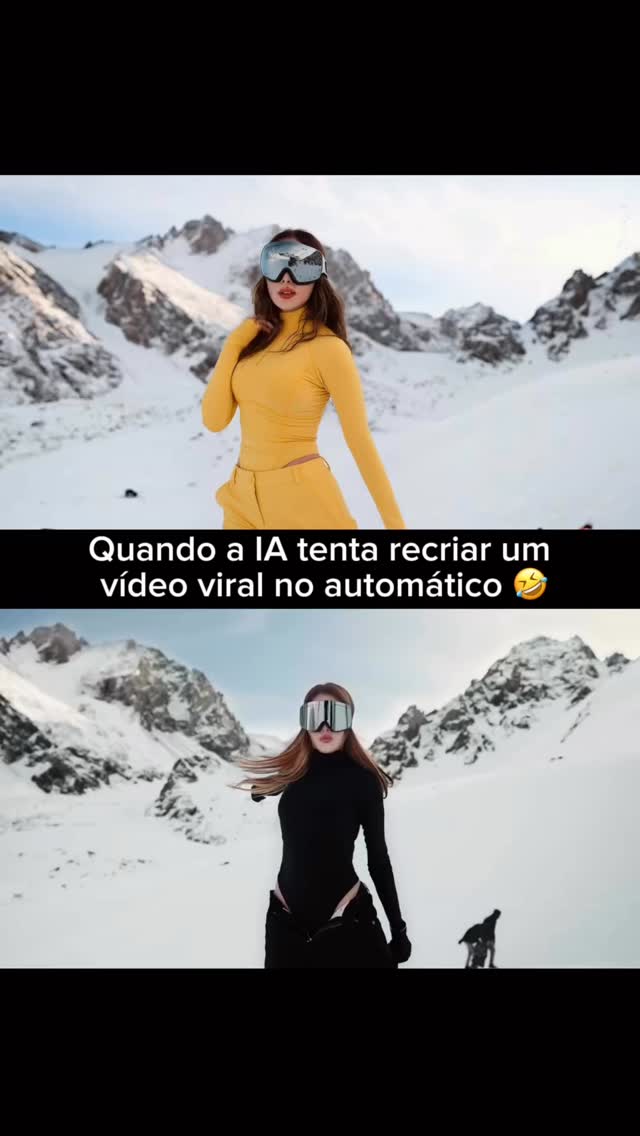
This case study analyzes a high-performing split-screen video that leverages the "AI recreation" trend. The video features a cinematic editorial portrait of a woman in a snowy mountain setting, wearing high-contrast ski attire (vibrant yellow vs. sleek black). By juxtaposing a "real" video with an "AI-generated" version that intentionally highlights common AI artifacts (like extra limbs and fluid anatomy), the creator taps into the current cultural fascination and humor surrounding AI's limitations. The aesthetic is "Premium UGC" meets "Tech Satire," making it highly shareable across Instagram and TikTok.
The video is a vertical split-screen. The top half features a woman in a bright yellow ribbed long-sleeve top and matching ski pants, wearing silver-mirrored ski goggles. The bottom half shows the same woman (or an AI-generated likeness) in a black version of the same outfit. Both are set against a breathtaking backdrop of jagged, snow-covered peaks under a clear, bright sky.
The lighting is harsh, direct sunlight characteristic of high-altitude environments, creating deep shadows and brilliant highlights on the snow. The color palette is dominated by the stark white of the mountains, the deep blue of the sky, and the high-saturation pop of the yellow outfit. The movement is rhythmic, following the beat of a "Papaoutai" remix, with the subject performing stylized, robotic-yet-fluid dance poses. Notably, the "AI" version in the bottom panel exhibits classic generative glitches—extra arms appearing and disappearing—which serves as the comedic core of the content.
| Time Range | Visual Content | Shot Language | Lighting & Color | Viewer Intent |
|---|---|---|---|---|
| 00:00 - 00:03 | Subject poses with ski goggles on, mountains in background. | Medium Shot (MS), static. | High-key, natural sun, high contrast. | Hook: Establish the "Premium Aesthetic" and the split-screen premise. |
| 00:03 - 00:07 | Rhythmic arm movements; bottom panel shows "glitched" extra arms. | Medium Shot, slight handheld jitter. | Vibrant yellow vs. deep black contrast. | Engagement: Trigger "Wait, what?" reaction to the AI glitch. |
| 00:07 - 00:11 | Subject turns, hair flows; AI version struggles with limb consistency. | Medium Shot, focus on torso and arms. | Cool blue shadows in the snow. | Retention: Keep viewer watching to see more "AI fails." |
| 00:11 - 00:14 | Final pose, subject looks directly at camera through goggles. | Medium Shot, closing pose. | Bright, clean finish. | CTA: Encourage comments about AI's current state. |
This video succeeds by subverting expectations. The top panel sets a high bar for "Influencer Aesthetic"—perfect lighting, expensive gear, and a stunning location. The bottom panel, labeled as "AI trying to recreate it," introduces a layer of humor and relatability. People love seeing technology "fail" in funny ways, especially when it involves something as uncanny as extra limbs appearing during a dance.
The creator targeted two distinct but overlapping audiences: the "Travel/Aesthetic" crowd and the "AI/Tech" community. By combining a high-end ski resort vibe with a commentary on generative AI, the video appeals to both groups. The use of a popular, rhythmic track further boosts its "loopability," as viewers re-watch to catch the exact moment the AI glitches occur.
From a platform perspective, the high watch time is driven by the split-screen comparison. Viewers' eyes dart between the top and bottom panels to find differences, effectively doubling the "perceived" content density. The "AI fail" aspect triggers high save and share rates, as users send it to friends with captions like "AI is getting out of hand" or "Look at the extra arm!"
Choose a high-aesthetic activity (skiing, tennis, luxury dining). This video suits "Lifestyle" or "Tech/AI" accounts looking to bridge the gap between high-end production and viral trends.
To maintain the same person across "Real" and "AI" versions, use a character sheet. If using AI tools like Midjourney, use the --cref (Character Reference) tag with a photo of your subject to ensure the face and hair remain consistent.
Film your "Real" version (the top panel) in high resolution. Ensure the background is clean and the lighting is consistent. For the ski vibe, use a 24mm or 35mm equivalent lens to capture both the subject and the vast landscape.
Use an Image-to-Video tool (like Luma Dream Machine, Kling, or Runway Gen-2). Upload a frame from your "Real" video and use a prompt that describes the movement but *intentionally* leaves room for AI "hallucinations." Pro Tip: To get the "extra arm" effect, use a prompt like "woman dancing with fluid, rapid arm movements, morphing limbs."
Use CapCut or Premiere Pro. Place the "Real" video on top and the "AI" video on the bottom. Add a text overlay in the center with a relatable hook like "When AI tries to be an influencer."
Choose a track with clear, rhythmic beats. Sync the most dramatic movements (or glitches) to the "drops" or "snare" hits in the music.
The cover should show both panels clearly. Use a title like "AI vs. Reality" or "The Future of Content? 🤖" to pique curiosity.
On Instagram, use the "Remix" feature if you are reacting to someone else's video. On TikTok, ensure you use the "AI-generated" label to comply with platform transparency rules while also leaning into the trend.
Use Luma Dream Machine or Kling AI with the "Image-to-Video" feature for the best subject consistency.
"Character consistency," "High-contrast lighting," and "Rhythmic motion."
AI often struggles with goggles and reflections; use a "Character Reference" image to lock the facial features.
If you *want* to avoid the AI look, use lower motion buckets and provide a very detailed "Negative Prompt" for artifacts.
Instagram Reels currently favors high-aesthetic "comparison" content, while TikTok loves the "AI fail" humor.
Use the platform's built-in "AI-generated" label and mention it clearly in the caption to build trust.