0:00 / 0:00
▶
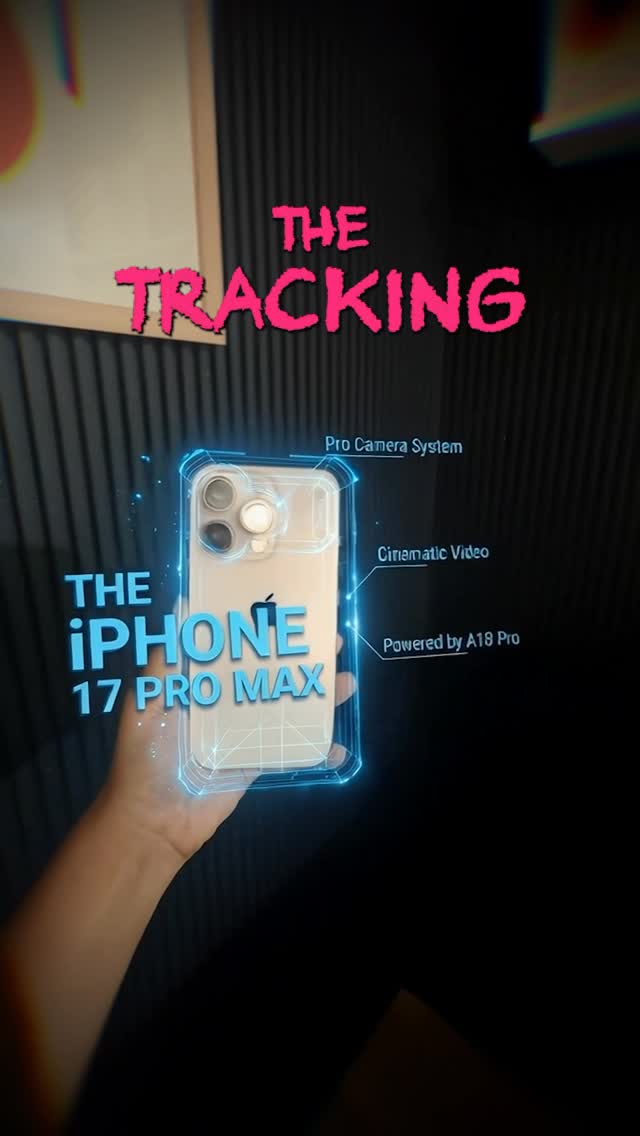
This viral tutorial by @cyborggirll demonstrates a high-end "Cinematic AR Tracking" effect that looks like professional VFX but is achieved entirely through AI. The video features a sleek, tech-focused aesthetic, combining warm indoor lighting with vibrant, glowing blue holographic overlays. By leveraging tools like Kling AI and Gemini (referred to as Banana Pro), the creator shows how to anchor 3D text to a moving object—specifically an iPhone—in under 30 seconds. This case is a prime example of "Tech-Magic" content: taking a complex post-production task and simplifying it for the average creator using generative AI.
The video alternates between direct-to-camera address, product close-ups, and screen recordings of the AI workflow. The lighting is a sophisticated "home studio" setup: a warm key light on the creator's face, a soft lamp in the background, and a subtle blue/pink color grade that gives it a futuristic, "cyborg" vibe. The editing is fast-paced, with text overlays popping in sync with the narration.
| Time Range | Visual Content | Shot Language | Lighting & Tone | Viewer Intent |
|---|---|---|---|---|
| 00:00–00:02 | iPhone 17 Pro Max with glowing blue AR text tracking its movement. | Close-up (CU), Handheld movement | Dark background, neon blue highlights | The Hook: Show the "impossible" result immediately. |
| 00:02–00:05 | Creator talking to a Rode microphone. | Medium Close-up (MCU) | Warm, cinematic, soft bokeh | Establish authority and persona. |
| 00:05–00:08 | Hand filming a phone against a slatted wall. | Point-of-View (POV) | Low light, moody | Step 1: Demonstrate the raw footage needed. |
| 00:08–00:20 | Screen recording of "Banana Pro" (Gemini) interface. | UI Capture | Digital interface | Tutorial Value: Show the specific AI prompt. |
| 00:23–00:27 | Screen recording of Kling AI interface. | UI Capture | Digital interface | Tutorial Value: Show the final rendering step. |
| 00:28–00:31 | Final rendered video with perfect tracking. | CU, Handheld | Saturated, high contrast | The Payoff: Confirm the method works. |
This video succeeded because it targets the "Aspiration vs. Effort" gap. Every creator wants high-end VFX, but few have the hours to learn After Effects. By promising this result in "under 30 seconds," the creator triggers an immediate "Save" response from viewers who want to try it later.
The choice of subject—the iPhone 17 Pro Max (a futuristic, speculative product)—adds a layer of "leak" or "concept" intrigue, which naturally draws more eyeballs than a standard tech review. The creator uses a Rode microphone as a prop, which signals "professional creator," further building trust in the tutorial's quality.
Platform Perspective: Instagram's algorithm prioritizes "Watch Time" and "Saves." The fast-paced UI recordings force users to re-watch or pause to read the prompts, effectively doubling the watch time. The clear, bold text overlays ("Step 1", "Step 2") make the content accessible even with the sound off, increasing its reach in the Reels feed.
The "Tool Reveal" Template:
VFX just got an AI upgrade. 🚀
I used to spend hours tracking text in After Effects, but now I just use [Tool Name].
Here is the exact workflow I used to get this tracking effect.
Which object should I try this on next? 👇
#AI #VFX #ContentCreatorTips
Kling AI for the video generation and Google Gemini (or "Banana Pro") for the initial layout design.
"Anchored," "3D motion," and "Holographic."
In this specific effect, you are only generating the object/text; keep the creator's face out of the AI generation step to maintain consistency.
Add real-world camera shake and film grain in post-production to mask AI smoothness.
Instagram Reels currently has a higher reach for high-aesthetic tech tutorials.
Use the "AI-Generated" label provided by the platform and mention the tools in the caption.