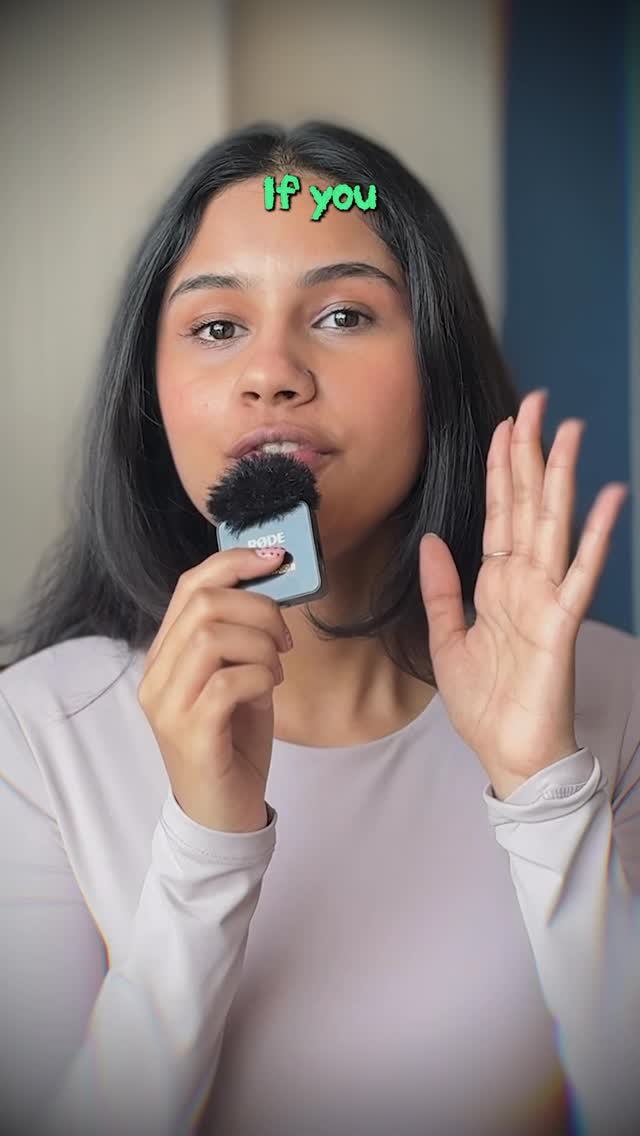
How cyborggirll Made This AI Passport Photo Google Gemini Hack — and How to Recreate It
This viral tutorial by @cyborggirll is a masterclass in "Utility-Driven AI Content." It targets a universal pain point—the dreaded, low-quality passport photo—and offers a high-tech, low-effort solution using Google Gemini. The video blends a polished "iPhone aesthetic" with fast-paced screen recordings, creating a "cinematic editorial" feel for a practical life hack. Key elements include warm, soft indoor lighting, a shallow depth of field that makes the creator pop, and a vibrant, high-contrast color grade with subtle chromatic aberration effects that signal "modern tech influencer."
What You’re Seeing
The video features a young South Asian woman (the creator) speaking directly to the camera in a well-lit home office environment. She holds a small wireless microphone (Rode) as a prop, which adds to the professional "creator" persona. The edit is tight, jumping between her talking head and screen recordings of the Gemini interface. The color palette is dominated by soft purples and neutrals, with bright green and white text overlays that keep the viewer engaged.
Shot-by-Shot Breakdown
Time Range
Visual Content
Shot Language
Lighting & Tone
Viewer Intent
00:00–00:03
Creator introduces the problem (no passport photo).
Medium Close-Up (MCU), static.
Soft, warm key light; blurred background.
Hook: Identify a common problem.
00:03–00:04
Overlay of an official government form.
Graphic overlay.
High contrast, informative.
Establish context/urgency.
00:04–00:08
Screen recording: Navigating to Gemini and uploading a selfie.
Screen capture.
Clean, UI-focused.
Tutorial: Show the "How-To."
00:08–00:10
Typing the specific AI prompt into the chat box.
Close-up on text.
High legibility.
Value: Provide the "secret sauce" prompt.
00:10–00:13
Reveal of the AI-generated passport photo.
Split screen/Overlay.
Professional, studio-lit look.
The "Aha!" moment/Proof of concept.
00:13–00:17
Creator explains printing options with app overlays.
MCU with floating UI elements.
Dynamic, fast-paced.
Practicality: How to get the physical result.
00:17–00:22
Comparison with a "bad" old passport photo.
MCU with photo overlay.
Humorous/Relatable.
Reinforce value through contrast.
00:22–00:25
Outro with call to action (CTA).
MCU, direct eye contact.
Friendly, authoritative.
Retention & Conversion.
Why It Went Viral
The Topic: Solving a Universal "Ugly" Problem
This video succeeds because it tackles a universal human experience: having a terrible passport photo. By framing the solution as an "AI Hack," the creator taps into the current cultural obsession with AI productivity. The "Glow-Up" aspect—turning a casual selfie into a professional, blazer-clad portrait—appeals to our biological desire for status and looking our best. It’s not just a tech tutorial; it’s a "life upgrade."
Platform Mechanics & Signals
From a platform perspective, this video is a Save and Share magnet.
High Save Rate: Users save this because it contains a specific, useful prompt they want to use later.
High Watch Time: The 0–3 second hook ("If you don't have a passport picture...") is immediate. The fast-paced screen recordings prevent viewers from scrolling away during the "boring" parts of the tutorial.
Loop Effect: The prompt is shown briefly, often forcing users to re-watch or pause, which signals to the algorithm that the content is highly engaging.
5 Testable Viral Hypotheses
The "Secret Prompt" Hypothesis: Providing a copy-pasteable prompt in the video creates high "Save" value, as users want to keep the instructions for future use.
The "Professional Polish" Hypothesis: Using a physical mic and high-quality lighting for a simple tutorial builds instant authority, making the AI advice seem more credible.
The "Before/After" Contrast Hypothesis: Showing a "bad" traditional photo vs. a "perfect" AI photo triggers a dopamine response and proves the utility of the hack.
The "Tool-Specific" Trend Hypothesis: Mentioning "Google Gemini" specifically (rather than just "AI") captures search traffic for a trending platform.
The "Zero-Cost" Appeal: Emphasizing that this can be done for free (or very cheap) removes the barrier to entry, increasing the likelihood of shares.
How to Recreate (Step-by-Step)
Identify a "Micro-Pain": Find a small, annoying task (like resizing photos, writing emails, or organizing files) that AI can solve.
Script the Hook: Start with "If you don't have [X]..." or "Stop doing [X] the hard way."
Set the Scene: Use a clean background with depth. Position yourself near a window for soft light, or use a ring light with a diffuser.
Audio is King: Use a dedicated microphone. Even a cheap lavalier mic makes you sound 10x more professional than phone audio.
Record the UI: Use a screen recording app to capture the AI tool in action. Ensure the text is large enough to read on a mobile screen.
The "Magic" Prompt: Clearly display the prompt you used. Use a contrasting text color (like the green used in the video).
Edit for Pace: Remove every "um," "ah," and long pause. Use "J-cuts" (audio starts before the video) to keep the flow seamless.
Add "Vibe" Filters: Apply a slight glow or chromatic aberration effect in CapCut to give it that "tech-aesthetic" look.
Growth Playbook
3 Opening Hook Lines
"Stop paying $20 for passport photos that look like mugshots."
"I just found the ultimate Google Gemini hack for your career."
"How to turn any selfie into a professional headshot in 30 seconds."
4 Caption Templates
The Direct Value: "No more bad passport photos 📸. I used Gemini to turn a bedroom selfie into this. Prompt is in the video! Have you tried AI for photos yet? 👇 #AIhacks #Gemini"
The Money Saver: "Save your money 💸. You don't need a professional studio for your next ID. Just your phone and this prompt. Save this for when you renew your passport! #Productivity #LifeHacks"
The "Did You Know?": "Did you know Gemini can do THIS? 🤯 Most people just use it for text, but the image editing is elite. Check the steps in the reel. What should I try next? #GoogleGemini #AITips"
The Relatable One: "We all have that one passport photo we're ashamed of... 💀 Never again. Use this AI trick to look your best on your next trip. Tag a friend who needs a glow-up! #TravelHacks #AI"