Télécommande égarée ?
Avec l’application Samsung SmartThings, le smartphone se transforme en télécommande complète pour la TV Samsung : changer de chaîne, régler le volume, lancer ses applis… tout est possible directement depuis l’écran du téléphone. Plus besoin de fouiller entre les coussins du canapé.
How to Create a SmartThings Phone TV Remote AI Video
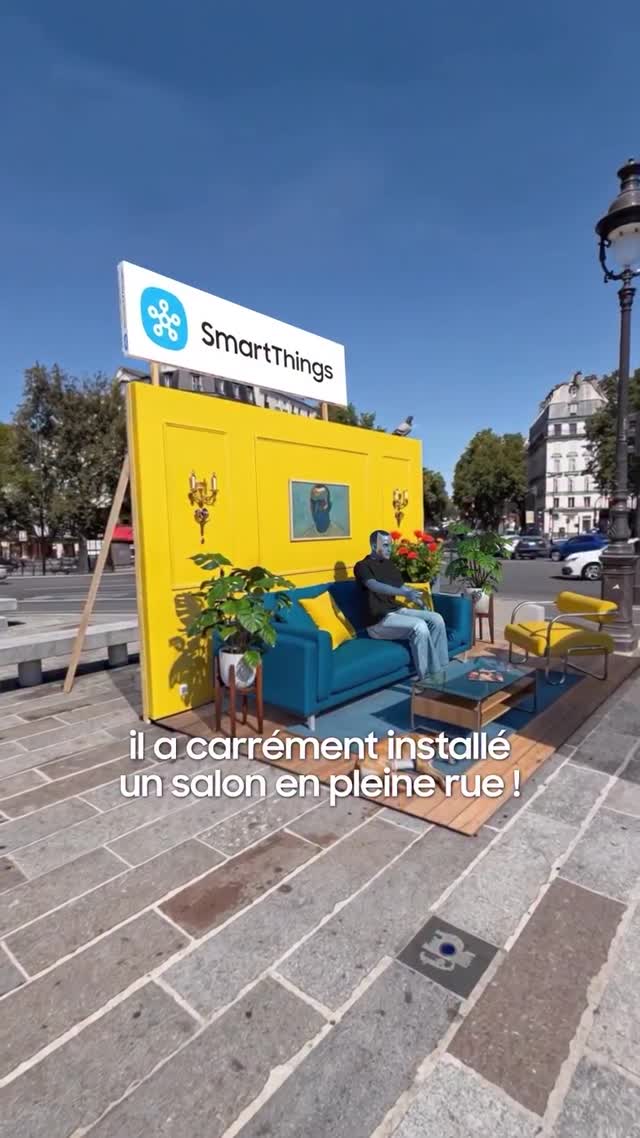
This short French promo video uses a simple product story and a memorable physical setup to make a utility feature feel more interesting than a normal app demo. Instead of showing someone on a couch at home, the ad installs an entire living room in the middle of a city square, then uses that unexpected environment to explain how a Samsung phone can become a full TV remote through SmartThings.
That makes the clip valuable for more than prompt reconstruction. It is also a good growth case study in how to turn a practical software feature into a visually legible social video. The product claim is straightforward, but the staging gives it novelty, while the first-person remote demonstration keeps the message concrete and usable.
Overview
The video opens with an outdoor city-square installation that looks like someone lifted a living room out of a home and placed it directly on the street. A bright yellow wall, SmartThings signage, sofa, plants, and furniture create an immediate visual interruption. From there, the ad moves to a large Samsung TV and a seated first-person point of view that frames the missing-remote problem and the phone-as-remote solution.
The structure is compact and efficient. First it earns attention with the unusual physical setup. Then it narrows into a direct feature demonstration. Finally, it closes with a brand end card. This is a very clear three-step product reel format: stop the scroll, explain the use case, close with brand memory.
Why the Ad Hook Works
The feature itself is not visually dramatic. “Use your phone as a TV remote” is practical, but on its own it could become a bland screen-recording style ad. The campaign solves that by externalizing the idea into a public installation. A living room in the middle of a city square is immediately strange enough to make people look.
That contrast matters. The environment feels playful and public, while the feature message is private and everyday. This combination lets the ad feel larger than the product claim without becoming confusing. The viewer gets visual surprise first, then a useful software explanation second.
Street Living Room Staging
The set design does more work than the runtime suggests. The yellow wall is bright and highly visible from a distance. The teal sofa and interior plants instantly communicate “living room.” The SmartThings sign ties the installation to the brand before the feature explanation even begins. By placing domestic furniture outdoors, the ad creates a visual metaphor for smart-home control that extends beyond the home itself.
This is especially useful for short-form marketing because the first frame must carry context fast. Viewers do not need to hear or read everything immediately. They can understand that something unusual is happening with a branded living-room setup in public space. That buys the ad a few extra seconds to explain the actual feature.
Remote-Control Demo Structure
After the setup, the ad pivots into a straightforward POV demo. The camera sits in a seated position facing the TV and coffee table. A hand enters with a remote, then the screen becomes inactive or reflective, signaling the remote-control problem. Next, a smartphone is lifted into frame, and the phone takes over the control task. The TV responds, and the floral SmartThings display returns.
This is a strong product-video move because it uses a before-and-after sequence without requiring long explanation. Problem: remote missing or unavailable. Solution: use the smartphone. Outcome: the TV works again. The visuals tell the story clearly enough that even without voiceover, the message is still understandable.
Branding and Subtitle Strategy
The branding in this clip is visible but not chaotic. SmartThings appears on the large sign at the installation, on the TV visual, and again in the final end card. That repetition is enough to ensure recall without cluttering every frame with additional promotional elements.
The French subtitles also help. They turn the visual story into a guided explanation without requiring speech. In social video, subtitles can do more than accessibility work. They can carry the copywriting rhythm of the ad while allowing the visuals to stay clean. Here they frame the street-installation surprise and the remote-replacement logic in a way that supports the product demo.
How to Prompt This Type of Product Video
To recreate this video well, the prompt needs to preserve the ad structure, not just the objects. Start by locking the public living-room installation: bright yellow wall, large SmartThings sign, city square, teal sofa, plants, and a casually seated person. Then move into the TV demo portion: a freestanding outdoor Samsung television, glass coffee table, first-person seated perspective, remote problem, smartphone solution, restored TV display, and black end card.
Because this is a branded product explainer, on-screen text matters more than it would in a generic aesthetic reel. The prompt should explicitly call for French subtitle captions and a final SmartThings end card. It should also preserve the utility-story flow rather than letting the generator turn the clip into an abstract lifestyle montage.
No speech is needed here. The video is visually led and subtitle-supported. That should be reflected in the prompt as well: quiet promo video, no voiceover, no spoken performance, just branded demonstration pacing.
Why First-Person POV Improves Utility Demos
The first-person seated viewpoint is an important choice because it makes the feature feel immediately usable. Instead of watching a distant actor manipulate a device, the viewer sees the problem and solution from the position they would occupy themselves. That creates a lightweight participatory effect without requiring interactivity.
For app or smart-home features, this viewpoint often performs better than a wide explanatory shot alone because it shortens the distance between feature and user. The product is no longer being described in theory. It is being enacted in the user’s perspective.
Why the Outdoor Location Strengthens the Message
Using a city square instead of a standard living room sounds counterintuitive for a smart-home feature, but that is what makes the demo memorable. The outdoor setting removes the ad from the expected category of generic connected-home content and turns it into an event. The viewer understands the feature faster because the environment is more surprising than the feature itself.
In practice, this is a good reminder for AI prompt creators and marketers alike: when the product function is simple, the staging may need to do extra attention work. The product story remains straightforward, but the visual wrapper gives it energy.
Marketing Lessons
This clip teaches three useful lessons for product-led short video. First, utility features benefit from a clear physical metaphor or staged environment. Second, the best demos reduce the feature story to a problem and a visible resolution. Third, subtitles can replace voiceover when the visuals are strong enough.
From an SEO and content perspective, this kind of video can support multiple search intents: smart TV remote app demo, SmartThings remote control feature, outdoor activation campaign case study, POV product explainer reel, or mobile phone as TV remote concept. A rich page can serve both marketers and creators who want to understand how to package practical software features into engaging short-form video.
Common Failure Modes
Failure one: losing the branded installation. If the yellow wall, sofa, plants, and sign disappear, the opening loses its surprise and the ad becomes generic.
Failure two: weakening the POV demo. The hand-held remote and phone need to read clearly, otherwise the product function becomes vague.
Failure three: removing subtitle logic. This ad depends on French on-screen explanation instead of voiceover. Without subtitle beats, the promo pacing changes.
Failure four: over-stylizing the video. This is not a glossy cinematic brand film. It works because it feels like an on-location social demo with strong branding.
Failure five: skipping the clean end card. The black SmartThings close is important for recall and campaign coherence.
FAQ
What is the core product message of this video?
The ad shows that a smartphone can act as a full Samsung TV remote through SmartThings, solving the common problem of a misplaced remote.
Why open with a living room in the street?
The outdoor installation is the attention hook. It makes the reel visually distinctive before the product explanation begins.
Does the video need voiceover?
No. The clip communicates through visual staging, product interaction, French subtitle text, and a clear before-and-after feature demonstration.
What type of prompt works best for recreating it?
A chronological product-demo prompt works best, with clear sections for the branded installation, the remote problem, the phone-control solution, and the closing logo card.
Why is the first-person shot effective?
It lets viewers experience the feature from a user perspective, making the utility feel immediate and concrete rather than abstract.
What content cluster could this page belong to?
It fits into clusters around app demo reels, smart-home marketing case studies, Samsung SmartThings features, POV product explainers, and brand activation video breakdowns.