How invideo.io Made This AI Production House AI Portrait
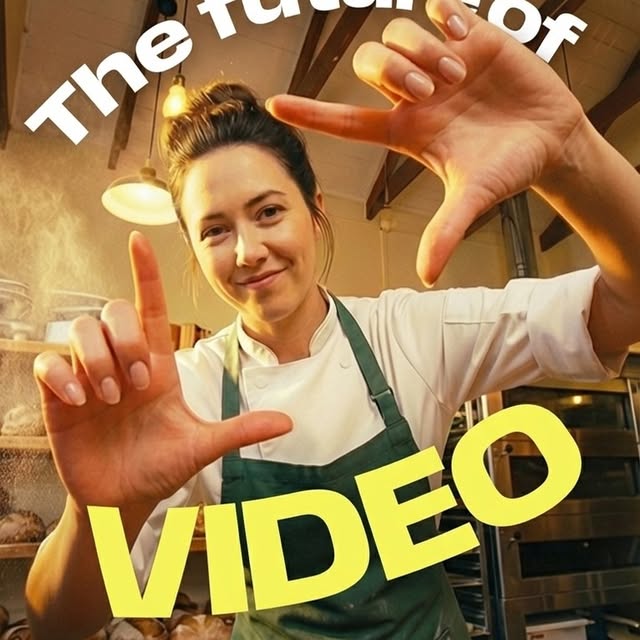
This image is optimized for one job: stop-scroll and trigger clicks. It combines expressive gesture, clear face, and oversized promise text in a single square frame.
Why This Thumbnail Pattern Works
The first mechanism is directional body language. The hand-frame gesture points attention toward the center and implies "watch this" instruction without extra copy. Gestures act like visual CTA arrows.
The second mechanism is immediate semantic clarity. "VIDEO" in large type sets topic in milliseconds. In crowded feeds, explicit text often outperforms subtle design when conversion is the goal.
| Signal | Evidence (from this image) | Mechanism | Replication Action |
|---|
| Gesture CTA | Hands forming a framing shape toward camera | Directs eye and increases click intent | Use one purposeful hand gesture in thumbnail hero shots |
| Topic certainty | Large "VIDEO" text in high-contrast yellow | Reduces ambiguity and improves quick comprehension | Use one dominant keyword in 1-2 words max |
| Human trust anchor | Friendly face and direct eye contact | Boosts approachability and retention | Prioritize face clarity and expression over background detail |
| Context relevance | Chef outfit and kitchen background | Supports niche positioning instantly | Align wardrobe and setting with topic domain |
Use Cases and Transfer
- Tutorial covers: Excellent for how-to or explainers with broad audiences.
- Reel/short hooks: Strong when first frame must communicate topic instantly.
- Course and workshop promos: Useful for conversion-driven educational offers.
- Niche creator branding: Effective when pairing role identity with clear CTA text.
Not ideal: cinematic storytelling trailers, subtle art projects, or text-minimal premium brand campaigns.
Three Transfer Recipes
- Tech Educator Variant
Keep: hand gesture + big keyword + smiling face.
Change: chef kitchen to desk setup and keyword to "AI" or "EDITING".
Template: {domain-specific outfit} {gesture-led close-up} {single big keyword overlay} {warm approachable lighting}
- Fitness Coach Variant
Keep: center face clarity and foreground hands.
Change: environment to gym studio and keyword to "FORM" or "WORKOUT".
Template: {expert role context} {camera-facing confidence} {bold lower-third keyword} {high-energy thumbnail composition}
- Food Creator Variant
Keep: kitchen context and educational promise text.
Change: headline wording and prop in hands.
Template: {culinary environment} {friendly expert portrait} {clear value proposition text} {social-first click design}
Aesthetic Read for Prompt Builders
The image succeeds because hierarchy is obvious: face first, gesture second, keyword third. If text becomes too long, readability collapses. If gesture is weak, thumbnail loses dynamism. If background is too busy, trust anchor drops. Keep one face, one gesture, one keyword.
| Prompt chunk | What it controls | Swap ideas (EN, 2-3 options) |
|---|
| "smiling expert close-up" | Trust and relatability | "friendly mentor portrait", "direct-eye contact host", "approachable presenter face" |
| "hands framing camera" | Visual direction | "gesture CTA", "focus-frame hands", "attention-guiding pose" |
| "large single-word keyword" | Topic clarity | "bold core term", "high-contrast headline word", "conversion keyword block" |
| "warm practical environment" | Niche authenticity | "domain-relevant backdrop", "real workplace context", "cozy task setting" |
| "square social thumbnail layout" | Platform performance | "feed-safe composition", "centered mobile crop", "click-first framing" |
Remix Steps
Baseline lock: lock face clarity, lock gesture shape, lock 1-2 word keyword overlay.
- Run 1: Build clean expression and hand placement.
- Run 2: Keep pose fixed; test 2 keyword words and font weights.
- Run 3: Keep text fixed; tune color contrast for readability on mobile.
- Run 4: Keep all fixed; test domain-specific background cues only.
For short-form growth, thumbnail legibility is a primary performance lever.