▶

Stay with me 🥹 • • • #dontleaveme #staywithme #cuteanimals #penguin #cutepenguin
Stay with me 🥹 • • • #dontleaveme #staywithme #cuteanimals #penguin #cutepenguin
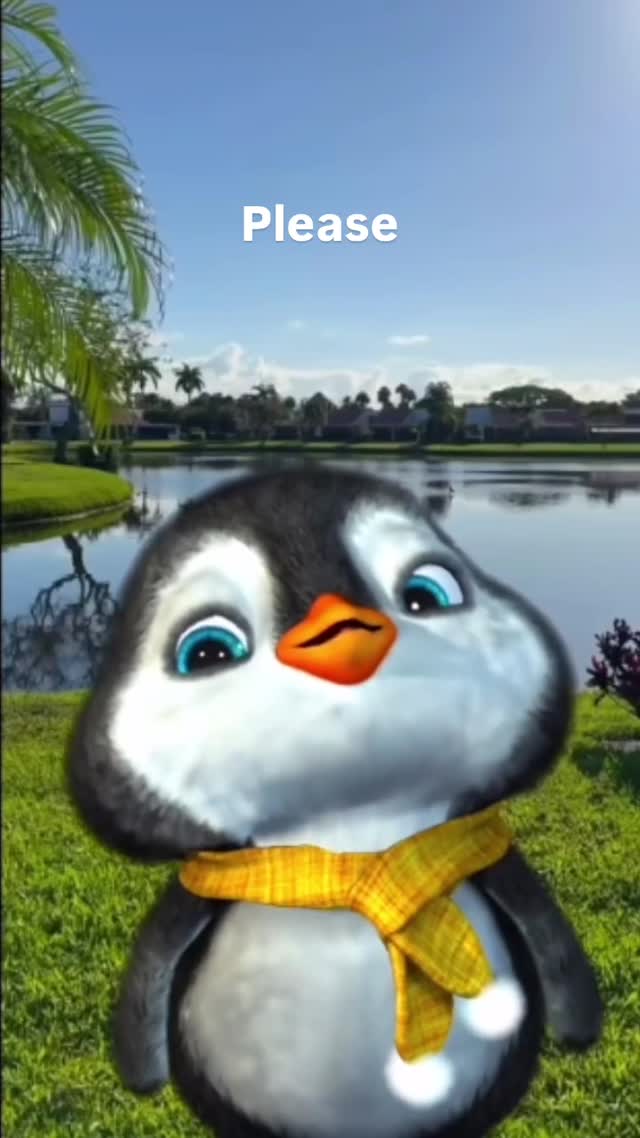
This viral sensation features a hyper-cute, 3D-animated baby penguin delivering a heart-wrenching plea: "Please don't leave. Stay with me." With over 770,000 likes, the video leverages emotional storytelling combined with high-fidelity 3D character design. The aesthetic is a blend of "Pixar-style" character animation and a realistic, sunny outdoor background. Key elements include the penguin's expressive blue eyes, a signature yellow checkered scarf, and a soft, high-pitched voiceover that triggers an immediate nurturing response in viewers. This is a prime example of how "cute-core" content can achieve massive reach by tapping into universal human emotions of attachment and fear of abandonment.
The video is a medium close-up of a stylized baby penguin. The character is meticulously textured with soft, downy feathers that catch the bright, natural sunlight. The background is a serene, out-of-focus park setting featuring a lake, palm trees, and suburban houses, creating a "UGC-meets-high-end-animation" vibe. The color palette is dominated by the vibrant green of the grass and the bright yellow of the penguin's scarf, which provides a warm contrast to the penguin's black and white body.
| Time Range | Visual Content | Shot Language | Lighting & Color | Viewer Intent |
|---|---|---|---|---|
| 00:00 – 00:02 | Penguin looks up with wide, watery blue eyes; text "Please" appears. | MCU (Medium Close-Up), static camera. | Bright daylight, warm tones, high saturation. | The Hook: Immediate emotional connection through eye contact. |
| 00:02 – 00:04 | Penguin tilts head slightly, beak moves with "don't leave". | MCU, subtle character sway. | Soft shadows on the face, emphasizing 3D depth. | Reinforce Persona: Establishing the "vulnerable" character. |
| 00:04 – 00:06 | Penguin blinks slowly, looking hopeful; text "Stay with". | CU (Close-Up) feel due to character leaning in. | Rim lighting on the "fur" texture. | Build Tension: Deepening the emotional plea. |
| 00:06 – 00:09 | Final blink and soft gaze; text "me" lingers. | Static CU, focus on the eyes. | Vibrant blue sky reflected in eyes. | The Close: Encouraging a "save" or "share" to "protect" the character. |
This video targets the biological instinct to care for "infantile" features—large eyes, round faces, and small statures (the Baby Schema). By combining these features with a vulnerable verbal plea, the creator triggers a powerful emotional response. The "Please don't leave" sentiment is a universal human experience, making it highly relatable for anyone who has felt lonely or attached to someone. It’s not just a penguin; it’s a vessel for the viewer's own feelings of vulnerability.
From a platform perspective, this video is a "watch-time magnet." The slow, deliberate pacing and the word-by-word subtitle reveal keep users glued to the screen to see the full sentence. The high share count likely comes from users sending this to partners or friends as a "cute" way to express affection or "clinginess." The "loop effect" is subtle but effective; the melancholic piano music doesn't have a jarring end, making it easy for the video to play 2-3 times before the user scrolls, signaling to the algorithm that the content is highly engaging.
Midjourney for the character base and Runway Gen-3 for the realistic motion and lighting.
"Subsurface scattering" (for skin/fur), "Cinematic lighting," and "Expressive eyes."
You need to use a "Character Reference" (CREF) in Midjourney or a consistent seed in your video generator.
Add subtle "imperfections" like a slight camera shake or natural-looking lens flares in post-production.
Instagram Reels currently favors high-aesthetic, emotional "vibe" content like this.
Use the platform's built-in "AI-generated" label and mention "Created with AI" in the caption to build trust.