
Happy Halloween guys 🐽🎃 Every year gets wilder, and the JP costumes keep leveling up! Share your look in the link in bio, gonna make a huge collage in the new house. #johnpork
Happy Halloween guys 🐽🎃 Every year gets wilder, and the JP costumes keep leveling up! Share your look in the link in bio, gonna make a huge collage in the new house. #johnpork
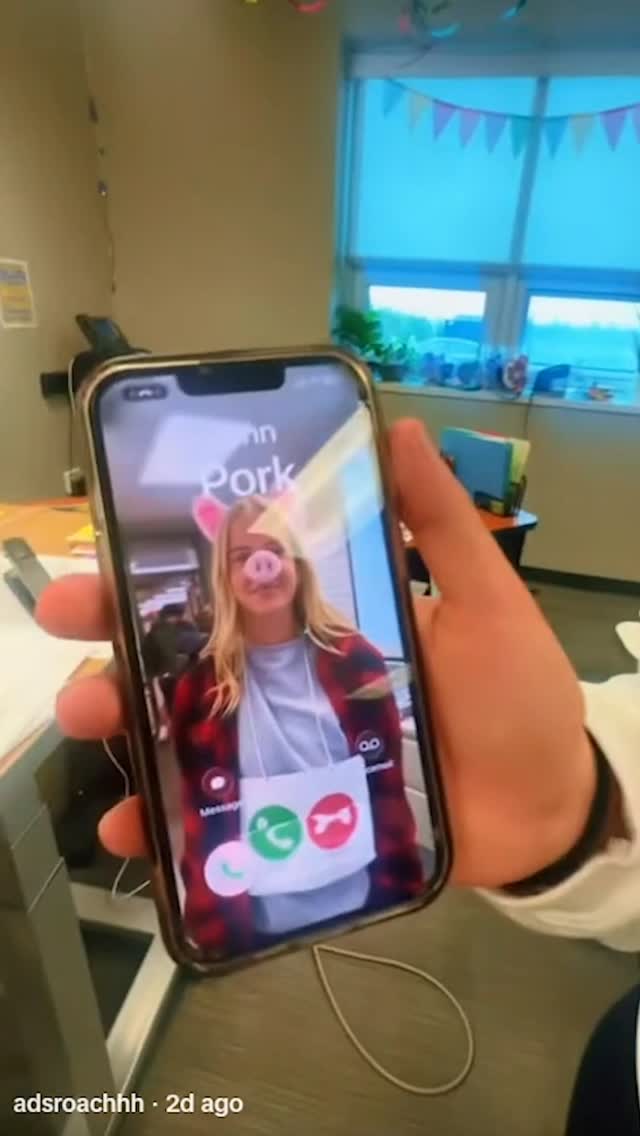
Sometimes the fastest way to earn attention is to look like you didn’t try. This frame is basically the opposite of polished: it’s a phone screen, handheld, slightly blurry, with an obvious filter. And that’s exactly why it works.
The first advantage is trust. A photo of a phone screen signals “this is something I saw in real life” rather than “this is a carefully designed post.” That feeling lowers viewer resistance. People treat it like gossip, a moment, a found clip—something worth passing along.
The second advantage is instant humor. The pig ears and snout filter is a one-frame joke. You don’t need context. And because it’s tied to a seasonal moment (Halloween), the viewer already has a mental folder for it: costumes, chaos, goofy friends.
Finally, the caption strategy turns the meme into a community prompt: “share your look… I’m making a huge collage.” That’s a smart loop—UGC submission → repost collage → more submissions. The image doesn’t have to be perfect; it just has to be a recognizable invitation.
| Signal | Evidence (from this image) | Mechanism | Replication action |
|---|---|---|---|
| “Found footage” credibility | Visible phone bezel + notch + handheld blur | Feels unfiltered → higher share rate | Prompt for a phone-in-hand shot with screen glare and compression |
| One-frame joke | AR pig ears + snout filter | Instant humor without reading | Use a single obvious filter and keep the face centered |
| Community loop | Halloween context + call to submit costumes | UGC turns audience into content supply | Pair the post with a simple submission CTA (tag, link-in-bio, keyword) |
Clean images can feel like ads. Messy images feel like receipts. The notch, the blur, the compression—those are credibility cues. They tell the viewer, “this came from a real feed,” which makes it easier to laugh, comment, or share without feeling like they’re helping a marketing campaign.
| Prompt chunk | What it controls | Swap ideas (EN) |
|---|---|---|
| “hand holding smartphone, visible bezel and notch” | Authentic phone-screen framing | “two hands holding phone”, “phone on table”, “mirror reflection of phone” |
| “screen glare, compression artifacts, slight motion blur” | Repost realism | “overexposed screen bloom”, “heavy jpeg artifacts”, “grainy low light” |
| “AR pig filter: ears + snout” | Instant joke | “dog filter”, “alien filter”, “cartoon face filter” |
| “bottom-left UI text tag” | Social-proof cue | “top-right sticker”, “timestamp overlay”, “reply bubble overlay” |
Change only one knob per run: filter type, background location, or UI tag placement. Keep the “phone screen” authenticity constant.