~ 連鎖する転回 ~
カオスの中で断片が結び直され、転回は次への合図となる。終わりに見えた地点は通過点へ変わり、同じ構造をなぞりながらも形を変え、進行は何度も更新されていく。
~ Chain of Turns ~
Within chaos, fragments reconnect, and every turn becomes a signal to move on. What once seemed like an ending shifts into a passage, repeating familiar patterns while constantly transforming, as momentum renews itself again and again.
#KakuDrop #カクウドロップ
#midjourney #klingai #nanobanana
How kakudrop Made This Anime Transition AI Video and How to Recreate It
This high-octane video by @kakudrop is a masterclass in "Dream-Core" AI cinematography. It blends a grounded, relatable setting—a Tokyo subway—with escalating surrealist transitions that defy physics. The aesthetic is a perfect marriage of cinematic editorial portraiture and cyberpunk anime, characterized by a sharp teal-and-orange color grade, heavy motion blur, and impeccable character consistency. By utilizing a "loop" structure (starting and ending in the subway), the creator maximizes replayability, turning a 20-second clip into an immersive experience that feels like a high-budget movie trailer for an indie creator's brand.
What You’re Seeing
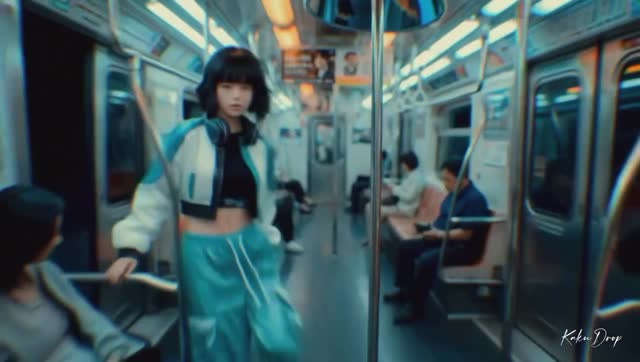
The video follows a consistent female protagonist through a series of increasingly chaotic and visually stunning environments. The wardrobe—a white and teal bomber jacket with matching baggy pants—serves as a visual anchor (the "Global Lock") that keeps the viewer grounded despite the shifting realities.
Shot-by-Shot Breakdown (Estimated)
Time Range
Visual Content
Shot Language
Lighting & Tone
Viewer Intent
00:00–00:02
Girl in subway car holding a pole.
Medium Close-Up (MCU), static.
Cool fluorescent, teal shadows.
Establish reality & character.
00:02–00:03
Macro of eye with fiery reflection.
Extreme Close-Up (ECU).
Warm orange glow in iris.
The "Inciting Incident" hook.
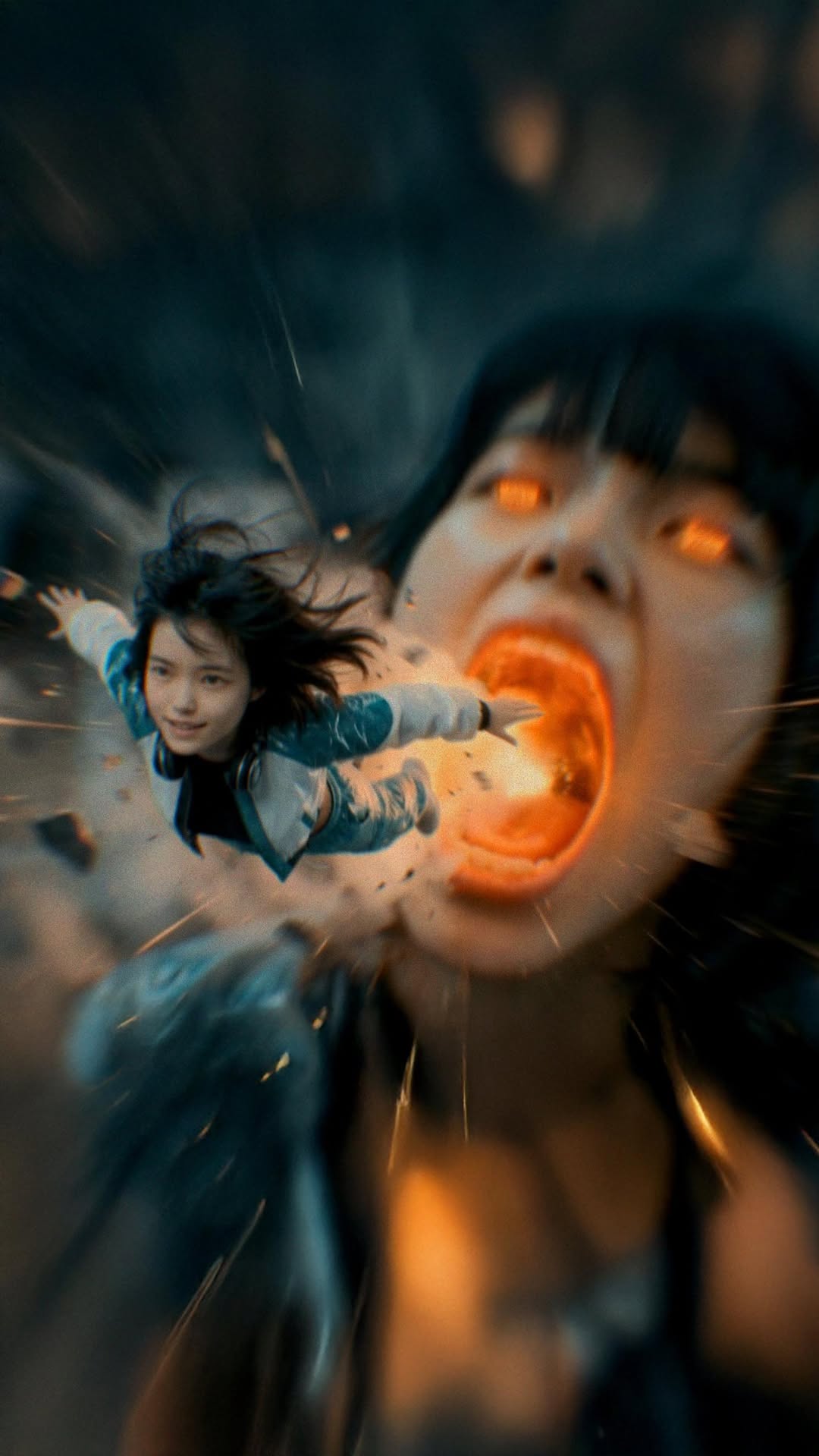
00:03–00:04
Flying out of a giant mouth.
Wide Shot, surreal morph.
High contrast, cinematic.
Shock value / Surrealism.
00:04–00:07
Skydiving through cloud city.
Tracking shot, high speed.
Pastel pinks and teals.
Sense of freedom/adventure.
00:08–00:10
Room of CRT monitors exploding.
Wide to MCU, center comp.
Warm amber practical lights.
Visual climax / "Glitch" vibe.
00:11–00:15
Driving sports car in neon tunnel.
Dutch angle, fast tracking.
Neon orange/blue streaks.
High energy / Speed.
00:16–00:20
Hoverboard to Subway return.
Low angle to profile.
Teal/Blue lightning.
Complete the loop.
Why It Went Viral: The "Dream Logic" Hook
The core of this video's success lies in its pacing and transition logic. It uses "Dream Logic"—where one scene flows into another based on a visual cue (like the eye reflection) rather than narrative logic. This keeps the brain engaged because it cannot predict the next frame. The 0–3 second hook is particularly strong: it starts with a mundane, relatable scene (subway) and immediately breaks it with a macro eye shot, signaling to the viewer that "something big is coming."
From a platform perspective, the high information density is key. Every 2 seconds, the environment changes completely. This forces the viewer to re-watch the video to catch all the details (the monitors, the car dashboard, the hoverboard), which signals to the Instagram/TikTok algorithm that the content is highly engaging. The use of a "brand logo" (KAKU DROP) halfway through also positions the creator as a high-end studio rather than just a casual user, increasing "Save" rates for aesthetic inspiration.
5 Testable Viral Hypotheses
The "Macro-to-Micro" Hook: Starting with a wide shot and immediately cutting to an extreme macro (the eye) creates a psychological "zoom" that captures attention. Replicate by: Cutting from a landscape to a 1:1 detail of an object.
Color Contrast Narrative: Using Teal (Subway) vs. Orange (Explosions/Car) creates a subconscious "Conflict and Resolution" feel. Replicate by: Using complementary colors for scene transitions.
The "Impossible" Action: Flying out of a mouth or riding a hoverboard triggers the "How did they do that?" response. Replicate by: Using AI to generate physics-defying movements.
Seamless Loop: Ending the video exactly where it started (the subway) encourages infinite playback. Replicate by: Matching the first and last frame's lighting and subject position.
Audio-Visual Sync: The fast cuts are timed to the rhythmic beats of the BGM, creating a "satisfying" sensory experience. Replicate by: Editing on the beat in CapCut or Premiere.
How to Recreate: From 0 to 1
Define Your "Global Lock": Choose a character (e.g., "Asian girl, bob cut, teal jacket"). This description must be in every prompt to maintain consistency.
Generate the "Anchor" Scene: Use an AI video tool (Runway Gen-3, Luma, or Kling) to create the subway scene. This is your "reality" base.
Create the "Transition" Assets: Generate the macro eye shot. Use a prompt that specifies "fiery reflection in the pupil" to bridge to the next scene.
Build the "Surreal" Sequence: Generate 2-3 second clips of the skydiving, the monitor room, and the car. Keep the "Global Lock" character description identical.
Use Image-to-Video: For better consistency, generate high-quality AI images of the character in the different scenes first (using Midjourney), then animate them.
The "Logo" Reveal: Create a 3D text element or use a tool like Luma to animate a static logo into a 3D space.
Editing & Speed Ramping: Bring all clips into CapCut. Use "Speed Ramping" (fast-slow-fast) to match the high-energy rhythm of the video.
Post-Processing: Add "Motion Blur" and "Film Grain" overlays to hide AI artifacts and give it a cinematic texture.
Growth Playbook
Opening Hook Lines
"POV: You're stuck in a glitch in the matrix."
"This is what my dreams actually look like."
"Wait for the transition at 0:08... 🤯"
Caption Templates
Template 1 (Story-driven):
Lost in the loop. 🌀 Sometimes the only way out is to go deeper. Which scene was your favorite? 👇 #AIArt #Cinematic #DreamCore
Template 2 (Creator-focused):
Pushing the limits of AI cinematography. 🎬 Created this entire sequence using [Tool Name]. The future of filmmaking is here. Save this for your next edit inspo! #AIVideo #CreativeDirection #DigitalArt