0:00 / 0:00
▶
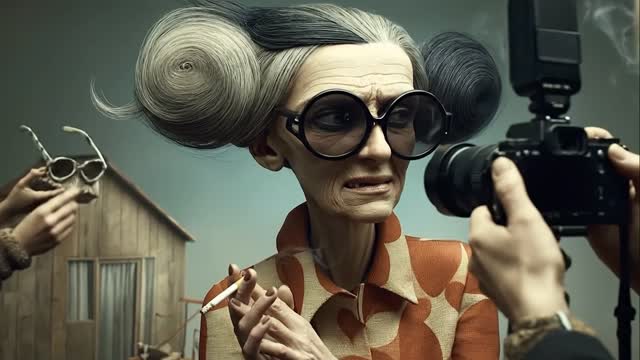
This case study analyzes a viral AI-generated video featuring a series of surreal editorial caricatures. The aesthetic blends high-fashion photography with grotesque, exaggerated character designs—think Wes Anderson meets Tim Burton in a high-end fashion magazine. Key visual elements include sculptural, gravity-defying hairstyles, hyper-detailed skin textures, and a "behind-the-scenes" narrative where these bizarre subjects are hounded by photographers. The video leverages a rhythmic, camera-shutter-synced editing style that creates a hypnotic viewing experience, perfect for Instagram and TikTok's fast-paced consumption.
The video is a montage of distinct "fashion shoots." Each segment introduces a new, highly stylized character—often elderly, with elongated limbs, massive eyes, and hair styled into impossible swirls, buns, or wild clouds. The subjects are dressed in retro-chic attire (polka dots, pinstripes, turtlenecks) and placed in minimalist, slightly surreal environments like a wooden studio, a vintage train car, or a concrete bunker. The primary action involves the characters posing, smoking, or drinking tea while being bombarded by camera flashes and clicking shutters.
| Time Range | Visual Content | Shot Language | Lighting & Color | Viewer Intent |
|---|---|---|---|---|
| 00:00–00:07 | Elderly woman with swirl hair in orange patterns. | Medium Close-up (MCU), static. | Soft studio light, muted teal background. | Hook: Establish the "weird editorial" world. |
| 00:07–00:15 | Character in an orange egg chair smoking. | Wide Shot (WS), side profile. | Dramatic side-lighting, heavy smoke. | Atmosphere: Create a sense of "cool" absurdity. |
| 00:29–00:37 | Character with wild white hair checking a phone. | Medium Shot (MS), low angle. | High contrast, cool tones. | Relatability: Modern tech in a surreal setting. |
| 01:04–01:12 | Character in a tunnel with rapid camera flashes. | Close-up (CU), centered. | Strobe lighting, blinding white flashes. | Sensory Overload: Increase intensity and engagement. |
| 01:28–01:36 | Character in a train car reading a book. | Medium Shot (MS), tracking feel. | Warm interior light, teal train walls. | Narrative: Show the character in a "real" world. |
This video taps into the "Uncanny Valley" effect but steers it toward artistic expression rather than horror. By using caricatures, the creator avoids the "creepy" factor of near-human AI and instead creates a distinctive brand identity. The subject matter—the absurdity of high-fashion photography—is a globally recognized trope. It mocks the self-importance of the industry while simultaneously being visually stunning, satisfying both the viewer's desire for humor and their appreciation for high-fidelity art.
From a platform perspective, the video is a masterclass in retention-based editing. The 0–3 second hook is immediate: a bizarre face you can't look away from. The use of diegetic sound effects (the camera shutters) synced perfectly to the music creates a rhythmic "ASMR" effect. This encourages users to watch until the end to see the next character reveal. The high "save" rate likely comes from other creators and artists using it as a style reference or "mood board" inspiration.
The "Artist's Note" Style:
Exploring the boundary between caricature and high fashion. 📸 Which character is your favorite? Let me know in the comments! 👇 #AIArt #Surrealism #FashionPhotography
The "Behind the Scenes" Style:
The paparazzi won't leave them alone. 💅 A deep dive into my latest AI character series. Created with Midjourney + Luma. #CreativeAI #DigitalArt #Editorial
Midjourney for the base images and Luma Dream Machine for the high-fidelity motion.
"Editorial," "Caricature," and "Cinematic Lighting."
You need to use a "Character Reference" (--cref in Midjourney) to lock the facial features.
Add specific "imperfections" like film grain, lens flares, and exaggerated anatomical proportions.
Instagram, as the "aesthetic" and "fashion" communities are more established there.