🎤 Words (Don't Come Easy) – Originally by F.R. David
A heartfelt homage to one of the most iconic soft pop songs of the 80s. 💫
This is a lipsync tribute performance using the original 1982 recording by F.R. David.
✨ Fun fact: Many listeners are surprised to learn that F.R. David is a male artist – his soft, high-pitched voice has often been mistaken for a woman’s, adding to the unique charm of the song.
I hope you enjoy this visual interpretation. Let me know in the comments what memories this song brings back for you! 💬💖
Why millasofiafin's Words Dont Come Easy Tribute Went Viral
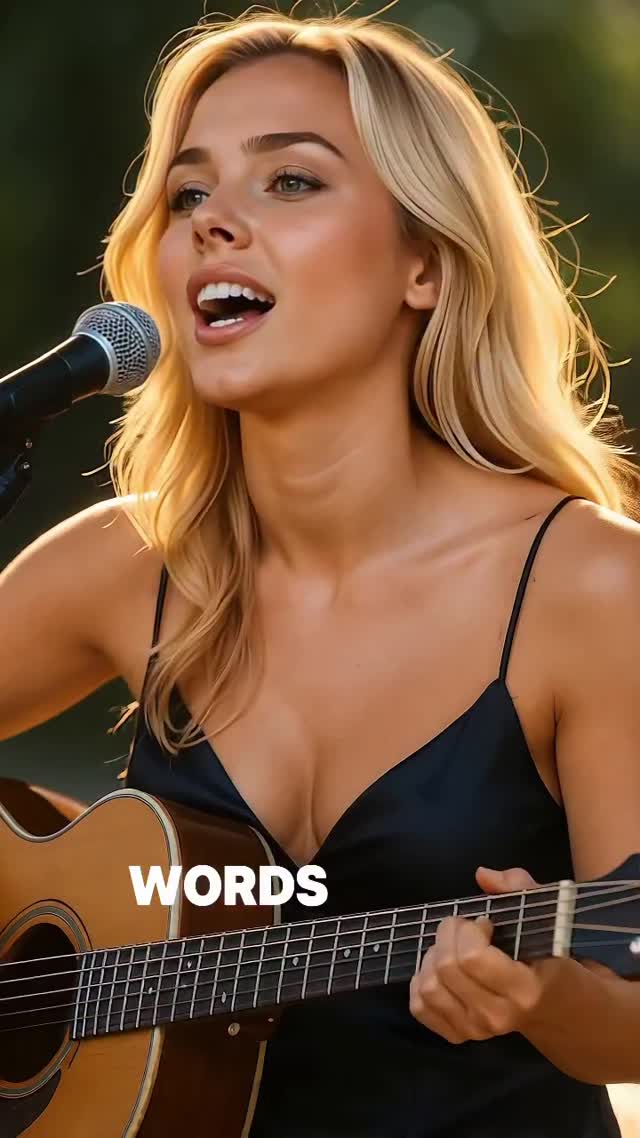
This case study analyzes a high-performing cinematic AI-generated video featuring a blonde female protagonist performing a heartfelt lip-sync tribute to F.R. David’s 1982 hit "Words." The visual style is cinematic editorial portraiture, characterized by "golden hour" lighting, a shallow depth of field, and a high-end iPhone aesthetic. By blending 80s nostalgia with cutting-edge AI realism, the creator @millasofiafin achieves a "perfect UGC" look that bridges the gap between digital art and relatable human performance. Key elements include the warm bedroom/outdoor glow, the minimalist black silk wardrobe, and the precise synchronization of lyrics with facial micro-expressions.
What You’re Seeing: A Visual Analysis
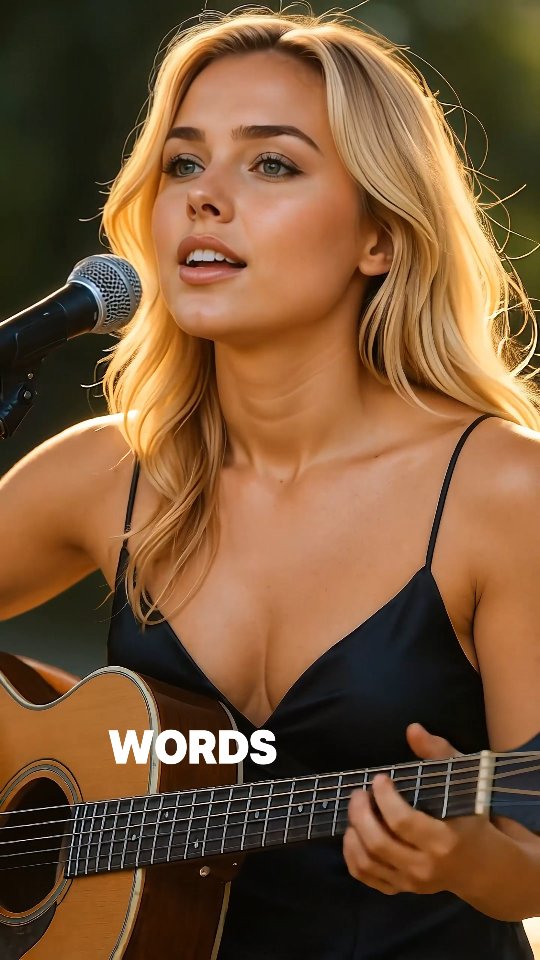
The video features a young Caucasian woman with blonde hair, styled in loose, natural waves. She is wearing a black silk slip dress with thin spaghetti straps, positioned behind a professional condenser microphone on a stand. She holds an acoustic guitar, though the focus remains on her upper body and face. The setting appears to be an outdoor park or garden during the "golden hour," with soft, warm sunlight creating a distinct rim light (hair light) that separates her from the blurred green background.
The color palette is dominated by warm ambers, golds, and deep blacks, providing a high-contrast yet soft visual texture. The editing is a single, continuous medium shot that uses subtle digital zooms and text overlays to maintain rhythm. The music is a clean, high-fidelity version of "Words (Don't Come Easy)," and the character’s lip-syncing is exceptionally tight, capturing even the breathy pauses of the original track.
Shot-by-Shot Breakdown
Time Range
Visual Content
Shot Language
Lighting & Tone
Viewer Intent
00:00–00:03
Subject starts singing "Words..." while looking slightly off-camera.
Medium Shot (MCU), static.
Golden hour, warm rim light on hair.
Hook: Establish the "pretty girl + music" aesthetic immediately.
00:03–00:07
Subject sings "...don't come easy to me," looking directly at the mic.
MCU, slight digital push-in.
Soft key light on face, high contrast.
Reinforce Persona: Show emotional connection to the lyrics.
00:07–00:12
Subject strums guitar, singing "How can I find a way..."
MCU, waist-up framing.
Consistent warm glow, blurred bokeh.
Create Contrast: Transition from the hook to the narrative of the song.
00:12–00:16
Subject closes eyes briefly on "I love you," then smiles.
Close-up (CU) feel via zoom.
Warm, saturated skin tones.
Emotional Payoff: High-value "moment" to encourage saves/shares.
Why It Went Viral: The Mechanics of Aesthetic Nostalgia
The Power of "Safe" Nostalgia
The choice of "Words" by F.R. David is a masterstroke in audience targeting. This 1980s soft-pop anthem triggers a powerful emotional response in Gen X and Boomer demographics (who are highly active on Instagram) while appearing "vintage-cool" to Gen Z. By using a song that is universally recognized but not overplayed, the creator taps into a collective memory, making the content feel familiar and comforting.
The "Uncanny Valley" Sweet Spot
Psychologically, this video succeeds because it sits right on the edge of the "Uncanny Valley." The AI generation is high-quality enough to be mistaken for a real person at first glance, but the "too perfect" lighting and skin texture create a dreamlike, aspirational quality. This triggers curiosity: users stop scrolling to determine if she is real, which drastically increases watch time and comment section debates.
Platform Signal Analysis
From a platform perspective, Instagram’s algorithm prioritizes "Aesthetic Excellence" and "Audio-Visual Sync." The high-contrast thumbnail (blonde hair against a dark dress) ensures a high Click-Through Rate (CTR). The 0–3 second hook—a beautiful face singing a familiar melody—minimizes the "bounce rate." Furthermore, the use of a trending/classic audio track allows the video to surface in the audio's dedicated discovery page, driving organic reach beyond the creator's followers.
5 Testable Viral Hypotheses
Hypothesis 1: The Rim-Light Effect. Backlighting a blonde subject creates a "halo" that signals high production value. Replication: Use "rim lighting" or "backlit golden hour" in your AI prompts.
Hypothesis 2: The Prop Credibility. Holding a guitar, even if not played perfectly, adds "talent" value to a "beauty" video. Replication: Always include a musical instrument or tool related to the audio.
Hypothesis 3: The Minimalist Wardrobe. A simple black slip dress reduces visual clutter, keeping the focus on the face and the song. Replication: Use "minimalist silk slip dress" to avoid distracting patterns.
Hypothesis 4: The Micro-Expression Hook. A slight eye-close or head tilt during a key lyric increases emotional resonance. Replication: Use video editors that allow for "expression control" or "motion strength" adjustments.
Hypothesis 5: The Lyric Overlay. Large, clean text in the center of the screen keeps users focused on the message. Replication: Use CapCut’s "Auto-Captions" with a bold, sans-serif font.
How to Recreate: From 0 to 1
Step 1: Character Design & Consistency
Create a consistent character using Midjourney or Flux. Use a prompt that specifies ethnicity, age, and a unique feature (e.g., "Scandinavian blonde, athletic build, soft jawline"). Save this seed or use a "Character Reference" (--cref) to maintain the look across shots.
Step 2: Environment & Lighting Setup
Generate a background image or a base video frame. Focus on "Golden hour in a lush garden, f/1.8 aperture, creamy bokeh background." The lighting must be "warm, directional, with strong rim light on the hair."
Step 3: Wardrobe & Prop Integration
Specify the "black silk slip dress" and "acoustic guitar." In AI video tools, ensure the guitar is positioned naturally against the body to avoid "floating" artifacts.
Step 4: Video Generation (The Base Motion)
Use Luma Dream Machine or Kling AI. Use a prompt like: "Cinematic medium shot of a blonde woman singing and strumming a guitar, emotional expressions, hair swaying in a light breeze." Keep the motion strength moderate (4-6) to avoid warping.
Step 5: Lip-Syncing
Take your generated video and the "Words" audio track into a tool like Hedra or LivePortrait. These tools will map the audio's phonemes onto the character's mouth with high precision.
Step 6: Color Grading
Import the clip into CapCut. Apply a "Warm/Golden" LUT. Increase contrast slightly and add a very fine "Film Grain" (intensity 5-10) to make the AI look more like real film stock.
Step 7: Dynamic Captions
Add "Auto-Captions." Choose a style where words appear one by one or in small chunks. Place them in the lower-middle third of the frame so they don't obscure the face.
Step 8: Publishing Strategy
Export in 1080x1920 (9:16). Use a high-bitrate setting. When posting, choose a cover frame where the subject's eyes are open and looking toward the camera.
Growth Playbook: Distribution & Scaling
3 Opening Hook Lines
"The song that defined an era... 🎤"
"POV: You're listening to 80s gold in the park. ✨"
"Words don't come easy, but this melody does. 💫"
4 Caption Templates
The Nostalgia Trip: "Taking it back to 1982. 💫 This song always hits different. What’s your favorite 80s memory? 👇 #80sMusic #Nostalgia"
The Aesthetic Vibe: "Golden hour and soft melodies. ✨ Sometimes the simplest songs are the most beautiful. Save this for your mood board. 📌 #GoldenHour #Aesthetic"
The "Talent" Showcase: "Words don't come easy to me... but singing them does. 🎤 Hope this brightens your day! Which song should I cover next? 💭 #Singer #AILife"
The Short & Sweet: "A heartfelt homage to F.R. David. 💫 Pure 80s magic. #ClassicHits #Words"