▶
🙌🏻🖤 . . . #model #influencerdigital #influencer
🙌🏻🖤 . . . #model #influencerdigital #influencer
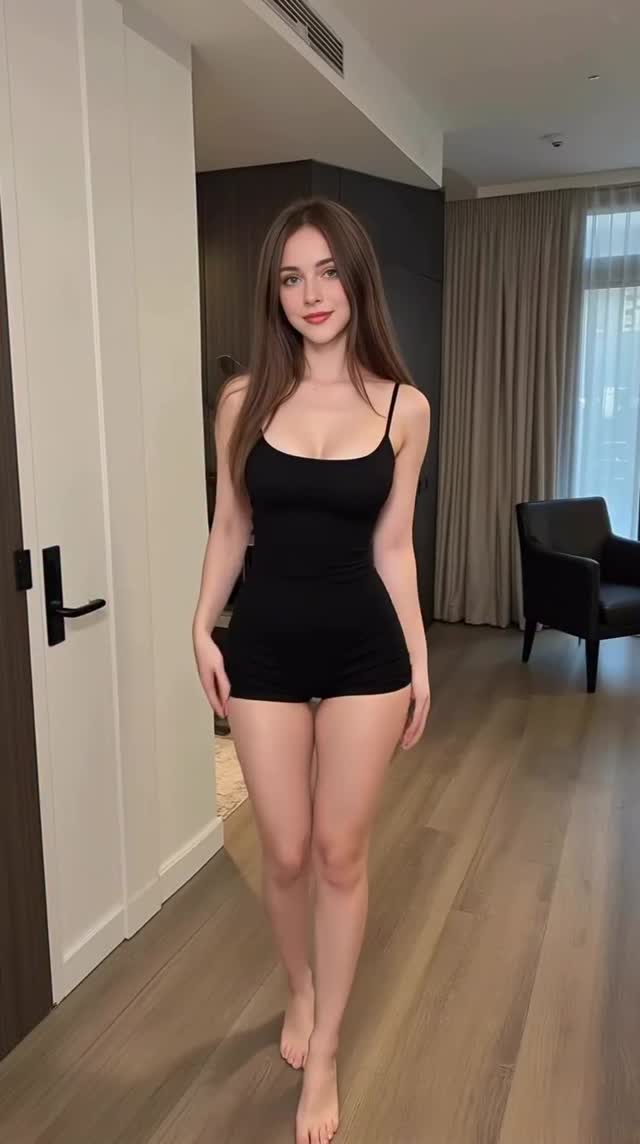
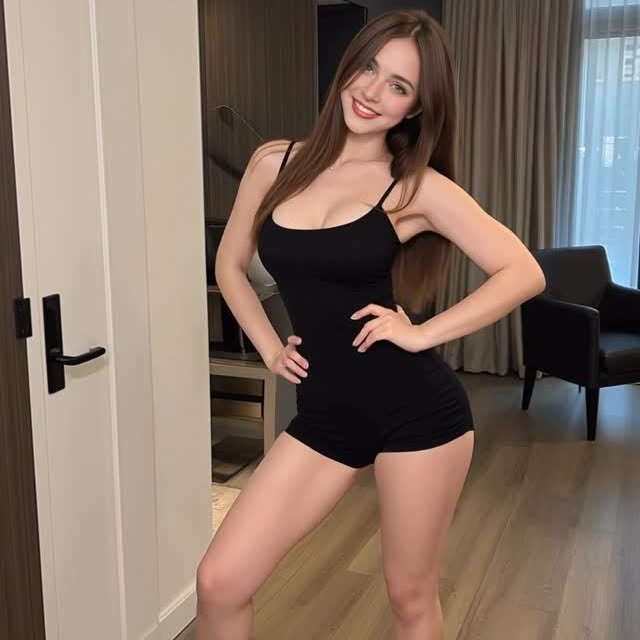
This video exemplifies the "Digital Influencer / AI Model" aesthetic—a rapidly growing niche on Instagram and TikTok. It features a photorealistic, digitally-generated (or heavily filtered) female subject in a minimalist luxury apartment, performing a simple "outfit check" walk-and-pose. The core appeal lies in the uncanny perfection: flawless skin, ideal lighting, and smooth, almost floating movement.
Key Elements: High-key soft lighting, neutral color palette (wood, white, black), tight-fitting black romper, and a direct-to-camera gaze that mimics traditional influencer behavior. The video leverages the "Is it real?" curiosity gap to drive engagement while delivering standard "thirst trap" or fashion content.
Subject & Wardrobe: A young female character with long, straight brunette hair and fair skin. She wears a simple, tight black spaghetti-strap romper (bodysuit with shorts). She is barefoot, emphasizing a casual, "at home" vibe.
Scene & Environment: A modern, upscale apartment interior. We see light oak wooden flooring, a white wall with a black door handle, dark wood cabinetry in the background, and beige floor-to-ceiling curtains. A black armchair sits in the corner. The space feels like a high-end hotel or a staged Airbnb.
Lighting & Color: The lighting is extremely soft and diffuse, likely simulating large window daylight coming from the right. There are no harsh shadows on the face, creating a "beauty filter" effect. The color grade is desaturated and clean, focusing on skin tones and the black outfit against neutral backgrounds.
Movement & Camera: The camera is static, positioned at eye level (vertical 9:16). The subject walks forward from the mid-ground to the foreground (approx. 2 steps), stops, places hands on hips, and shifts her weight into a pose while smiling. The motion is fluid but has a slight "floaty" quality often seen in AI video generation.
| Time | Visual Content | Shot Language | Lighting/Color | Viewer Intent |
|---|---|---|---|---|
| 0:00 - 0:01 | Subject walks from back to front, looking at lens. | Full shot, static camera. | Soft daylight, even exposure. | Hook: Movement towards the viewer grabs attention immediately. |
| 0:01 - 0:02 | Stops, places hands on hips. | Medium-Full shot (subject closer). | Consistent soft light. | Engagement: Establishes the "pose" and outfit details. |
| 0:02 - 0:04 | Shifts weight, tilts head, smiles. | Static. | Face is the focal point. | Retention: The smile and eye contact build a parasocial connection. |
This tutorial assumes you are using AI Video tools (like Kling, Luma, or Runway) to create a "Digital Influencer."
You need a consistent face. Use Midjourney or Stable Diffusion to generate your "base model."
Prompt keywords: "20yo female, brunette, soft features, instagram model, raw photo, shot on iPhone."
Save this image to use as a character reference (CREF) in video tools.
Decide on a "uniform" for the video. Here, it's a black romper.
Background: "Luxury minimalist apartment, blurred background, daylight."
Lighting: "Soft window light, no harsh shadows."
Tool: Kling AI or Luma Dream Machine (currently best for human motion).
Input: Upload your base character image.
Prompt: "A girl in a black romper walks forward from the back of the room, stops, puts hands on hips, smiles at the camera, photorealistic, 4k, mobile phone footage."
Settings: Set "Motion" to 5 (medium) to ensure the walk looks natural but not chaotic.
AI video often comes out soft. Use an upscaler (like Topaz or CapCut's built-in enhancer) to sharpen facial details. This is crucial for the "is it real?" effect.
Since there is no speech, pick a trending "baddie" or "chill lofi" track. The audio should match the relaxed but polished vibe.
Upload to Instagram Reels / TikTok. Ensure the loop is smooth. If the AI generation has a weird morph at the end, trim it.
Currently, Kling AI (Professional mode) or Luma Dream Machine offer the best human motion consistency for walking shots.
Use a "Character Reference" (CREF) feature in Midjourney for the base image, and use that same image as the input for every Image-to-Video generation.
AI struggles with complex geometry like fingers; try to generate poses where hands are simple (like on hips) or partially obscured to hide defects.
Yes, platforms like Instagram and TikTok now require you to label AI-generated content to avoid reach restrictions or bans.
Add a slight "camera shake" effect in post-production (CapCut) to mimic handheld movement, which masks the unnatural smoothness of AI motion.