AI Coloring Page Generator

AI coloring page generator pages matter when the output is actually printable and pleasant to color. Parents, teachers, Etsy creators, and hobbyists usually want clean outlines, closed shapes, and pages that look usable with crayons, pencils, or markers right away. This page helps you compare coloring-page ideas that prioritize line quality and printability instead of decorative image noise.

Video
GLOBAL LOCK: 
The video features a female creator with long dark brown hair, fair skin, wearing a white short-sleeved button-up shirt. She is in a studio with warm lighting and purple/pink bokeh lights in the background. The illustrations interspersed throughout follow a "Retro Kitsch" style: hand-drawn oil pastel/wax crayon texture, monochromatic vibrant palette dominated by cherry red, magenta, and bright fluoro-pink, with white stippled highlights and sparse gold accents. Naive art aesthetic with visible sketchy strokes.

[00:00–00:03]
Subject: Two side-by-side vertical illustrations. Left: A "Pink Diner" with people at a counter. Right: A "Modern Art Gallery" with people looking at pink paintings.
Action: Static graphics with bold yellow text "Your branding doesn't look generic" appearing.
Camera: Static split-screen.
Lighting: Bright, saturated pink tones.
Speech: "Your branding doesn't look generic because you lack creativity."

[00:03–00:04]
Subject: Female creator in white shirt, centered.
Action: Speaking directly to camera, slight head tilt. Text "It's your System" appears in bold yellow.
Camera: Medium close-up, static.
Lighting: Soft key light on face, purple/pink background glow.
Speech: "It's your system."

[00:04–00:10]
Subject: Rapid montage of pink kitsch illustrations: a retro radio on a shelf, a collection of patterned hats, a set of backpacks, a vintage alarm clock, pants hanging on a line, a cliffside with crashing waves.
Action: Fast cuts every 0.5 seconds.
Camera: Full-screen static graphics.
Lighting: High saturation, vibrant pink/magenta.
Speech: "Most people are still paying agencies, waiting weeks for revisions, and ending up with something that looks like every other brand on the feed."

[00:10–00:13]
Subject: Female creator speaking.
Action: Hand gestures emphasizing "Meanwhile, you could build...". Text "Meanwhile you could build" appears.
Camera: Medium close-up.
Lighting: Studio setting, warm/purple mix.
Speech: "Meanwhile, you could build the entire visual system yourself."

[00:13–00:16]
Subject: Screen recording of the Higgsfield web interface.
Action: Mouse cursor navigates to "Nano Banana Pro" in a list of models.
Camera: Screen capture.
Lighting: UI dark mode.
Speech: "Open Higgsfield, go into Nano Banana Pro..."

[00:16–00:20]
Subject: A prompt box showing: "Hand-drawn oil pastel illustration of [INSERT SUBJECT]. Monochromatic vibrant palette featuring cherry red, magenta, and bright fluoro-pink...". Then, illustrations of a pink brick house and a plush pink armchair appear.
Action: Text "Instantly you generate" appears over the images.
Camera: Static graphic overlays.
Lighting: Vibrant pink.
Speech: "...and drop in a structured brand prompt. Instantly you generate a full aesthetic."

[00:20–00:26]
Subject: Montage showing style variations: a watercolor landscape of mountains, a stack of old books, a detailed hiking backpack, a desert sunset with cacti, a floral armchair in a room.
Action: Images swap to show different textures and subjects while maintaining a "hand-drawn" feel.
Camera: Full-screen graphics.
Lighting: Varied (natural watercolor tones, warm desert oranges, muted library browns).
Speech: "And if you don't like one pattern, you can easily swap it, change the texture, replace the background, keep the identity structure, shift the world around it."

[00:26–00:27]
Subject: Female creator speaking.
Action: Confident expression. Text "The system stays consistent" appears.
Camera: Medium close-up.
Speech: "The system stays consistent."

[00:27–00:33]
Subject: Final rapid montage of pink illustrations: a girl in a flower field, a peacock with ornate feathers, a pink wooden chair, a collection of sunglasses, a pink city skyline, a pink record player.
Action: Fast cuts synced to speech.
Camera: Full-screen graphics.
Lighting: Return to high-saturation pink/magenta.
Speech: "You're not guessing your style, you're defining it. Everything is generated inside Nano Banana Pro, but the control stays with you."

[00:33–00:36]
Subject: Female creator speaking.
Action: Direct eye contact, final CTA. Text "Comment Brand" in yellow.
Camera: Medium close-up.
Speech: "Comment Brand and I'll send you the exact master prompt."

NEGATIVE PROMPT:
Visual: Photorealistic textures (except for talking head), 3D render look, dull colors, messy lines, inconsistent character features in talking head, flickering background lights, text/logos inside illustrations.
Speech: Robotic tone, background noise, muffled audio, lip-sync mismatch on key words like "System" or "Brand", long pauses.

SPEECH PACK:
[00:00–00:04] "Your branding doesn't look generic because you lack creativity. It's your system."
[00:04–00:10] "Most people are still paying agencies, waiting weeks for revisions, and ending up with something that looks like every other brand on the feed."
[00:10–00:16] "Meanwhile, you could build the entire visual system yourself. Open Higgsfield, go into Nano Banana Pro..."
[00:16–00:20] "...and drop in a structured brand prompt. Instantly you generate a full aesthetic."
[00:20–00:27] "And if you don't like one pattern, you can easily swap it, change the texture, replace the background, keep the identity structure, shift the world around it. The system stays consistent."
[00:27–00:33] "You're not guessing your style, you're defining it. Everything is generated inside Nano Banana Pro, but the control stays with you."
[00:33–00:36] "Comment Brand and I'll send you the exact master prompt."

Delivery: Energetic, authoritative, fast-paced (approx. 160 WPM).
TAKE_A: Professional and crisp.
TAKE_B: More casual and "insider secret" tone.
TAKE_C: High energy, emphasizing "System" and "Control".
Video
GLOBAL LOCK: A vertical collector-review talking-head video, approximately 1 minute 53 seconds, centered on a male creator enthusiastically discussing a physical book or art publication in a cozy media room. The host is a light-skinned ginger-bearded man wearing glasses, a dark baseball cap, and a graphic tee, speaking directly to camera from a seated desk setup. Behind him are shelves, posters, anime and pop-culture decor, a world map, collectibles, and lit computer equipment, giving the room a casual nerd-culture creator vibe. He uses animated hand gestures, points toward the camera, and repeatedly holds up the book and interior pages as visual proof while talking.

The featured item is a printed publication with a bold teal or green cover and franchise-style branding, shown both closed and open. The host flips through pages, highlights “starter” materials, and calls attention to interior photos or artwork. The edit occasionally cuts away from the host to close-up shots of the book itself, including black-and-white illustration pages with fantasy-creature or goblin-like line art, allowing viewers to inspect the visual content directly. White subtitle text appears across many shots, emphasizing key spoken points and giving the video a clipped, creator-review rhythm.

The overall tone is enthusiastic, collector-friendly, and explanatory. This is not a cinematic ad and not a generic vlog; it is a fandom/collector breakdown where the value lies in seeing a real person present and react to a physical piece of media. Visual priorities: direct-to-camera creator presence, cozy decorated room, clear visibility of the book cover and interior spreads, subtitle emphasis on key phrases, hand-held page flips, and a sense of personal recommendation or show-and-tell. Avoid over-stylized editing. The charm comes from authenticity, physical object handling, and the host’s excited commentary.
Video
GLOBAL LOCK: A young South Asian woman with long, straight dark hair and a friendly, articulate expression. She wears a light pink/beige long-sleeved ribbed top. The setting is a bright, modern indoor room with a neutral off-white wall. In the background, a minimalist black abstract sculpture sits on a wooden desk. Lighting is soft, even, and frontal, creating a clean UGC aesthetic. Audio is crisp with a close-mic signature, as she holds a small black wireless lavalier microphone.

[00:00–00:02]
Subject: Medium shot of the woman holding the microphone near her mouth.
Action: She speaks directly to the camera with an enthusiastic expression.
Text Overlay: Large, stylized pink and white text reads "SIDE HUSTLE you NEVER thought of".
Camera: Static MS, eye-level.
Lighting: Soft indoor lighting.

[00:02–00:04]
Environment: Screen recording of a Google search page.
Action: A cursor moves and clicks on a search result for "Gemini Storybook — for the story".
Text Overlay: Green text "Go to this" appears at the top.
Camera: Direct screen capture.

[00:04–00:06]
Environment: Digital interface showing a 10-panel storyboard titled "THE LIBRARY OF WHISPERS".
Action: The screen scrolls slightly to show the different panels (P1 to P10) featuring indie-style illustrations of a girl in a library.
Text Overlay: Green text "Plan an entire storyboard".
Camera: Direct screen capture.

[00:06–00:09]
Environment: AI tool interface showing an upload area.
Action: A cursor drags a white square icon into an upload box. Then, a character sheet titled "OUTFIT DETAILS" is shown, featuring a girl in a green cardigan and brown corduroy pants.
Text Overlay: Green text "your inputs like images characters or sketches".
Camera: Direct screen capture.

[00:10–00:12]
Environment: Text prompt box in an AI interface.
Action: The text "Create a 10-page comic titled The Library of Whispers..." is visible. The cursor clicks a "Send/Generate" arrow icon.
Text Overlay: Green text "an entire storyline Hit generate".
Camera: Direct screen capture.

[00:13–00:16]
Subject: Medium shot of the woman holding a smartphone vertically.
Action: The phone screen displays a digital comic book cover. She uses her thumb to "flip" a digital page, revealing a beautifully illustrated page with text.
Text Overlay: Green text "and boom! a comic book without any".
Camera: Static MS, focusing on the phone in her hand.

[00:17–00:19]
Subject: Medium shot of the woman speaking to the camera.
Action: She gestures with her hands while explaining the customization options.
Text Overlay: Green text "involved customize for any".
Camera: Static MS.

[00:20–00:25]
Environment: Close-up of a digital comic book page.
Action: The page features a yellow background with two characters (a girl with dark hair and a boy with white hair). The text on the page discusses "identifying feelings and thoughts."
Text Overlay: Green text "educational I made one for EQ which will identify between and thoughts".
Camera: Direct screen capture/Close-up of the art.

[00:26–00:28]
Environment: Amazon Kindle Direct Publishing (KDP) dashboard.
Action: The screen shows the "Manage. Publish." section with buttons for "Kindle eBook" and "Series page".
Text Overlay: Green text "After this you can sell them as ebooks".
Camera: Direct screen capture, dark mode UI.

[00:29–00:32]
Subject: Medium shot of the woman speaking her final call to action.
Action: She smiles and gestures towards the screen.
Text Overlay: Green text "And for cool as such" followed by a stylized logo "the CYBORG girl" in pink.
Camera: Static MS.
Speech: "And for cool AI hacks as such, follow the Cyborg Girl for more."

NEGATIVE PROMPT: blurry, low resolution, inconsistent facial features, flickering lighting, robotic movements, distorted text in overlays, messy background, poor lip-sync, harsh shadows, over-saturated colors, watermark, low-quality audio, background noise.

SPEECH PACK:
[00:00-00:02] "Here's a side hustle you never thought of."
TAKE_A: (Energetic, fast-paced) "Here's a side hustle you NEVER thought of!"
TAKE_B: (Intriguing, lower pitch) "Check out this side hustle... you probably never thought of."
TAKE_C: (Friendly, casual) "So, here is a side hustle you've never thought of before."

[00:13-00:16] "And boom! You just made a comic book without any manpower involved."
TAKE_A: (Excited, emphasizing 'boom') "And BOOM! You just made a comic book, no manpower needed."
TAKE_B: (Satisfied, calm) "And just like that, you've got a comic book without any manual work."
TAKE_C: (Punchy) "Boom! A full comic book, zero manpower involved."

[00:29-00:32] "And for cool AI hacks as such, follow the Cyborg Girl for more."
TAKE_A: (Warm, inviting) "For more cool AI hacks like this, follow the Cyborg Girl!"
TAKE_B: (Direct, authoritative) "Follow the Cyborg Girl for more AI hacks just like this one."
TAKE_C: (Smiling, upbeat) "Want more AI hacks? Follow the Cyborg Girl!"
Video
GLOBAL LOCK:
Subject is a Caucasian male, mid-20s, with short brown hair and a light beard, wearing a tan "VANS" trucker hat and a plain white t-shirt. He is positioned in the bottom third of the frame in a talking-head format. The top two-thirds of the frame is a digital workspace. The environment for the subject is a cozy room with warm, out-of-focus background lighting. The digital workspace is a clean, modern software UI with a white background. The video has a high-energy, fast-paced UGC tutorial style. Speech is enthusiastic, clear, and direct-to-camera.

[00:00–00:03]
The top 2/3 shows a rapid succession of Taylor Swift posters. First, a red and black vintage-style poster with "TAYLOR" in large block letters. Then, a collage-style poster with denim textures and "TAYLOR SWIFT" in a stylized font. The subject at the bottom is talking excitedly, gesturing with his hands.

[00:04–00:06]
The top 2/3 switches to Post Malone posters. One is a gritty, black-and-white screen-print with a red star over his eye and "POST" in red spray-paint font. The next is a profile shot with "F-1 Trillion" text in pink. The subject continues his energetic narration.

[00:07–00:14]
The top 2/3 shows a breakdown of a Leonardo DiCaprio poster. A portrait of DiCaprio appears on the left, a text prompt on the right. A progress bar fills, and a "Wolf of Wall Street" poster is revealed, featuring a screen-print texture and yellow/black color scheme. The subject points upwards toward the visuals.

[00:15–00:25]
The top 2/3 shows the "Lovart" website interface. A cursor clicks "New Project." The subject explains the tool. The cursor types "Create me a poster for Ed Sheeran" into a chat box. A model selection menu pops up, and "Nano Banana Pro" is selected.

[00:26–00:37]
The top 2/3 shows an Ed Sheeran poster being generated. It features him with a guitar against a sunset background. The subject demonstrates iterations: the text at the bottom changes to "NEW YEAR'S EVE" and "LAS VEGAS SPHERE." The style then shifts to a high-contrast green and black screen-print.

[00:38–00:42]
The entire frame transitions to a real-world scene. A man in a tan jumpsuit, seen from behind, is taping a large white poster onto a red brick wall. The poster features a black circular logo and the text "COMMENT AI." The subject appears in a small bubble at the bottom, saying "type AI in the comments."

NEGATIVE PROMPT:
Visual: blurry face, distorted hands, flickering UI elements, inconsistent hat logo, low resolution, messy background, unnatural eye movements.
Speech: robotic tone, monotone delivery, background noise, muffled audio, lip-sync mismatch, stuttering, long pauses.

SPEECH PACK:
[00:00–00:06]
TAKE_A: "Google Nano Banana Pro is mind-blowing when it comes to creating graphic design work. You can take any character and create any poster design."
TAKE_B: "Nano Banana Pro is a total game-changer for design. Take any celeb, any style, and boom—instant professional posters."
TAKE_C: "This new AI model is insane for graphics. One reference photo is all you need to make these incredible celebrity posters."

[00:07–00:14]
TAKE_A: "With one reference image of their face and a basic prompt. So I'm going to show you exactly how you can get the best results."
TAKE_B: "Just one photo and a simple sentence. I'll show you the secret to getting these high-end results every single time."
TAKE_C: "Reference photo plus a basic prompt equals this. Let me walk you through the process for the best output."

[00:15–00:25]
TAKE_A: "To get started you want to go to Lovart, which is a dedicated AI design tool. You can now write in a basic prompt, then select Google Nano Banana Pro."
TAKE_B: "Head over to Lovart—it's built for designers. Type your idea, pick the Nano Banana Pro model, and you're ready."
TAKE_C: "Step one: open Lovart. It’s an AI design powerhouse. Enter your prompt, choose the Google model, and watch the magic."

[00:26–00:42]
TAKE_A: "Once you hit generate, it will use its own prompt enhancer. Now you can iterate, change text or backgrounds. Type AI in the comments for the link!"
TAKE_B: "Hit generate and let the AI enhance your prompt. Tweak the text, swap the background, it's that easy. Comment AI for access!"
TAKE_C: "Generate, iterate, and perfect. Change anything you want in seconds. If you want to try this, just type AI below!"
Video
GLOBAL LOCK:
Subject: A Caucasian woman in her late 20s, blonde hair tied in a neat ponytail, wearing a leopard-print (cheetah pattern) blouse.
Environment: A cozy home studio/office background with dark grey walls, wooden bookshelves filled with books, green indoor plants, and soft dual-tone lighting (warm orange light from one side, cool blue light from the other).
Camera: MCU (Medium Close-Up) framing, eye-level, 35mm lens feel with shallow depth of field.
Style: Professional UGC creator aesthetic, high-quality video, crisp audio.
Speech: Direct-to-camera delivery, energetic and authoritative tone.

[00:00–00:05]
Visual: Rapid montage of extreme macro close-ups (ECU). First, a human eye with visible iris patterns and eyelashes. Second, an ear with a gold hoop earring showing skin texture. Third, a wrist with a simple black line tattoo showing skin pores and fine hairs.
Action: Static macro shots.
Lighting: Bright, natural daylight feel for the macros.
Text Overlay: "most AI" -> "look fake" -> "because" -> "is trained".
Speech: "Most AI images look fake for one reason. Because AI is trained to remove flaws."

[00:05–00:11]
Visual: The woman (Subject) in the MCU studio setting, gesturing with her hands. Floating icons of AI tools (ChatGPT, Freepik, Ideogram, Nano Banana) appear around her.
Action: Subject talks directly to the camera, moving hands to emphasize points.
Lighting: Studio setup (Orange/Blue).
Text Overlay: "need" -> "AI tools" -> "to prompt".
Speech: "But we don't need better AI tools. We just need to prompt the model to create images that actually look real."

[00:11–00:21]
Visual: Transition to a black screen with white text titled "Master Prompt". The text scrolls or highlights specific sections. Then, a split screen showing the woman talking in a small window and the prompt text in a larger window.
Action: Subject continues talking while the prompt text is displayed.
Lighting: Studio setup for the talking head.
Text Overlay: "to create" -> "that actually" -> "look real".
Speech: "The key to realistic AI images is using a prompt with a specific structure. This prompt should force skin detail, including visible pores, uneven tone, and natural imperfections."

[00:21–00:30]
Visual: Montage of AI-generated faces with high realism. A man's face with stubble and pores, a woman's face with freckles and slight redness. Then, a screen recording of the Freepik interface showing a gallery of realistic portraits.
Action: Fast cuts between the portraits and the UI.
Lighting: Varied, matching the generated images.
Text Overlay: "most people start" -> "make" -> "image".
Speech: "Most people start their prompt with 'make a realistic image of'. I start by telling the model how the camera behaves."

[00:30–00:42]
Visual: Screen recording of a prompt being typed into a text box. Keywords like "iPhone 14 Pro", "handheld framing", and "imperfect composition" are highlighted in yellow.
Action: Scrolling through the prompt text.
Lighting: Digital UI.
Text Overlay: "model that" -> "camera behaves" -> "casual hand" -> "imperfect composition".
Speech: "Casual handheld framing, slightly imperfect composition, and a smartphone camera perspective. This alone already breaks the AI look."

[00:42–00:52]
Visual: The woman back in the MCU studio setting. She gestures toward floating app icons for "Enhancor" and "Higsfield". A screen recording shows a "Skin Enhancer" tool being used on a photo of a woman with goggles.
Action: Subject explains the final step.
Lighting: Studio setup.
Text Overlay: "But Most People Stop There" -> "Final Step" -> "Most Creators Are Gatekeeping".
Speech: "But most people stop there. I use a final step that most creators are gatekeeping. I run each image through a final skin enhancement step using Enhancor or Higsfield."

[00:52–01:00]
Visual: The woman in MCU, pointing down toward a text box that says "Comment GUIDE". A final zoom-out effect or a slight blur transition.
Action: Subject smiles and points.
Lighting: Studio setup.
Text Overlay: "Prompt Structure" -> "Workflow" -> "Comment GUIDE".
Speech: "If you want my exact prompt structure and the full workflow, just comment GUIDE and I'll send it over."

NEGATIVE PROMPT:
Smooth skin, plastic texture, perfect symmetry, airbrushed look, 6 fingers, distorted eyes, watermark, logo, blurry background (unless specified), robotic voice, lip-sync lag, harsh sibilance, flickering lights, low resolution.

SPEECH PACK:
[00:00-00:05] "Most AI images look fake for one reason. Because AI is trained to remove flaws."
[00:05-00:11] "But we don't need better AI tools. We just need to prompt the model to create images that actually look real."
[00:11-00:21] "The key to realistic AI images is using a prompt with a specific structure. This prompt should force skin detail, including visible pores, uneven tone, and natural imperfections."
[00:21-00:30] "Most people start their prompt with 'make a realistic image of'. I start by telling the model how the camera behaves."
[00:30-00:42] "Casual handheld framing, slightly imperfect composition, and a smartphone camera perspective. This alone already breaks the AI look."
[00:42-00:52] "But most people stop there. I use a final step that most creators are gatekeeping. I run each image through a final skin enhancement step."
[00:52-01:00] "If you want my exact prompt structure and the full workflow, just comment GUIDE and I'll send it over."
Video
GLOBAL LOCK: The video consists of a series of "impossible POV" shots where the camera is placed inside objects. The visual style is consistently cinematic, photorealistic, and high-detail. Lighting is motivated by the environment, often warm and soft. The camera uses macro or wide-angle lenses depending on the internal space. Textures like skin, metal, and liquid are hyper-detailed.

[00:00–00:02]
Subject: A young Caucasian girl with light brown hair, wearing a dark blue hoodie.
Environment: Viewed from inside an open human mouth. The camera is placed on the tongue.
Action: The girl leans forward toward the camera as if to kiss it or look closely.
Framing: Extreme macro. The upper and lower rows of teeth and pink gums frame the top and bottom of the image.
Lighting: Soft, natural light coming from behind the girl, creating a slight rim light on her hair.
Motion: Subtle movement of the girl's head and the camera's slight handheld shake.

[00:03–00:06]
Subject: A mailman in a blue uniform and gloves.
Environment: Viewed from inside a dark metal mailbox looking out onto a city street. A brown UPS truck is parked in the background.
Action: The mailman opens the door and slides a stack of white envelopes into the mailbox toward the camera.
Framing: Wide-angle POV. The dark interior of the mailbox frames the street scene.
Lighting: Bright, overcast daylight outside; the interior of the box is in deep shadow.
Motion: Fast motion of the mail being inserted.

[00:07–00:10]
Subject: A person's fingers (macro skin texture).
Environment: Viewed from inside the eye of a large sewing needle.
Action: A thick, blue-colored thread is being pushed through the eye of the needle toward the camera.
Framing: Microscopic macro. The scratched, silver metallic edges of the needle eye dominate the frame.
Lighting: Harsh, direct studio lighting highlighting the metallic texture and skin pores.
Motion: Slow, deliberate threading motion.

[00:11–00:15]
Subject: A man's eye and forehead.
Environment: Viewed from inside an antique brass clock mechanism.
Action: A man stares through a circular opening in the clock face, his eye moving as he inspects the gears.
Framing: Close-up. Large, out-of-focus brass gears and springs frame the circular opening.
Lighting: Warm, golden light reflecting off the brass components.
Motion: Rotating gears in the foreground; the man's eye blinks and shifts.

[00:16–00:19]
Subject: Carbonated dark liquid (cola).
Environment: Viewed from the bottom of a metallic soda can, looking upward toward the opening.
Action: Dark liquid rushes into the can, creating violent streams and a mass of dense, fizzy bubbles that explode toward the lens.
Framing: Dynamic POV. The circular opening of the can is at the top of the frame.
Lighting: Backlit through the can opening, creating high-contrast highlights on the bubbles.
Motion: Fast, turbulent fluid dynamics.

[00:20–00:23]
Subject: A coastal landscape with a lighthouse.
Environment: Viewed from deep within the cranial cavity of a weathered, sun-bleached skull resting on a beach.
Action: Static landscape shot.
Framing: The two eye sockets and nasal cavity of the skull frame the ocean and lighthouse in the distance. Cobwebs are visible inside the skull.
Lighting: Natural, diffused daylight.
Motion: Subtle waves in the background; slight camera drift.

[00:24–00:28]
Subject: The internal anatomy of a flower.
Environment: Viewed from the center of a blooming tulip or lily.
Action: Looking outward from the base of the pistil.
Framing: Large, yellow stamens with pollen grains tower like pillars around the frame; soft pink/orange petals form the "walls."
Lighting: Bright, ethereal sunlight filtering through the translucent petals.
Motion: Pollen particles floating in the air; gentle swaying of the petals.

[00:29–00:33]
Subject: A girl blowing out a candle.
Environment: A birthday cake with colorful blue and yellow frosting.
Action: The camera is placed low in the frosting. A girl leans down into the frame and blows toward a single lit candle.
Framing: Low-angle macro. Swirls of frosting frame the bottom and sides.
Lighting: Warm, flickering candlelight; soft bokeh of party lights in the background.
Motion: The flame flickering and then being extinguished; smoke rising.

[00:34–00:38]
Subject: Text on black background.
Action: "COMMENT 'ARCADS' FOR THE PROMPTS" appears in bold white and yellow font.

NEGATIVE PROMPT: blurry, low resolution, distorted anatomy, extra fingers, cartoonish, 2D, flat lighting, watermark, text (except for the intended overlays), shaky camera, glitchy transitions, unrealistic physics.

SPEECH PACK:
[00:00–00:33] No speech, only background music.
[00:34–00:38] Text-to-speech or silent CTA.
Transcript: "Comment 'ARCADS' for the prompts."
TAKE_A: (Energetic) Comment ARCADS for the prompts!
TAKE_B: (Direct) Just comment ARCADS and I'll send you the prompts.
TAKE_C: (Casual) Want these? Comment ARCADS.
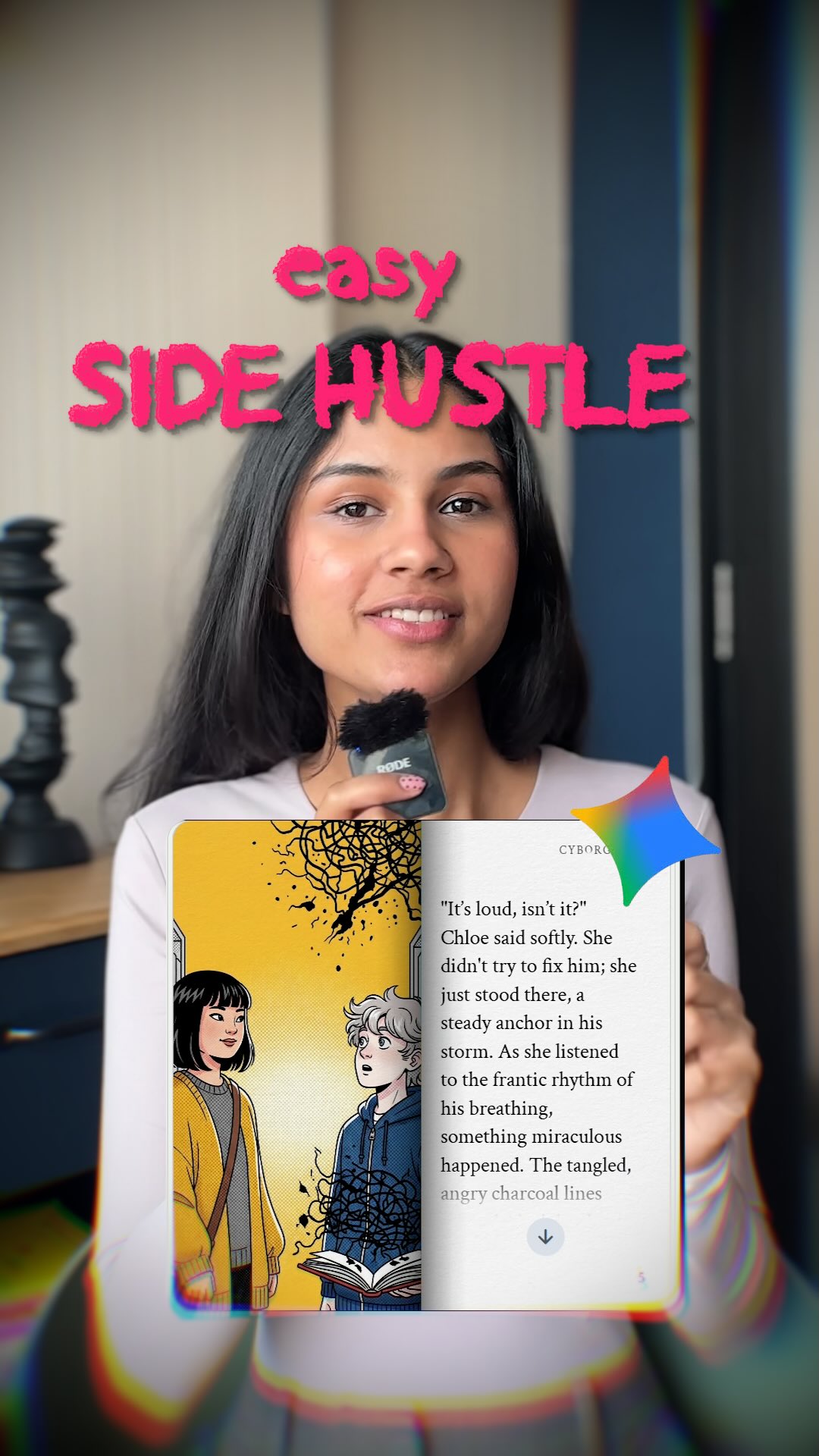
cyborggirll: Easy Side Hustle Creator Thumbnail Breakdown
[Subject] A young woman content creator speaking directly to camera in a casual indoor setup, long straight dark hair, warm natural makeup, light-colored top, holding a compact handheld microphone near her mouth, friendly confident expression, framed as a social-media educator or creator explaining a quick online income idea. [Environment] Home-office or apartment interior with softly blurred neutral walls and furniture, vertical mobile-video composition, bold hot-pink headline text at the top reading like a viral hook, a floating app or AI-story interface card overlaid in the lower center foreground, subtle rainbow lens-distortion edges and creator-thumbnail styling, no complex background distractions. [Composition/Camera] Vertical short-form content cover image, speaker centered in medium close-up, direct eye contact with the viewer, top text occupying the upper third, interface overlay card anchored in the lower middle, microphone visible as the authority prop, clean hierarchy optimized for Reels/TikTok/Shorts thumbnail scanning. [Lighting] Soft indoor daylight or window light, flattering even illumination on the face, gentle background blur, crisp readable text and UI overlay, no hard shadows, no dramatic studio contrast, social-first clarity. [Style/Rendering] Viral side-hustle video thumbnail, creator-economy promo cover, bright and legible social-media design, realistic influencer portrait mixed with app-demo overlay, slight chromatic aberration and hype-thumbnail polish, optimized for fast comprehension and click-through appeal. [Detail constraints] Keep exactly one female creator centered on camera with a handheld mic, preserve the hot-pink “easy side hustle” style headline, the overlaid app/story card, and the subtle rainbow distortion around the edges; do not add extra people, cluttered desk objects, heavy logos, fantasy effects, unrelated charts, or outdoor scenery. Negative prompt: extra people, podcast studio crowd, unreadable text, messy background, dark moody lighting, overdesigned infographic clutter, multiple UI cards, gamer setup, low-resolution blur, exaggerated makeup, duplicated microphone, cyberpunk neon, business suit corporate set, outdoor scene, stage audience, fantasy elements, text walls. Suggested parameters: aspect ratio 4:5, lens 50mm equivalent, shallow depth of field, steps 24-34, CFG 5-6.5, sampler DPM++ 2M Karras, seed 421876. Delta prompt strategy: 1. If the creator loses prominence, add “centered female speaker in medium close-up holding a microphone to camera.” 2. If the thumbnail loses virality, add “bold hot-pink hook text across the top in a short-form content style.” 3. If the app card disappears, add “floating AI-story or reading-app interface overlay in the lower center foreground.” 4. If the scene becomes too formal, add “casual creator economy video cover, approachable and social-first.” 5. If lighting gets too dramatic, add “soft even indoor daylight optimized for creator thumbnails.” 6. If the background gets busy, add “neutral blurred room with minimal distractions.” 7. If the image becomes generic vlog content, add “side-hustle explainer thumbnail with clear monetization hook.” 8. If colors flatten, add “pink headline text and subtle rainbow edge distortion for high click visibility.” 9. If the microphone vanishes, add “small handheld mic visible near the speaker’s mouth.” 10. If the design gets cluttered, add “single speaker, single overlay card, clear text hierarchy, no extra graphics.”
Video
GLOBAL LOCK: The video is a high-quality screen recording of a desktop browser. The interface is ChatGPT in "Dark Mode" (dark charcoal background, light gray text). The font is the standard ChatGPT sans-serif. The cursor is a standard white pointer. All text overlays are in a bold, white, all-caps sans-serif font, positioned in black "letterbox" bars at the top and bottom of the frame. The overall vibe is clean, instructional, and tech-focused.

[00:00–00:03]
Visual: A static screen recording of the ChatGPT interface. A large text overlay at the top reads "STEP 1: CREATE YOUR CHARACTER PROMPT USING CHATGPT". The GPT name "Midjourney V7 - Photorealistic Image Prompts" is visible at the top of the chat.
Action: The screen is still, establishing the scene.
Audio: Low-fi tech beat starts, steady and rhythmic.

[00:03–00:07]
Visual: The cursor clicks into the "Ask anything" input box at the bottom. The text "give me a front view shot of portrait shot of woman in her 20s, model, with crazy facial features and should look very unique and easily recognizable, front view shot, looking into the camera, flat studio lighting" is typed out rapidly.
Action: Rapid typing animation.
Audio: Subtle keyboard clicking sounds synced to the typing.

[00:07–00:11]
Visual: The AI begins to respond. The text "Here's your photorealistic Midjourney prompt based on your description: Prompt: A front view portrait shot of a woman in her 20s, fashion model, with highly unique and exaggerated facial features..." streams onto the screen.
Action: Text "streaming" effect where words appear one by one from left to right.
Audio: The music continues; the typing sounds stop as the AI generates.

[00:11–00:14]
Visual: The cursor moves up and highlights the generated prompt text in a light blue selection box. A bottom text overlay appears: "Head to ChatGPT and search for GPTs to find 'Midjourney V7...'. Describe your character, and the GPT will generate the perfect prompt for you to copy." A small white hand icon with a clicking animation appears in the bottom right corner.
Action: Smooth cursor movement and text selection.
Audio: Music swells slightly for the conclusion.

NEGATIVE PROMPT: Handheld camera shake, blurry screen, light mode UI, messy desktop icons, low resolution, watermark, robotic voiceover, stuttering text generation, inconsistent font styles, bright colors, distracting background elements.

SPEECH PACK:
(Note: This video has no spoken dialogue, only text-to-be-read. The "Speech" here refers to the rhythmic delivery of the text overlays.)

Segment 1 [00:00-00:03]: "STEP 1: CREATE YOUR CHARACTER PROMPT USING CHATGPT"
TAKE_A: Bold, authoritative, slow pacing.
TAKE_B: Fast, energetic, "hack" style.
TAKE_C: Neutral, instructional.

Segment 2 [00:11-00:14]: "Head to ChatGPT and search for GPTs to find 'Midjourney V7...'"
TAKE_A: Informative, helpful tone.
TAKE_B: Urgent, "do this now" tone.
TAKE_C: Calm, step-by-step guidance.
Video
GLOBAL LOCK: A vertical AI tutorial video combining a talking-head presenter and step-by-step static visual slides. The presenter is a young woman with long dark brown hair, fair skin, and a fitted white sweater, seated in front of a soft pink-lilac studio background. The tutorial is built around Google Gemini and shows how to use prompt packs for different photo-enhancement tasks: restoring and colorizing old family photos, turning a casual portrait into a passport-style headshot, improving male portrait accuracy using face-shape and hairstyle references, and combining multiple prompt blocks into one reusable master prompt. The overall design uses a teal-green slide background, floating image cards, arrows, and large numbered sections like #3, #4, and #5. Keep the educational tone, slide-driven pacing, and Gemini branding consistent throughout. Speech should be clear, direct, and creator-oriented, with close dry mic sound and paced social-video caption timing.

[00:00–00:04] Open with the presenter promising to show prompt sets for Google Gemini. She appears in a small talking-head frame over a teal instructional background while stacked text blocks and the Gemini logo appear beside her. The tone is straightforward and valuable, like a creator giving away useful workflow templates.

[00:00–00:04] The opening line should sound like a practical tutorial intro, emphasizing that the viewer will get prompts they can reuse. Sync should align with words such as “show you,” “prompts,” and “Google Gemini.”

[00:04–00:10] Transition into a slide showing old family photographs transforming into restored or colorized versions. Use card-like images of black-and-white family portraits rotating or swapping into cleaner, modernized images. The presenter explains that Gemini can help enhance old photos and restore image quality. Keep visual arrows and before/after relationships obvious.

[00:10–00:15] Move to a passport-photo conversion section. Show a casual female portrait as input and a clean, centered passport-style headshot as the result. The presenter explains how one of the prompts can convert an ordinary image into a more formal ID / passport-ready format. Use neutral backgrounds and clear face centering to emphasize the transformation.

[00:15–00:21] Introduce a face-structure and hairstyle guidance section for male portraits. Show diagrams of head shapes, hair reference charts, a celebrity-like sports portrait, and improved portrait outputs of the same male subject in different styles. The presenter explains that adding face shape and hair references improves likeness and overall accuracy. The comparison should feel systematic and instructional rather than purely aesthetic.

[00:21–00:27] Shift to another numbered section focused on prompt construction. Show a stylish woman’s portrait, a separate prompt block, and then a refined final output. The presenter explains how to combine image references and descriptive instructions to sharpen the final look. Text overlays and slide panels should imply that several separate prompt fragments are being organized into one effective workflow.

[00:27–00:35] End with full text-slide examples showing long prompt paragraphs and a final note that the creator has combined all prompts into one. Large text urges viewers to comment “Gemini” to receive the full set. The presenter may no longer be visible in these last frames; instead, the tutorial closes with readable document-like slides and a strong CTA focused on reuse and download.
Video
GLOBAL LOCK: A young man in his early 20s, Mediterranean/Southern European appearance, olive skin tone, curly dark brown hair, well-groomed mustache and goatee. He wears a black cotton t-shirt with a vintage-style graphic print. The environment is a modern home office with soft, natural indoor lighting and a blurred background containing shelves and posters. Cinematic color grading with high dynamic range and soft highlight rolloff. Speech is energetic, clear, and direct-to-camera.

[00:00–00:02]
Subject: The man in a maroon and navy blue soccer jersey with "PEOPLESTYLE 07" on the front.
Environment: A grey asphalt street with white crosswalk markings.
Action: Standing still, looking directly at the camera with a neutral expression.
Framing: Medium shot, eye level.
Lighting: Warm, sepia-toned, mimicking the aged oil painting texture of the Mona Lisa shown in the top half of the split screen.
Motion: Subtle handheld camera micro-shake.
Speech: No speech, upbeat background music starts.

[00:02–00:03]
Subject: The man in a dark charcoal suit, white shirt, and striped tie.
Environment: A high-rise office with a large window overlooking a city skyline.
Action: Holding a vintage black desk phone to his ear, looking slightly off-camera.
Framing: Medium shot, eye level.
Lighting: High contrast, deep blues and vibrant yellows, mimicking Van Gogh's "Starry Night" shown in the top half.
Motion: Static camera.

[00:03–00:05]
Subject: The man in a plain black t-shirt.
Environment: An outdoor desert landscape at dusk.
Action: Profile view, looking over his shoulder toward the camera.
Framing: Medium close-up, side angle.
Lighting: Monochromatic warm orange glow, soft backlighting, mimicking the geometric 3D art above.
Motion: Slow camera pan around the subject.

[00:05–00:11]
Subject: The man in the global lock black graphic tee.
Environment: Home office desk with a laptop in the foreground.
Action: Talking to the camera, using expressive hand gestures (palms up, moving outward).
Framing: Medium close-up, eye level.
Lighting: Natural window light from the side, shallow depth of field.
Speech: "to your... with absolutely no prompts... that's why I started using..." (Energetic, persuasive tone).
Sync: High lip-sync strictness; cuts land on phrase endings.

[00:11–00:20]
Visual: Screen recording of the Higgsfield Hex interface. A dark mode dashboard. A cursor moves to click a "Color transfer" button. An abstract red, black, and white painting is uploaded. The UI extracts a color palette (red, pink, tan).
Action: Digital UI interaction.
Lighting: Clean digital screen glow.
Speech: Narrating the process (implied).

[00:20–00:37]
Subject: Back to the man in the home office.
Environment: Same as [00:05-00:11].
Action: Continuing to talk and gesture. Floating UI cards appear in front of him showing various images (a white goat, a vintage car, a blonde woman) all styled with the same color palette.
Framing: Medium close-up.
Text Overlays: "ARTISTIC VISION NOW DECODED", "#hex", "Comment 'SOUL'".
Speech: "and that's it... choose... artistic vision now decoded... if you want to try this out, comment 'SOUL' and I'll send you..."
Sync: High lip-sync strictness. Final cut on the CTA.

NEGATIVE PROMPT: Robotic speech, flat delivery, blurry face, inconsistent facial hair, flickering lighting, distorted UI text, messy background, unnatural hand movements, low-resolution textures, over-saturated colors, lip-sync lag.

SPEECH PACK:
[00:05–00:11]
Transcript: "...to your videos with absolutely no prompts. That's why I started using..."
TAKE_A: (Fast, excited) "...to your videos with absolutely NO prompts! That's why I started using..."
TAKE_B: (Confident, steady) "...to your videos with absolutely no prompts. [pause] That's why I started using..."

[00:20–00:37]
Transcript: "And that's it. Choose... artistic vision now decoded. If you want to try this out, comment 'SOUL' and I'll send you the link."
TAKE_A: (Inviting) "And that's it! Just choose... artistic vision now decoded. If you want to try this out, comment 'SOUL' [emphasis] and I'll send you the link!"
TAKE_B: (Direct) "And that's it. Choose your style. Artistic vision decoded. Comment 'SOUL' now and I'll send it over."
Video
GLOBAL LOCK: The video features a first-person POV of a creator's hands interacting with a physical children's workbook. The hands have a light skin tone and natural nails. The environment is a home office with a laptop (showing a dashboard with green bar charts), a small blue recycling bin, and a whiteboard with handwritten notes in the background. The workbook is titled "My First Learn-to-Write Workbook" and features vibrant, 3D-style AI illustrations of animals and objects. The lighting is bright, natural daylight from a side window. The color grade is clean, high-contrast, and slightly warm. The camera movement is handheld and rhythmic.

[00:00–00:02]
The camera is positioned in a POV angle looking down at a desk. A pair of hands enters the frame and flips open the yellow and blue cover of a workbook. The cover has a grid of colorful animal illustrations. The background shows a laptop screen with a data dashboard.

[00:02–00:15]
The hands rapidly flip through the pages of the workbook in a rhythmic motion. Each page features a large, colorful 3D-style AI illustration (e.g., an apple, a bee, a cat) on the top half and dashed tracing lines for letters on the bottom half. The flipping is fast, creating a blur of color and educational content.

[00:15–00:30]
The flipping continues, showing more complex pages with "Getting Ready" sections and multiple rows of tracing letters (e.g., 'B', 'F', 'J', 'V'). The illustrations remain consistent in their high-quality, 3D-rendered aesthetic. The hands move naturally, occasionally pausing for a fraction of a second on a page.

[00:30–00:34]
A close-up shot focusing on a specific page featuring a high-detail AI illustration of a young boy with large eyes, wearing a red shirt, sitting at a desk and drawing. The camera zooms in slightly to emphasize the artistic quality of the illustration.

[00:34–00:38]
The camera pans slightly to the left as a hand reaches into a small, white countertop fridge and pulls out a silver and red Diet Coke can. The movement is casual and suggests a "behind-the-scenes" creator lifestyle.

[00:38–00:43]
The video transitions to a static, cinematic AI-generated portrait of a smiling woman with long brown hair and a young girl with blonde hair, both sitting at a sunlit table. They are surrounded by warm, soft bokeh. Text overlays appear: "amazon", "kindle", and "direct publishing" logos. An Amazon product listing UI is superimposed at the bottom, showing the price "$15.00" and an "Add to Cart" button.

NEGATIVE PROMPT: Blurry or distorted hands, extra fingers, inconsistent art styles within the workbook, flickering laptop screen, low-resolution textures, robotic or jerky page-flipping, text on pages being unreadable gibberish, dark or muddy lighting.

SPEECH PACK:
[00:00-00:43]
Transcript: "A is for Apple, B is for Bee. Follow the lines, don't you see? Color inside the lines so neat. Patience brings a sweet treat. First steps together hand in hand. Learning is fun across the land. With every letter, every mark, watch our knowledge spark. Hold your pen with care and love. Practice makes us rise above. Lines and letters pave the way, on this learning day."

TAKE_A: Upbeat, nursery-rhyme cadence, energetic and clear.
TAKE_B: Soft, educational tone, slower pacing for a "teaching" feel.
TAKE_C: Rhythmic and bouncy, emphasizing the rhyming words (Bee, See, Neat, Treat).

Prosody: High energy, clear enunciation, rhythmic pauses between phrases to match page flips. No on-camera speech (VO only).
Video
GLOBAL LOCK: A blonde female creator in a vertical talking-head tutorial explains why Midjourney still stands out compared with every other image generator she has tested. She appears in a clean indoor creator setup with a clip-on lav mic, speaking directly to camera. The edit repeatedly cuts to example images demonstrating many different creative categories: editorial portraits, lifestyle photography, cinematic fantasy creatures, poster design, product shots, business scenes, thumbnails, nail beauty macro, illustrated covers, and branded commercial visuals. Bright yellow all-caps caption fragments appear over the presenter to emphasize key claims. The tone is opinionated, fast, educational, and highly creator-oriented.

[00:00-00:06]
Open with the presenter stating that she has tested every major image generator. Intercut quick example visuals: polished editorial portraits, high-style fashion or business shots, and surreal fantasy imagery. The hook establishes a comparison-based tutorial.

[00:06-00:12]
The presenter continues in direct-to-camera mode while examples flash on screen showing poster-style graphics, clean product imagery, lifestyle travel scenes, and stylized character art. The message is that no other tool matches Midjourney’s breadth and quality.

[00:12-00:18]
Cut through more categories: beauty close-ups, cinematic environments, realistic portraits, thumbnails, branded compositions, and bold poster designs. The creator points out use cases like thumbnails, products, and business visuals.

[00:18-00:24]
The tutorial emphasizes practical strengths: consistency, versatility, and premium-looking results. More examples appear, including animals, commercial-style food or product shots, and polished people imagery. The pacing remains sharp and category-driven.

[00:24-00:27]
End with the presenter delivering a summary and call-to-action style close, while the final frames reinforce the Midjourney comparison point and encourage saving or following for more creator-tool advice.

NEGATIVE PROMPT:
male presenter, no example images, no yellow caption phrases, blurry screenshots, no variety of styles, no portrait examples, no poster or product visuals, flat stock imagery, watermark, text glitches

SPEECH PACK:
One female English-speaking creator voice.
TRANSCRIPT INTENT: Explain that after testing many image generators, Midjourney still outperforms others across multiple visual categories such as portraits, products, thumbnails, posters, and stylized scenes.
DELIVERY: Fast, assertive, expert-review cadence with short emphasized claims and creator-focused framing.
SYNC: Talking-head segments require tight lip-sync; image example sections can run under voiceover and caption emphasis.
Video
GLOBAL LOCK: A high-definition screen recording of a web browser. The interface is the Freepik website in dark mode. The cursor is a standard white arrow. The subject identity is a consistent AI-generated character: a blonde woman with a friendly, professional appearance, light skin tone, and casual-chic wardrobe. The environment is the Freepik AI Image Generator workspace. The lighting is the digital glow of the UI. The color grade is clean, high-contrast, and modern. The speech is a warm, enthusiastic female voiceover, recorded with a close-mic, dry studio signature.

[00:00–00:02]
The browser is on the Freepik homepage. The cursor moves smoothly toward the "AI Suite" menu item in the top navigation bar.
Speech: "This is Nano Banana Pro."
Lip-sync: N/A (Screen recording)

[00:02–00:05]
The cursor clicks "AI Suite" and then selects "AI Image Generator." The page transitions quickly to the generator workspace.
Speech: "I spent the last two days testing it."

[00:05–00:08]
The user clicks the model selection dropdown. The list scrolls down to reveal "Google Nano Banana Pro." The cursor selects it.
Speech: "It is mind-blowing."

[00:08–00:10]
The user clicks the "Character" tab. A grid of faces appears. The cursor selects the first character, a blonde woman labeled "@johanne."
Speech: "Look at how it handles character consistency."

[00:10–00:13]
The cursor clicks into the prompt box. Text appears rapidly as if pasted: "@johanne - Hyper-realistic studio podcast scene featuring the man sitting across from a bearded neuroscientist in a dim, moody podcast studio..." The user then clicks the "9:16" aspect ratio icon.
Speech: "You just drop in your prompt, pick your ratio..."

[00:13–00:15]
The "Generate" button is clicked. After a brief loading animation, a 2x2 grid of four cinematic, high-quality images appears, showing the character in a professional podcast setting with warm, moody lighting.
Speech: "...and the results are professional grade. Comment 'AI' to try it."

NEGATIVE PROMPT: Visual artifacts, blurry UI text, shaky camera, external glare on screen, messy browser tabs, slow loading times, robotic voiceover, harsh sibilance, background noise, inconsistent character features, low-resolution AI results.

SPEECH PACK:
[00:00–00:05]
TAKE_A: "This is Nano Banana Pro. I spent the last two days testing it." (Enthusiastic, fast-paced)
TAKE_B: "Check out Nano Banana Pro. I've been playing with this for two days straight." (Casual, conversational)
TAKE_C: "You need to see Nano Banana Pro. Two days of testing and I'm hooked." (Authoritative, punchy)

[00:05–00:15]
TAKE_A: "It is mind-blowing. The character consistency is perfect. Just paste your prompt and hit generate. Comment AI for the link." (Clear, instructional)
TAKE_B: "It's honestly mind-blowing. Look at that consistency! Set your ratio, hit generate, and boom. Comment AI to get access." (Excited, high energy)
TAKE_C: "Mind-blowing results. It keeps the character perfectly. One click and you're done. Comment AI and I'll send it over." (Direct, CTA-focused)
Video
Create a vertical 9:16 minimal premium design-poster visual for an AI creative workflow, featuring a bright yellow tennis ball floating just above an outstretched human hand against a clean blue sky. The hand should rise from the lower portion of the frame wearing a white wristband, with the ball suspended in crisp sunlight so it feels like a polished 3D object hovering in space. Bold yellow Lovart text repeats in the upper left, while repeated Design text appears in the lower right like confident editorial poster typography. The overall result should feel like a high-end animated 3D poster concept for designers: simple, modern, vector-friendly, and easy to manipulate as a motion design asset. No clutter, no subtitles, no extra objects, no cartoon style.
Video

GLOBAL LOCK: Vertical graphic-design workflow explainer with a clean white background and a fast editorial mix of bold typography, sticker-like character art, texture zoom-ins, print references, AI prompt screenshots, and motion-design timeline captures. The visual identity is playful and contemporary, using saturated risograph-like colors such as hot pink, bright red, teal, yellow, blue, and black. Featured elements include chunky 3D or poster-style letters, cartoon animal or mascot characters, grainy print textures, a risograph printer reference, a green crocodile illustration, simple bear-like character outlines, and dark chat-interface screens used for AI ideation. The tone is energetic, design-savvy, and instructional, focused on using AI to build a coherent physical-looking graphic system.

[00:00-00:07] Open with bold colorful typography and poster-like lettering on a clean white field, quickly introducing a playful design system built from chunky forms, stars, stickers, and high-contrast color. The first visuals should feel like a design board coming alive, with quick cuts and minimal explanatory text fragments.

[00:00:07-00:15] Transition into reference-gathering and visual language setup: printed character cards, sketchbook-like layouts, and texture close-ups showing halftone, grain, and misaligned ink layers typical of risograph-inspired output. The sequence should emphasize physical print aesthetics rather than purely digital polish.

[00:00:15-00:24] Show a risograph printer reference, then move into colorful mascot experiments including a crocodile-like character and sticker-style compositions. Alternate between finished visuals and tool or prompt-interface glimpses so the viewer understands that AI is helping generate, iterate, and extend the design system.

[00:00:24-00:34] Introduce more process evidence: dark AI chat windows, typed prompts, and timeline or animation software screenshots paired with evolving graphic assets. Character sheets, rough sketches, and cleaner rendered outcomes should appear in quick succession, suggesting a workflow from concept to graphic application.

[00:00:34-00:44] End by tying the system together with final visual outputs: a consistent playful print-inspired identity made of letters, mascots, textures, and animated or poster-ready assets. Closing text should imply that this whole graphic language was built with AI, while preserving the feeling of tactile risograph craft, not generic digital generation.
Video
GLOBAL LOCK: a soft 2D hand-drawn cartoon animation with clean outlines, pastel suburban color palette, gentle Studio Ghibli-inspired slice-of-life mood, an elderly man with gray-blue hair and a full beard, casual vest and shirt, a small vintage blue compact car, quiet suburban streets, dashboard flower ornament, police station / driver's license renewal office setting, smooth simple character motion, daytime lighting, no photorealism, no 3D look.

[00:00-00:05] Start outside a modest suburban house where the elderly man steps out from the porch and heads toward his small blue vintage car, calm neighborhood in the background, warm everyday cartoon atmosphere.

[00:05-00:10] Cut inside and around the car as he drives through the neighborhood, hands on the wheel, the dashboard visible with a small pink flower ornament, soft windshield reflections and passing houses establishing a slow everyday commute.

[00:10-00:16] Show exterior driving angles of the blue car moving down a quiet residential street, then approaching a police or civic-services building, keeping the animation style simple, gentle, and readable.

[00:16-00:22] Move closer to the front of the car and dashboard as he parks and reaches forward, then transition to the building entrance where he walks toward a public service counter, preserving the same cozy cartoon look.

[00:22-00:30] End in a driver's license renewal office where the elderly man speaks face-to-face with a clerk across the counter under a sign reading driver's license renewal, holding on a calm conversational exchange and mild facial reactions in a clean storybook-style cartoon frame.

NEGATIVE PROMPT: photorealism, 3D CGI, anime action style, dark noir lighting, futuristic city, luxury sports car, young protagonist, messy sketch lines, heavy shadows, horror, text-heavy graphic design, warped anatomy, crowded background, high-speed chase, dramatic explosions.

AI Coloring Page Generator

AI coloring page generator content becomes useful only when it respects the difference between a nice image and a page someone can actually color. The strongest examples on this page should show clean edges, closed spaces, and line art that feels intentional on paper. That matters whether the user is a parent making activities, a teacher building classroom material, or a seller preparing digital downloads.

Printability is the real filter here. Too much shading, muddy texture, or broken outlines can ruin the result even if the image looks interesting on screen. When you compare examples on this page, focus on whether the design would still work with crayons, markers, or pencils once printed at normal size.

FAQ

What is an AI coloring page generator best for?

It is best for making printable line-art pages for kids, classrooms, hobby coloring, and digital-download products that need clear outlines and simple coloring areas.

What makes a good coloring page output?

Closed shapes, readable line weight, and minimal gray shading usually matter most. The best pages are easy to color without needing extra cleanup.

Can creators use this for Etsy products?

Yes. Many creators use these workflows for printable downloads, but quality matters. The examples here are most useful when they already feel clean and product-ready.

What should I compare on this page?

Look at outline clarity, print friendliness, and whether the page keeps enough open coloring space to stay fun instead of cluttered.

AI Coloring Page Generator: Printable Line Art Ideas | Alici.AI